
After adding all my sources to Channels (HDHomeRun, Sling, Pluto, Plex, Tubi, etc), I wanted a better way to manage duplicate channels and save/hide multiple channels across categories (for example, I don't care about religious or Spanish channels). So I put together this tool to help manage a large variety of sources better. Sharing this here, use as you will. I don't plan on updating this regularly or anything like that, but I thought other people might find it helpful.
Channels DVR · Channel Manager
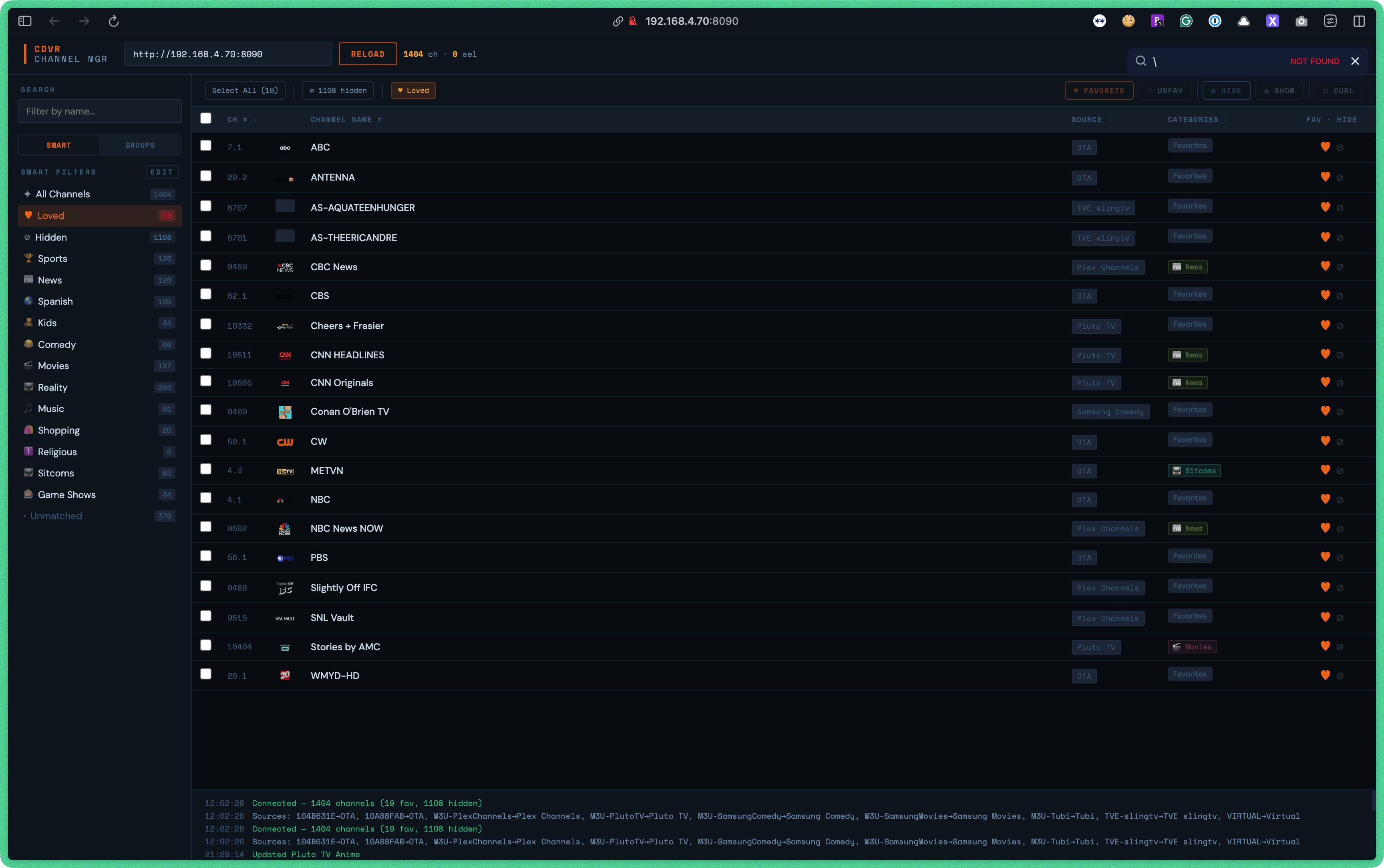
A single-file web app for managing channels in Channels DVR. Bulk favorite, hide, and show channels across all your sources — served as a lightweight Docker container on your local network.
Features
- Connect to any Channels DVR server by IP/hostname
- Smart Filters — automatically categorize channels by keyword rules (Sports, News, Movies, Music, Kids, etc.) with customizable rules and keywords
- M3U Groups — browse channels by their raw group tags from your M3U sources
- Loved / Hidden filters — quickly see all favorited or hidden channels, including channels hidden directly in Channels DVR that don't appear in normal playlists
- Bulk actions — select any number of channels and favorite, unfavorite, hide, or show them all at once
-
Single-channel toggles — click the
 or ⊘ icon on any row for quick per-channel control
 - Duplicate detection — flags channels with the same name across multiple sources
- Curl fallback — if a bulk API call fails, the app generates curl commands you can paste into your terminal
How It Works
The app is a self-contained index.html (React via CDN, no build step). When you click Connect:
- It fetches your device list from
/dvr/lineupsto discover all sources (OTA tuners, M3U streams, TVE, etc.) - It pulls the M3U playlist from each device to get the full channel list with stream URLs
- It fetches
/devices/{id}/channelsfor each source to read favorite and hidden state - Hidden channels that are excluded from the M3U are fetched from the JSON endpoint and added to the Hidden filter so you can still manage them
Actions (favorite/hide/show) are applied via the Channels DVR REST API. Smart filter rules are saved to localStorage so your customizations persist across sessions.
Setup
Option A — Add to an existing docker-compose.yml
Copy the channels-manager service block from docker-compose.yml into your existing compose file, and copy index.html, Dockerfile, and nginx.conf into the same folder. Then run:
docker compose up -d --build channels-manager
Option B — Run standalone
docker compose up -d --build
Open http://<your-server-ip>:8090 in a browser on the same network.
Usage
- Open the app and enter your Channels DVR server URL (e.g.
http://192.168.1.100:8089) - Click Connect — channels load automatically from all sources
- Use the Smart tab in the sidebar to filter by category, or the Groups tab to filter by raw M3U group tag
- Check individual channels or use Select All to select everything in the current view
- Use the toolbar buttons to apply bulk actions: Favorite, Unfavorite, ⊘ Hide, ◎ Show
Smart Filter Rules
Click Edit next to "Smart Filters" to customize the keyword rules. Each rule matches channels whose name or group contains any of its comma-separated keywords. Rules are saved in your browser's localStorage. Click Reset to restore the built-in defaults.
Notes
- The app runs entirely in your browser — no data leaves your local network
- Because it runs on the same network as Channels DVR, API calls go directly from browser to server with no proxy or CORS issues
- Hidden channels from streaming sources (PlutoTV, Tubi, Plex, etc.) are loaded separately and only appear in the Hidden filter
Port
Default port is 8090. Change it in docker-compose.yml if needed.
