ChannelWatch: Real-Time Alerts for Your Channels DVR

I am getting this

What should this variable be ?CHANNELS_DVR_HOST

[2025-04-20 01:54:18] Starting ChannelWatch v0.5

[2025-04-20 01:54:18] ERROR: CHANNELS_DVR_HOST environment variable not set

[2025-04-20 01:55:22] Log file: /config/channelwatch.log (keeping 7 days)

[2025-04-20 01:55:22] Log level: 1 (Standard)

[2025-04-20 01:55:22] Starting ChannelWatch v0.5

[2025-04-20 01:55:22] ERROR: CHANNELS_DVR_HOST environment variable not set

[2025-04-20 01:56:27] Log file: /config/channelwatch.log (keeping 7 days)

[2025-04-20 01:56:27] Log level: 1 (Standard)

[2025-04-20 01:56:27] Starting ChannelWatch v0.5

[2025-04-20 01:56:27] ERROR: CHANNELS_DVR_HOST environment variable not set

[2025-04-20 01:57:31] Log file: /config/channelwatch.log (keeping 7 days)

[2025-04-20 01:57:31] Log level: 1 (Standard)

[2025-04-20 01:57:31] Starting ChannelWatch v0.5

[2025-04-20 01:57:31] ERROR: CHANNELS_DVR_HOST environment variable not set

[2025-04-20 01:58:36] Log file: /config/channelwatch.log (keeping 7 days)

[2025-04-20 01:58:36] Log level: 1 (Standard)

[2025-04-20 01:58:36] Starting ChannelWatch v0.5

[2025-04-20 01:58:36] ERROR: CHANNELS_DVR_HOST environment variable not set
1 Like

The IP of your Channels DVR Server
https://github.com/CoderLuii/ChannelWatch?tab=readme-ov-file#-quick-setup

1 Like

He hasn't released the new version yet

@CoderLuii
Looks really nice!

Couple questions;

  1. Why does this have to run network_mode: host instead of network_mode: bridge (using bridge mode and it seems to work fine it doesn't send notifications)

  2. I checked your future roadmap https://github.com/CoderLuii/ChannelWatch?tab=readme-ov-file#-future-roadmap and didn't see this on there. Any plans to support multiple Channels DVR Servers?
    Would be great to see all servers, or even to be able to switch between your multiple servers.

Something I noticed is that the connection to the server (/dvr/events/subscribe) times out if no data was received after 5 minutes. Assume you set a 5 minute timeout, because I can keep the connection opened forever with my curl/jq script.

Looking back at my notifications with missing art, this was particularly happening when I was working on the latest cc4c containers (both Docker and Promox LXC versions). Does it take a bit before art is available when sources are added/deleted and otherwise modified?

I think I'll wait to see if this happens once my sources stabilize again. Also, with your new version soon to be released, I should probably see how it goes after I move to that. If this issue reappears, I'll capture the data requested above.

@CoderLuii

If it disconnects from the server, right before a recording starts, it doesn't notify the recording started since it reconnected 29 seconds after it started.

[2025-04-20 18:54:29] Event: {"Type":"hello", "Version":"2025.04.17.1651"}
[2025-04-20 18:57:44] Connection healthy: 612 consecutive successful pings
[2025-04-20 18:59:03] Status update: Connected to 192.168.1.4:8189, processed 1068 events (0 alerts, 514 filtered, 0 errors) [0.4 events/min]
[2025-04-20 18:59:29] Network error: HTTPConnectionPool(host='192.168.1.4', port=8189): Read timed out.
[2025-04-20 18:59:29] Connection closed
[2025-04-20 18:59:29] Reconnecting in 60s
[2025-04-20 19:00:29] Event: {"Type":"hello", "Version":"2025.04.17.1651"}
[2025-04-20 19:00:30] Event: {"Type":"activities.set","Name":"0-job-1745200800-834","Value":"Recording ch713 for Tracker until 8:01PM: strength=97% quality=100% symbol=100% rate=5.7Mb/sec buf=0% drop=0%"}
[2025-04-20 19:00:30] Checking event: activities.set - Value: Recording ch713 for Tracker until 8:01PM: strength...

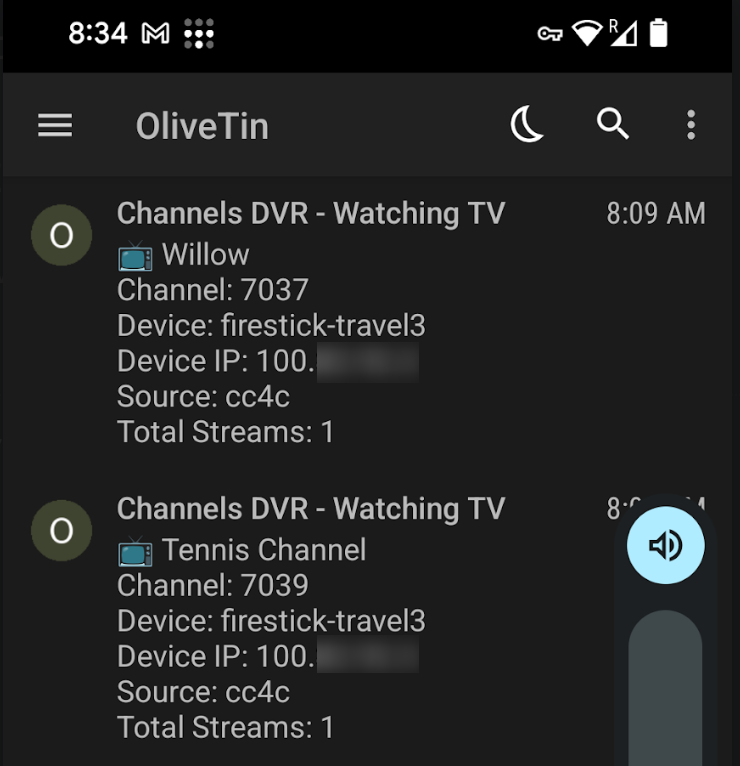
An example from multiple notifications this morning with no art:

This is from the ChannelWatch log:

[2025-04-21 09:09:36] Watching Willow (Ch7037) - Device: firestick-travel3, Source: cc4c, IP: 100.x.x.x
[2025-04-21 09:09:36] Total Streams: 1
[2025-04-21 09:09:36] Notification sent via Pushover: Channels DVR - Watching TV
{"id":"WLLOHD","name":"Willow","number":"7037","hd":true,"source_name":"cc4c","source_id":"M3U-cc4c","station_id":"80621"}
<channel id="7037">
<lcn>7037</lcn>
<display-name>WLLOHD</display-name>
<display-name>Willow</display-name>
<icon src="https://tmsimg.fancybits.co/assets/s80621_ll_h15_aa.png?w=360&h=270"/>
</channel>
<programme start="20250421140000 +0000" stop="20250421172000 +0000" channel="7037">
<title>IPL Cricket</title>
<sub-title>Kolkata Knight Riders vs. Gujarat Titans</sub-title>
<desc>From Eden Gardens in Kolkata, West Bengal, India.</desc>
<category>Sports</category>
<category>Sports event</category>
<category>Cricket</category>
<icon src="https://tmsimg.fancybits.co/assets/GNLZZGG001LJ6L8.jpg?w=720&h=540"/>
<series-id system="tms">3606596</series-id>
<episode-num system="tms">EP011386071050</episode-num>
<new/>
<live/>
</programme>
"CHANNELS_DVR_HOST=192.168.110.66",
"Alerts_Recording-Events=true",
"VOD_DURATION=true",
"VOD_CAST=true",
"VOD_DEVICE_NAME=true",
"Alerts_Channel-Watching=true",
"RD_ALERT_STARTED=true",
"PROGRAM_NAME=true",
"VOD_GENRES=true",
"CHANNEL_CACHE_TTL=86400",
"DEVICE_IP_ADDRESS=true",
"VOD_IMAGE=true",
"PUSHOVER_USER_KEY=[Redacted]",
"PUSHOVER_API_TOKEN=[Redacted]",
"TZ=US/Mountain",
"DEVICE_NAME=true",
"PROGRAM_CACHE_TTL=86400",
"VOD_DEVICE_IP=true",
"CHANNELS_DVR_PORT=8089",
"LOG_LEVEL=1",
"Alerts_VOD-Watching=true",
"Alerts_Disk-Space=true",
"RD_ALERT_COMPLETED=true",
"CHANNEL_NUMBER=true",
"VOD_SUMMARY=true",
"STREAM_COUNT=true",
"CHANNEL_NAME=true",
"STREAM_SOURCE=true",
"VOD_EPISODE_TITLE=true",
"VOD_PROGRESS=true",
"VOD_CACHE_TTL=86400",
"JOB_CACHE_TTL=3600",
"VOD_TITLE=true",
"VOD_RATING=true",
"RD_ALERT_SCHEDULED=true",
"RD_ALERT_CANCELLED=true",

Last night, when I was watching basketball on TNT via tve, the channel logo came through. This morning watching the Tennis Channel and Willow via cc4c, there was no art.

EDIT: Here's your requested curl command JSON from another tune with no art:

{"Type":"activities.set","Name":"6-stream-M3U-cc4c-7047-100.x.x.x","Value":"Watching ch7047 BBC News from firestick-travel3: buf=0% drop=0%"}

And he hasn't posted here since 3 days ago.
Maybe you have to be a developer and post on his github account to get his attention?
I'm not a developer. I don't have a github account. I'm just a CDVR user.

And this post

and his reply causes some concern. Anyone else?

I'm not fluent in Python, but why hide the source code?

For these reasons I have uninstalled his container.

Quick Update on v0.6

Sorry for my radio silence the last few days, everyone! I came down with a pretty nasty bug that had me completely out of commission. Being a solo developer on this project means when I'm down, everything unfortunately pauses.

I'm back on my feet now and actively working on finalizing v0.6. Barring any surprises, I'm aiming to get the release out either today or tomorrow. Thanks for your patience and understanding!

Environment Variable Setup

@Edwin_Perez - Ah, I see what happened! You removed the environment variables thinking v0.6 was already released. I apologize for any confusion my preview post might have caused.

The v0.6 update (which will indeed remove the need for those environment variables) is still in final development and hasn't been released yet. My recent post was just a preview of what's coming soon.

Docker Networking & Future Features

@chDVRuser - Thanks for your detailed questions and observations about ChannelWatch! Really appreciate your interest in the project.

I recommended Host mode by default - it's simpler to set up when your DVR server runs on the same Docker host.

If using bridge mode with both ChannelWatch and Channels DVR on the same machine, you'll need to:

  • Configure ChannelWatch with the Docker-assigned IP address of Channels DVR, or
  • Create a shared network so the containers can communicate properly

Regarding multiple DVR servers - while not explicitly on the current roadmap, the new web UI will make this much easier to implement in the future. I've made a note to consider this for v0.7 or v0.8!

The timeout issue you spotted is something I'm actively working on. The reconnection logic has been improved, but the recording events module still needs some additional tweaking to handle those scenarios better.

Open Source Approach

@chDVRuser - I understand your concerns about the compiled components. To be totally transparent: the web UI, configuration system, and API interfaces are all open source code. Only the core event processing engine is compiled, which I did to ensure consistent behavior across different Docker environments where Python dependencies can sometimes cause issues. This isn't about hiding functionality - it's about delivering a reliable experience.

With v0.6, I've restructured much of this engine to work more cleanly with dependencies, which will allow me to expose more of the codebase. I value your trust and hope this clarity helps address your concerns.

Missing Channel Art Issue

@bnhf - Thank you for the detailed report and for providing all the requested information! This is really helpful to start investigating the missing art issue with cc4c sources. The data you've provided shows the art paths are available in the API responses, so something is happening during processing or notification delivery.

I'm focusing on getting v0.6 out the door first, but I've added this to my priority list for v0.7. Your thorough testing and documentation will make addressing this much easier. I'll keep you posted on progress!

Cheers,
CoderLuii
203967356

1 Like

It's fine to compile your code for the release version, but to actually be open source you should be posting all the source code on GitHub.

Having some core parts of your code hidden, along with being a relatively new user on both this forum and GitHub, is a legitimate cause for concern.

1 Like

@bnhf Thanks for weighing in! ChannelWatch follows a progressive open-source model—stability first, transparency next. Check out the repo and roadmap here: ChannelWatch(GitHub).

Early versions suffered from environment-specific bugs since compiling the event engine solved these issues for many users. That core handles:

  1. Connection to the Channels DVR server
  2. Event stream processing
  3. Reconnection logic

Everything else—UI, config, notifications, API interactions—remains fully open source (Python/JavaScript). Contributions welcome!

Cheers,
CoderLuii
203967356

1 Like

This alert thing is totally awesome. I really appreciated something similar in the SageTV software a couple decades ago.

Thanks for doing this. It's almost like the unpaid developers here in the forum are about 50% of the way to creating your own DVR!

1 Like

I share your concern, and have uninstalled this project as well. Too many red flags.

He may be well meaning and it's totally benign, but I also see the red flags.
I'm not a developer, but something just doesn't sound right.
I thought if you containerized something, you control the dependencies?
I also don't understand the need to have the container run in host network mode.
Maybe one of the Channels developers could add their thoughts on this Project.

1 Like

I never ran it in host mode myself, as this bit like allowing a total stranger, that just knocked on your door, to connect his computer to your LAN. Some level of trust needs to be established.

I ran it in bridge mode, but had to force a DNS assignment to make it work, which is among my list of concerns.

Open source software is something I believe in strongly, and try to contribute to significantly. But, it's up to all of us to remain vigilant, especially in the era of AI were bad actors can be much more difficult to spot.

2 Likes

Yeah...I err on the side of caution. I created my own python tools in the past and I don't remember needing to pre-compile dependecies before putting it up on github. The host network mode I get as that just get rid of the step of mapping ports but the rest of that? Yeah...this is bizarre. I may have to look for another tool to do this or...mess around with a home assistant device.

2 Likes

AFAIK, there are no published listening ports yet that need a mapped port. Maybe in 0.6 with the web UI. He can initiate outgoing traffic from the container, but incoming traffic would be blocked unless it's a response to his outgoing traffic, right?

Not sure how that explains notifications not working if running his container in bridge mode.

All of the same kinds off attacks that can be launched against your public facing IP can be happening, but now they'd be coming from a container on your LAN against your private IP addresses.

@bnhf @chDVRuser @Jean0987654321 - I've addressed these points multiple times, but given the continued spread of technical misinformation, I'll make one final definitive statement:

  1. On security implications: The claim that a Docker container can "launch attacks against your private IP addresses" fundamentally misrepresents Docker's security model. Containers do not have any network capabilities beyond what you explicitly grant them. ChannelWatch has no ability to scan or attack your network - this is verifiable fact, not opinion.

  2. On notifications in bridge mode: They work perfectly when properly configured. Full stop. The container makes outbound connections to notification services - no inbound connections are required. Users running in bridge mode simply need to specify their Channels DVR server's IP correctly.

  3. On compiled components: Compilation for stability and dependency management is standard practice in software distribution. This approach ensures consistent operation across different environments while also protecting the intellectual property that goes into creating a reliable product. As I've stated from the beginning, ChannelWatch follows a progressive open-source model—stability first, transparency next. As the project matures and stabilizes, more components will become fully open.

  4. On Docker networking: Host mode is a recommendation for convenience, not a requirement. The claim that DNS assignment is required for bridge mode is factually incorrect. You only need to set the CHANNELS_DVR_HOST environment variable to your server's Docker IP.

I've made ChannelWatch available for those who find it valuable. For those who choose not to use it based on misunderstandings or personal preferences - that's entirely your right.

This will be my final technical statement on this thread as I focus on releasing v0.6 for users who appreciate the tool.

Cheers,
CoderLuii
203967356

@bnhf @chDVRuser @Jean0987654321 - For those interested in technical specifics, here are the verifiable facts from ChannelWatch's actual code:

ChannelWatch's dependencies (from requirements.txt):

  • requests: Standard HTTP library used by thousands of Python applications
  • sseclient-py: Library for Server-Sent Events to monitor Channels DVR streams
  • apprise: Notification library for services like Pushover, Telegram, etc.
  • pytz: Time zone handling library
  • setuptools/pip: Standard Python packaging tools

The Docker container (from Dockerfile):

  • Uses standard Python Alpine base image
  • Installs only the dependencies listed above
  • Has no special privileges or capabilities
  • Contains no network scanning or attack tools

These facts directly contradict the claims being made:

  1. The container cannot "launch attacks against your LAN" - it has neither the tools nor privileges to do so.

  2. Notifications do work in bridge mode - the container makes standard HTTP requests using the 'requests' and 'apprise' libraries.

  3. There is no need for DNS assignment in bridge mode - the container only needs the CHANNELS_DVR_HOST environment variable set.

I respectfully ask that you stop spreading technical misinformation about this project. Those who choose not to use ChannelWatch are free to do so, but please base that decision on facts rather than incorrect technical claims.

Cheers,
CoderLuii
203967356