ChannelWatch: Real-Time Alerts for Your Channels DVR

Project Development

@bnhf - ChannelWatch is open source with a focus on reliable deployment through Docker. While some core files are compiled to ensure consistent operation, the project's architecture and interfaces remain fully accessible. I'm currently prioritizing stable user experience in these early stages of development. The project's structure and documentation remain transparent for the community.

Decimal Channel Fix

@Matthew_Crommert - Thank you for sharing your experience with ChannelWatch! I'm glad it's working well for you. I've identified the issue with decimal channels like 13.1 and will fix this in the next release(v0.4) to properly handle subchannels. That Harry Potter notification looks great!

Cheers,
CoderLuii
203967356

2 Likes

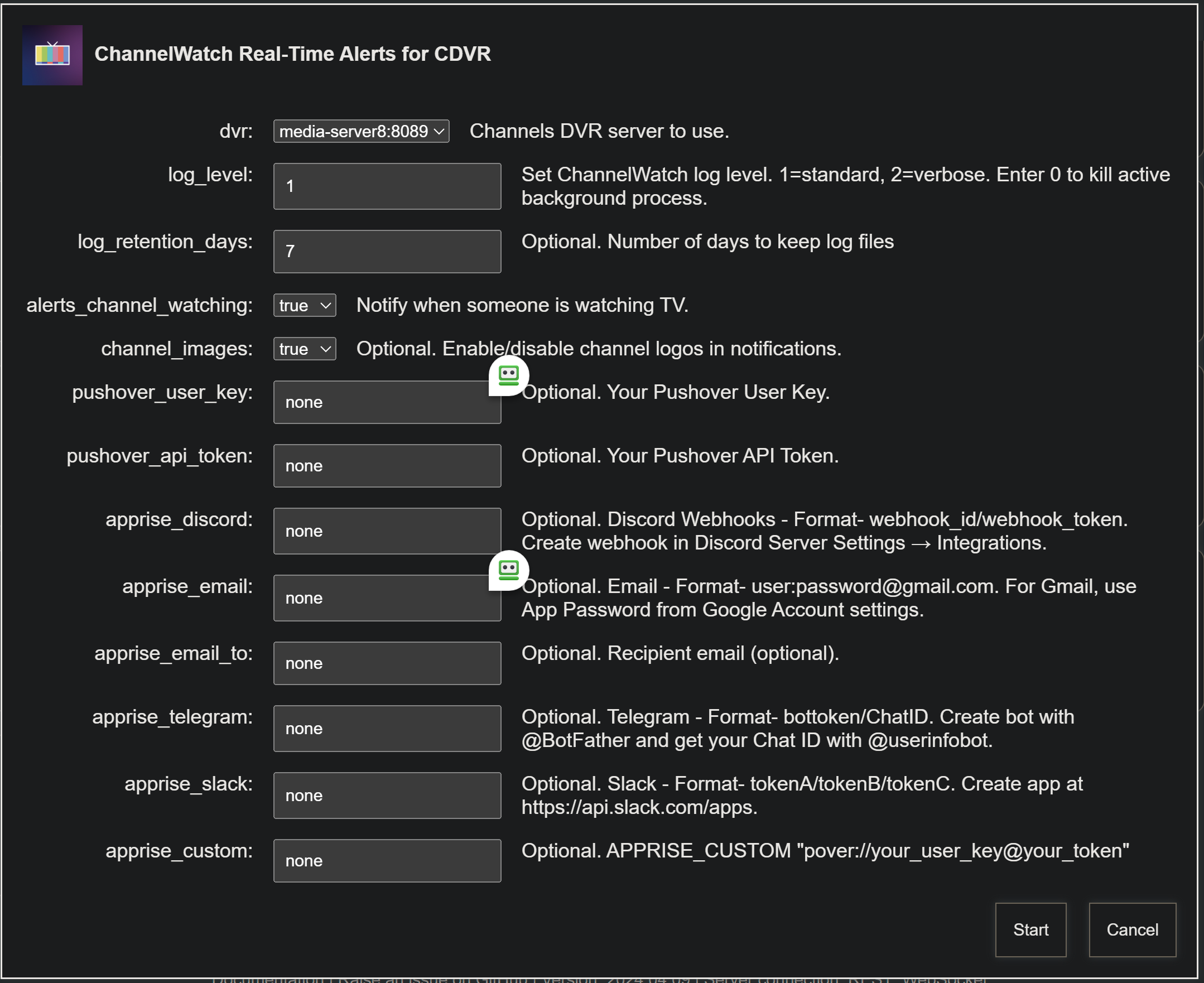
Indeed I have. Once again, thanks @CoderLuii for expanding the capabilities of this tool. I've added v0.3.0 to OliveTin-for-Channels, with support for multiple DVRs, as before:

Set log_level to 0 to kill the active instance of ChannelWatch for the selected DVR. The icon will remain green as long as there's at least one instance running. Be sure to select at least one notification method.

Also, thanks to some fine stress testing by @TerryD, @Edwin_Perez and @chDVRuser the new OliveTin EZ-Start process is better than ever. Just two env vars for initial spin-up, and there's an Action to help you determine the rest.

1 Like

@CoderLuii sorry i don't seem to find all of these at the same time

So for virtual channels in plex there doesn't seem to be a corresponding log entry

For example watching my Home Improvement channel

image

but in logs

And no notification

This one might not be fixable

1 Like

Recorded / VOD Detection

@Matthew_Crommert - Thanks for sharing these detailed logs! I see the issue now. What you're watching is video-on-demand content from Plex rather than a standard live TV channel. ChannelWatch is currently designed to detect standard channel watching that include channel numbers in the log pattern.

For VOD/recorded content that uses different activity patterns (like your Home Improvement example), I'll need to implement additional detection rules. This is a good enhancement request that I'll add to the roadmap for future development.

Cheers,
CoderLuii
203967356

1 Like

I tried using this and I get this error from channelwatch

[2025-03-25 01:13:55] Log file: /config/channelwatch.log (keeping 7 days)

[2025-03-25 01:13:55] Log level: 2 (Verbose)

[2025-03-25 01:13:55] Starting ChannelWatch v0.3

[2025-03-25 01:13:55] ERROR: CHANNELS_DVR_HOST environment variable not set

Let's move this discussion over to the OliveTin thread...

1 Like

ChannelWatch v0.4 Soon! :rocket:

I've been working around the clock on ChannelWatch v0.4, and it's packed with improvements based directly on your feedback! Here's what's coming:

Program Information

  • :tv: Program Titles - See exactly what's playing on each channel directly in notifications
  • :framed_picture: Program Images - Choose between channel logos or actual program images in alerts
  • :clapper: Enhanced Metadata - Richer program information with improved formatting

Channel Enhancements

  • :1234: Decimal Channel Support - Full support for subchannels (13.1, etc.) for broadcast/OTA channels
  • :bar_chart: Total Streams Counter - See how many concurrent streams are active across your system
  • :iphone: Stream Source Identification - Cleaner display of M3U, TVE, and Tuner sources

VOD & Recording Features

  • :vhs: VOD/Recorded Content Detection - New support for virtual channels and recorded content
  • :floppy_disk: Disk Space Monitoring - Configurable alerts when recording space runs low (by % or GB)
  • :arrows_counterclockwise: 24-hour Program Cache - Extended program data caching for better performance

System Improvements

  • :zap: Performance Optimizations - Preloaded cache at startup for faster operation
  • :gear: Expanded Configuration - Control exactly what appears in your notifications
  • :jigsaw: Cache Management - Configurable TTLs and improved validation

Last Call for Features! :mega:

I'm in the final stages of development for v0.4 - is there anything else you'd like to see included? Now's your chance to get your requests in before release! Drop a comment below with any ideas or suggestions you have.

All these changes make ChannelWatch more feature-rich, configurable and robust, while maintaining compatibility with previous versions.

Coming very soon!

Cheers,
CoderLuii
203967356

1 Like

:rocket: ChannelWatch v0.4.0 RELEASED - Major Feature Expansion!

I'm thrilled to announce that ChannelWatch v0.4.0 is now available! This release represents a major expansion of capabilities, with several key enhancements requested directly by the community. Your feedback has been invaluable in shaping this update.

:clapper: NEW: VOD-Watching Alert

As requested by @Matthew_Crommert, we now fully support tracking recorded/VOD content! This new alert type provides:

  • Rich metadata display with title, episode, progress, and duration
  • Device identification and tracking
  • Support for both 6-file and 7-file patterns
  • Single notification per viewing session
  • Detailed logging of viewing activity

Example of VOD-Watching Alert:

No more missed notifications when watching recorded content or virtual channels!

:floppy_disk: NEW: Disk-Space Monitoring

Keep an eye on your DVR storage with configurable alerts when space runs low:

  • Set thresholds by percentage and/or absolute GB
  • Get detailed space usage information in notifications
  • Prevent recording failures due to insufficient space

Example of Disk-Space Alert:

image

:tv: Channel-Watching Improvements

  • Program Titles - See exactly what's playing on each channel directly in notifications
  • Program Images - Choose between channel logos or actual program images in alerts
  • Enhanced Metadata - Richer program information with improved formatting
  • Decimal Channel Support - Full support for subchannels (13.1, etc.) for broadcast/OTA channels (special thanks to @Matthew_Crommert for reporting this!)
  • Total Streams Counter - See how many concurrent streams are active across your system
  • Stream Source Identification - Cleaner display of M3U, TVE, and Tuner sources

Example of New Channel-Watching Alert:

image

:gear: System Improvements

  • Multi-Platform Support - Now with official builds for amd64, arm64, and arm/v7 architectures
  • Performance Optimizations - Preloaded cache at startup for faster operation
  • Expanded Configuration - Control exactly what appears in your notifications
  • Cache Management - Configurable TTLs and improved validation
  • Session Tracking - Enhanced reliability to prevent duplicate alerts

:bug: Bug Fixes

  • Fixed IP address extraction from various event formats
  • Improved timestamp and duration formatting
  • Enhanced session tracking reliability
  • Fixed events/min calculation for accurate stats
  • Resolved disk space monitoring persistence issues

:package: How to Update

docker pull coderluii/channelwatch:latest
docker-compose down
docker-compose up -d

If you're using @bnhf's excellent OliveTin integration, watch for updates there soon!

:pray: Thank You!

This release would not have been possible without the valuable feedback and suggestions from our amazing community. Special thanks to:

I'm committed to continuing development of ChannelWatch based on your needs. If you have any issues or suggestions for future versions, please don't hesitate to let me know!

Cheers,
CoderLuii
203967356

3 Likes

The low disk space warning looks good. :+1:

Thank you for this great release! :clap:

My pleasure. The new v0.4.0 looks pretty slick.

Added to bnhf/olivetin:latest (aka bnhf/olivetin:2025.03.31):

EDIT: For those moving from a previous version of the OliveTin version of ChannelWatch, be sure to stop the Channelwatch Action -- and then delete the Channelwatch image in Portainer. Then, with the latest version of OliveTin-for-Channels (2025.03.31), the most recent version of ChannelWatch will be pulled next time you run the OliveTin Action.

:rocket: ChannelWatch v0.5 RELEASED - Recording Events Alert!

I'm excited to announce that ChannelWatch v0.5 is now available! Based on community feedback, this release adds comprehensive monitoring for your DVR recording activities with rich, detailed notifications.

:new: NEW: Recording-Events Alert

Now you can track the entire lifecycle of your recordings with real-time alerts! This highly-requested feature provides:

  • :date: Scheduled notifications when new recordings are added to your DVR
  • :red_circle: Started alerts when a recording begins capturing content
  • :white_check_mark: Completed notifications when recordings finish successfully
  • :no_entry_sign: Cancelled alerts if scheduled recordings are removed before starting
  • :stop_button: Stopped notifications when recordings are manually ended early

Each alert includes rich metadata with program details, channel information, precise timing, and duration statistics.

Example of Recording Scheduled Alert:

Example of Recording Started Alert:


Example of Recording Stopped Alert:

Example of Recording Cancelled Alert:

Example of Recording Completed Alert:

Never miss a DVR activity again - whether recordings are scheduled in advance, start capturing, complete successfully, or get cancelled!

:muscle: Enhanced Features

  • Total Streams Integration - Recording activity is now included in stream counts
  • Robust Status Handling - Intelligently handles delays in recording processing
  • Fine-Grained Control - Enable/disable specific recording event types
  • Improved Time Formatting - User-friendly time display with "Today/Tomorrow" labels
  • Enhanced API Integration - More reliable channel and program information

As always, upgrade to the latest version with coderluii/channelwatch:latest. Your feedback helps shape future releases - please keep it coming!

Cheers,
CoderLuii
203967356

This is amazing, thanks so much for your work on this! Is there an alert to tell you if a scheduled recording failed for some reason?

@augie0041 Thanks for the kind words!

Yes, ChannelWatch will alert you if a scheduled recording fails. When a recording doesn't complete properly, it will show up as ":white_check_mark: Completed (Interrupted)" in the notification.

You'll get the same detailed notification format as other recording events, including the channel information, program details, and duration, so you'll know exactly which recording had issues.

Here are examples of what both interrupted and delayed recording notifications would look like:

For an Interrupted Recording:

πŸ“Ί NBC
Channel: 5
Status: βœ… Completed (Interrupted)
Program: The Tonight Show
-----------------------
Duration: 15 minutes
Total Streams: 1

Jimmy Fallon interviews celebrity guests and features musical performances.

For a Delayed Recording:

πŸ“Ί ESPN
Channel: 206
Status: βœ… Completed (Delayed)
Program: Monday Night Football
-----------------------
Duration: 3 hours 15 minutes
Total Streams: 1

Live coverage of NFL Monday Night Football featuring postgame analysis and highlights.

Have you been having any specific issues with your recordings?
Is there any suggestions you'd like to see in the upcoming release of ChannelWatch v0.6?

Cheers,
CoderLuii
203967356

Yes, an example is when I'm in a blackout region for an MLB game or one of the custom channels I've programmed such as m0ngr31's ESPNTV docker app that I need to go in and re validate my TVE or MLBTV credentials as quick as possible to not miss the game I'm recording.
Finally, is there a way to suppress some notifications, because I extend almost all of my live game recordings by 2-3 hours in case of overtime, rain delays, etc, and Channels provides a confusing message next to every recording that it was recorded but was interrupted. It works fine so I never said anything, but I certainly don't need a notification telling me this every day.


@CoderLuii I edited this post to include a screenshot of the error that Channels provides

@augie0041 - Regarding the TVE/MLBTV credential validation issue - I'd need more details about exactly what happens during these credential failures to better understand if there's a way ChannelWatch could help. Since each provider handles authentication differently, this would be helpful to know for improving error handling.

For suppressing notifications - you have a few options:

  1. You can completely disable specific alert types in your docker-compose.yml by setting:

    ALERT_RECORDING_EVENTS: FALSE
    
  2. For more granular control, you can disable just completed recording alerts while keeping scheduled/started notifications:

    RD_ALERT_COMPLETED: FALSE
    
  3. If you only want to suppress notifications during certain times, most notification providers (like Pushover) have quiet hours or temporary muting options.

I recommend checking the main configuration post for all available options:

Nice @CoderLuii! v0.5 now integrated into OliveTin-for-Channels via bnhf/olivetin:latest (aka bnhf/olivetin:2025.04.03), with the usual support for multiple DVRs. Tailscale MagicDNS and other hostnames also supported -- as they are throughout OliveTin. There's a DNS override option as well.

All the upside of the OliveTin-for-Channels approach to the multitude of scripts and tricks available for Channels DVR with centralized management, a common user interface, and leveraging of a single set of variables representing your CDVR installation:

EDIT: Also, with this update, you only need to kill your background versions of Channelwatch in the OliveTin interface -- followed by updating OliveTin-for-Channels. This will automatically bring Channelwatch to v0.5.

1 Like

Error Detection Module

@augie0041 Thanks for adding the screenshots! I didn't get notified when you updated your post, so I just saw these now.

I see the issues you're encountering - those M3U/playlist errors are actually part of Channels DVR's core functionality rather than something ChannelWatch currently monitors. This would require a completely new module focused on error detection and reporting, which isn't part of the current recording alert system.

To build something like this properly, I'd need to:

  1. Catalog the various error types that Channels DVR produces
  2. Create patterns to detect and classify them
  3. Build a new alert module specifically for these failures

If you'd be interested in helping with development, would you mind sending me a list of the common errors you encounter (either via private message or just a list)? I'm going to scrape the community forums as well to identify the most common issues users face.

For your specific blackout/credential validation issues, this would be particularly valuable information since I don't have a TVE setup to test with.

This will take a few iterations to get right, but I think it could be very useful for many users!

Cheers,
CoderLuii
203967356

:fire:ChannelWatch v0.6: Modern Web UI Coming Soon! :rocket:

Hey everyone!

I've been working on something really exciting for ChannelWatch, and I wanted to give you all a preview of what's coming in version 0.6! This update completely transforms the user experience with a modern web interface and dramatically simplifies setup.

:star2: What's Coming in v0.6

  • Beautiful Dashboard - Real-time monitoring of system status, disk space, active streams, and upcoming recordings
  • One-Command Setup - Just one Docker command and a volume mount - that's it!
  • Mobile Compatibility - Fully responsive design that works great on phones and tablets
  • Built-in Diagnostics - Troubleshooting tools accessible directly from the UI

:muscle: Super Simple Setup

Installation will be as simple as:

version: '3.0'
services:
  ChannelWatch:
    image: coderluii/channelwatch:latest
    container_name: channelwatch
    network_mode: host
    volumes:
      - /your/local/path:/config
    restart: unless-stopped

That's it! Just access http://your-server-ip:8501 to configure everything through the web UI.

All the notification features you love (channel watching, VOD tracking, recording events, disk space monitoring) will still be there, but now with an interface that makes everything infinitely easier to set up and monitor.

I'm putting the finishing touches on it now and will share the full release soon!

Special thanks to @Matthew_Crommert, @Jean0987654321, @augie0041, @mjitkop, @TerryD, @Edwin_Perez, and @chDVRuser for all your feedback and support on previous versions - your input has been invaluable in shaping ChannelWatch's evolution!

What do you think about the new design? Let me know in the comments below!

Cheers,
CoderLuii
203967356

2 Likes

@CoderLuii Looks like I pretty much wasted my time front-ending ChannelWatch, eh? :slight_smile: Looks great though. I'll likely move it from an OliveTin-for-Channels Action, to a Project One-Click deployment.

BTW, I don't believe I'm seeing any art in notifications when channels are tuned via ah4c, cc4c or ADBTuner. Any fix for that coming in this release?

1 Like

@bnhf - Thanks for the feedback on the v0.6 teaser, I appreciate you taking a look! About your front-end work - definitely not wasted at all! Your One-Click deployment idea sounds solid.

Regarding the channel art issue with ah4c, cc4c, or ADBTuner sources – this is the first I'm hearing about it specifically with those methods. Channel art should generally work, so I'd love to dig into why it might not be showing up in your notifications.

To help troubleshoot, could you possibly share a few things when you get a chance?

  1. Event Stream Logs: Capture the log output when you tune one of these channels. You can get this by running one of the following commands in your terminal:

    • Windows:
      curl.exe -H "Accept: text/event-stream" http://your-server-ip:8089/dvr/events/subscribe
      
    • Linux/macOS:
      curl -H "Accept: text/event-stream" http://your-server-ip:8089/dvr/events/subscribe
      

    Let it run while you tune the channel, then copy the relevant lines related to the channel tuning event.

  2. Channel Information: Could you grab the relevant section for the specific channel being tuned from this API endpoint? Just the relevant part about the channel in question.
    http://your-server-ip:8089/api/v1/channels

  3. Program Information: Could you grab the program information for the specific show being tuned on that channel from this guide data endpoint? Just the relevant <programme> block for that specific airing is needed.
    http://your-server-ip:8089/devices/ANY/guide/xmltv?duration=3600

  4. Notification Screenshot: A screenshot of the notification you receive (e.g., from Pushover or another Apprise service) showing the missing art.

  5. ChannelWatch Configuration: Could you share your ChannelWatch configuration?

Thanks a bunch for reporting this and for your willingness to help track it down! With that info, I should be able to figure out what's going on.

Cheers,
CoderLuii
203967356