ChannelWatch: Real-Time Alerts for Your Channels DVR

@bnhf @chDVRuser @Jean0987654321 - I've addressed these points multiple times, but given the continued spread of technical misinformation, I'll make one final definitive statement:

  1. On security implications: The claim that a Docker container can "launch attacks against your private IP addresses" fundamentally misrepresents Docker's security model. Containers do not have any network capabilities beyond what you explicitly grant them. ChannelWatch has no ability to scan or attack your network - this is verifiable fact, not opinion.

  2. On notifications in bridge mode: They work perfectly when properly configured. Full stop. The container makes outbound connections to notification services - no inbound connections are required. Users running in bridge mode simply need to specify their Channels DVR server's IP correctly.

  3. On compiled components: Compilation for stability and dependency management is standard practice in software distribution. This approach ensures consistent operation across different environments while also protecting the intellectual property that goes into creating a reliable product. As I've stated from the beginning, ChannelWatch follows a progressive open-source model—stability first, transparency next. As the project matures and stabilizes, more components will become fully open.

  4. On Docker networking: Host mode is a recommendation for convenience, not a requirement. The claim that DNS assignment is required for bridge mode is factually incorrect. You only need to set the CHANNELS_DVR_HOST environment variable to your server's Docker IP.

I've made ChannelWatch available for those who find it valuable. For those who choose not to use it based on misunderstandings or personal preferences - that's entirely your right.

This will be my final technical statement on this thread as I focus on releasing v0.6 for users who appreciate the tool.

Cheers,
CoderLuii
203967356

@bnhf @chDVRuser @Jean0987654321 - For those interested in technical specifics, here are the verifiable facts from ChannelWatch's actual code:

ChannelWatch's dependencies (from requirements.txt):

  • requests: Standard HTTP library used by thousands of Python applications
  • sseclient-py: Library for Server-Sent Events to monitor Channels DVR streams
  • apprise: Notification library for services like Pushover, Telegram, etc.
  • pytz: Time zone handling library
  • setuptools/pip: Standard Python packaging tools

The Docker container (from Dockerfile):

  • Uses standard Python Alpine base image
  • Installs only the dependencies listed above
  • Has no special privileges or capabilities
  • Contains no network scanning or attack tools

These facts directly contradict the claims being made:

  1. The container cannot "launch attacks against your LAN" - it has neither the tools nor privileges to do so.

  2. Notifications do work in bridge mode - the container makes standard HTTP requests using the 'requests' and 'apprise' libraries.

  3. There is no need for DNS assignment in bridge mode - the container only needs the CHANNELS_DVR_HOST environment variable set.

I respectfully ask that you stop spreading technical misinformation about this project. Those who choose not to use ChannelWatch are free to do so, but please base that decision on facts rather than incorrect technical claims.

Cheers,
CoderLuii
203967356

Sorry to have 'riled you', but I don't think I did that.
If I did, please reference my post.
I was just asking questions and expressing my concerns. It's a "community forum".

They didn't for me.
Could be the issue I already reported to you.
I changed running in bridge mode to host mode networking and notifications then worked, until I ran into the issue with disconnects every 5 minutes, as I reported to you.

I don't like running containers in host networking mode, and I'm sure you're aware why, being a security analyst CoderLuii (CoderLuii) · GitHub

3 Likes

I'm sorry, I didn't want to pile on before this, especially because I would rather not make an insinuation without actual proof of malfeasance. For the time being, I am choosing to take your word that you have no ill intents and are just trying to do what you feel is the best approach. However, as a fellow open source Python developer, I thoroughly disagree with your posted sentiment.

"Protecting intellectual property" is against the ethos of open source in general, and definitely when we are talking about freely available community-based projects. Under those ideals, I've happily shared code with you, even pointed out specific areas that might help your project. As such, I'd expect nothing less in return. We all build off of and on top of each other's work; we own the overall solutions and products, not how we got there.

Then, there are parts of this argument that make no sense to me. Python is OS agnostic, especially when dealing with a Docker distribution, so I also don't see this need to compile for those reasons. If your problems are with arm/v7, then just drop support for that. You are talking about something that is 13 years old and was replaced 6 years ago. I had to do the same because it could not handle many modern modules that I'm dependent upon.

If you don't want to develop open source or want to create a commercial product with all sorts of protections for IP, that is fine, I have no problem with that. Your described methodology more aligns to this path anyway. But you are either 100% transparent with your released code or 0%. Going halfway(?) is just confusing and your reasons make it sound like something treif is going on in there, even if everything is perfectly kosher.

3 Likes

Has latest been pulled?

Looks like it. The latest tag is gone on Docker Hub.

Dang! This looked like a really nice project. Now that I’m back at home with time to focus, it was on my to-do list to install this weekend :sob:

I was going to Install this but Channels DVR alerts are really overkill ... I get too many alerts now do not need my DVR to tell me what's scheduled and what's recording. I just want a DVR that records and plays lol

1 Like

@chDVRuser - I want to provide a quick response despite not being home at the moment.

Regarding your opening comment - I appreciate your questions and concerns about the project. Open discussion helps improve the software, and I welcome your feedback in the community forum.

About bridge mode networking: The issue is definitely with how Docker assigns IP addresses. When running both Channels DVR and ChannelWatch within the same Docker environment, you need to use the internal Docker network IP address, not the host machine's IP.

You can find your Channels DVR container's IP address with:


docker inspect -f '{{range .NetworkSettings.Networks}}{{.IPAddress}}{{end}}' channels-dvr

(Replace "channels-dvr" with your actual container name)

Then configure ChannelWatch to use that container IP. This should resolve the notification issue in bridge mode.

Regarding the timeout/reconnection issue - this has been completely fixed in v0.6. The new version includes a revamped connection recovery system that properly handles disconnects.

The web UI in v0.6 also makes troubleshooting these connection issues much easier with built-in diagnostic tools.

Cheers,
CoderLuii
203967356

@Matthew_Crommert @bnhf - You're both right! I temporarily removed the v0.6 tag (which also removed the 'latest' tag) because I discovered some startup issues that weren't meeting my quality standards. I've been fine-tuning the web UI and fixing a persistent bug that was affecting the initial container startup.

The good news is that I'm planning to finalize and release v0.6 tonight! :rocket:

In the meantime, you can still use the stable v0.5 release with:


docker pull coderluii/channelwatch:0.5

@Fofer - Sorry about the timing! The new version with the web UI will be worth the short wait - looking forward to having you try it out this weekend!

@Edwin_Perez - Completely understand about notification overload! One of the nice features of ChannelWatch is that you can selectively enable just the alerts you want. The upcoming web UI makes this even easier by providing toggles for each alert type, so you can customize exactly what notifications you receive.

Thanks everyone for your patience and interest in the project! The new web interface is a complete transformation of the user experience, and I'm excited to get it in your hands.

Cheers,
CoderLuii
203967356

There's the rub. My Channels DVR containers are forced to run in host network mode.

I was able to exec into the ChannelWatch container (running on bridge network) using busybox sh and wget and communicate with my Channels DVR Server (running in host network mode) using its host IP address and port, no problem.

/app # wget -O - http://192.168.1.4:8289/tms/stations/hulu
Connecting to 192.168.1.4:8289 (192.168.1.4:8289)
writing to stdout
[{"type":"Cable Only","name":"HULU","callSign":"HULU","stationId":"117861","bcastLangs":["en"],"preferredImage":{"uri":"","height":"","width":"","primary":"","category":"","text":"","tier":""},"videoQuality":{"signalType":"Digital","videoType":"HDTV","truResolution":"TruHD Uncooperative"}},{"type":"Streaming","name":"SC3 Hulu","callSign":"SC3HULU","stationId":"107009","bcastLangs":["en"],"preferredImage":{"uri":"","height":"","width":"","primary":"","category":"","text":"","tier":""},"videoQuality":{"signalType":"Digital","videoType":"SDTV","truResolution":""}},{"type":"Cable Only","name":"Cablevision HULU","callSign":"HULUCAB","stationId":"99153","bcastLangs":["en"],"preferredImage":{"u-                    100% |******************************************************************************************************************************|   853  0:00:00 ETA
written to stdout

It was probably due to your 5 min timeout on the server connection.

1 Like

I wanted to give you some additional detail on this, as I believe this is the same issue I've seen before with the combination of Tailscale (which many of us use) on the Docker/Portainer host, and Alpine-based Docker containers.

The short version of the story is that the ChannelWatch container inherits the DNS server IP (100.100.100.100 in the case of Tailscale) from the host, along with the search domain. An Alpine-based container, chokes on this, to the extent that no hostnames (on or off the LAN will resolve).

Forcing a replacement DNS IP address, either public or the LAN's DNS IP (which could be the router, or could be a dedicated DNS server) is one way to resolve this problem. The other, which is the approach I've taken over the last few years, is to build using Debian-Slim as a base rather than Alpine.

There's a significant advantage to the Debian-Slim build approach, as Tailscale's DNS (and MagicDNS) works, which means MagicDNS hostnames will resolve in the container. As a result, easy to remember hostnames can be used, and those will typically resolve either via the local network's domain (e.g. localdomain) or the user's Tailnet. It matters not which search domain is successful, as the hostname will resolve on either.

4 Likes

I totally agree. I have no need for it.
The only reason I was testing it is to help the developer and provide feedback.

Do you plan on putting the 'latest' tag back? I use WatchTower in portainer to automatically update my containers ( have it set to run once daily) and I keep getting the following:
time="2025-04-26T09:00:58Z" level=warning msg="Could not do a head request for "coderluii/channelwatch:latest", falling back to regular pull." container=/channelwatch image="coderluii/channelwatch:latest"

time="2025-04-26T09:00:58Z" level=warning msg="Reason: registry responded to head request with "404 Not Found", auth: "not present"" container=/channelwatch image="coderluii/channelwatch:latest"

time="2025-04-26T09:00:59Z" level=info msg="Unable to update container "/channelwatch": Error response from daemon: manifest for coderluii/channelwatch:latest not found: manifest unknown: manifest unknown. Proceeding to next."

Thank you as always for your hard work on this project!

ChannelWatch v0.6 - Modern UI & Open Source!

I'm thrilled to announce that ChannelWatch v0.6 is now available! On my birthday today, I'm especially excited to share that this major update not only transforms the user experience with a modern web interface and dramatically simplifies configuration, but also makes the project fully open source with no compiled binaries! :tada:

:new:Modern Web Dashboard

ChannelWatch now features a responsive web UI that makes monitoring and configuration easier than ever:

  • :desktop_computer: Real-time Dashboard with system status, disk space, and active streams
  • :gear: Visual Configuration that eliminates all environment variables
  • :bar_chart: Status Overview showing upcoming recordings and system health
  • :mag: Built-in Diagnostics for easy troubleshooting
  • :iphone: Mobile Compatibility with responsive design for all devices

:muscle: Enhanced Features

  • Simplified Installation - Just one Docker command and a volume mount (no environment variables!)
  • Persistent Configuration - All settings stored automatically and accessible through the UI
  • Improved Error Recovery - Automatic reconnection for network issues and service interruptions
  • Enhanced Performance - Optimized for resource-constrained environments
  • Better Component Architecture - Completely restructured codebase with cleaner organization
  • Full Open Source Code - Transparent development with no compiled binaries
  • Platform Focus - Improved support for modern ARM64 while dropping ARM7 support

:rocket: Super Simple Setup

Installation is now easier than ever:

version: '3.0'
services:
  ChannelWatch:
    image: coderluii/channelwatch:latest
    container_name: channelwatch
    network_mode: host
    volumes:
      - /your/local/path:/config
    restart: unless-stopped

That's it! Just access the web interface at http://your-server-ip:8501 to configure everything.

Note:

  • All configuration is now done through the web UI at http://your-server-ip:8501
  • For bridge networking, replace network_mode: host with:
network_mode: bridge
ports:
  - "8501:8501"  # Or replace 8501 on the left with your desired port

As always, upgrade to the latest version with coderluii/channelwatch:latest. Your feedback helps shape future releases - please keep it coming!

:clap: Special Thanks

I'd like to express my sincere gratitude to the community members whose feedback, suggestions, and support made this release possible: @zerodayz, @Matthew_Crommert, @Jean0987654321, @Accustiver, @babsonnexus, @bnhf, @mjitkop, @chDVRuser, @TerryD, @Edwin_Perez, and everyone else who contributed ideas and reported issues.

This project continues to evolve thanks to your valuable input!

Cheers,
CoderLuii
CoderLuii

4 Likes

Happy Birthday :birthday:
Great work!

I like the fully open source, modern well designed clean UI, a settings.json instead of docker env vars, nice touches like a Restart button and Light/Dark/System theme.

I've had it running for about 3hrs now (using bridge network) and no more server connection timeouts after 5 minutes.
This new version is working flawlessly.

2 Likes

Thanks so much and happy birthday to you! The new release looks great. Today I'm busy but tomorrow I'll be giving ChannelWatch a shot and reporting back. I really appreciate your sharing of hard work!

1 Like

Good news is the new version handles server disconnects much better.
This was logged when updating the dvr server to latest pre-release version

[2025-04-27 11:10:02] [CORE] Connection closed
[2025-04-27 11:10:02] [CORE] Reconnecting in 5s
[2025-04-27 11:10:07] [CORE] Event: {"Type":"hello", "Version":"2025.04.23.2347"}

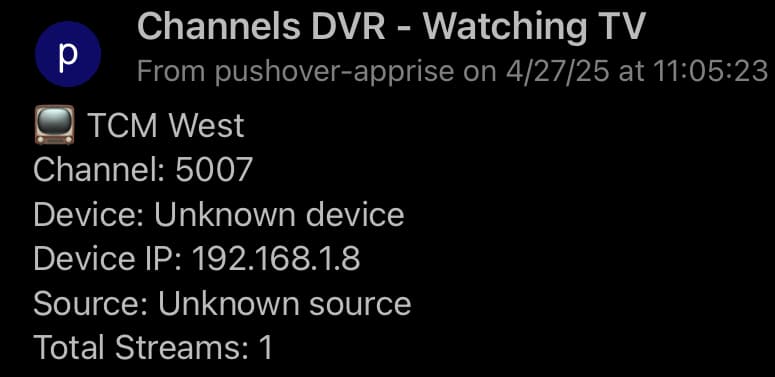
Notifications for Watching live doesn't show Source.


Although it's in the /devices API

{
  "Provider": "m3u",
  "DeviceID": "M3U-TCMWest",
  "FriendlyName": "TCMWest",
  "ModelNumber": "HDHRCOMPAT-1",
  "Lineup": "X-M3U",
  "Channels": [
    {
      "ID": "TCMWest",
      "GuideNumber": "5007",
      "GuideName": "TCM West",
      "HD": 1,
      "Station": "64312"
    }
  ],
  "Disabled": false
}

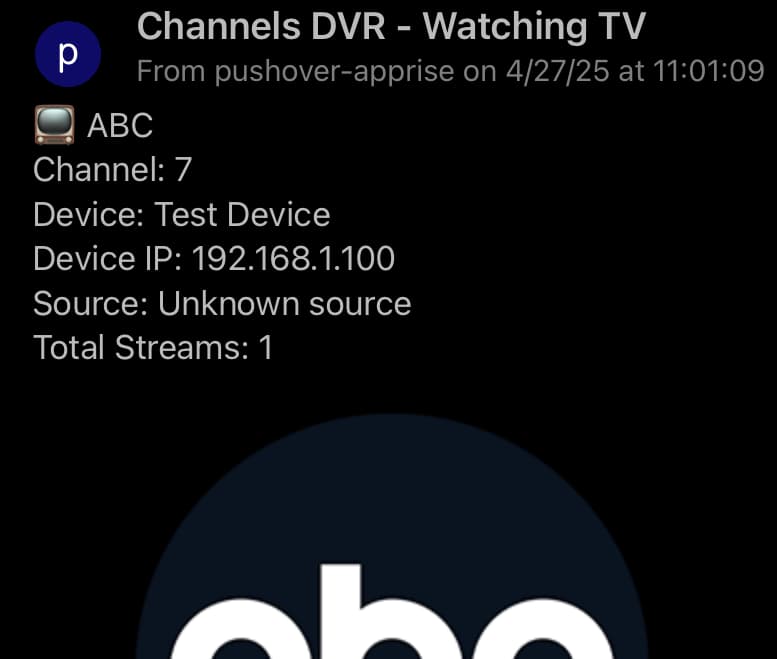
Did a Diagnostics > Test Channel Watching Alert and same issue.

It also didn't appear in the container log.
Screenshot 2025-04-27 at 11-01-36 ChannelWatch

@chDVRuser - Thank you for reporting this issue with the Source field not showing up correctly in your notifications, particularly with the HDHRCOMPAT-1 device type.

To further understand the issue and why it's happening, can you please follow the steps below?

  1. Event Stream Logs: Capture the log output when you tune one of these channels. You can get this by running one of the following commands in your terminal:

    Windows:

    curl.exe -H "Accept: text/event-stream" http://your-server-ip:8089/dvr/events/subscribe
    

    Linux/macOS:

    curl -H "Accept: text/event-stream" http://your-server-ip:8089/dvr/events/subscribe
    

Let it run while you tune the channel, then copy and paste the relevant lines related to the channel tuning events in your response

Cheers,
CoderLuii
203967356"

This is watching a Custom M3U channel from the Channels DVR web UI player and then an iPhone client.

# curl -H "Accept: text/event-stream" http://192.168.1.4:8289/dvr/events/subscribe
{"Type":"hello", "Version":"2025.04.23.2347"}
{"Type":"activities.set","Name":"7-ch5007-dANY-ip192.168.1.8","Value":"Watching ch5007 from 192.168.1.8"}
{"Type":"activities.set","Name":"7-ch5007-dANY-ip192.168.1.8","Value":"Watching ch5007 from 192.168.1.8 ()"}
{"Type":"activities.set","Name":"7-ch5007-dANY-ip192.168.1.8","Value":"Watching ch5007 from 192.168.1.8 (Remux Starting)"}
{"Type":"activities.set","Name":"7-ch5007-dANY-ip192.168.1.8","Value":"Watching ch5007 from 192.168.1.8 (Remux Starting): buf=0% drop=0% timeouts=0 segment_timeouts=0 playlist_timeouts=0"}
{"Type":"activities.set","Name":"7-ch5007-dANY-ip192.168.1.8","Value":"Watching ch5007 from 192.168.1.8 (Remux Starting: 17s @ 2.73x (81.67fps)): buf=0% drop=0% timeouts=0 segment_timeouts=0 playlist_timeouts=0"}
{"Type":"activities.set","Name":"7-ch5007-dANY-ip192.168.1.8","Value":"Watching ch5007 from 192.168.1.8 (Remux Starting: 30s @ 2.26x (67.63fps)): buf=0% drop=0% timeouts=0 segment_timeouts=0 playlist_timeouts=0"}
{"Type":"activities.set","Name":"7-ch5007-dANY-ip192.168.1.8"}
{"Type":"activities.set","Name":"7-ch5007-dANY-ip192.168.1.96","Value":"Watching ch5007 from iPhone"}
{"Type":"activities.set","Name":"7-ch5007-dANY-ip192.168.1.96","Value":"Watching ch5007 from iPhone ()"}
{"Type":"activities.set","Name":"7-ch5007-dANY-ip192.168.1.96","Value":"Watching ch5007 from iPhone (Remux Starting): buf=0% drop=0% timeouts=0 segment_timeouts=0 playlist_timeouts=0"}
{"Type":"activities.set","Name":"7-ch5007-dANY-ip192.168.1.96","Value":"Watching ch5007 from iPhone (Remux Starting: 18s @ 2.73x (81.82fps)): buf=0% drop=0% timeouts=0 segment_timeouts=0 playlist_timeouts=0"}
{"Type":"activities.set","Name":"7-ch5007-dANY-ip192.168.1.96","Value":"Watching ch5007 from iPhone (Remux Starting: 24s @ 1.64x (49.07fps)): buf=0% drop=0% timeouts=0 segment_timeouts=0 playlist_timeouts=0"}
{"Type":"activities.set","Name":"7-ch5007-dANY-ip192.168.1.96"}

This is watching a SiliconDust HDHR tuner channel from the Channels DVR web UI player and then an iPhone client.

# curl -H "Accept: text/event-stream" http://192.168.1.4:8189/dvr/events/subscribe
{"Type":"hello", "Version":"2025.04.23.2347"}
{"Type":"activities.set","Name":"7-ch204-dANY-ip192.168.1.8","Value":"Watching ch204 from 192.168.1.8"}
{"Type":"activities.set","Name":"7-ch204-dANY-ip192.168.1.8","Value":"Watching ch204 from 192.168.1.8 ()"}
{"Type":"activities.set","Name":"7-ch204-dANY-ip192.168.1.8","Value":"Watching ch204 from 192.168.1.8 (Remux Starting: 1s @ 3.19x (0.00fps)): strength=96% quality=100% symbol=100% rate=1.5Mb/sec buf=0% drop=0%"}
{"Type":"activities.set","Name":"7-ch204-dANY-ip192.168.1.8","Value":"Watching ch204 from 192.168.1.8 (Transcoder Running at 9mbps: 4s @ 1.38x (30.39fps)): strength=96% quality=100% symbol=100% rate=2.3Mb/sec buf=0% drop=0%"}
{"Type":"activities.set","Name":"7-ch204-dANY-ip192.168.1.8","Value":"Watching ch204 from 192.168.1.8 (Transcoder Running at 9mbps: 7s @ 0.88x (26.52fps)): strength=96% quality=100% symbol=100% rate=597.8Kb/sec buf=0% drop=0%"}
{"Type":"activities.set","Name":"7-ch204-dANY-ip192.168.1.8","Value":"Watching ch204 from 192.168.1.8 (Transcoder Running at 9mbps: 14s @ 1.07x (28.39fps)): strength=96% quality=100% symbol=100% rate=2.1Mb/sec buf=0% drop=0%"}
{"Type":"activities.set","Name":"7-ch204-dANY-ip192.168.1.8","Value":"Watching ch204 from 192.168.1.8 (Transcoder Running at 9mbps: 19s @ 1.05x (30.11fps)): strength=96% quality=100% symbol=100% rate=2.2Mb/sec buf=0% drop=0%"}
{"Type":"activities.set","Name":"7-ch204-dANY-ip192.168.1.8","Value":"Watching ch204 from 192.168.1.8 (Transcoder Running at 9mbps: 24s @ 1.03x (30.02fps)): strength=96% quality=100% symbol=100% rate=2.2Mb/sec buf=0% drop=0%"}
{"Type":"activities.set","Name":"7-ch204-dANY-ip192.168.1.8"}
{"Type":"activities.set","Name":"7-ch204-dANY-ip192.168.1.96","Value":"Watching ch204 from iPhone"}
{"Type":"activities.set","Name":"7-ch204-dANY-ip192.168.1.96","Value":"Watching ch204 from iPhone ()"}
{"Type":"activities.set","Name":"7-ch204-dANY-ip192.168.1.96","Value":"Watching ch204 from iPhone (Remux Starting: 2s @ 1.69x (38.03fps)): strength=96% quality=100% symbol=100% rate=741.7Kb/sec buf=0% drop=0%"}
{"Type":"activities.set","Name":"7-ch204-dANY-ip192.168.1.96","Value":"Watching ch204 from iPhone (Remux Starting: 7s @ 1.18x (32.18fps)): strength=96% quality=100% symbol=100% rate=1.3Mb/sec buf=0% drop=0%"}
{"Type":"activities.set","Name":"7-ch204-dANY-ip192.168.1.96","Value":"Watching ch204 from iPhone (Remux Starting: 12s @ 1.14x (32.29fps)): strength=96% quality=100% symbol=100% rate=1Mb/sec buf=0% drop=0%"}
{"Type":"activities.set","Name":"7-ch204-dANY-ip192.168.1.96","Value":"Watching ch204 from iPhone (Remux Starting: 17s @ 1.07x (30.78fps)): strength=96% quality=100% symbol=100% rate=2.3Mb/sec buf=0% drop=0%"}
{"Type":"activities.set","Name":"7-ch204-dANY-ip192.168.1.96","Value":"Watching ch204 from iPhone (Remux Starting: 22s @ 1.06x (30.77fps)): strength=96% quality=100% symbol=100% rate=2.2Mb/sec buf=0% drop=0%"}
{"Type":"activities.set","Name":"7-ch204-dANY-ip192.168.1.96"}

ch204 from /devices has 2 device sources with "GuideNumber": "204"

HDHR Prime device source

{
  "DeviceID": "1323AADB",
  "DeviceAuth": "<REDACTED>",
  "IPAddress": "192.168.1.7",
  "TunerCount": 3,
  "IsLegacy": false,
  "FriendlyName": "HDHomeRun PRIME",
  "FirmwareName": "hdhomerun3_cablecard",
  "FirmwareVersion": "20230713",
  "ModelNumber": "HDHR3-CC",
  "Lineup": "<REDACTED>",
  "Channels": [
    {
      "GuideNumber": "204",
      "GuideName": "MAGN",
      "Modulation": "auto",
      "Frequency": 243000000,
      "ProgramNumber": 2314,
      "VideoCodec": "MPEG2",
      "AudioCodec": "AC3",
      "Station": "18544",
      "Logo": "https://tmsimg.fancybits.co/assets/s18544_h3_ba.png?w=360&h=270"
    },

Custom M3U device source

{
  "Provider": "m3u",
  "DeviceID": "M3U-Prime1323AADB",
  "TunerCount": 3,
  "FriendlyName": "Prime-1323AADB",
  "ModelNumber": "HDHRCOMPAT-1",
  "Lineup": "X-M3U",
  "Channels": [
    {
      "ID": "204",
      "GuideNumber": "204",
      "GuideName": "MAGN",
      "Station": "18544",
      "Logo": "https://tmsimg.fancybits.co/assets/s18544_h3_ba.png?w=360&h=270",
      "Categories": ["SD"]
    },