
My Android phone has tuner sharing enabled and Channelwatch shows that I am watching a channel. Shouldn't the active streams increment as well?
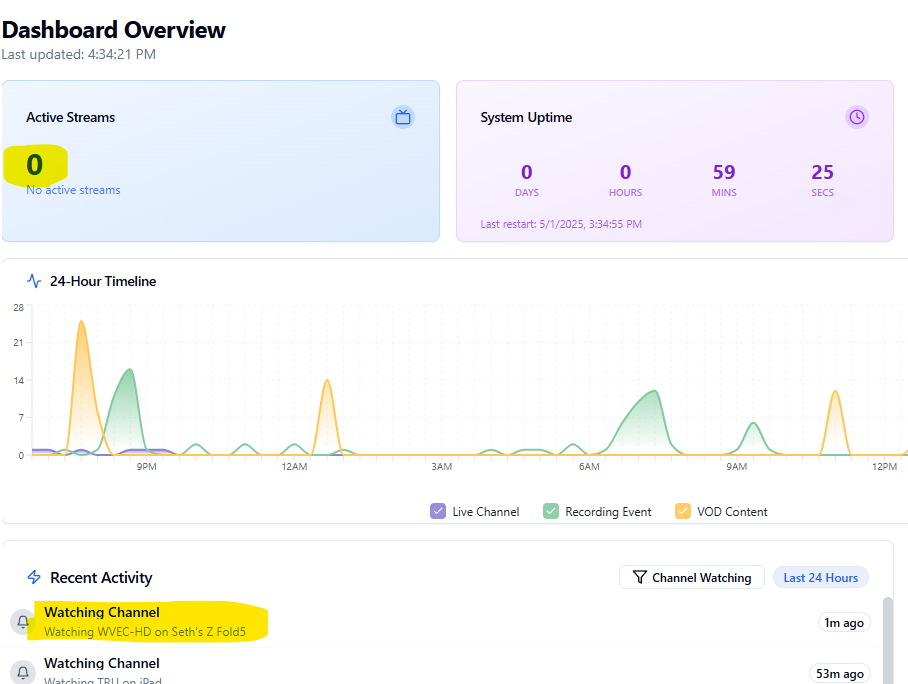
Sometimes the counter of active streams can take between 10 seconds to 45 seconds after notifications, i suggest to refresh the page, if its a persistent issue - let me know.
@chDVRuser - After reviewing these logs, I don't see any sources identified in your event streams. Unfortunately, this is where ChannelWatch has some limitations. The app tries to extract source information from these activity events, but in some cases, Channels DVR doesn't provide complete source details in the event stream.
Are you able to see the source within the activity tab of Channels?
Most of the time, the activity tab should show the same or similar information as what appears in the event stream. If the source is missing there too, this might explain why ChannelWatch can't display it.
This can happen due to a combination of factors - like differences between home streaming vs remote streaming, or various device configurations. Since I can't modify how Channels DVR reports these activities, ChannelWatch is limited by what information it can extract from the events.
Regarding your issue with notifications re-occurring every 5 minutes - can you update to v0.7 and confirm if you're still having this issue? The latest version includes some fixes that might address this problem.
1 Like
activity tab mimics what you see in the event stream.
It doesn't display the source (other than channel number).
For example below with bold highlights
{"Type":"activities.set","Name":"7-ch204-dANY-ip192.168.1.96","Value":"Watching ch204 from iPhone (Remux Starting: 22s @ 1.06x (30.77fps)): strength=96% quality=100% symbol=100% rate=2.2Mb/sec buf=0% drop=0%"}
ch204 is channel 204
dANY is any device source containing channel 204
Do you have an example you tested where ChannelWatch can see the device source?
I thought maybe you queried /devices to determine which device source the streaming channel number came from.
Channels DVR log does display the device source
2025/05/01 15:49:47.514379 [M3U] stream timestamps: TCMWest: start_at=2025-05-01T15:39:32-07:00 end_at=2025-05-01T15:49:30-07:00 live_delay=11.100377614s
2025/05/01 15:49:47.514522 [TNR] Opened connection to M3U-TCMWest for ch5007 TCM West-64312
2025/05/01 15:49:47.514589 [HLS] Starting live stream for channel 5007 from 192.168.1.8
2025/05/01 15:49:48.358845 [HLS] Probed live stream in 843.864461ms: h264 1280x720 progressive 5344598bps
2025/05/01 15:49:48.432662 [HLS] Session ch5007-dANY-ip192.168.1.8 started in 918.006857ms
@chDVRuser - Thank you for sharing those additional logs. You've hit on something interesting here that I've encountered during my previous testing.
I considered querying the /devices endpoint to match channels to sources, but this creates problems when the same channel number exists in multiple sources - it would be impossible to know which one is actually being used for the current stream.
The challenge is that logs like [TNR] Opened connection to M3U-TCMWest don't appear every single time. A reliable and consistent log is needed to calculate the source every-time.
Here are some of the examples that ChannelWatch uses to determine the source
Example 1 - M3U source:
{"Type":"activities.set","Name":"7-ch1001-stream-M3U-HDHR","Value":"Watching ch1001 Discovery from Living Room (192.168.1.10)"}
Example 2 - TVE (TV Everywhere) source:
{"Type":"activities.set","Name":"7-ch503-stream-TVE-XFINITY","Value":"Watching ch503 ESPN from Bedroom Tablet (192.168.1.25)"}
Example 3 - Tuner source with ID:
{"Type":"activities.set","Name":"7-ch7-stream-ABC123DE","Value":"Watching ch7 ABC from Kitchen TV (192.168.1.15)"}
Example 4 - Another M3U source format:
{"Type":"activities.set","Name":"7-ch230-stream-M3U-LocalCable","Value":"Watching ch230 from iPhone (Transcoder Running at 9mbps)"}
Example 5 - TV Everywhere with provider:
{"Type":"activities.set","Name":"7-ch512-stream-TVE-DirecTV_Stream","Value":"Watching ch512 HBO from Fire TV (192.168.1.50)"}
I really appreciate your detailed feedback and logs - this helps me understand exactly what's happening in your setup. If you have any other ideas for how we might be able to capture this source information more reliably, I'm all ears! These kinds of insights from users like you are incredibly valuable for making ChannelWatch better.
Hmm, thought it did.
As long as CDVR is providing the stream, it should.
Where do you see CDVR not providing it in the log?
Throw out those where a client connects directly to an HDHR Tuner because tuner sharing isn't enabled. That isn't monitoring CDVR, that's monitoring a client.
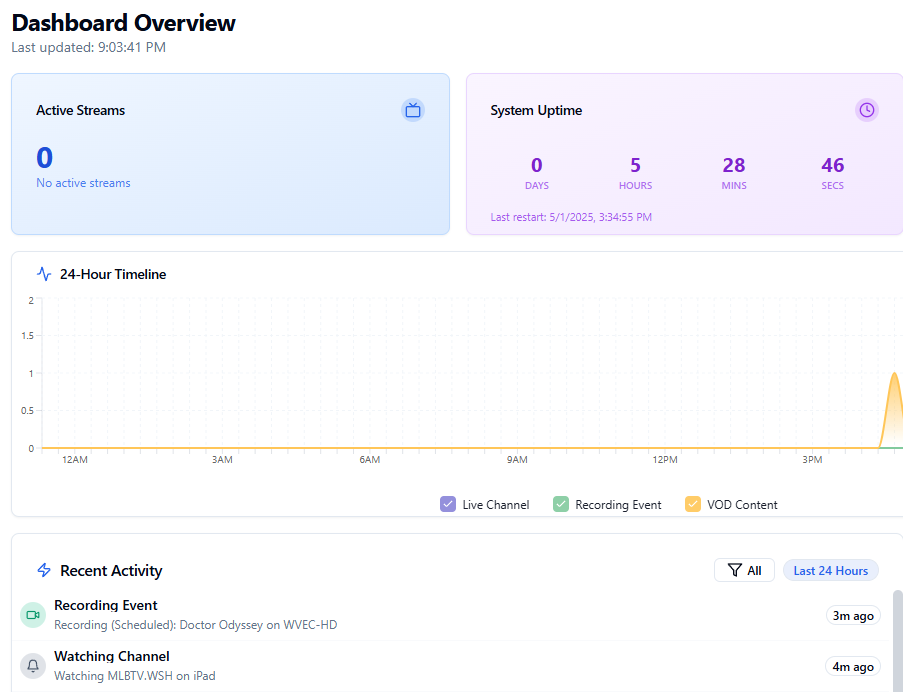
Ive let it sit for about 45 min while i am watching an mlb game and active streams are still at 0
I never paid attention to that, but I think if you refresh the page it will be accurate.
I see the same issue with some of the CDVR web UI, have to refresh the page.
Based on my testing with various channel sources and setups, I've observed differences in how source information appears in event streams across configurations.
I don't have comprehensive logs from every possible configuration to prove absolute consistency one way or the other. This is precisely why feedback from users with different setups like yours is so valuable.
The log below is not consistent through every channel you tune to:
Would you be willing to test and confirm if this is the same case for you or is it consistent across more than 5 channels you tune-in in real time?
If so, please feel free to share your logs to check the consistency. This would help me better understand the pattern consistency in your specific setup, which could inform a more robust solution.
@slampman - To troubleshoot why your active streams counter stays at 0 even while you're watching MLB content, I'll need to see what's happening behind the scenes. Could you please share:
-
Container logs: Run this command and share the output:
docker logs channelwatch -
Event stream data: While you're watching your MLB game, run this in another terminal window and capture about 30 seconds of output:
curl -H "Accept: text/event-stream" http://your-server-ip:8089/dvr/events/subscribe
here you go
[2025-05-01 20:56:44] [CORE] Event: {"Type":"activities.set","Name":"3-processor","Value":"Processing newly recorded files."}
[2025-05-01 20:56:44] [CORE] Event: {"Type":"activities.set","Name":"3-processor","Value":"Refreshing smart rules for virtual channels"}
[2025-05-01 20:56:44] [CORE] Event: {"Type":"activities.set","Name":"3-processor","Value":"Refreshing smart rules for library collections"}
[2025-05-01 20:56:44] [CORE] Event: {"Type":"activities.set","Name":"3-processor"}
[2025-05-01 20:59:33] [CORE] Event: {"Type":"activities.set","Name":"6-stream-M3U-mlbradiofeeds-1429-10.100.12.98","Value":"Watching ch1429 MLBTV.WSH from iPad: buf=0% drop=0% timeouts=0 segment_timeouts=0 playlist_timeouts=0"}
[2025-05-01 20:59:33] [CORE] Program info: MLBTV.WSH (Ch1429) | MLB Baseball
[2025-05-01 20:59:33] [CORE] Watching MLBTV.WSH (Ch1429) - Device: iPad, Source: mlbradiofeeds, IP: 10.100.12.98
[2025-05-01 20:59:33] [CORE] Using program image: https://tmsimg.fancybits.co/assets/GNLZZGG001YMXXM.jpg?w=720&h=540
[2025-05-01 20:59:33] [CORE] Formatting alert with channel: MLBTV.WSH, device: iPad, program: MLB Baseball
[2025-05-01 20:59:33] [CORE] Format alert with channel_info: {'number': '1429', 'name': 'MLBTV.WSH', 'logo_url': 'https://tmsimg.fancybits.co/assets/GNLZZGG001YMXXM.jpg?w=720&h=540', 'program_title': 'MLB Baseball'}, device_info: {'name': 'iPad', 'source': 'mlbradiofeeds', 'ip_address': '10.100.12.98'}
[2025-05-01 20:59:33] [CORE] Adding program title to message: MLB Baseball
[2025-05-01 20:59:33] [CORE] Formatting message with parts: {'channel': {'number': '1429', 'name': 'MLBTV.WSH', 'program_title': 'MLB Baseball'}, 'device': 'iPad', 'ip': '10.100.12.98', 'source': 'mlbradiofeeds'}
[2025-05-01 20:59:33] [CORE] Added program line: Program: MLB Baseball
[2025-05-01 20:59:33] [CORE] Final formatted message: 📺 MLBTV.WSH
Channel: 1429
Program: MLB Baseball
Device: iPad
Device IP: 10.100.12.98
Source: mlbradiofeeds
[2025-05-01 20:59:33] [CORE] Sending notification: Channels DVR - Watching TV
[2025-05-01 20:59:33] [CORE] Other notification services: delivery failed
[2025-05-01 20:59:33] [CORE] Notification sent successfully
[2025-05-01 20:59:33] [CORE] Notification sent via Apprise: Channels DVR - Watching TV
[2025-05-01 20:59:33] [CORE] Activity recorded directly to history file: Watching Channel - Watching MLBTV.WSH on iPad
[2025-05-01 20:59:33] [CORE] Session added: 6-stream-M3U-mlbradiofeeds-1429-10.100.12.98
[2025-05-01 20:59:33] [CORE] Alert triggered: Channel-Watching
[2025-05-01 20:59:49] [CORE] DVR Storage: 1.23 TB free (69.0%)
[2025-05-01 20:59:50] [CORE] Event: {"Type":"activities.set","Name":"0-job-1746147590-292","Value":"Recording ch13.1 for Doctor Odyssey until 10:01PM: buf=0% drop=0%"}
[2025-05-01 20:59:50] [CORE] Event: {"Type":"groups.updated","Name":"27397604","UpdatedAt":1746147590413}
[2025-05-01 20:59:50] [CORE] Event: {"Type":"files.created","Name":"23080","UpdatedAt":1746147590384}
[2025-05-01 20:59:50] [CORE] Event: {"Type":"jobs.updated","Name":"1746147590-292","UpdatedAt":1746147590452}
[2025-05-01 20:59:50] [CORE] Event: {"Type":"programs.set","Name":"EP051377600016","Value":"recording-1746147590-292"}
[2025-05-01 20:59:50] [CORE] Pre-fetching job details for job_id '1746147590-292' (Event: programs.set)
[2025-05-01 20:59:50] [CORE] Retrieving job by ID: 1746147590-292
[2025-05-01 20:59:50] [CORE] Job 1746147590-292 found in cache
[2025-05-01 20:59:50] [CORE] Successfully pre-fetched job details for '1746147590-292'
[2025-05-01 20:59:50] [CORE] Acquiring lock for event programs.set (thread 140605937281848)...
[2025-05-01 20:59:50] [CORE] Lock acquired for event programs.set (thread 140605937281848).
[2025-05-01 20:59:50] [CORE] Formatting message with parts: {'status': '🔴 Recording (Scheduled)', 'details': 'Program: Doctor Odyssey', 'time_table': '-----------------------\nRecording: 8:59 PM EDT\nDuration:  1 hour 1 minute', 'channel': {'number': '13.1', 'name': 'WVEC-HD'}, 'custom': 'Mayhem ensues when high-profile book tours for trad wives and sex-positive groups are double-booked.'}
[2025-05-01 20:59:50] [CORE] Final formatted message: 📺 WVEC-HD
Channel: 13.1
Status: 🔴 Recording (Scheduled)
Program: Doctor Odyssey
Mayhem ensues when high-profile book tours for trad wives and sex-positive groups are double-booked.
-----------------------
Recording: 8:59 PM EDT
Duration:  1 hour 1 minute
[2025-05-01 20:59:50] [CORE] Recording started (Scheduled): Doctor Odyssey on WVEC-HD, Duration: 1 hour 1 minute
[2025-05-01 20:59:50] [CORE] Recording event recorded: Recording (Scheduled): Doctor Odyssey on WVEC-HD
[2025-05-01 20:59:50] [CORE] Sending notification: Channels DVR - Recording Event
[2025-05-01 20:59:50] [CORE] Other notification services: delivery failed
[2025-05-01 20:59:50] [CORE] Notification sent successfully
[2025-05-01 20:59:50] [CORE] Notification sent via Apprise: Channels DVR - Recording Event
[2025-05-01 20:59:50] [CORE] Processing complete for programs.set. Result: True
[2025-05-01 20:59:50] [CORE] Lock released for event programs.set (thread 140605937281848).
[2025-05-01 20:59:50] [CORE] Alert triggered: Recording-Events
[2025-05-01 20:59:55] [CORE] Event: {"Type":"activities.set","Name":"0-job-1746147590-292","Value":"Recording ch13.1 for Doctor Odyssey until 10:01PM: strength=100% quality=100% symbol=100% rate=7.8Mb/sec buf=0% drop=0%"}
[2025-05-01 21:00:00] [CORE] Event: {"Type":"activities.set","Name":"0-job-1746147590-292","Value":"Recording ch13.1 for Doctor Odyssey until 10:01PM: strength=100% quality=100% symbol=100% rate=5.6Mb/sec buf=0% drop=0%"}
[2025-05-01 21:00:05] [CORE] Event: {"Type":"activities.set","Name":"0-job-1746147590-292","Value":"Recording ch13.1 for Doctor Odyssey until 10:01PM: strength=100% quality=100% symbol=100% rate=4.1Mb/sec buf=0% drop=0%"}
[2025-05-01 21:00:10] [CORE] Event: {"Type":"activities.set","Name":"0-job-1746147590-292","Value":"Recording ch13.1 for Doctor Odyssey until 10:01PM: strength=100% quality=100% symbol=100% rate=7.2Mb/sec buf=0% drop=0%"}
[2025-05-01 21:00:15] [CORE] Event: {"Type":"activities.set","Name":"0-job-1746147590-292","Value":"Recording ch13.1 for Doctor Odyssey until 10:01PM: strength=100% quality=100% symbol=100% rate=5.1Mb/sec buf=0% drop=0%"}
[2025-05-01 21:00:20] [CORE] Event: {"Type":"activities.set","Name":"0-job-1746147590-292","Value":"Recording ch13.1 for Doctor Odyssey until 10:01PM: strength=100% quality=100% symbol=100% rate=4Mb/sec buf=0% drop=0%"}
[2025-05-01 21:00:24] [CORE] Connection healthy: 1301 consecutive successful pings
[2025-05-01 21:00:25] [CORE] Event: {"Type":"activities.set","Name":"0-job-1746147590-292","Value":"Recording ch13.1 for Doctor Odyssey until 10:01PM: strength=100% quality=100% symbol=100% rate=4.9Mb/sec buf=0% drop=0%"}
[2025-05-01 21:00:30] [CORE] Event: {"Type":"activities.set","Name":"0-job-1746147590-292","Value":"Recording ch13.1 for Doctor Odyssey until 10:01PM: strength=100% quality=100% symbol=100% rate=4Mb/sec buf=0% drop=0%"}
seth@docker:~$
*** System restart required ***
Last login: Thu May  1 15:39:57 2025 from 172.16.1.11
seth@docker:~$ curl -H "Accept: text/event-stream" http://192.168.12.30:8089/dvr/events/subscribe
{"Type":"hello", "Version":"2025.05.01.0438"}
{"Type":"activities.set","Name":"6-stream-M3U-mlbradiofeeds-1429-10.100.12.98","Value":"Watching ch1429 MLBTV.WSH from iPad: buf=0% drop=0% timeouts=0 segment_timeouts=0 playlist_timeouts=0"}
{"Type":"activities.set","Name":"0-job-1746147590-292","Value":"Recording ch13.1 for Doctor Odyssey until 10:01PM: buf=0% drop=0%"}
{"Type":"groups.updated","Name":"27397604","UpdatedAt":1746147590413}
{"Type":"files.created","Name":"23080","UpdatedAt":1746147590384}
{"Type":"jobs.updated","Name":"1746147590-292","UpdatedAt":1746147590452}
{"Type":"programs.set","Name":"EP051377600016","Value":"recording-1746147590-292"}
{"Type":"activities.set","Name":"0-job-1746147590-292","Value":"Recording ch13.1 for Doctor Odyssey until 10:01PM: strength=100% quality=100% symbol=100% rate=7.8Mb/sec buf=0% drop=0%"}
{"Type":"activities.set","Name":"0-job-1746147590-292","Value":"Recording ch13.1 for Doctor Odyssey until 10:01PM: strength=100% quality=100% symbol=100% rate=5.6Mb/sec buf=0% drop=0%"}
{"Type":"activities.set","Name":"0-job-1746147590-292","Value":"Recording ch13.1 for Doctor Odyssey until 10:01PM: strength=100% quality=100% symbol=100% rate=4.1Mb/sec buf=0% drop=0%"}
{"Type":"activities.set","Name":"0-job-1746147590-292","Value":"Recording ch13.1 for Doctor Odyssey until 10:01PM: strength=100% quality=100% symbol=100% rate=7.2Mb/sec buf=0% drop=0%"}
{"Type":"activities.set","Name":"0-job-1746147590-292","Value":"Recording ch13.1 for Doctor Odyssey until 10:01PM: strength=100% quality=100% symbol=100% rate=5.1Mb/sec buf=0% drop=0%"}
{"Type":"activities.set","Name":"0-job-1746147590-292","Value":"Recording ch13.1 for Doctor Odyssey until 10:01PM: strength=100% quality=100% symbol=100% rate=4Mb/sec buf=0% drop=0%"}
{"Type":"activities.set","Name":"0-job-1746147590-292","Value":"Recording ch13.1 for Doctor Odyssey until 10:01PM: strength=100% quality=100% symbol=100% rate=4.9Mb/sec buf=0% drop=0%"}
{"Type":"activities.set","Name":"0-job-1746147590-292","Value":"Recording ch13.1 for Doctor Odyssey until 10:01PM: strength=100% quality=100% symbol=100% rate=4Mb/sec buf=0% drop=0%"}
{"Type":"activities.set","Name":"0-job-1746147590-292","Value":"Recording ch13.1 for Doctor Odyssey until 10:01PM: strength=100% quality=100% symbol=100% rate=3.7Mb/sec buf=0% drop=0%"}
{"Type":"activities.set","Name":"0-job-1746147590-292","Value":"Recording ch13.1 for Doctor Odyssey until 10:01PM: strength=100% quality=100% symbol=100% rate=6.8Mb/sec buf=0% drop=0%"}
{"Type":"activities.set","Name":"0-job-1746147590-292","Value":"Recording ch13.1 for Doctor Odyssey until 10:01PM: strength=100% quality=100% symbol=100% rate=5.2Mb/sec buf=0% drop=0%"}
{"Type":"activities.set","Name":"0-job-1746147590-292","Value":"Recording ch13.1 for Doctor Odyssey until 10:01PM: strength=100% quality=100% symbol=100% rate=7.3Mb/sec buf=0% drop=0%"}
{"Type":"activities.set","Name":"0-job-1746147590-292","Value":"Recording ch13.1 for Doctor Odyssey until 10:01PM: strength=100% quality=100% symbol=100% rate=6.8Mb/sec buf=0% drop=0%"}
{"Type":"activities.set","Name":"0-job-1746147590-292","Value":"Recording ch13.1 for Doctor Odyssey until 10:01PM: strength=100% quality=100% symbol=100% rate=6.2Mb/sec buf=0% drop=0%"}
{"Type":"activities.set","Name":"0-job-1746147590-292","Value":"Recording ch13.1 for Doctor Odyssey until 10:01PM: strength=100% quality=100% symbol=100% rate=6.5Mb/sec buf=0% drop=0%"}
{"Type":"activities.set","Name":"0-job-1746147590-292","Value":"Recording ch13.1 for Doctor Odyssey until 10:01PM: strength=100% quality=100% symbol=100% rate=3Mb/sec buf=0% drop=0%"}
{"Type":"activities.set","Name":"0-job-1746147590-292","Value":"Recording ch13.1 for Doctor Odyssey until 10:01PM: strength=100% quality=100% symbol=100% rate=5.7Mb/sec buf=0% drop=0%"}
{"Type":"activities.set","Name":"0-job-1746147590-292","Value":"Recording ch13.1 for Doctor Odyssey until 10:01PM: strength=100% quality=100% symbol=100% rate=4.1Mb/sec buf=0% drop=0%"}
{"Type":"activities.set","Name":"0-job-1746147590-292","Value":"Recording ch13.1 for Doctor Odyssey until 10:01PM: strength=100% quality=100% symbol=100% rate=3.2Mb/sec buf=0% drop=0%"}
{"Type":"activities.set","Name":"0-job-1746147590-292","Value":"Recording ch13.1 for Doctor Odyssey until 10:01PM: strength=100% quality=100% symbol=100% rate=4.1Mb/sec buf=0% drop=0%"}
{"Type":"activities.set","Name":"0-job-1746147590-292","Value":"Recording ch13.1 for Doctor Odyssey until 10:01PM: strength=100% quality=100% symbol=100% rate=3.6Mb/sec buf=0% drop=0%"}
{"Type":"activities.set","Name":"0-job-1746147590-292","Value":"Recording ch13.1 for Doctor Odyssey until 10:01PM: strength=100% quality=100% symbol=100% rate=3.7Mb/sec buf=0% drop=0%"}Still happening with v0.7 watching VOD
Maybe can test this weekend with LiveTV.
From activity_history.json
  {
    "id": "879cfbd5-cccc-4767-999b-58c6b1468a1e",
    "type": "watching_vod",
    "title": "Watching VOD Content",
    "message": "Watching Ranch to Table on Unknown Device",
    "timestamp": "2025-05-01T17:56:00.043016",
    "icon": "play"
  },
  {
    "id": "2baf7137-9d4f-4e67-8cc7-27f83e79d023",
    "type": "watching_vod",
    "title": "Watching VOD Content",
    "message": "Watching Ranch to Table on Unknown Device",
    "timestamp": "2025-05-01T17:50:55.059485",
    "icon": "play"
  },
  {
    "id": "407e66a8-4c84-4c97-9447-9930ac1e69c5",
    "type": "watching_vod",
    "title": "Watching VOD Content",
    "message": "Watching Ranch to Table on Unknown Device",
    "timestamp": "2025-05-01T17:45:50.043666",
    "icon": "play"
  },
  {
    "id": "4ac9d2e1-8ba0-4f77-938f-d7168b0a04e0",
    "type": "watching_vod",
    "title": "Watching VOD Content",
    "message": "Watching Ranch to Table on Unknown Device",
    "timestamp": "2025-05-01T17:40:45.045089",
    "icon": "play"
  },
  {
    "id": "e6379371-7598-47a0-8c5b-d69a888ca16a",
    "type": "watching_vod",
    "title": "Watching VOD Content",
    "message": "Watching Ranch to Table on Unknown Device",
    "timestamp": "2025-05-01T17:35:40.103095",
    "icon": "play"
  },
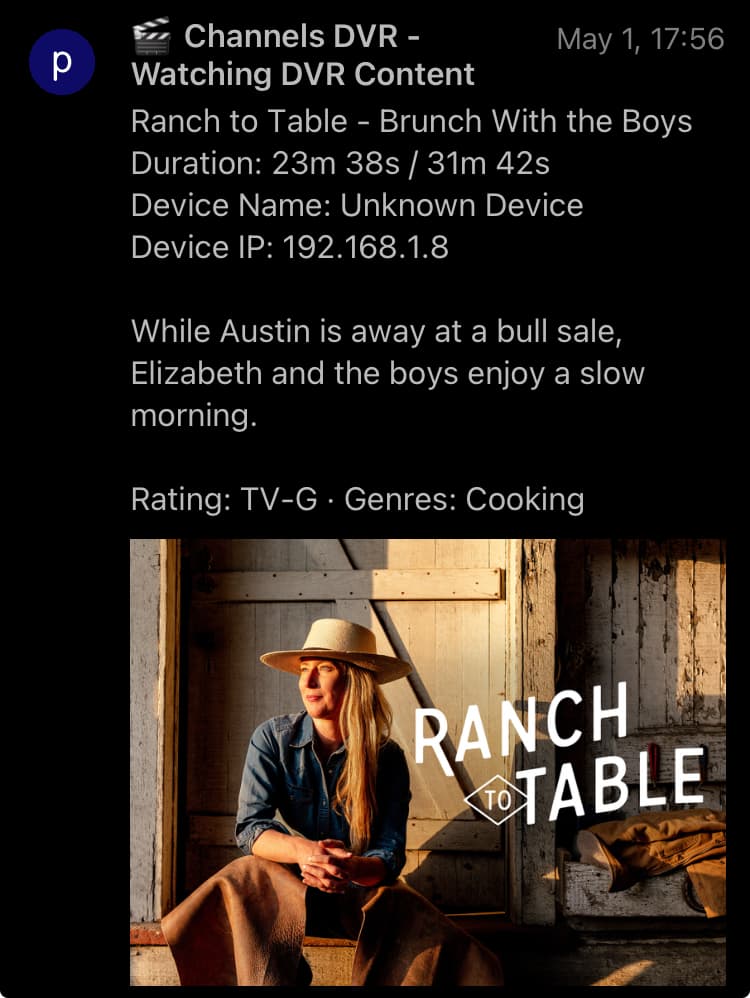
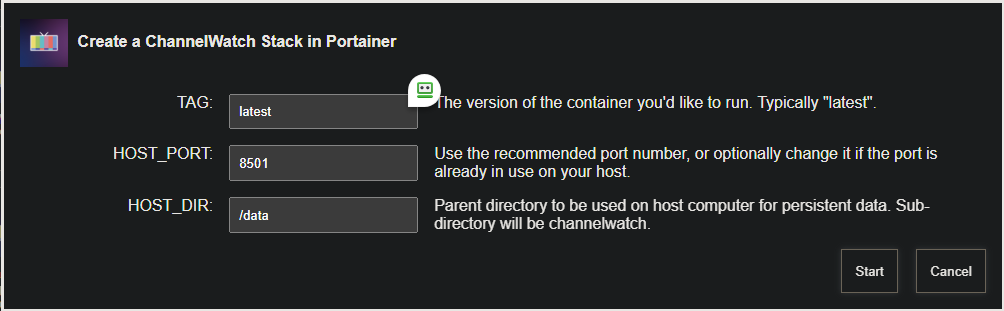
New bnhf/olivetin:latest (aka bnhf/olivetin:2025.05.02) pushed today that transitions ChannelWatch from an OliveTin Action, to a stack you can deploy via Project One-Click. This makes more sense now that it has its own WebUI:
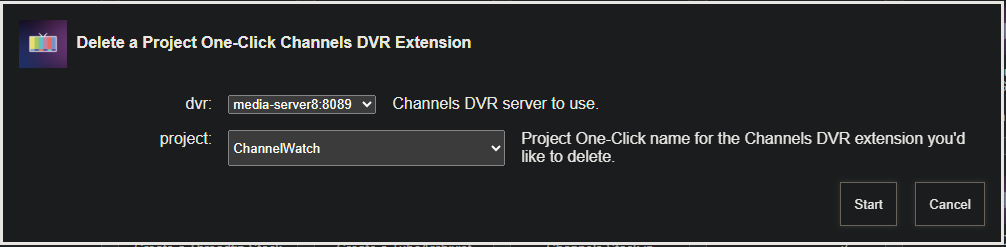
If you've been using ChannelWatch via the Action, the best approach is to kill it by using a log_level of 0 in the Action. Then in the Project One-Click Delete a Project One-Click Channels DVR Extension Action choose ChannelWatch and click Start. This will delete the current ChannelWatch image, and clear the decks for a fresh start:
Then, you can proceed with deploying ChannelWatch via Project One-Click. If you're an Apple or Synology user, keep in mind your HOST_DIR value cannot be /data, but needs to be a parent directory you can write to.
In the case of Apple, this is usually /Users/<your username>, the channelwatch subdirectory will be added automatically to the parent you specify. For Synology, /volume1/docker is the usual choice, and again a channelwatch subdirectory will be added automatically to that parent. As always, on Synology, that directory /volume1/docker/channelwatch needs to exist before you attempt to deploy the stack.
1 Like
So it looks the same no matter which channel I watch live, whether from On Now or the grid guide.
One server
2025/05/03 11:11:10.593401 [TNR] Opened connection to 1323AADB/1 for ch706 KVIEDT
2025/05/03 11:11:10.593464 [HLS] Starting live stream for channel 706 from 192.168.1.96
2025/05/03 11:11:11.239009 [HLS] Probed live stream in 644.645531ms: h264 1280x720 progressive 791461bps
2025/05/03 11:11:15.651611 [HLS] Session ch706-dANY-ip192.168.1.96 started in 5.057808166s
2025/05/03 11:12:08.470029 [HLS] Stopping transcoder session ch706-dANY-ip192.168.1.96 (out=59.974411s finished=false first_seq=1 last_seq=41)
2025/05/03 11:12:08.474640 [TNR] Closed connection to 1323AADB/1 for ch706 KVIEDT
2025/05/03 11:12:08.474746 [SNR] Statistics for ch706 KVIEDT: ss=96%-97% snq=100% seq=100% bps=3900027,1783744-4129984 pps=333,153-353
2025/05/03 11:12:08.474785 [SNR] Buffer statistics for ch706 KVIEDT: buf=0% drop=0%
{"Type":"activities.set","Name":"7-ch706-dANY-ip192.168.1.96","Value":"Watching ch706 from iPhone"}
{"Type":"activities.set","Name":"7-ch706-dANY-ip192.168.1.96","Value":"Watching ch706 from iPhone ()"}
{"Type":"activities.set","Name":"7-ch706-dANY-ip192.168.1.96","Value":"Watching ch706 from iPhone (Remux Starting: 4s @ 2.89x (69.29fps)): strength=97% quality=100% symbol=100% rate=1.7Mb/sec buf=0% drop=0%"}
{"Type":"activities.set","Name":"7-ch706-dANY-ip192.168.1.96","Value":"Watching ch706 from iPhone (Remux Starting: 9s @ 1.46x (61.73fps)): strength=97% quality=100% symbol=100% rate=3.8Mb/sec buf=0% drop=0%"}
{"Type":"activities.set","Name":"7-ch706-dANY-ip192.168.1.96","Value":"Watching ch706 from iPhone (Remux Starting: 14s @ 1.25x (61.10fps)): strength=97% quality=100% symbol=100% rate=3.8Mb/sec buf=0% drop=0%"}
{"Type":"activities.set","Name":"7-ch706-dANY-ip192.168.1.96","Value":"Watching ch706 from iPhone (Remux Starting: 19s @ 1.17x (60.24fps)): strength=97% quality=100% symbol=100% rate=3.9Mb/sec buf=0% drop=0%"}
{"Type":"activities.set","Name":"7-ch706-dANY-ip192.168.1.96","Value":"Watching ch706 from iPhone (Remux Starting: 24s @ 1.14x (60.59fps)): strength=97% quality=100% symbol=100% rate=3.6Mb/sec buf=0% drop=0%"}
{"Type":"activities.set","Name":"7-ch706-dANY-ip192.168.1.96","Value":"Watching ch706 from iPhone (Remux Starting: 28s @ 1.1x (59.88fps)): strength=97% quality=100% symbol=100% rate=3.9Mb/sec buf=0% drop=0%"}
{"Type":"activities.set","Name":"7-ch706-dANY-ip192.168.1.96","Value":"Watching ch706 from iPhone (Remux Starting: 34s @ 1.09x (60.38fps)): strength=96% quality=100% symbol=100% rate=3.7Mb/sec buf=0% drop=0%"}
{"Type":"activities.set","Name":"7-ch706-dANY-ip192.168.1.96","Value":"Watching ch706 from iPhone (Remux Starting: 39s @ 1.08x (60.27fps)): strength=97% quality=100% symbol=100% rate=3.8Mb/sec buf=0% drop=0%"}
{"Type":"activities.set","Name":"7-ch706-dANY-ip192.168.1.96","Value":"Watching ch706 from iPhone (Remux Starting: 44s @ 1.07x (60.22fps)): strength=97% quality=100% symbol=100% rate=3.9Mb/sec buf=0% drop=0%"}
{"Type":"activities.set","Name":"7-ch706-dANY-ip192.168.1.96","Value":"Watching ch706 from iPhone (Remux Starting: 49s @ 1.06x (60.23fps)): strength=97% quality=100% symbol=100% rate=3.8Mb/sec buf=0% drop=0%"}
{"Type":"activities.set","Name":"7-ch706-dANY-ip192.168.1.96","Value":"Watching ch706 from iPhone (Remux Starting: 54s @ 1.06x (60.19fps)): strength=97% quality=100% symbol=100% rate=3.8Mb/sec buf=0% drop=0%"}
{"Type":"activities.set","Name":"7-ch706-dANY-ip192.168.1.96","Value":"Watching ch706 from iPhone (Remux Starting: 59s @ 1.05x (59.93fps)): strength=97% quality=100% symbol=100% rate=3.8Mb/sec buf=0% drop=0%"}
{"Type":"activities.set","Name":"7-ch706-dANY-ip192.168.1.96"}
Another server
2025/05/03 11:23:18.426439 [TNR] Opened connection to M3U-frndlyTV for ch9025 FYI
2025/05/03 11:23:18.426514 [HLS] Starting live stream for channel 9025 from 192.168.1.96 (bitrate=3193kbps)
2025/05/03 11:23:19.332872 [HLS] Session ch9025-dANY-ip192.168.1.96 started in 906.21218ms
2025/05/03 11:23:19.580969 [HLS] Probed live stream in 1.154042707s: h264 1280x720 progressive 2800573bps
2025/05/03 11:24:19.928338 [HLS] Stopping transcoder session ch9025-dANY-ip192.168.1.96 (out=1m7.988s finished=false first_seq=1 last_seq=71)
2025/05/03 11:24:19.948318 [TNR] Closed connection to M3U-frndlyTV for ch9025 FYI
2025/05/03 11:24:19.948409 [SNR] Buffer statistics for ch9025 FYI: buf=0% drop=0%
2025/05/03 11:24:19.948451 [SNR] Streaming statistics for ch9025 FYI: timeouts=0 segment_timeouts=0 playlist_timeouts=0
{"Type":"activities.set","Name":"7-ch9025-dANY-ip192.168.1.96","Value":"Watching ch9025 from iPhone"}
{"Type":"activities.set","Name":"7-ch9025-dANY-ip192.168.1.96","Value":"Watching ch9025 from iPhone ()"}
{"Type":"activities.set","Name":"7-ch9025-dANY-ip192.168.1.96","Value":"Watching ch9025 from iPhone (Remux Starting): buf=0% drop=0% timeouts=0 segment_timeouts=0 playlist_timeouts=0"}
{"Type":"activities.set","Name":"7-ch9025-dANY-ip192.168.1.96","Value":"Watching ch9025 from iPhone (Remux Starting: 11s @ 2.1x (62.89fps)): buf=0% drop=0% timeouts=0 segment_timeouts=0 playlist_timeouts=0"}
{"Type":"activities.set","Name":"7-ch9025-dANY-ip192.168.1.96","Value":"Watching ch9025 from iPhone (Remux Starting: 19s @ 1.85x (55.34fps)): buf=0% drop=0% timeouts=0 segment_timeouts=0 playlist_timeouts=0"}
{"Type":"activities.set","Name":"7-ch9025-dANY-ip192.168.1.96","Value":"Watching ch9025 from iPhone (Remux Starting: 27s @ 1.48x (44.22fps)): buf=0% drop=0% timeouts=0 segment_timeouts=0 playlist_timeouts=0"}
{"Type":"activities.set","Name":"7-ch9025-dANY-ip192.168.1.96","Value":"Watching ch9025 from iPhone (Remux Starting: 31s @ 1.49x (44.53fps)): buf=0% drop=0% timeouts=0 segment_timeouts=0 playlist_timeouts=0"}
{"Type":"activities.set","Name":"7-ch9025-dANY-ip192.168.1.96","Value":"Watching ch9025 from iPhone (Remux Starting: 35s @ 1.35x (40.49fps)): buf=0% drop=0% timeouts=0 segment_timeouts=0 playlist_timeouts=0"}
{"Type":"activities.set","Name":"7-ch9025-dANY-ip192.168.1.96","Value":"Watching ch9025 from iPhone (Remux Starting: 39s @ 1.35x (40.35fps)): buf=0% drop=0% timeouts=0 segment_timeouts=0 playlist_timeouts=0"}
{"Type":"activities.set","Name":"7-ch9025-dANY-ip192.168.1.96","Value":"Watching ch9025 from iPhone (Remux Starting: 47s @ 1.28x (38.41fps)): buf=0% drop=0% timeouts=0 segment_timeouts=0 playlist_timeouts=0"}
{"Type":"activities.set","Name":"7-ch9025-dANY-ip192.168.1.96","Value":"Watching ch9025 from iPhone (Remux Starting: 51s @ 1.21x (36.22fps)): buf=0% drop=0% timeouts=0 segment_timeouts=0 playlist_timeouts=0"}
{"Type":"activities.set","Name":"7-ch9025-dANY-ip192.168.1.96","Value":"Watching ch9025 from iPhone (Remux Starting: 55s @ 1.23x (36.81fps)): buf=0% drop=0% timeouts=0 segment_timeouts=0 playlist_timeouts=0"}
{"Type":"activities.set","Name":"7-ch9025-dANY-ip192.168.1.96","Value":"Watching ch9025 from iPhone (Remux Starting: 1m3s @ 1.19x (35.67fps)): buf=0% drop=0% timeouts=0 segment_timeouts=0 playlist_timeouts=0"}
{"Type":"activities.set","Name":"7-ch9025-dANY-ip192.168.1.96","Value":"Watching ch9025 from iPhone (Remux Starting: 1m7s @ 1.16x (34.91fps)): buf=0% drop=0% timeouts=0 segment_timeouts=0 playlist_timeouts=0"}
{"Type":"activities.set","Name":"7-ch9025-dANY-ip192.168.1.96"}
Another server and added timestamps to events
2025/05/03 11:43:34.964389 [TNR] Opened connection to M3U-tubiTV for ch3045 Duck Dynasty
2025/05/03 11:43:34.964455 [HLS] Starting live stream for channel 3045 from 192.168.1.96 (bitrate=3000kbps)
2025/05/03 11:43:36.526248 [HLS] Session ch3045-dANY-ip192.168.1.96 started in 1.561733626s
2025/05/03 11:43:36.838309 [HLS] Probed live stream in 1.873317784s: h264 1280x720 progressive 2720618bps
2025/05/03 11:44:37.927925 [HLS] Stopping transcoder session ch3045-dANY-ip192.168.1.96 (out=1m6.057333s finished=false first_seq=1 last_seq=35)
2025/05/03 11:44:37.944622 [TNR] Closed connection to M3U-tubiTV for ch3045 Duck Dynasty
2025/05/03 11:44:37.944753 [SNR] Buffer statistics for ch3045 Duck Dynasty: buf=0% drop=0%
2025/05/03 11:44:37.944799 [SNR] Streaming statistics for ch3045 Duck Dynasty: timeouts=0 segment_timeouts=0 playlist_timeouts=0
{"Type":"activities.set","Name":"7-ch3045-dANY-ip192.168.1.96","Value":"Watching ch3045 from iPhone","At":"2025-05-03T18:43:34Z"}
{"Type":"activities.set","Name":"7-ch3045-dANY-ip192.168.1.96","Value":"Watching ch3045 from iPhone ()","At":"2025-05-03T18:43:34Z"}
{"Type":"activities.set","Name":"7-ch3045-dANY-ip192.168.1.96","Value":"Watching ch3045 from iPhone (Remux Starting): buf=0% drop=0% timeouts=0 segment_timeouts=0 playlist_timeouts=0","At":"2025-05-03T18:43:37Z"}
{"Type":"activities.set","Name":"7-ch3045-dANY-ip192.168.1.96","Value":"Watching ch3045 from iPhone (Remux Starting: 18s @ 2.98x (89.03fps)): buf=0% drop=0% timeouts=0 segment_timeouts=0 playlist_timeouts=0","At":"2025-05-03T18:43:42Z"}
{"Type":"activities.set","Name":"7-ch3045-dANY-ip192.168.1.96","Value":"Watching ch3045 from iPhone (Remux Starting: 24s @ 1.95x (58.41fps)): buf=0% drop=0% timeouts=0 segment_timeouts=0 playlist_timeouts=0","At":"2025-05-03T18:43:52Z"}
{"Type":"activities.set","Name":"7-ch3045-dANY-ip192.168.1.96","Value":"Watching ch3045 from iPhone (Remux Starting: 30s @ 1.46x (43.75fps)): buf=0% drop=0% timeouts=0 segment_timeouts=0 playlist_timeouts=0","At":"2025-05-03T18:43:57Z"}
{"Type":"activities.set","Name":"7-ch3045-dANY-ip192.168.1.96","Value":"Watching ch3045 from iPhone (Remux Starting: 36s @ 1.25x (37.46fps)): buf=0% drop=0% timeouts=0 segment_timeouts=0 playlist_timeouts=0","At":"2025-05-03T18:44:07Z"}
{"Type":"activities.set","Name":"7-ch3045-dANY-ip192.168.1.96","Value":"Watching ch3045 from iPhone (Remux Starting: 42s @ 1.22x (36.46fps)): buf=0% drop=0% timeouts=0 segment_timeouts=0 playlist_timeouts=0","At":"2025-05-03T18:44:12Z"}
{"Type":"activities.set","Name":"7-ch3045-dANY-ip192.168.1.96","Value":"Watching ch3045 from iPhone (Remux Starting: 48s @ 1.19x (35.72fps)): buf=0% drop=0% timeouts=0 segment_timeouts=0 playlist_timeouts=0","At":"2025-05-03T18:44:17Z"}
{"Type":"activities.set","Name":"7-ch3045-dANY-ip192.168.1.96","Value":"Watching ch3045 from iPhone (Remux Starting: 54s @ 1.17x (35.16fps)): buf=0% drop=0% timeouts=0 segment_timeouts=0 playlist_timeouts=0","At":"2025-05-03T18:44:22Z"}
{"Type":"activities.set","Name":"7-ch3045-dANY-ip192.168.1.96","Value":"Watching ch3045 from iPhone (Remux Starting: 1m0s @ 1.16x (34.64fps)): buf=0% drop=0% timeouts=0 segment_timeouts=0 playlist_timeouts=0","At":"2025-05-03T18:44:32Z"}
{"Type":"activities.set","Name":"7-ch3045-dANY-ip192.168.1.96","Value":"Watching ch3045 from iPhone (Remux Starting: 1m6s @ 1.15x (34.31fps)): buf=0% drop=0% timeouts=0 segment_timeouts=0 playlist_timeouts=0","At":"2025-05-03T18:44:37Z"}
{"Type":"activities.set","Name":"7-ch3045-dANY-ip192.168.1.96","At":"2025-05-03T18:44:37Z"}
Same server. Record channel and then watch same channel (watch live, not recording) which does tuner sharing. Started recording, started watching 14 secs later, cancelled recording, stopped watching 14 secs after cancelling recording.
2025/05/03 15:09:34.207236 [DVR] Starting job 1746310174-ch3045 Duck Dynasty on ch=[3045]
2025/05/03 15:09:35.126128 [TNR] Opened connection to M3U-tubiTV for ch3045 Duck Dynasty
2025/05/03 15:09:35.178166 [DVR] Recording for job 1746310174-ch3045 from M3U-tubiTV ch3045 into "TV/Duck Dynasty/Duck Dynasty S05E01 S05E01  Boomerang Becca 2025-05-03-1509.mpg" for 15m38.792522363s
2025/05/03 15:09:35.539106 [IDX] Generating video index for job 1746310174-ch3045
2025/05/03 15:09:49.103158 [TNR] Sharing existing connection to M3U-tubiTV for ch3045 Duck Dynasty (clients=2, len=0)
2025/05/03 15:09:49.103452 [HLS] Starting live stream for channel 3045 from 192.168.1.96 (bitrate=3000kbps)
2025/05/03 15:09:49.345246 [HLS] Probed live stream in 241.270578ms: h264 1280x720 progressive 2729954bps
2025/05/03 15:09:49.655182 [HLS] Session ch3045-dANY-ip192.168.1.96 started in 551.612463ms
2025/05/03 15:11:47.047086 [SNR] Buffer statistics for "TV/Duck Dynasty/Duck Dynasty S05E01 S05E01  Boomerang Becca 2025-05-03-1509.mpg": buf=0% drop=0%
2025/05/03 15:11:47.047240 [SNR] Streaming statistics for "TV/Duck Dynasty/Duck Dynasty S05E01 S05E01  Boomerang Becca 2025-05-03-1509.mpg": timeouts=0 segment_timeouts=0 playlist_timeouts=0
2025/05/03 15:11:47.144489 [MTS] Statistics for "TV/Duck Dynasty/Duck Dynasty S05E01 S05E01  Boomerang Becca 2025-05-03-1509.mpg": discontinuity_detected=0 transport_errors=0 saw_pcr=true saw_pmt=true highest_pts=141.274467
2025/05/03 15:11:47.161528 [DVR] Job cancelled: 1746310174-ch3045 Duck Dynasty
2025/05/03 15:11:47.257245 [DVR] Processing file-2885: TV/Duck Dynasty/Duck Dynasty S05E01 S05E01  Boomerang Becca 2025-05-03-1509.mpg
2025/05/03 15:12:01.676500 [HLS] Stopping transcoder session ch3045-dANY-ip192.168.1.96 (out=2m18.123333s finished=false first_seq=1 last_seq=72)
2025/05/03 15:12:01.692597 [TNR] Closed connection to M3U-tubiTV for ch3045 Duck Dynasty
2025/05/03 15:12:01.692842 [SNR] Buffer statistics for ch3045 Duck Dynasty: buf=0% drop=0%
2025/05/03 15:12:01.692967 [SNR] Streaming statistics for ch3045 Duck Dynasty: timeouts=0 segment_timeouts=0 playlist_timeouts=0
{"Type":"hello","Version":"2025.05.01.0438","At":"2025-05-03T22:09:22Z"}
{"Type":"jobs.created","Name":"1746310174-ch3045","UpdatedAt":1746310174130,"At":"2025-05-03T22:09:34Z"}
{"Type":"programs.set","Name":"Duck Dynasty/S5E1","Value":"queued-1746310174-ch3045","At":"2025-05-03T22:09:34Z"}
{"Type":"activities.set","Name":"0-job-1746310174-ch3045","Value":"Recording ch3045 for Duck Dynasty until 3:25PM: buf=0% drop=0% timeouts=0 segment_timeouts=0 playlist_timeouts=0","At":"2025-05-03T22:09:35Z"}
{"Type":"groups.updated","Name":"Duck Dynasty","UpdatedAt":1746310175363,"At":"2025-05-03T22:09:35Z"}
{"Type":"files.created","Name":"2885","UpdatedAt":1746310175178,"At":"2025-05-03T22:09:35Z"}
{"Type":"jobs.updated","Name":"1746310174-ch3045","UpdatedAt":1746310175529,"At":"2025-05-03T22:09:35Z"}
{"Type":"programs.set","Name":"Duck Dynasty/S5E1","Value":"recording-1746310174-ch3045","At":"2025-05-03T22:09:35Z"}
{"Type":"activities.set","Name":"7-ch3045-dANY-ip192.168.1.96","Value":"Watching ch3045 from iPhone","At":"2025-05-03T22:09:49Z"}
{"Type":"activities.set","Name":"7-ch3045-dANY-ip192.168.1.96","Value":"Watching ch3045 from iPhone ()","At":"2025-05-03T22:09:49Z"}
{"Type":"activities.set","Name":"7-ch3045-dANY-ip192.168.1.96","Value":"Watching ch3045 from iPhone (Remux Starting): buf=0% drop=0% timeouts=0 segment_timeouts=0 playlist_timeouts=0","At":"2025-05-03T22:09:52Z"}
{"Type":"activities.set","Name":"7-ch3045-dANY-ip192.168.1.96","Value":"Watching ch3045 from iPhone (Remux Starting: 18s @ 2.33x (69.59fps)): buf=0% drop=0% timeouts=0 segment_timeouts=0 playlist_timeouts=0","At":"2025-05-03T22:09:57Z"}
{"Type":"activities.set","Name":"7-ch3045-dANY-ip192.168.1.96","Value":"Watching ch3045 from iPhone (Remux Starting: 24s @ 1.54x (46.11fps)): buf=0% drop=0% timeouts=0 segment_timeouts=0 playlist_timeouts=0","At":"2025-05-03T22:10:07Z"}
{"Type":"activities.set","Name":"7-ch3045-dANY-ip192.168.1.96","Value":"Watching ch3045 from iPhone (Remux Starting: 30s @ 1.44x (43.13fps)): buf=0% drop=0% timeouts=0 segment_timeouts=0 playlist_timeouts=0","At":"2025-05-03T22:10:12Z"}
{"Type":"activities.set","Name":"7-ch3045-dANY-ip192.168.1.96","Value":"Watching ch3045 from iPhone (Remux Starting: 36s @ 1.33x (39.82fps)): buf=0% drop=0% timeouts=0 segment_timeouts=0 playlist_timeouts=0","At":"2025-05-03T22:10:17Z"}
{"Type":"activities.set","Name":"7-ch3045-dANY-ip192.168.1.96","Value":"Watching ch3045 from iPhone (Remux Starting: 42s @ 1.26x (37.76fps)): buf=0% drop=0% timeouts=0 segment_timeouts=0 playlist_timeouts=0","At":"2025-05-03T22:10:27Z"}
{"Type":"activities.set","Name":"7-ch3045-dANY-ip192.168.1.96","Value":"Watching ch3045 from iPhone (Remux Starting: 48s @ 1.24x (37.30fps)): buf=0% drop=0% timeouts=0 segment_timeouts=0 playlist_timeouts=0","At":"2025-05-03T22:10:32Z"}
{"Type":"activities.set","Name":"7-ch3045-dANY-ip192.168.1.96","Value":"Watching ch3045 from iPhone (Remux Starting: 54s @ 1.21x (36.10fps)): buf=0% drop=0% timeouts=0 segment_timeouts=0 playlist_timeouts=0","At":"2025-05-03T22:10:37Z"}
{"Type":"activities.set","Name":"7-ch3045-dANY-ip192.168.1.96","Value":"Watching ch3045 from iPhone (Remux Starting: 1m0s @ 1.19x (35.54fps)): buf=0% drop=0% timeouts=0 segment_timeouts=0 playlist_timeouts=0","At":"2025-05-03T22:10:42Z"}
{"Type":"activities.set","Name":"7-ch3045-dANY-ip192.168.1.96","Value":"Watching ch3045 from iPhone (Remux Starting: 1m6s @ 1.17x (35.07fps)): buf=0% drop=0% timeouts=0 segment_timeouts=0 playlist_timeouts=0","At":"2025-05-03T22:10:47Z"}
{"Type":"activities.set","Name":"7-ch3045-dANY-ip192.168.1.96","Value":"Watching ch3045 from iPhone (Remux Starting: 1m12s @ 1.16x (34.73fps)): buf=0% drop=0% timeouts=0 segment_timeouts=0 playlist_timeouts=0","At":"2025-05-03T22:10:52Z"}
{"Type":"activities.set","Name":"7-ch3045-dANY-ip192.168.1.96","Value":"Watching ch3045 from iPhone (Remux Starting: 1m18s @ 1.14x (34.18fps)): buf=0% drop=0% timeouts=0 segment_timeouts=0 playlist_timeouts=0","At":"2025-05-03T22:11:02Z"}
{"Type":"activities.set","Name":"7-ch3045-dANY-ip192.168.1.96","Value":"Watching ch3045 from iPhone (Remux Starting: 1m24s @ 1.14x (34.22fps)): buf=0% drop=0% timeouts=0 segment_timeouts=0 playlist_timeouts=0","At":"2025-05-03T22:11:07Z"}
{"Type":"activities.set","Name":"7-ch3045-dANY-ip192.168.1.96","Value":"Watching ch3045 from iPhone (Remux Starting: 1m30s @ 1.13x (33.79fps)): buf=0% drop=0% timeouts=0 segment_timeouts=0 playlist_timeouts=0","At":"2025-05-03T22:11:12Z"}
{"Type":"activities.set","Name":"7-ch3045-dANY-ip192.168.1.96","Value":"Watching ch3045 from iPhone (Remux Starting: 1m36s @ 1.12x (33.62fps)): buf=0% drop=0% timeouts=0 segment_timeouts=0 playlist_timeouts=0","At":"2025-05-03T22:11:17Z"}
{"Type":"activities.set","Name":"7-ch3045-dANY-ip192.168.1.96","Value":"Watching ch3045 from iPhone (Remux Starting: 1m42s @ 1.12x (33.56fps)): buf=0% drop=0% timeouts=0 segment_timeouts=0 playlist_timeouts=0","At":"2025-05-03T22:11:22Z"}
{"Type":"activities.set","Name":"7-ch3045-dANY-ip192.168.1.96","Value":"Watching ch3045 from iPhone (Remux Starting: 1m48s @ 1.08x (32.49fps)): buf=0% drop=0% timeouts=0 segment_timeouts=0 playlist_timeouts=0","At":"2025-05-03T22:11:32Z"}
{"Type":"activities.set","Name":"7-ch3045-dANY-ip192.168.1.96","Value":"Watching ch3045 from iPhone (Remux Starting: 1m54s @ 1.09x (32.61fps)): buf=0% drop=0% timeouts=0 segment_timeouts=0 playlist_timeouts=0","At":"2025-05-03T22:11:37Z"}
{"Type":"programs.set","Name":"Duck Dynasty/S5E1","Value":"recorded-2885","At":"2025-05-03T22:11:41Z"}
{"Type":"jobs.deleted","Name":"1746310174-ch3045","At":"2025-05-03T22:11:41Z"}
{"Type":"activities.set","Name":"7-ch3045-dANY-ip192.168.1.96","Value":"Watching ch3045 from iPhone (Remux Starting: 2m0s @ 1.08x (32.40fps)): buf=0% drop=0% timeouts=0 segment_timeouts=0 playlist_timeouts=0","At":"2025-05-03T22:11:42Z"}
{"Type":"activities.set","Name":"0-job-1746310174-ch3045","At":"2025-05-03T22:11:46Z"}
{"Type":"files.updated","Name":"2885","UpdatedAt":1746310306988,"At":"2025-05-03T22:11:47Z"}
{"Type":"files.updated","Name":"2885","UpdatedAt":1746310307047,"At":"2025-05-03T22:11:47Z"}
{"Type":"activities.set","Name":"0-job-1746310174-ch3045","At":"2025-05-03T22:11:47Z"}
{"Type":"files.updated","Name":"2885","UpdatedAt":1746310307161,"At":"2025-05-03T22:11:47Z"}
{"Type":"activities.set","Name":"3-processor","Value":"Processing newly recorded files.","At":"2025-05-03T22:11:47Z"}
{"Type":"activities.set","Name":"3-processor","Value":"Processing recording TV/Duck Dynasty/Duck Dynasty S05E01 S05E01  Boomerang Becca 2025-05-03-1509.mpg","At":"2025-05-03T22:11:47Z"}
{"Type":"files.updated","Name":"2885","UpdatedAt":1746310307300,"At":"2025-05-03T22:11:47Z"}
{"Type":"activities.set","Name":"7-ch3045-dANY-ip192.168.1.96","Value":"Watching ch3045 from iPhone (Remux Starting: 2m6s @ 1.07x (32.20fps)): buf=0% drop=0% timeouts=0 segment_timeouts=0 playlist_timeouts=0","At":"2025-05-03T22:11:47Z"}
{"Type":"files.updated","Name":"2885","UpdatedAt":1746310307936,"At":"2025-05-03T22:11:48Z"}
{"Type":"files.updated","Name":"2885","UpdatedAt":1746310308077,"At":"2025-05-03T22:11:48Z"}
{"Type":"activities.set","Name":"3-processor","Value":"Refreshing smart rules for library collections","At":"2025-05-03T22:11:48Z"}
{"Type":"activities.set","Name":"3-processor","At":"2025-05-03T22:11:48Z"}
{"Type":"activities.set","Name":"7-ch3045-dANY-ip192.168.1.96","Value":"Watching ch3045 from iPhone (Remux Starting: 2m12s @ 1.07x (32.17fps)): buf=0% drop=0% timeouts=0 segment_timeouts=0 playlist_timeouts=0","At":"2025-05-03T22:11:57Z"}
{"Type":"activities.set","Name":"7-ch3045-dANY-ip192.168.1.96","At":"2025-05-03T22:12:01Z"}
That's all I have time to test now.
Thanks for this @bnhf, I got ChannelWatch up and running. Its working great with Pushover alerts sent to my phone.
And thanks again @CoderLuii! This project is excellent, much appreciated.
ChannelWatch - Community Update:

Hi everyone! First, I want to thank you all for your continued feedback and support for ChannelWatch. Your input is invaluable in making this tool better for everyone.
Current Issues:
I've noted several issues that I'll be addressing during my mid-week development sessions:
-
The source detection issue shared by @chDVRuser with the detailed logs provided
-
The stream counter issue reported by @slampman where MLB streams aren't being detected correctly
-
The duplicate VOD watching notifications issue that @chDVRuser reported, where notifications are repeating every 5 minutes even after updating to v0.7
I appreciate the comprehensive data everybody has provided - this will be extremely helpful in diagnosing what's happening.
GitHub Issues Tracking:
For better organization and tracking, please submit bugs and feature requests to:
This helps me prioritize work and ensures nothing gets missed. As a solo developer, this centralized system is tremendously helpful for maintaining quality.
Forum Activity:
Most of my responses will be coming mid-week each week when I'm actively working on the project. I'll continue to check the forum, with my primary focus here being release notes and community updates.
I'm committed to maintaining and improving ChannelWatch as I balance this with my new project (and no, it's not another Channels DVR tool - I'm not trying to compete with myself!  )
)
Special Thanks:
I also want to thank @bnhf for integrating ChannelWatch into Project One-Click! This is a fantastic development that makes installation much easier for many users, especially on Apple and Synology systems. The new deployment method via Project One-Click is a great improvement over the previous Action-based approach.
Thanks again for your patience and understanding!
CoderLuii

Just to clarify no live stream is detected for me (with tuner sharing on or watching TVE etc)
Not really sure what to make of this, but it looks like ChannelWatch sent something like 2000 notifications yesterday via Pushover. I received 100+ of them in very rapid succession on my phone, before I shut the container down.
I'm somewhat reluctant to fire it back up again, as one could burn through the 10K messages per month allowed in a big hurry. You can see my typical daily rate here, followed by a huge spike yesterday:
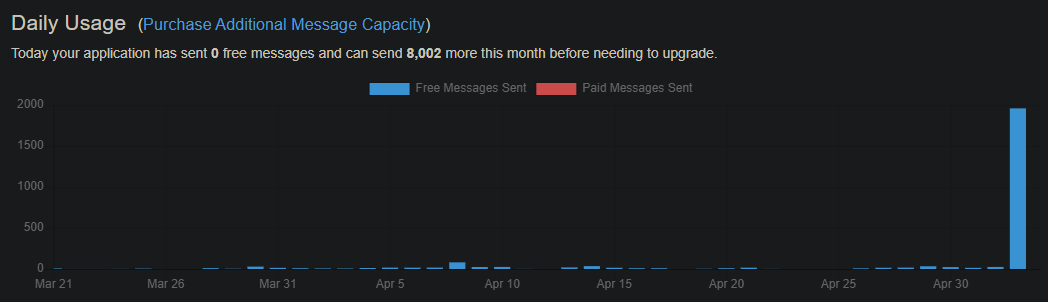
Nothing in the Channels DVR logs looks particularly unusual.
Regardless of the cause, I'd suggest ChannelWatch needs some safeguards to prevent a runaway train scenario like this from ever happening.
Thanks for this, I added it to the Unraid Appstore for people using Unraid. They just need to change it from host to bridge if they want to use bridge.
One quick thing I noticed was the normal TZ environment variable wasn't passed to the core settings, so I had to do my timezone again there. Any chance you can you have the TZ environment variable map to the Timezone setting?
All the environment values have been replaced by settings done in the app since v0.6.
And after making any changes to the config, click the Restart button (upper right) on the UI
The config settings are stored in the settings.json file in the /config directory
settings.json
{
  "alert_channel_watching": true,
  "alert_disk_space": false,
  "alert_recording_events": true,
  "alert_vod_watching": true,
  "apprise_custom": "pover://<redacted>",
  "apprise_discord": "",
  "apprise_email": "",
  "apprise_email_to": "",
  "apprise_gotify": "",
  "apprise_matrix": "",
  "apprise_mqtt": "",
  "apprise_slack": "",
  "apprise_telegram": "",
  "channel_cache_ttl": 86400,
  "channels_dvr_host": "192.168.1.4",
  "channels_dvr_port": 8190,
  "cw_channel_name": true,
  "cw_channel_number": true,
  "cw_device_ip": true,
  "cw_device_name": true,
  "cw_image_source": "PROGRAM",
  "cw_program_name": true,
  "cw_stream_source": true,
  "ds_threshold_gb": 50,
  "ds_threshold_percent": 10,
  "job_cache_ttl": 3600,
  "log_level": 2,
  "log_retention_days": 7,
  "program_cache_ttl": 86400,
  "pushover_api_token": "",
  "pushover_user_key": "",
  "rd_alert_cancelled": true,
  "rd_alert_completed": true,
  "rd_alert_scheduled": false,
  "rd_alert_started": true,
  "rd_channel_name": true,
  "rd_channel_number": true,
  "rd_duration": true,
  "rd_program_desc": true,
  "rd_program_name": true,
  "rd_type": true,
  "stream_count": true,
  "tz": "America/Los_Angeles",
  "vod_alert_cooldown": 300,
  "vod_cache_ttl": 86400,
  "vod_cast": true,
  "vod_device_ip": true,
  "vod_device_name": true,
  "vod_duration": true,
  "vod_episode_title": true,
  "vod_genres": true,
  "vod_image": true,
  "vod_progress": true,
  "vod_rating": true,
  "vod_significant_threshold": 300,
  "vod_summary": true,
  "vod_title": true
}