2025.04.01.0623
IMPROVED: Buffering stalls during OTA playback
Just installed this. Will give it a whirl today. Thanks

IMPROVED: Buffering stalls during OTA playback
Just installed this. Will give it a whirl today. Thanks
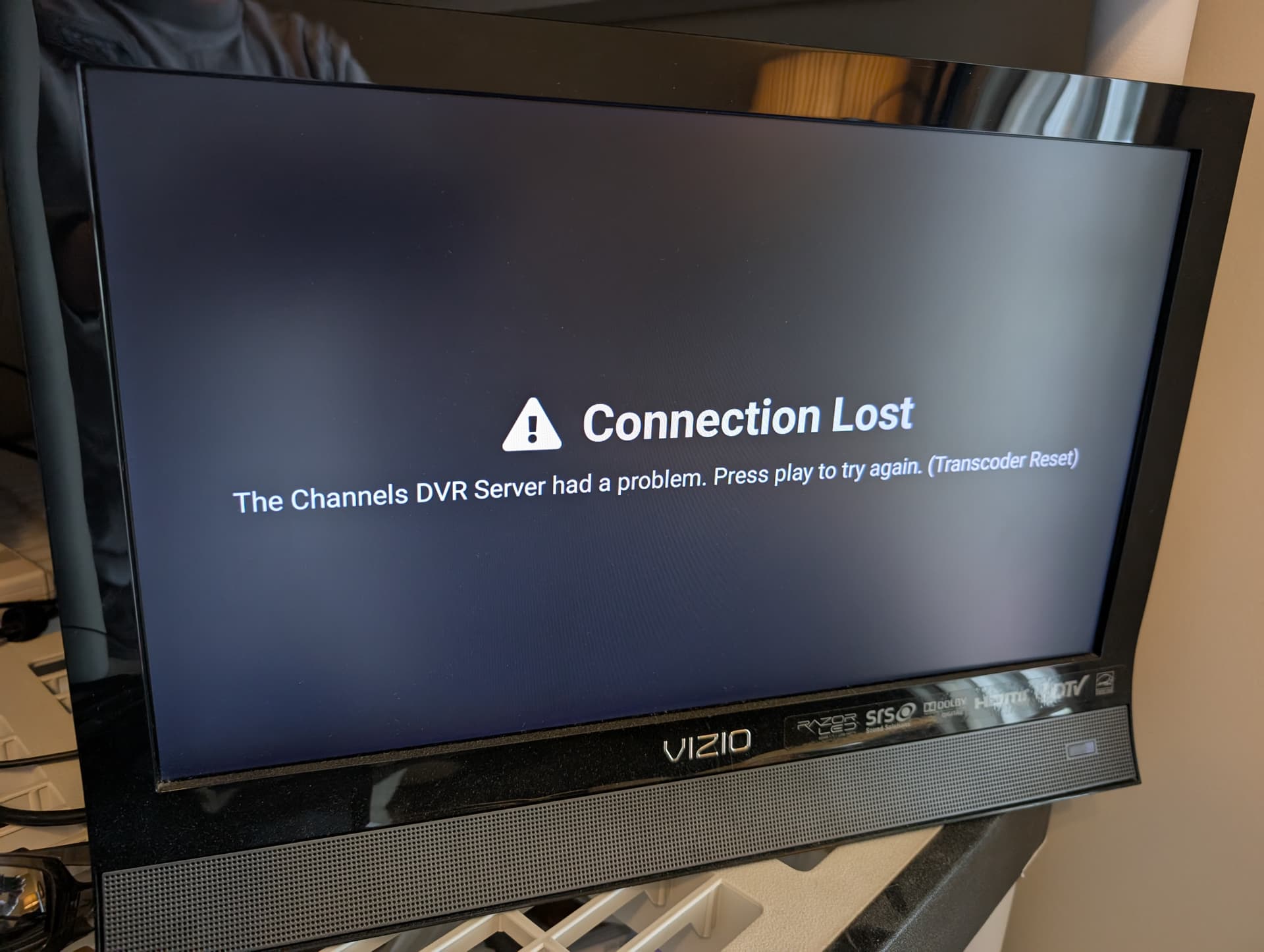
@eric Still getting the same error. Most of the time the image just freezes and the entire ATV box is frozen and unusable. Can't send diags until after Channels DVR crashes and I restart it.
This is still happening constantly. I sent over at least 3 diags in the last hour or so. Channels DVR has been overall lethargic and crash-prone lately as well 
I'm checking out the latest diagnostics and trying to understand more about what is contributing to this. I can see the last change is kicking in, but is not enough for these custom feeds that are sending more video than can be played in realtime.
What do you mean by this? If that's the case, you're likely having some unrelated hardware issues.
Ok glad you are trying to figure it out. It does seem to overall be better but is not fixed yet.
My guess is that it's related to the issue you are trying to solve. The app can be super slow when trying to bring up the quick menu, RW, FF, etc after a period of time. Meaning if the app isn't crashing and appears to be working fine, it's actually not and something is happening making the functionality slow/buggy.
So the issue isn't with the DVR, it's just with the app.
From what I've been able to uncover, there isn't going to be a simple solution for this when using Direct streaming. The custom source you're using is sending so much data that it our system that expects data to be sent in realtime can't handle it. The best bet is going to be using Streaming as that will allow the server to take on that additional disk space.
App likely but probably from whatever is going on with the server?
Yikes so have to change all devices, both on the LAN and remote, to Streaming? What are the pros/cons of each method exactly? I always thought Direct was the best option but maybe not???
Thanks @eric
Generally Direct is best, because that feeds everything as the server prefers to the clients with no additional intervention.
When you use Streaming, 2 things occur:
The difference: Direct has a much lower overhead, and is more responsive for tuning; Streaming is better with cheap streaming devices if you're willing to sacrifice responsiveness (which you obviously are, if you are using a device that would benefit for it.)
(There is a caveat to my second point: if you have a streaming box with many apps (or are using a device with barely enough storage in the first place)—and therefore minimal storage available—“streaming” may be the preferable option, as the buffer is kept on the server instead of the client device.)
The issue is your custom channel source is behaving badly.
One hard-and-fast rule of watching live content in our real world is that you can only watch one minute of content per minute of time that passes.
The issue is that this source is sometimes sending 5 or 10 minutes of content in 10 seconds, which defeats much of the assumption in our disk handling for how content is being received.
All of our situations are going to eventually result in an error or in forcing the video to skip forward. The way Streaming handles this sort of edge case will be better than the Direct mode, but all of this is sub-optimal.
The best solution would be for the source to just not send too much data at once, but that is out of our hands.
These B10+ and ESPN+ games that I watch are live. Is it possible to send 5-10 minutes worth of data if it's live?
I will keep testing /experimenting and report back. Thanks @eric
Yes, it’s possible for custom sources like those to send more data than realtime. It could be malfunctioning ad insertion that is causing the issue, but that’s only a guess.
So today I had a little time to test. Have 2 onn 4K streaming boxes here testing, both switched to "Stream". I got this error 3 or 4 times on different channels in a short period of time and sent diags up. Is it the same issue we are dealing with using "Direct"?
What kind of IPTV are you using to cause this ? Must be something with your streams as no one else is reporting this.
I am using Desktop Docker with EPlusTV. Been using the setup for approx 1 year and the issue started a few weeks back.
From the logs:
2025/04/14 12:31:07.957483 [HLS] Couldn't generate stream playlist for ch16010-dM3U-ESPPLUS-ip192.168.1.123: Playlist has not been updated in 30.3485618s
2025/04/14 12:31:07.957483 [HLS] Stopping transcoder session ch16010-dM3U-ESPPLUS-ip192.168.1.123 (out=29m46.183s finished=false first_seq=1 last_seq=893)
Yeah, this source is just not behaving in such a way that you can expect to leave it running for hours and have it work. Sorry I don't have better news for you, but something has clearly changed in the sources that you are watching and they are not providing a stable stream.
I believe this could be the one where I was watching a B1G+ game. For some reason B1G, FS1, and FS2 streams have all been acting super goofy lately where they would work for one minute then not the next and vice versa. This particular one may be totally unrelated to the underlining issue.
I'm not sure how you want to quantify the "underlying issue", but so far it seems that the underlying issue for all of these problems is that the custom source is not behaving in a way that works with consistent live streaming. Instead of just papering over underlying failures and having hidden glitches in the stream, we have opted as a policy to surface those issues so that the consumer of the stream can be sure that they're seeing everything that was sent.
I'm sorry these EPlusTV streams are no longer reliable for extended periods of time. I haven't found anything we could do on our end that would help the situation.
Do you think that it's an issue with some clients and not others otherwise the EPlusTV thread would be getting blown up with posts with people having the same issue as I am? Maybe they are mostly using devices such as an Nvidia Shield or Apple TV which have larger storage available thus not running into the same problem? I seem to be the only one reporting on this?
Yes, I'm sure the more available disk space on those devices could have an impact here. It could also be your watching habits being different from others... I'm not totally sure.
This topic was automatically closed 30 days after the last reply. New replies are no longer allowed.