
This error shows that you are still transcoding. Make sure your settings look like this on the client
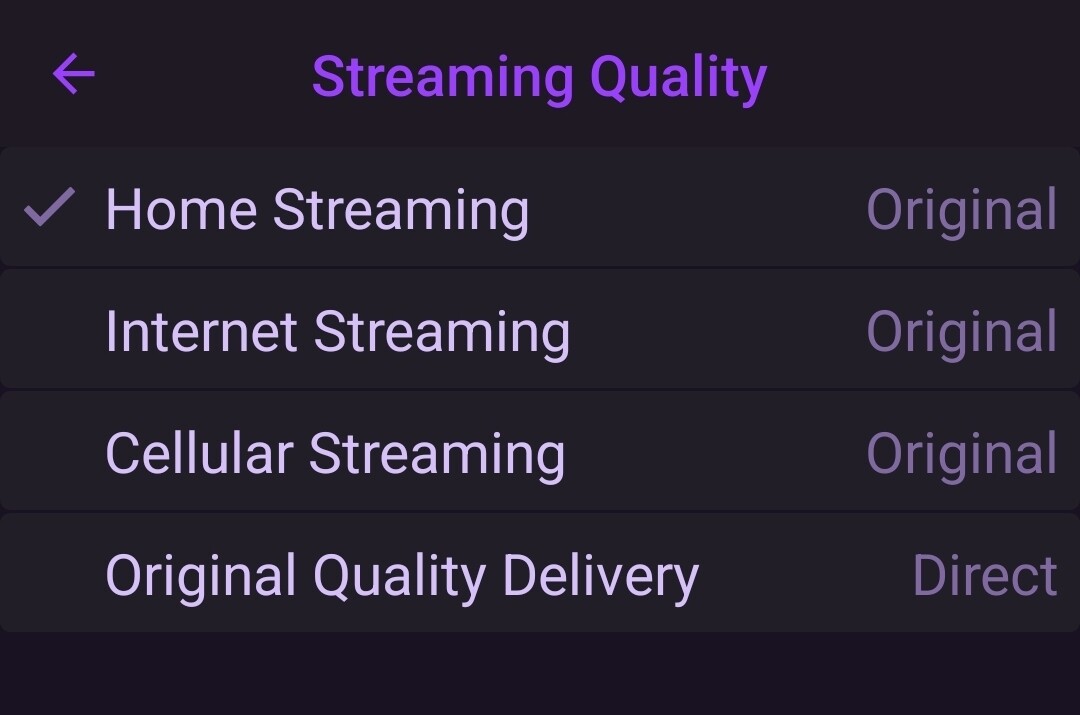
I was just continuing the discussion from the other thread, specifically what @tmm1 asked the other poster.
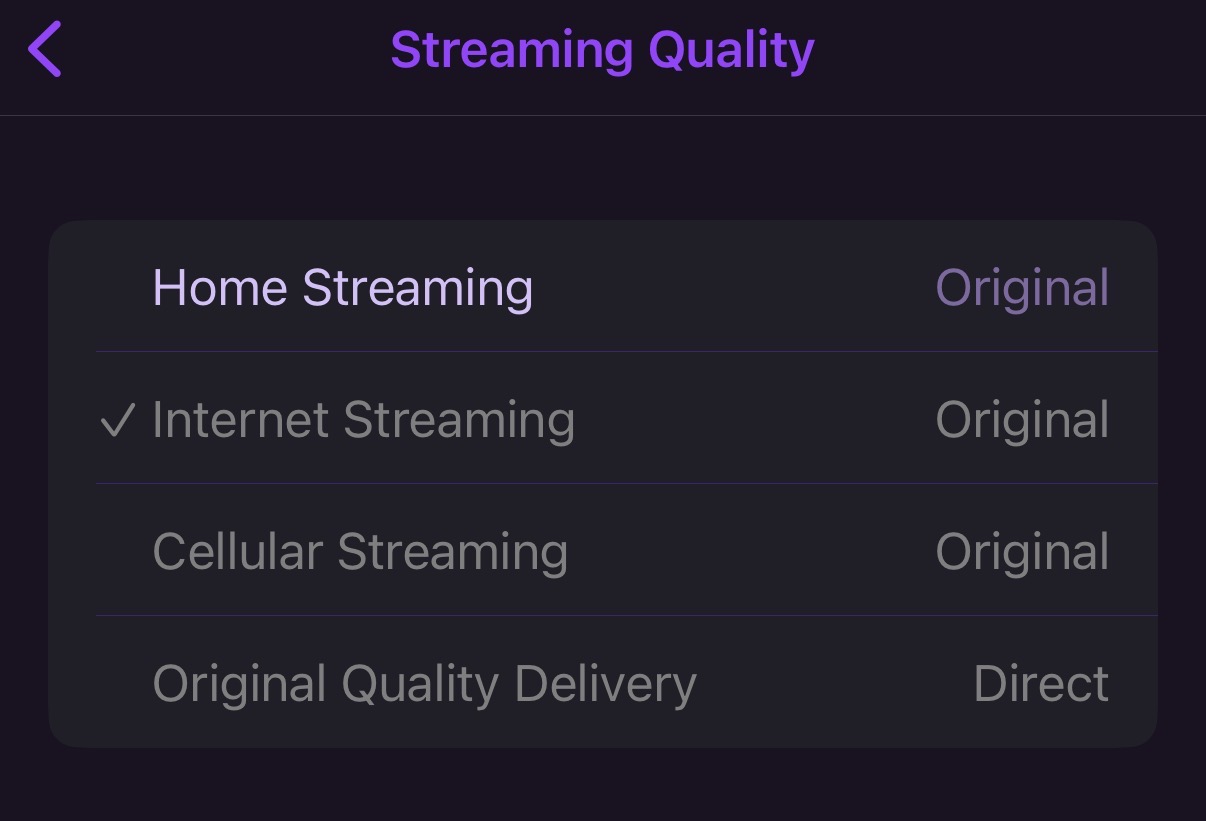
Recreate and post some logs of this happening. Also what source are you trying to play?
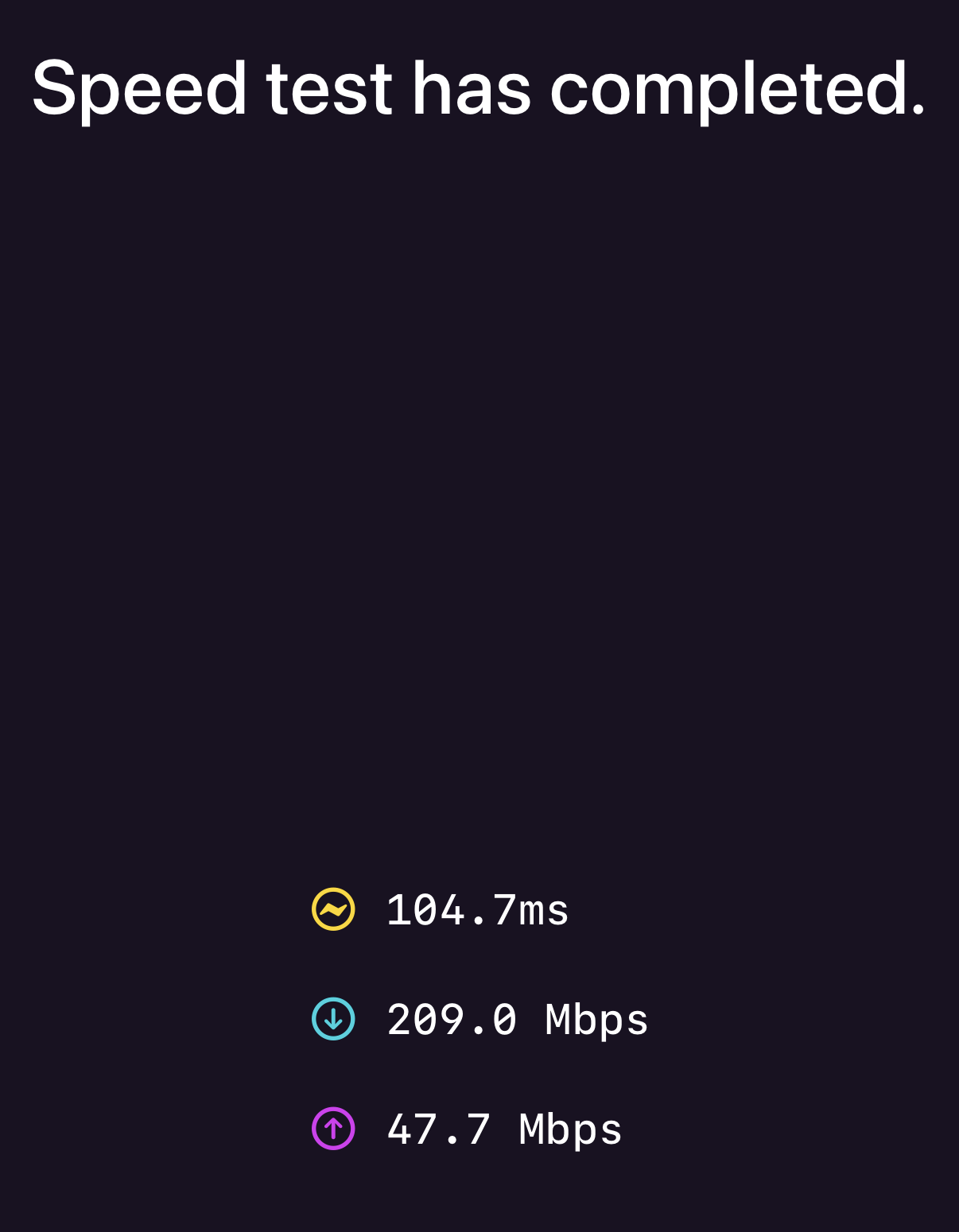
Also do a speed test from the client to the dvr in settings and post the results of that as well
Nothing in this occurred when the playback paused and I saw the buffering spinner.
Generally the transcoder error I shared doesn’t appear. Generally just very stuttering playback.
2025/12/28 18:22:17.794118 [TNR] Opened connection to 12523831/0 for ch101 BBC ONE Lon HD
2025/12/28 18:22:17.794341 [HLS] Starting live stream for channel 101 from 100.111.191.105
2025/12/28 18:22:17.897957 [HLS] ffmpeg: ch101-dANY-ip100.111.191.105-remux:  [h264 @ 0x14bf069e0] sps_id 0 out of range
2025/12/28 18:22:18.651250 [HLS] Probed live stream in 787.750208ms: h264 1920x1080 progressive 3858812bps
2025/12/28 18:22:20.325703 [HLS] Session ch101-dANY-ip100.111.191.105 started in 2.531366375s
2025/12/28 18:23:13.003824 [HLS] Stopping transcoder session ch101-dANY-ip100.111.191.105 (out=55.836378s finished=false first_seq=1 last_seq=52)
2025/12/28 18:23:13.026620 [TNR] Closed connection to 12523831/0 for ch101 BBC ONE Lon HD
2025/12/28 18:23:13.026840 [SNR] Statistics for ch101 BBC ONE Lon HD: ss=84%-85% snq=100% seq=100% bps=6473494,4408224-11188256 pps=554,377-958
2025/12/28 18:23:13.026905 [SNR] Buffer statistics for ch101 BBC ONE Lon HD: buf=0% drop=0%
Speed test:
As for what I’m playing, it is broadcast TV (in this case BBC 1 HD). This comes from a silicon dust tuner.
I note from here: What is hardware video transcoding?
That there is no mention of mac hardware being supported for transcoding - not that I am using transcoding now, however it would be good to know if there’s any mac hardware that does do transcoding well.
Are you using integrated tailscale on the Channels server? Im trying to figure out why you have a cgnat address for your HDHR.
Post your network design with ip addresses for each component and maybe we can try and sort this for you.
Please do a traceroute from your remote location to your home server and past the result in to this thread
Not sure what you need here but I’ll summarise how things are set up:
- Mac mini channels server (local IP and tailscale: 100.123.190.109) - due to current situation, it is using WiFi but was and will be using Ethernet again soon.
- synology NAS store (local IP and tailscale).
- device (iPhone) streaming to 100.123.190.105 (also tried iPad, same result).
- various UniFi kit, including UDM Pro
Do this as soon as you possibly can. In fact for testing I would run a temp ethernet cable to test.
Are you using the integrated tailscale from Channels? If so I would recommend setting up your own tailscale server. The channels implementation of tailscale is not great. Set up your own tailscale server and run it as an exit node.
I have Tailscale running on channels server built in and on the Mac mini.
Traceroute to channels server takes about 4 seconds (!!!):
traceroute to 100.123.190.109 (100.123.190.109) , 5 relative hops max, 52 byte packets
1 unifi.localdomain (192.168.1.1) 3687.125 ms 3703.439 ms 3706.631 ms
It seems to fail to complete. Another run:
traceroute to 100.123.190.109 (100.123.190.109) , 5 relative hops max, 52 byte packets
1 * * *
2 unifi.localdomain (192.168.1.1) 1747.181 ms 1763.380 ms 1767.754 ms
To the Mac mini itself:
traceroute to 100.114.195.30 (100.114.195.30) , 5 relative hops max, 52 byte packets
1 100.114.195.30 (100.114.195.30) 22.410 ms 25.279 ms *
2 100.114.195.30 (100.114.195.30) 74.971 ms 78.756 ms *
3 100.114.195.30 (100.114.195.30) 17.069 ms 20.817 ms
unifi.localdomain (192.168.1.1) 609.636 ms
I’m not there right now so can’t experiment with running a cable immediately but I’ll do that. Will also look at using the tailscale on the Mac mini and turn off the channels one.
Btw, thanks for your help
1st problem. Turn off tailscale on the channels server settings. It will literally casue you nothing but problems.
My setup is a bit different than yours. I run my tailscale server on a linux VM in proxmox and set it up as an exit node. I would set your mac mini as an exit node. Exit node setup guide Then on the iphone, conect to tailscale and select your mac mini as the exit node. On the channels client set the connection to at home and enter the local address of yiur mac mini (192.168.1.x). Dont enter your tailscale IP here, you want the actual physical local address. It should connect and hopefully work without issue.
I think I might struggle with replicating your set up. I don’t want my iPhone to use my Mac mini as an exit node
Using the Mac mini tail scale address seems like worth trying.
1 Like
I would at the very least turn off channels integrated tailscale and then just set your channels client to "at home" and then enter the tailscale addr of the mac mini.
The part that was puzzling to me was that the client looked like it thought it was away from home as it was remuxing to hls. It should behave as if it were directly connected to your network.
1 Like
Recreated that transcoder error
2025/12/28 19:26:32.206804 [TNR] Opened connection to 12523831/0 for ch106 BBC FOUR HD
2025/12/28 19:26:32.208029 [HLS] Starting live stream for channel 106 from 100.111.191.105 (bitrate=1260269kbps)
2025/12/28 19:26:32.898275 [HLS] Probed live stream in 612.469958ms: h264 1920x1080 tt 2029077bps
2025/12/28 19:26:34.614039 [HLS] Session ch106-dANY-ip100.111.191.105 started in 2.404931959s
2025/12/28 19:26:38.360405 [HLS] ffmpeg: ch106-dANY-ip100.111.191.105-remux:  [hls @ 0x13260b2a0] failed to rename file /Volumes/Plex/Library/DVR/Streaming/sessions/ch106-dANY-ip100.111.191.105-2935905832/remux/stream.m3u8.tmp to /Volumes/Plex/Library/DVR/Streaming/sessions/ch106-dANY-ip100.111.191.105-2935905832/remux/stream.m3u8: Resource busy
2025/12/28 19:27:08.741216 [HLS] Couldn't generate stream playlist for ch106-dANY-ip100.111.191.105: Playlist has not been updated in 30.04308975s
2025/12/28 19:27:08.742866 [HLS] Stopping transcoder session ch106-dANY-ip100.111.191.105 (out=36.816822s finished=false first_seq=1 last_seq=5)
2025/12/28 19:27:08.765998 [TNR] Closed connection to 12523831/0 for ch106 BBC FOUR HD
2025/12/28 19:27:08.766663 [SNR] Statistics for ch106 BBC FOUR HD: ss=84%-85% snq=100% seq=100% bps=4399367,3809632-5015840 pps=376,327-430
2025/12/28 19:27:08.766766 [SNR] Buffer statistics for ch106 BBC FOUR HD: buf=0% drop=0%
2025/12/28 19:27:12.718274 [ERR] Failed to clean up /Volumes/Plex/Library/DVR/Streaming/sessions/ch106-dANY-ip100.111.191.105-2935905832: unlinkat /Volumes/Plex/Library/DVR/Streaming/sessions/ch106-dANY-ip100.111.191.105-2935905832/remux/stream.m3u8: resource busy
2025/12/28 19:27:14.545479 [TNR] Opened connection to 12523831/0 for ch106 BBC FOUR HD
2025/12/28 19:27:14.545624 [HLS] Starting live stream for channel 106 from 100.111.191.105
2025/12/28 19:27:15.356661 [HLS] Probed live stream in 771.15ms: h264 1920x1080 tt 1975432bps
2025/12/28 19:27:18.057743 [HLS] Session ch106-dANY-ip100.111.191.105 started in 3.512089542s
2025/12/28 19:27:24.081916 [HLS] Stopping transcoder session ch106-dANY-ip100.111.191.105 (out=9.760822s finished=false first_seq=1 last_seq=3)
2025/12/28 19:27:24.104890 [TNR] Closed connection to 12523831/0 for ch106 BBC FOUR HD
2025/12/28 19:27:24.105232 [SNR] Statistics for ch106 BBC FOUR HD: ss=84%-85% snq=100% seq=100% bps=3672467,1413760-4713536 pps=314,121-404
2025/12/28 19:27:24.105331 [SNR] Buffer statistics for ch106 BBC FOUR HD: buf=0% drop=0%
This was when connecting to the Mac mini tailscale address (at home) but before disabling the channels tailscale
1 Like
Im out of ideas except i would ditch tailscale to rule it out completely. Open the port on your router and enable remote streaming in channels. The connect away from home on the channels client and see if everything works. I think you have some wierd routing issues on your network as the server should not be transcoding if you are connected "locally" throigh tailscale.
Bypassing tailscale should prove if that is the issue.
Ok disable the channels tailscale. You literally never want to enable that for any reason. Its terrible.