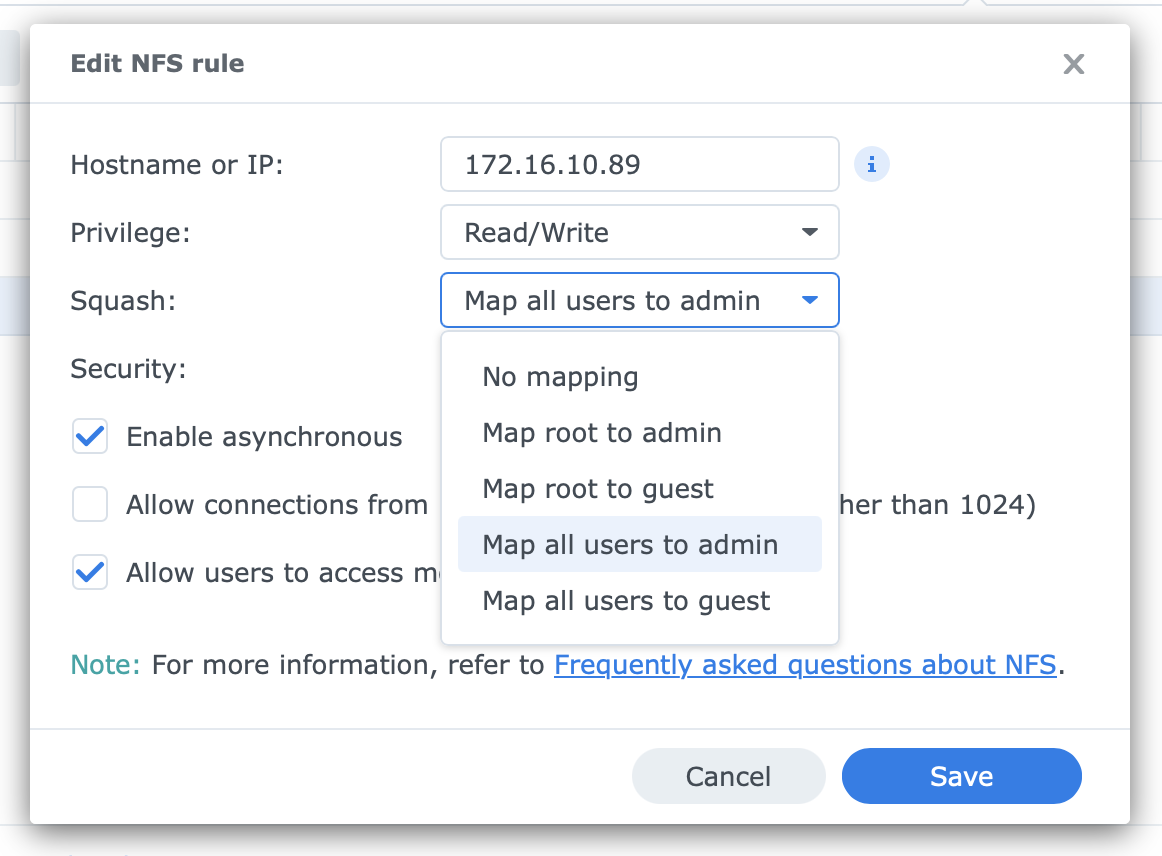
Enabling this:
Requires various SMB configurations to be set (for me 3 or 4) that are different from your configuration.
Enabling it (and the SMB configs) then breaks remote streaming.

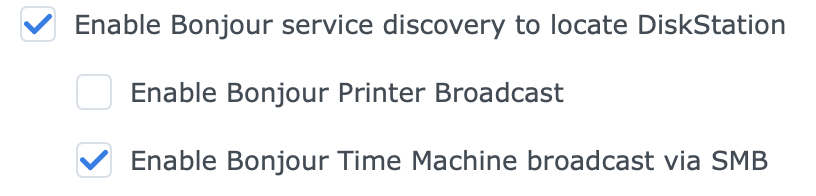
Enabling this:
Requires various SMB configurations to be set (for me 3 or 4) that are different from your configuration.
Enabling it (and the SMB configs) then breaks remote streaming.
I don't have any first-hand experience with how reliable this is, but you could have better luck using NFS.
and mounting with something along the lines of:
$ sudo mkdir /Volumes/Media
$ sudo mount -t nfs -o vers=4,tcp,rsize=1048576,wsize=1048576,resvport,hard,intr synology.local:/volume1/Media /Volumes/Media
Note: If that does work, you'd have to do the additional work to get the automounter to work properly with it.
Thanks. Would rather they both worked via SMB.
I've submitted support files
7b3ace4f-8266-43c5-9a59-c71be8014e0a
Can you define multiple pools on your NAS and define the access to each as needed for the various apps you use? Possibly this will work better at the share level, it depends on your NAS.
The share settings / networking settings are for the NAS as a whole. I’d need a second NAS for Time Machine which somewhat defeats the point of a NAS as a single storage box.
@eric do you think resolving this incompatibility is something that Channels can fix or is it a Synology defect?
Granted I know nothing about Apple computers or NAS. But assuming Apple can do symbolic links, couldn't you move your DVR server folder to the Apple computer except for the Movie and TV folders. Then provide links for those two folders from your Apple to the NAS folders. I think all the Live TV processing would stay local on your Apple.
The DVR requires a filesystem that follows POSIX schematics (which includes Windows, Linux, and macOS local file systems and most network file systems we’ve heard of people using). It seems there’s something particular about how macOS interacts with SMB shares with these locking/leasing features enabled that causes these issues.
If I were having this issue, I would peruse using NFS for this because it’s a simpler protocol. Otherwise, I believe creating a symlink for the Streaming/ directory to a location on your local drive (assuming you make sure you have at least 20GB free) should work around this situation.
You may want to check the Synology Help for
SMB settings
and File Services settings
Thanks I’ll give it a go. When I’ve tried symlinks from Mac to NAS before they haven’t been that durable. But worth trying for sure.
I actually did it the other way and symlinked from Mac to NAS - for now, all directories apart from Streaming are symlinked to the NAS. This seems to be working. Significant advantages of using built in SSD on Mac for moving back and forth through the cached stream. This now occurs essentially instantaneously.
This configuration seems highly beneficial for users who have Channels on a separate server from the store and would be great to have each folder location to be defined separately within Channels.
To summarise how I have things set up. All symlinked except where noted
~/Documents/Channels/Database
~/Documents/Channels/Images
~/Documents/Channels/Imports
~/Documents/Channels/Logs
~/Documents/Channels/Metadata
~/Documents/Channels/Movies
~/Documents/Channels/Streaming not symlinked
~/Documents/Channels/TV
I'm wondering if there's any benefit to other folders not being symlinked? Perhaps only /Movies and /TV should be and the rest local?
I'm now seeing hundreds of errors in logs similar to these:
2026/01/01 11:53:11.939397 [DVR] Generating fingerprint for file-1735: His Dark Materials S02E01 The City of Magpies 2020-11-08-2009.mpg
2026/01/01 11:53:11.939499 [ERR] Generating fingerprint failed for file-1735: file does not exist
2026/01/01 11:53:11.957448 [DVR] Generating fingerprint for file-1738: The Great British Bake Off 2016-12-25 Christmas Special Episode 1 2020-11-09-1759.mpg
2026/01/01 11:53:11.957542 [ERR] Generating fingerprint failed for file-1738: file does not exist
Why would this be required? Have I missed moving something important over to the Mac mini?
Sorry to but in, but I hope the developers are taking a well-deserved break today to be with family and friends. At any rate, I don't believe you have said if you are using the latest Server Pre-release version. It has some recent updates for the fingerprint generation. I was getting fingerprint fails when I added some new shows to my server, but they are now fixed.
As far as folders that may benefit being local, the Images folder contains lots of files that I assume are loaded as needed to the clients. The logs folder is being written to quite often at least when the server is active. The Meta folder contains the new fingerprint data, not sure exactly how often it is accessed.
Of course, Eric will know much better than I do.
I am as of yesterday running a pre-release build per the discussion here:
Of course I'm not expecting any responses today from devs - seems reasonable to treat this forum as an async communication channel though - we can post and people can reply as and when they want.
I moved the metadata folder to be local instead of symlink and things seem better.
One final post for the day on this:
Having resolved the SMB issues via Symlinks, I can now enable the transcoder and it works fine (more or less).
Generally I have an issue (with or without the transcoder) where the stream plays fine for a couple of seconds and then buffers for a bit. Then play continues fine.
Having looked at the frame rates when this is happening, those first few seconds the frame rate is below the ~25fps. Then the pause occurs and after that it runs stable at ~25fps. Seems like there is some sort of slow down that occurs when starting the stream but that after a period of time, this resolves.
The symptom you describe indicates that the server and network are just able to provide enough data to keep the client streaming. The short pause allows the buffer to grow and thus it's not running out during playback.
Hmm. I don’t think so.
Network is definitely not an issue - hundreds of mbps and once it settles it’s fine. If there was a network speed issue it would keep doing it. Also, this happens regardless of transcoding setting.
Server, also I don’t think so. I think it is using hardware, therefore it should be fine for the first few seconds if it is fine later on. If the transcoder can only do 22fps, then I’m not sure why it would then be able to do a stable 25fps after initial start.
Perhaps there’s a CPU issue and it isn’t providing the hardware transcoder sufficient input data initially due to other tasks that are occurring. If that’s the case, it seems like it should be possible to only start the stream once the other tasks are complete.
You will need to monitor the server and see what the bottleneck is