Corrupt Recordings

I'm running Channels on a Windows 10 PC with the following specs:

  • Intel Core i7-4500U CPU
  • 8GB Ram
  • Windows 10 version 22H2 (OS Build 19045.5440)
  • Internal PC HD (2TB)

I'm using an HDHomeRun Quad Tuner
HDHomeRun and PC are connected to internet via Ethernet

Playing live tv is just fine. Recordings are corrupt and don't play, are totally pixilated, and the video/audio is off if it plays at all. I've scoured the forum and reddit for answers. Many say it's a network connection or related issue. Considering that I had Channels setup on this machine several years ago and had no issues, that doesn't seem to make sense since nothing changed in my setup.

Playback on all devices is terrible (iPhone, ATV4k, ATVHD). Playing the video from the web player on the PC is also terrible. So, there's something with the recording itself. I signed up for a month of Plex Pass as a test to determine if the issue is the machine, or the software. It appears that Plex is recording and playing tv just fine and the playback is showing no issues. Which leads me to believe that this is a Channels software issue.

I really want to use Channels over Plex but I don't know what else to try. My equipment is all up to date (most recent versions of the available software and firmware). My PC is used ONLY for this purpose and is as stock Windows 10 as I can get it with adjustments made to the OS for performance. I really don't know what else to try except to swap out my PC for something else but I don't want to spend the money on that without knowing that it will indeed work. Given my test with Plex on the same machine, I don't think it's the hardware.

Any advice? What am I missing?
What are you using for your drive? Is it USB attached, powered by a separate power supply? Have you checked the drive on anything else?

It's the built in hard drive on the machine.

Interestingly, I just deleted all of the recordings in my library and purged the trash. I then started recording a few shows and they appear to be working at the moment. Playback is looking good on all devices. I'll continue to monitor, but if there are any other suggestions, I'm all ears!

I'm using Plex as a Channels client with Roku hardware. It works well. Just use Plex for the LiveTV. Use the Channels DVR for the recording since it's superior than Plex. Add folders for the recording in Plex that point to the Channels DVR recordings. Let Plex handle any media server stuff since it's better than Channels at that.

Check your HDD for SMART errors. You may actually have a bad HDD. I use Linux (Debian) for my OS but have both Plex and Channels running as Docker apps.

The log will show you what happened during the previous recordings

That is going backwards Channels DVR is much better when using for LiveTV. You have so many different ways to watch LiveTV in Channels only 1 way in Plex.

  1. No tuner Sharing in Channels DVR ... buffer is kept on the device no impact at all on Server.
  2. Tuner Sharing .... buffer is kept on Device ... Channels are streamed from the DVR Server... great to limit HDHR hops.... and also, if your HDHR devices are limited.
  3. Buffer is kept on the Server for low storage devices.
2 Likes

The Channels DVR integration with Plex is just copying the streams to Plex. Or at least that's what the streams say. If I wasn't clear, I'm not saying to directly use your streaming sources in Plex but rather to use the Channels integration by picking Channels as the tuner in Plex. There is no Channels client for Roku otherwise. That's why I said to also let Channels do the recording. The only thing Plex needs to do on its own is the media server piece because frankly, it's better than Channels at that.

possibly there is a bad spot on your hard drive or it's going bad. I hope you make backups. If not, start making backups.

To test your hard drive, open file explorer and right click the hard drive. Select properties. There should be some tabs on top. Select tools, then scan and scan the drive including all sectors.

Good luck,

Morris

I agree with Aman

Check the DVR log

I am having this same issue as well! I was running the Raspberry Pi image and never had any issues at all in the 2-1/2 +/- years I ran it. I recently switched to a Beelink Mini S12 Pro for the DVR Server. About a week or so after I switched, I began noticing that my recordings were corrupt. At first I thought it was a signal issue as I do live a fair distance from my broadcast towers, but this looked different than the normal signal dropouts that I experience. The recordings are more like a corrupt video file than signal issues and the audio gets out of sync a lot when it is watchable. At times it's like the video is fast forwarding then slows down and will catch up to the audio for a minute or two. Now, other than switching to the Beelink and migrating the storage, I have not changed one thing on my network or setup. The strange thing is I can watch the program live and record it and there are zero issues watching live. (I do understand that live tv is not handled by the server.) I have also temporarily activated my old HDHomreRun DVR to see if it exhibits the same behavior. I can say, it does not. All recordings playback fine from that. I will say that the channels that this happens on the most are 1080i channels with higher bit rates (not a ton, but like maybe 2-3 mbps more than my other channels). I do have this running on an external 4TB seagate USB 3.0 HDD (With its own power supply). This is the same one I have used with the pi image for almost three years without issue. The beelink is running Windows 11 Pro 24H2. It has 16 GB of Memory and 500GB on the M.2 boot drive. My first thought was that my HDD was possibly failing, but wouldn't the recordings from the HDHomeRun service exhibit the same symptoms if that was the case? My network is solid and I have made no other changes other than doing away with the pi. When I go look at the recording in the web interface under options view details, there is no warning showing any signal dropouts like I get from time to time. When I look at the HDHomeRun tuner while a recording is taking place, no major signal fluctuations and bit rate is steady. Something is telling me it has to be something with the recording engine or my machine. With the HDHomeRun DVR working ok, I am stumped. And yes, the HDHomeRun service is running on the same device. I have taken care to make sure that they are both never recording at the same time for now while I am testing. I will post a couple of strange entries that I did notice in my log file in another post. If anyone has any insight into this, I would really appreciate it. I love the Channels setup and do want to get this figured out. Thanks in advance. Also, recording from TV Everywhere does not exhibit these symptoms. One last thing, when you go to the troubleshooting section, I get green checks on everything.

1 Like

Below are some entries in the log that I pulled. On the recording that was unwatchable, the buffer statistics show a drop=92%, while the other recording showed a drop=0%. I had other recordings that were messed up, but my log (at least on the web interface) only goes back a couple of days.

File That Plays Without Error
2025/02/16 18:59:00.537227 [TNR] Opened connection to 107B6806/0 for ch7.1 KOAM-HD
2025/02/16 18:59:00.701038 [DVR] Recording for job 1739753940-81 from 107B6806 ch7.1 into "TV\Tracker\Tracker S02E09 The Disciple 2025-02-16-1859.mpg" for 1h1m59.9986886s
2025/02/16 18:59:00.852428 [IDX] Generating video index for job 1739753940-81
2025/02/16 20:01:00.086949 [SNR] Signal statistics for "TV\Tracker\Tracker S02E09 The Disciple 2025-02-16-1859.mpg": ss=100% snq=99%,77%-100% seq=99%,17%-100% bps=6117707,1603264-12025984 pps=524,147-1030
2025/02/16 20:01:00.118657 [SNR] Buffer statistics for "TV\Tracker\Tracker S02E09 The Disciple 2025-02-16-1859.mpg": buf=1%,0%-57% drop=0%
2025/02/16 20:01:00.902594 [DVR] Finished job 1739753940-81 Tracker
2025/02/16 20:01:00.961111 [DVR] Processing file-5137: TV\Tracker\Tracker S02E09 The Disciple 2025-02-16-1859.mpg

File That Is Totally Unwatchable
2025/02/16 20:06:12.390257 [TNR] Opened connection to 107B6806/1 for ch16.1 KSNF-DT
2025/02/16 20:06:40.230892 [DVR] Starting job 1739758000-ch16.1 Saturday Night Live on ch=[16.1]
2025/02/16 20:06:43.177564 [DVR] Recording for job 1739758000-ch16.1 from 107B6806 ch16.1 into "TV\Saturday Night Live\Saturday Night Live S50E13 SNL50 The Anniversary Spe 2025-02-16-2006.mpg" for 2h9m19.7691074s
2025/02/16 20:06:43.228914 [DVR] Refreshing metadata for Saturday Night Live (183890)
2025/02/16 20:06:43.730513 [IDX] Generating video index for job 1739758000-ch16.1
2025/02/16 22:16:00.012763 [TNR] Closed connection to 107B6806/1 for ch16.1 KSNF-DT
2025/02/16 22:16:58.970742 [SNR] Signal statistics for "TV\Saturday Night Live\Saturday Night Live S50E13 SNL50 The Anniversary Spe 2025-02-16-2006.mpg": ss=100% snq=99%,96%-100% seq=99%,53%-100% bps=11782871,1422784-15671680 pps=1008,122-1341
2025/02/16 22:16:58.997918 [SNR] Buffer statistics for "TV\Saturday Night Live\Saturday Night Live S50E13 SNL50 The Anniversary Spe 2025-02-16-2006.mpg": buf=98%,0%-100% drop=92%
2025/02/16 22:16:59.712982 [DVR] Finished job 1739758000-ch16.1 Saturday Night Live
2025/02/16 22:16:59.751021 [DVR] Processing file-5139: TV\Saturday Night Live\Saturday Night Live S50E13 SNL50 The Anniversary Spe 2025-02-16-2006.mpg

This Was When I Watched A Portion Of The Above Show Live
2025/02/16 20:06:56.861079 [SNR] Statistics for ch16.1 KSNF-DT: ss=100% snq=100% seq=100% bps=10287496,1422784-14620384 pps=880,122-1251
2025/02/16 20:06:56.861591 [SNR] Buffer statistics for 10.20.30.6 (Living Room) for ch16.1 KSNF-DT: buf=0% drop=0%

Again, any insight would be appreciated.

Thanks,

Is your new Beelink server WIRED ethernet, or are you trying to run it wireless?

If so, I wonder if that could be causing the issue. Otherwise, I'd try a different USB drive, just as a test. If you have another one laying around that is.

It's wired. Almost everything that deals with streaming video in my house is hard wired. I may try that at some point. Do not have a lot of time to mess with it at the moment. The funny thing is that I can copy the files to other drives without issue and they play, just messed up. It still seems to me that there is something going on with the record engine. I may just end up reverting back to the raspberry pi until may. I never had one issue with anything on that setup. I would set it up on a Linux machine, but my knowledge messing with Linux is sparce. I can make things work, but Windows I have delt with for years and fully understand. That is why I liked the Raspberry Pi image, it was all self contained and I didn't have to do anything. It could be something in Windows that is causing it, but this is a new install with no extra software other than Chrome installed along with calculator, notepad, etc. HDHomeRun is now running, but that just occured last night. So far that recording engine is not corrupting anything. I am still baffled.

High drop rate means something is not able to keep up

Could be cpu usage, but usually an I/O issue. Like not using USB3 or drive failure.

1 Like

Thanks,

I will try to set a recording and remote into the computer and see what the CPU, drives, memory, network, etc are doing. I disabled commercial detection, thinking that was the culprit, but it didn't change anything. I know there are many ways a hard drive can fail, but I can copy to and from the drive and the speeds seem OK to me. I cannot remember the exact number, but it was three digits in MB/s. I was thinking it was faster than gigabit ethernet. I did do a speed test from the channels app on my apple tv to the server and it was 940 Mbps down and up. I really can't see any bottleneck on the ethernet side and based on USB 3.0 speeds and how fast a HDD can read and write, the gigabit network should be the slowest component. I have had this server and my main computer on a UPS since i have had it, so I have never had any power outages or unwanted shutdowns with it at all. Recording the tv even at the highest bit rate shown for channel 16.1 would only be around 2 MB/s. Right now, I am leaning toward either something with the hard drive or the USB 3.0 bus. Would the hard drive being formatted as exfat coming from the old Raspberry Pi setup have anything to do with this? I don't know how fragmented exfat can get as I have watched and deleted many shows, movies, etc. over the time I have had it. Right now, it is roughly 40% full and has been as high as around 65% full. I don't remember exactly when I noticed this, but it was shortly after I migrated from the Raspberry Pi. So, it may never have been right since I migrated to the Beelink setup. Does anyone know of anything or some weird setting that would need to be changed on these computers? I have just tried to keep it minimal as to the amount of other software that is on it and changed the power settings to always on and not allowing the usb drive to go to sleep. Any help would be appreciated. I am still confused if my hard drive is failing or the USB bus is not keeping up, how in the world does the HDHomeRun engine record without issue?

I just a month or so ago, swapped out a RP running the Channels DVR image with a WD 4tb USB 3.0 drive, formatted as exFat. I put that on a Beelink Mini S12, running Windows 11 Pro same as you, and I'm not having any issues with corrupt recordings.

I did have some birthing pains, but worked through them, and it's all rock-solid now: Help Migrating from RPI to PC

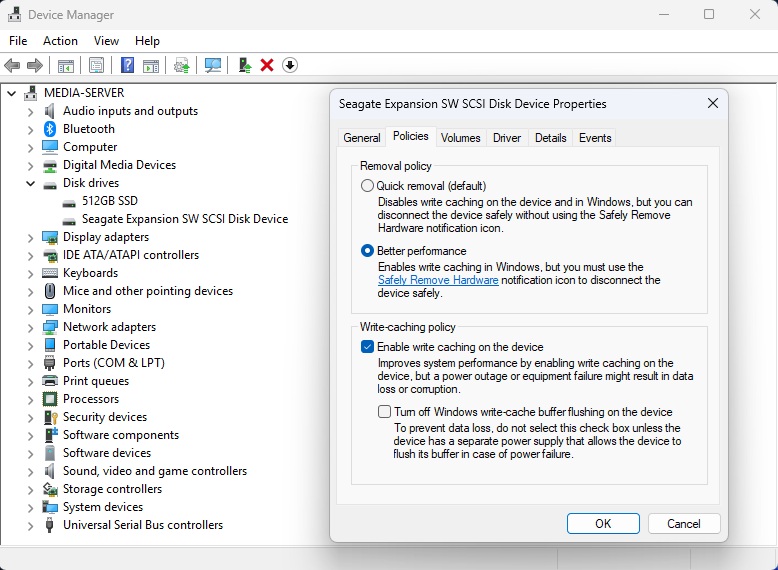
Well, I believe that I have figured out my issue. And I feel a little stupid. I was on the way home from work last night and it was running through my head what could be causing the HDD to not keep up short of controller failure, etc. I do not know why, but write caching popped into my head. I got home and sure enough the enable write caching box was not checked for the drive. I did a test before turning it on and the drive would have a burst of speed for a few seconds, then taper off to around 5-10 MB/s transferring a 3 GB video file. I didn't notice this before because I didn't move any files large enough to really notice. I turned on the write caching and transferred another video file of similar size and the write speeds started at 280 MB/s and fluctuated a bit but held at around 100-120 MB/s for the duration. I set a recording last night on the same channel 16.1 listed in my post above and it finished without issue and without any corruption. I had 0% drop in the buffer statistics. I have no idea what made me think of this, but I am glad I did. I realize that if you are using a drive connected internally either with SATA or M.2 write caching will be defaulted to on, but if you are migrating from the Raspberry Pi with an external USB 3.0 drive, you will have check this setting if you are going to use a Windows PC. Maybe for some reason mine did not default to having that turned on and usually it does, but it is something to check if you are coming from the Pi. It took me a while to figure this out, because it does look a lot like signal issues at first and if the DVR was only recording on one channel, it would usually finish with maybe one or two bad spots and that was it. If you were recording two-three channels, it would completely choke. Just something to check if you have an issue like this. Thanks everyone for the input and especially Aman, I think when you mentioned I/O it got my brain turned on!

Thanks Again!

Can you post a screenshot of where this needs to be enabled for the next person

Sure. I will post it when I get home tonight. I do not have an external drive to plug in here at work. The options are different if you are using an internal drive, so I want to make sure I post the correct picture information.


Here is a screen shot of the setting in device manager to enable write caching in Windows 10 or 11. Hope this helps anyone who may have had the same issue as I did migrating from the Pi!

2 Likes