DeepLinks: ESPN+

I'm seeing this error running espn_scraper.py:

root@eplustv:/opt/DeepLinks# python3 espn_scraper.py
2025-11-02 16:38:21,532 - INFO - Current time (TZ=UTC): 2025-11-02 16:38:21.532080+00:00
2025-11-02 16:38:21,532 - INFO - ===========================================================
2025-11-02 16:38:21,532 - INFO - ESPN Watch Graph Scraper - Starting
2025-11-02 16:38:21,532 - INFO - ===========================================================
2025-11-02 16:38:21,532 - INFO - Fetching dates: 2025-11-01, 2025-11-02, 2025-11-03, 2025-11-04
2025-11-02 16:38:21,532 - INFO - About to fetch days: ['2025-11-01', '2025-11-02', '2025-11-03', '2025-11-04']
2025-11-02 16:38:21,532 - INFO - Fetching day 1/4: 2025-11-01
2025-11-02 16:38:21,532 - INFO - Request URL: https://watch.graph.api.espn.com/api?apiKey=0dbf88e8-cc6d-41da-aa83-18b5c630bc5c&features=pbov7
2025-11-02 16:38:21,532 - INFO - Request payload keys: ['query', 'operationName', 'variables']
2025-11-02 16:38:21,532 - INFO - Variables: {'countryCode': 'US', 'deviceType': 'DESKTOP', 'tz': 'UTC', 'day': '2025-11-01', 'limit': 2000}
2025-11-02 16:38:23,501 - INFO - API request for 2025-11-01: status=200, duration_ms=1967, bytes=208298
2025-11-02 16:38:23,501 - INFO - Retrieved 438 airings for 2025-11-01
2025-11-02 16:38:23,501 - INFO - Sample packages from first 5 airings:
2025-11-02 16:38:23,501 - INFO -   Airing 1 'Seton Hall vs. Marquette': packages=['ESPN_PLUS']
2025-11-02 16:38:23,501 - INFO -   Airing 2 'Montana vs. Northern Colorado': packages=['ESPN_PLUS']
2025-11-02 16:38:23,501 - INFO -   Airing 3 'Pop-A-Shot 2025 National Championship': packages=[]
2025-11-02 16:38:23,501 - INFO -   Airing 4 'Kentucky vs. Auburn': packages=[]
2025-11-02 16:38:23,501 - INFO -   Airing 5 '#18 Oklahoma vs. #14 Tennessee': packages=[]
2025-11-02 16:38:23,501 - INFO - League data - name: 'NCAAW Soccer', abbrev: 'None', sport: 'Soccer'
2025-11-02 16:38:23,501 - ERROR - Fatal error
Traceback (most recent call last):
  File "/opt/DeepLinks/espn_scraper.py", line 255, in <module>
    main()
    ~~~~^^
  File "/opt/DeepLinks/espn_scraper.py", line 243, in main
    total = parse_and_store(days)
  File "/opt/DeepLinks/espn_scraper.py", line 202, in parse_and_store
    db.execute("""INSERT OR REPLACE INTO events(
    ~~~~~~~~~~^^^^^^^^^^^^^^^^^^^^^^^^^^^^^^^^^^
        id, sport, league, title, subtitle, summary, image,
        ^^^^^^^^^^^^^^^^^^^^^^^^^^^^^^^^^^^^^^^^^^^^^^^^^^^
    ...<3 lines>...
    (pid, sport, league, title, subtitle, "", "",
    ^^^^^^^^^^^^^^^^^^^^^^^^^^^^^^^^^^^^^^^^^^^^^
     s_iso, e_iso, status, 1, "", event_type, "", ""))
     ^^^^^^^^^^^^^^^^^^^^^^^^^^^^^^^^^^^^^^^^^^^^^^^^^
sqlite3.OperationalError: table events has no column named event_type

@KineticMan PR submitted for ah4c compatibility, once the above error is addressed.

2 Likes

give it a fresh pull pls.. added some robustness for first run to setup the DB/folder/permissions. make sure run espn_scraper first.

1 Like

Looks good now. I had to rm -R out to blow away the DB first though:

root@eplustv:/opt/DeepLinks# python3 espn_scraper.py
2025-11-02 20:12:00,164 - INFO - Current time (TZ=UTC): 2025-11-02 20:12:00.164754+00:00
2025-11-02 20:12:00,164 - INFO - ===========================================================
2025-11-02 20:12:00,164 - INFO - ESPN Watch Graph Scraper - Starting
2025-11-02 20:12:00,164 - INFO - ===========================================================
2025-11-02 20:12:00,164 - INFO - Fetching dates: 2025-11-01, 2025-11-02, 2025-11-03, 2025-11-04
2025-11-02 20:12:00,164 - INFO - Database directory: /opt/DeepLinks/out
2025-11-02 20:12:00,164 - INFO - Database path: /opt/DeepLinks/out/espn_schedule.db
2025-11-02 20:12:00,198 - INFO - Database initialized successfully
2025-11-02 20:12:00,198 - INFO - About to fetch days: ['2025-11-01', '2025-11-02', '2025-11-03', '2025-11-04']
2025-11-02 20:12:00,198 - INFO - Fetching day 1/4: 2025-11-01
2025-11-02 20:12:00,198 - INFO - Request URL: https://watch.graph.api.espn.com/api?apiKey=0dbf88e8-cc6d-41da-aa83-18b5c630bc5c&features=pbov7
2025-11-02 20:12:00,198 - INFO - Request payload keys: ['query', 'operationName', 'variables']
2025-11-02 20:12:00,198 - INFO - Variables: {'countryCode': 'US', 'deviceType': 'DESKTOP', 'tz': 'UTC', 'day': '2025-11-01', 'limit': 2000}
2025-11-02 20:12:01,416 - INFO - API request for 2025-11-01: status=200, duration_ms=1216, bytes=208298
2025-11-02 20:12:01,416 - INFO - Retrieved 438 airings for 2025-11-01
2025-11-02 20:12:01,416 - INFO - Sample packages from first 5 airings:
2025-11-02 20:12:01,416 - INFO -   Airing 1 'Seton Hall vs. Marquette': packages=['ESPN_PLUS']
2025-11-02 20:12:01,416 - INFO -   Airing 2 'Montana vs. Northern Colorado': packages=['ESPN_PLUS']
2025-11-02 20:12:01,416 - INFO -   Airing 3 'Pop-A-Shot 2025 National Championship': packages=[]
2025-11-02 20:12:01,416 - INFO -   Airing 4 'Kentucky vs. Auburn': packages=[]
2025-11-02 20:12:01,416 - INFO -   Airing 5 '#18 Oklahoma vs. #14 Tennessee': packages=[]
2025-11-02 20:12:01,416 - INFO - League data - name: 'NCAAW Soccer', abbrev: 'None', sport: 'Soccer'
2025-11-02 20:12:01,417 - INFO - League data - name: 'NCAA Women's Volleyball', abbrev: 'None', sport: 'Volleyball'
2025-11-02 20:12:01,417 - INFO - League data - name: 'NCAAH', abbrev: 'None', sport: 'Hockey'
2025-11-02 20:12:01,417 - INFO - League data - name: 'NCAAM Soccer', abbrev: 'None', sport: 'Soccer'
2025-11-02 20:12:01,417 - INFO - League data - name: 'USL Championship', abbrev: 'None', sport: 'Soccer'
2025-11-02 20:12:01,417 - INFO - Fetching day 2/4: 2025-11-02
2025-11-02 20:12:01,838 - INFO - API request for 2025-11-02: status=200, duration_ms=420, bytes=136203
2025-11-02 20:12:01,839 - INFO - Retrieved 291 airings for 2025-11-02
2025-11-02 20:12:01,839 - INFO - Fetching day 3/4: 2025-11-03
2025-11-02 20:12:02,548 - INFO - API request for 2025-11-03: status=200, duration_ms=708, bytes=113726
2025-11-02 20:12:02,548 - INFO - Retrieved 254 airings for 2025-11-03
2025-11-02 20:12:02,549 - INFO - Fetching day 4/4: 2025-11-04
2025-11-02 20:12:04,932 - INFO - API request for 2025-11-04: status=200, duration_ms=2382, bytes=168979
2025-11-02 20:12:04,932 - INFO - Retrieved 371 airings for 2025-11-04
{
  "db": "/opt/DeepLinks/out/espn_schedule.db",
  "rows_inserted": 725,
  "live_now": 59,
  "window_72h": 441
}

If you're good with merging the PR, I'll get to work on full ah4c support.

2 Likes

Cool. Excited someone can make use of this!

1 Like

OK, initial support has been added, but more testing is needed from those willing few. :slight_smile:

I've created a containerized version of @KineticMan's work here, plus I've added some basic ah4c scripts by way of STREAMER_APP=scripts/firetv/espn (I expect these will work with streaming sticks other than FireSticks, but you'll need to use this value regardless).

eplustv-ah4c:

services:
  eplustv-ah4c:
    image: bnhf/eplustv-ah4c:${TAG:-latest}
    container_name: eplustv-ah4c
    dns_search:
      - ${DOMAIN:-localdomain} # Change to the name of your LAN's domain, which is usually local or localdomain
      - ${TAILNET} # Change to the name of your Tailnet, which is in the form tailxxxxx.ts.net
    dns_opt:
      - ndots:${NDOTS:-1} # Allows hostanme resolution on LAN and Tailnet domains in Alpine Linux-based containers
    ports: # Note that the M3U is hosted by ah4c (typically port 7654) and the XML is hosted by eplustv-ah4c (typically port 7644)
      - ${PORT:-7644}:${PORT:-7644} # The port espn_plus.xml will be hosted on, in the form http://<hostname or IP>:<PORT>/espn_plus.xml
    environment:
      - TZ=${TZ} # Your local timezone in a valid Linux format
      - HOST=${HOST} # Your Channels DVR host URL in the form http://<hostname or IP>:8089
      - CRON_HOURLY=${CRON_HOURLY:-5 * * * *} # Typically 5 * * * *
      - CRON_NIGHTLY=${CRON_NIGHTLY:-15 3 * * *} # Typically 15 3 * * *
      - PORT=${PORT:-7644} # The port espn_plus.xml will be hosted on, in the form http://<hostname or IP>:<PORT>/espn_plus.xml
      - AH4C=${AH4C:-true} # Set to true for the URL used in espn_plus.m3u to be in a valid ah4c format, typically hosted at http://<hostname or IP>:7654/m3u/espn_plus.m3u
    volumes:
      - ${HOST_DIR:-/data}/ah4c/m3u:/app/out # The parent directory, on your Docker host, under which your ah4c M3Us are stored 
    restart: unless-stopped

Sample env vars:

TAG=latest
DOMAIN=localdomain
TAILNET=tailxxxxx.ts.net
TZ=US/Mountain
HOST=http://media-server8:8089
CRON_HOURLY=5 * * * *
CRON_NIGHTLY=15 3 * * *
PORT=7644
AH4C=true
HOST_DIR=/data

ah4c setup is per usual, using the above STREAMER_APP value.

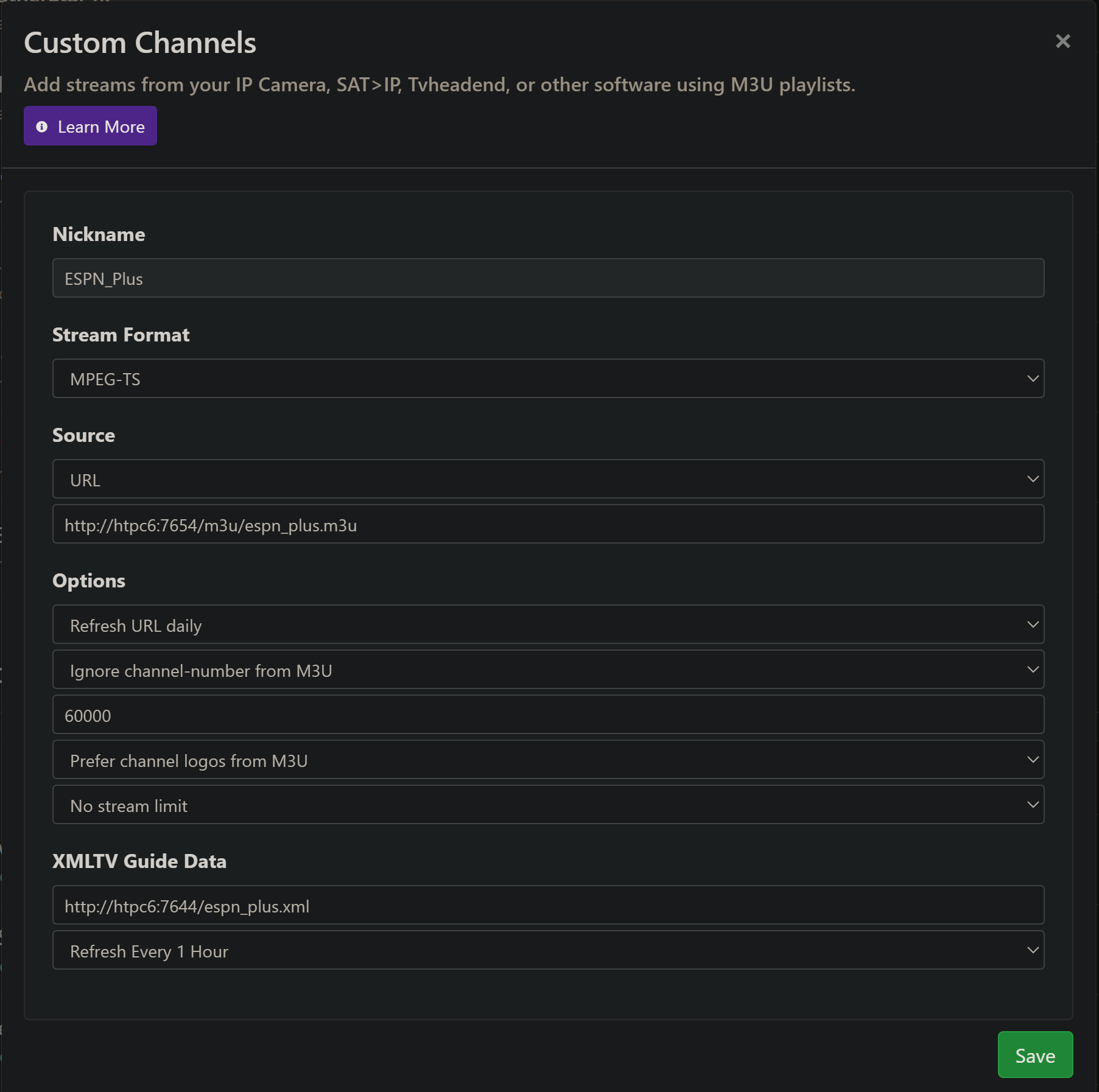
CDVR Custom Channels setup like this:

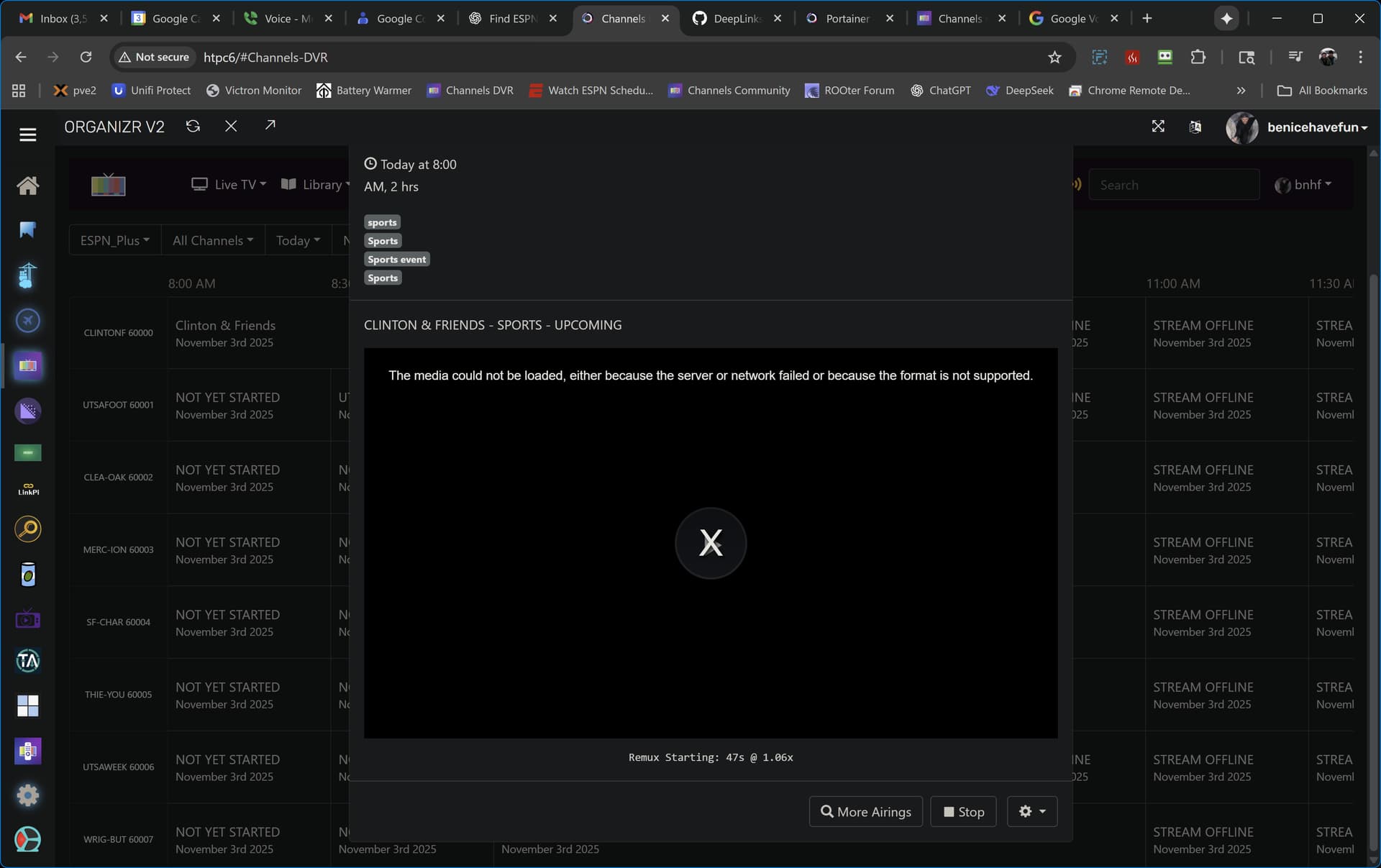
Personally, I've seen some failures like this where neither CDVR or ah4c are reporting any errors, so it seems like something with the deeplinks or ESPN app. I'd appreciate some help nailing this down:

Note that espn_plus.m3u and espn_plus.xml are being served on different ports, with slightly different URL formats -- be sure to pay attention to this nuance when setting up your CDVR Custom Channels Source.

4 Likes

I'll spin this up. I've been ADB only for a while, but this would help fill a void.

@KineticMan I'm seeing the above error pretty frequently when tuning to a given event, but then can connect when trying again moments later.

Also, it appears that at least some (all?) of the event IDs play the event from the beginning, as opposed to joining a live event in progress.

Maybe a different URL format is required to join an event live?

thats strange.. i haven't noticed that personally - but let me try to debug.

is it possible your code introduced a syntax error to the url? just speculating at this point - doesnt make sense why it would work the second time you hit the url.

Many times it works right away, others it takes a couple of tries. I'm experimenting with having the app running already vs. starting it together with the deeplink. No discernable pattern yet.

As far as getting events to start from the live point, sending three fast forwards sequentially via ADB works OK -- once playback has begun. I'm hoping there's a way to do it with a slightly different deeplink though. Neither &startFrom=LIVE or &mode=live appended to the end are working.

how can debug the exact URL that ADB is sending?

testing this one live now:
Hou Christian vs E Texas. testing with my original script (on iOS). it calls URL:
sportscenter://x-callback-url/showWatchStream?playID=67581654-64f4-4c29-a471-1624ef83b90a spins up ESPN and stream goes live now (not to beginning)

yours calls:
http://{{ .IPADDRESS }}/play/tuner/4728d720-4a41-43e1-9fee-eb06822ffedb

edit - nm figured it out - i think its sending the right url.. ill debug further tonight. need to be at home.

FYI, been playing around with the deep links on my AppleTV to see if I can get this to work with my setup.
Try &startOption=live It has been working in my testing.

Both ADBTuner and ah4c are proxies, so URLs used in their M3Us is not the same as what they send to start the stream.

This is the deeplink sent by ah4c, but it always starts the stream from the beginning, rather than from the live point -- at least on a FireStick 4K Max (Gen 2).

EDIT: This is the full virtual tuning command sent by ah4c:

$adbTarget shell am start -n $packageName/$packageLaunch sportscenter://x-callback-url/showWatchStream?playID=$channelID

Where (for example):

adbTarget=adb -s firestick-rack1:5555 (or whatever the streaming stick hostname:port or IP:port is)
packageName=com.espn.gtv
packageLaunch=com.espn.startup.presentation.StartupActivity
channelID=<value passed by the M3U URL after the last slash>

It's working, just not reliably, and the event always starts from the beginning.

Unfortunately this doesn't work on a latest generation FireStick (4K Max Gen 2). I appreciate the suggestion though!

1 Like

Too bad. It is working on the ATV in the format "sportscenter://x-callback-url/showWatchStream?playID=847fce2e-a186-4fd3-8ce3-9024fa833288&startOption=live" so perhaps there is some permutation that will work on the FireStick.

Thank you for containerizing @KineticMan work. It makes it a little easier for me to experiment.

I run a customized version of the original HDMI for channels code for my bank of ATVs that has worked (almost) flawlessly for the last few years.

Looking at your changes, it appears that the replacement link for AH4C with {{ .IPADDRESS }} is then further processed by AH4C to create the M3U (thus the slightly changed port in channels config). Is that correct?

If so, I am going to need to branch and make that IP address configurable.

I don't really know what I am doing (a hacker in the true sense of the word). But I love to tinker and learn. That and I really miss having ESPN+

Thanks to both of you for your contributions.

When your CDVR server loads an ah4c M3U the value of the ah4c env var IPADDRESS is subbed in for {{ .IPADDRESS }} in the M3U URL. This keeps one from having to hardcode a hostname:port or ip:port into the M3U. However ah4c was only designed to serve M3Us, and not XMLs -- which is why the M3U is served by ah4c and the XML is served by eplustv-ah4c.

This could be changed of course, but right now I'm mostly trying to determine if ah4c is a reliable way to tune to these ESPN+ events. It looks promising, but there are a couple of things (mentioned above) to figure out.

Getting to the live point in an event can be handled with ADB keyevents (if needed), but the current inconsistent virtual tuning results is a "must fix" in my opinion.

Makes sense. I am hoping I can get to the point where I can contribute to testing the those ESPN+ events. I can handle the minor code modifications. But I will need to a: learn how to run python on my Mac server, or b: learn how to make a fork of your container to run it on my NAS. I think maybe the latter, I have wanted to learn for a while now.

Thanks

1 Like

@bnhf
Well, I pulled out the test encoder and got ah4c running with dtvstreamdeeplinks on my test server (Synology). You must have taught me right as I had very few issues getting it going in Portainer.

I plan on working with your ESPN+ in the next day or so but need to get my head wrapped around tailscale.

  1. Should I install tailscale on the synology or just check the box on Channels Web UI?

  2. Other than creating a tailscale account, is there anything else I need to learn about it or will the container just take care of all?

On a side note, it looks like my adb authorization from July 2024 was still working as I did not have to reauthorize (that's when we first started trying ah4c).

i havent been able to replicate that bug you're seeing with the stream failing yet, but def seeing the "start from beginning" default. its probably by design on their part but ill keep looking for an override.

ive been using this command fyi
adb shell am start -d 'sportscenter://x-callback-url/showWatchStream?playID=7264bc45-dbaa-4cff-b9b0-7e6820b59391'

humor me on your adb command that you send.. might be a deadend but worth a shot.

ah4c's current command:

adb -s firestick-rack1:5555 shell am start -n com.espn.gtv/com.espn.startup.presentation.StartupActivity sportscenter://x-callback-url/showWatchStream?playID=7264bc45-dbaa-4cff-b9b0-7e6820b59391

THE FIX

Corrected command with -d flag:

adb -s firestick-rack1:5555 shell am start -n com.espn.gtv/com.espn.startup.presentation.StartupActivity -d 'sportscenter://x-callback-url/showWatchStream?playID=7264bc45-dbaa-4cff-b9b0-7e6820b59391'

WHAT THE -d FLAG DOES

The -d flag stands for "data" and is part of the Android am start (Activity Manager) command syntax.

What it does:

  • Tells Android that what follows is a data URI for the intent
  • This URI becomes the intent's data field that the app can read to determine what content to load
  • Without -d, the shell treats the URI as random positional arguments, which may get ignored or misinterpreted (Could be the bug you're seeing?)