
I would decompile com.att.tv.openvideo to try and find the path. Claude would happily do it.
That sounds promising. I will try that. Thank you.
I would use CC at the TUI.
Just a question: why not use channels with ADB Tuner or ah4c. That sidesteps the whole issue.
Not exactly. I would still have to pull all the video data from that location. I just don't have a Channels server there or any other hardware to run it and I don't really want to setup ADB Tuner or ah4c.
Wait isn't Channels the whole point of the Channels forums? It would solve your issue.
While troubleshooting my Osprey Boxes and consulting with DIRECTV support. I heard from a representative that they are discontinuing the Gemini Air soon and coming out with the New Osprey Boxes that will have Ethernet ports.
It sounds like they're going to be available for lease but that doesn't mean that we won't be able to buy Gemini Airs on eBay or Amazon or whatever Walmart etc. I imagine one could use a pass-through USB C power adapter with an Ethernet adapter on it to get Ethernet with them. Or some sort of PoE to usb C adapter.
I also want to mention that a very cautiously not wanting to sort of speak way too soon but I may have solved my issues. I noticed they started to occur when I noticed that CH4C logged itself out. One session just completely tore down out of three. After I fixed it the next day I noticed weird issues with my Osprey Boxes.
I looked back through my browser history to get the time down right.
What I ended up doing was resetting my DirecTV password, resetting my security questions, waiting a little while then clearing my com.att.tv.openvideo app a couple of times and rebooting the box until they all logged out and when one straggler occurred I reset the password again and repeated the dance.
Once it was clear that everything was sort of logged out on its own rather than me manually logging out the boxes I logged each one in and so far it has been stable. I'm still cautiously optimistic because I have been bitten before but so far I have not had any issues. I find it weird that this started happening after I got CH4C working again after it seemed to have logged itself out.
I believe the issues I've been troubleshooting with my Osprey fleet are solved. I just want to be 100% certain so I'm going to update this comment in a few days with a write-up of what the issue was and what the solution is. I just don't want to do a write-up until I'm 100% certain that I have the mechanism of recovery completely nailed down.
NOTE: I'm sharing this because I am nearly certain I have this nailed down. Only time will tell if my solution holds but this is based on the decompiled APKs from my Ospreys and my own A/B testing.
Now on to what's been going on...
I figured I'd write this up because it took me forever to solve my persistent issues that started occurring late June.
I have 10 Osprey boxes driven by deeplink and every so often a box would blue screen about 5 minutes into a stream. Picture drops for a second, comes back, and then it carries on. Essentially the channel would reload and show the channel logo and name of the show etc. Other boxes on the same account and same network would run clean for hours right next to it.
I wasted a ton of time on this. Thought it was a DirecTV server bug, thought it was my network, my cables, my account, a device limit, region stuff. None of it. All dead ends.
What it actually is
There's a server controlled feature flag in the app called USE_YOURTV_FOR_STARTUP. When it's on, waking the box sends startup through a "Your TV" resume flow. It appears to be a serial keyed A/B test. I have no idea what it does, but it's in the APK and server controlled.
Here's the trap. If you fire deeplink at the box before the app has settled, it doesn't tune right away. It saves your deeplink as a pending one and replays it later in the middle of startup, where it races the resume flow. 99% of the time this hangs you on a blank bluish screen, and even when it does come up, the entire box is in a bad state, it wedges and this state causes the a widevine session rebuild 5 minutes to the clock of every subsequent tune one time. This took forever to nail down the cause but I got to where I could reproduce it on command. Wedge a box and it starts tearing down. A box that never wedges runs for hours. No wedge, no teardown.
One thing to know if a box is already stuck. Once it's wedged into that state you can't just tune it clean to get it back, the bad state sticks. The only thing that clears it is a pm clear com.att.ngc.core and pm clear com.att.tv.openvideo then reboot the box. Clearing the either on it's own does nothing, it has to be both. And heads up, clearing ngc.core has some fallout. The box bootloops for a while before it settles back down, and it resets your launcher settings to default, because ngc.core is where those get stored. The start at home, the sports scores toggle (the app calls it Show Scores and Hide Scores pretty much everything in the launcher goes back to stock and you have to set it up again. So the real answer is prevention. Keep it from wedging in the first place and you never have to touch any of this.
So this isn't really DirecTV breaking on their end. It's the box getting knocked into a bad state by a tune you fired too early, and that feature flag is what turns "too early" into a wedge instead of a harmless miss.
How I fixed it
Two ways, both work. Same idea behind both, quit firing cold deeplinks at a box that's still waking up.
- Readiness gate before the deeplink. Wake the box, then wait until the app is actually up and playing before you send the tune. I poll the box for playback state and only fire the deeplink once it says it's really playing. That keeps it on the handle it now path instead of the deferred raced one. No wedge.
In my ah4c prebmitune.sh script I added the following. This is on GH but not sure if it's in the actual bnhf docker yet:
'for i in $(seq 1 80); do dumpsys audio 2>/dev/null | grep -E "pack: com.att.tv.openvideo.*gain: GAIN " >/dev/null && break; dumpsys media_session 2>/dev/null | grep "PlaybackState {state=3" >/dev/null && break; sleep 0.1; done'
This can be adapted to ADBTuner and avoid the wedge.
- Channel number tuning. Skip the deeplink completely. Wake the box and punch in the channel number like you would on the remote, just send the digits. That goes through the in player channel change, which has no cold start deeplink to defer, so there's nothing to wedge. This is the one I run now. It's faster than waiting on a readiness gate and it can't wedge, period. ah4c is required for this. I wrote some more robust channel number tune scripts with the help of Fable 5 that have been working super well for me.
Blocking the flag at the network, if you want to go that route
Worth knowing where the flag lives. The app pulls its feature flags from Rollout.io, which is CloudBees Feature Management now. The boxes hit conf.rollout.io, rox-conf.cloudbees.io, x-api.rollout.io, statestore.rollout.io and push.rollout.io to grab flag values and live updates.
So you can block it. Sinkhole those hosts on your DNS (Pi-hole, NextDNS, a router rule, whatever) and the app can't pull remote flags anymore, it falls back to its built in defaults. If that Your TV routing is coming from the server side, cutting the config endpoint stops them from flipping it on your boxes.
Just know what you're doing first. It's a sledgehammer. You're freezing every flag at default, not just this one, so other stuff can shift too. It only helps if the default happens to be the safe one. The app also caches the last config it pulled, so if a box already grabbed the bad value you'll probably need to clear the app after you block it so it drops the cache. And an app update could change the behavior on you. It's reversible though, unblock the hosts and you're back to normal.
I didn't go this route myself. The readiness gate and the number tuning both dodge the wedge no matter what the flag says, and they don't touch my network. But blocking the endpoint is a real option if you'd rather kill it at the source. I prefer the channel number option as it tunes a bit quicker from sleep when the readiness gate is implemented.
I also want to note lastly that I went full nuclear and cancelled my account with support and created a whole fresh DirecTV account to rule out an account level bug. I've factory reset boxes etc, it's simply this remote feature flag rollout that causes deeplinks to throw the Ospreys into this bad state.
Here are more robust channel # tuning scripts I wrote for ah4c. If people like them I will contribute them to the repo: ah4c Osprey Channel Number Tune (New Scripts) · GitHub
@mackid1993
Thanks for the write up. I believe the complexity of your system, running 10 Ospreys, ah4c, ADBTuner , Ch4c, multiple encoders , etc. may be causing some of your issues. I run 3 Ospreys with deeplinks on ah4c and never see your issues though I try to replicate. The only issue I ever see is whenever I update my Synology DSM. After I update, I have to restart each Osprey before they will work. Bouncing the container does nothing.
1 Like
I just have 10 ospreys and ah4c. I cut out CH4C and I'm not using ADB Tuner as that would conflict with ah4c. Also it appears to be a serial gated A/B test so that could be why you don't see it. CH4C has also never touched this fresh account. New billing etc.
Ignore everything I said.
It's still happening, but I did a little bit more digging. It seems that every time this issue occurs the DAI partner Yospace issues a new session in a different region. The issue occurs when my stream grabs a Yospace session in AWS US East 1 (Ashburn). The moment the stream restarts my session swaps from east to west!
If I pick up US West 2 from the start I'm fine. The onset was the height of the world cup (late June) so I bet that is the crux of my problem and it's regional for me. Hence why it's only me. I figured this out running tcpdump on my UniFi UDR7 and monitoring an Osprey during a teardown.
Another bit of info. When I made my new DTV account they had a 24 month promo, lease a Gemini for $10, get $15 off for 24 months and get Disney, Hulu and ESPN. I actually have a better promo now than before. The interesting thing is they no longer offer the Gemini Air. I was told they are sending out the Ospreys again. I will report back when this unit arrives on Friday but it's looking like if it's the same device our Ospreys won't be cut off anytime soon!
Update 7/17: both the initial tune wake from sleep wedging, as well as the random five-minute into stream blue screening have resolved finally. From what I could tell, this might have been isolated to my specific DMA, which is why no one else was seeing the issue. That could also be why, when my DMA was accidentally changed by a DirecTV agent to South Carolina, it suddenly got better. Given that the big World Cup game is Sunday, I imagine they pushed a fix just before the weekend.
--
I also got my Gemini box from DirecTV. Officially, they are now giving out black label Ospreys. This isn't even like a Gemini Air or that new Osprey prototype we saw. This is a regular Osprey, just a black label. It came to me brand new with a manufacture date of 2023. I was told by a representative that they discontinued the Gemini Air devices. What is incredibly encouraging is this device that I received is running the exact same Android 11, the exact same open video client, the exact same firmware as the old 60233s I have sitting in my taco tray. So they're clearly not discontinuing this line of devices anytime soon. I think we have another couple of years left in them, guys. 
look like this?
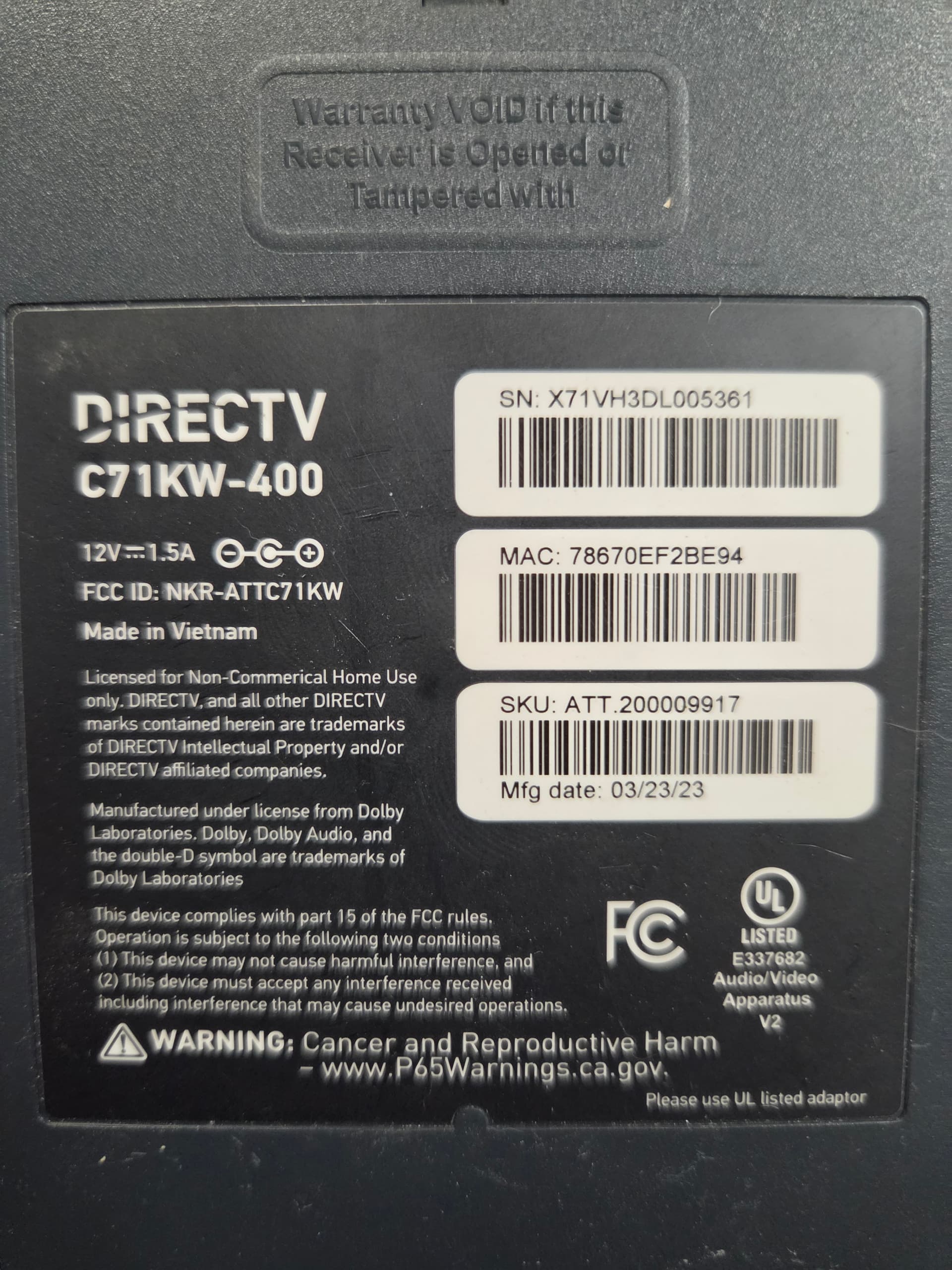
this one is running the satellite firmware, there's supposed to be a way to get it on streaming, but it doesn't survive a reset, so I haven't even tried yet. maybe your buddAi can get the full streaming firmware for these boxes.
Exactly like that, except the box said DirecTV Stream. Like it looked almost like new old stock.
I wonder if they're going to start up production again and they stopped production of the Gemini airs because of all of the NAND issues right now.
the kw-650 is expected in ~6mo so I'm guessing is just inventory they still controlled from when they started pushing the air.
It's also possible that it's not coming.
Both NAND and RAM prices have gotten insane. They might not want to produce these new units. It might be cheaper for them to just keep selling or leasing the Ospreys. I have a feeling that's why I got an Osprey instead of one of these new ones, or a Gemini Air.
Also, they seem a little desperate right now. I ended up getting a better deal than I did when I signed up initially. This box is essentially free for two years and I save $5.00 by getting it. There's a $15.00 additional discount for getting the box, which costs $10.00 a month. So I net $5.00 and also get Hulu, ESPN, and Disney Plus. All of those things are gated on getting the box. So for having a spare box, I save $5.00, get Hulu, ESPN, and Disney Plus. It's kind of like they're trying to attract customers after having to raise prices because of Disney.
1 Like
By the way, I remember you saying you were having some issues with recordings being missed, since I know you tune by channel number.
While I was troubleshooting my bizarre issues, I wrote some scripts for tuning by channel number that I shared above, but I thought I'd highlight them to you in case you want to try them. Maybe they might work better.
They specifically check to make sure you're tuned to the right channel.
yeah i looked after your first post, too bad its for the regular packages, and not genre packs.
Yeah, there are like specific channels that I watch that are just not in the genre packs.
I added one of your early ones on 6/27.
#!/bin/bash
#prebmitune.sh for osprey/dtvosprey
# 2026.04.16

#Debug on if uncommented
set -x

streamerIP="$1"
streamerNoPort="${streamerIP%%:*}"
adbTarget="adb -s $streamerIP"

mkdir -p $streamerNoPort

#Trap end of script run
finish() {
  echo "prebmitune.sh is exiting for $streamerIP with exit code $?"
}

trap finish EXIT

adbConnect() {
  adb connect $streamerIP

  local -i adbMaxRetries=3
  local -i adbCounter=0

  while true; do
    $adbTarget shell input keyevent KEYCODE_WAKEUP
    local adbEventSuccess=$?

    if [[ $adbEventSuccess -eq 0 ]]; then
      break
    fi

    if (($adbCounter > $adbMaxRetries)); then
      touch $streamerNoPort/adbCommunicationFail
      echo "Communication with $streamerIP failed after $adbMaxRetries retries"
      exit 2
    fi

    sleep 1
    ((adbCounter++))
  done
}

adbWake() {

    $adbTarget shell input keyevent KEYCODE_WAKEUP; sleep 2;
    echo "Waking $streamerIP"
    touch $streamerNoPort/adbAppRunning

}

main() {
  adbConnect
  adbWake
  $adbTarget shell 'for i in $(seq 1 80); do dumpsys audio 2>/dev/null | grep -E "pack: com.att.tv.openvideo.*gain: GAIN " >/dev/null && break; dumpsys media_session 2>/dev/null | grep "PlaybackState {state=3" >/dev/null && break; sleep 0.1; done'
}

main
env
LIVETV_ATTEMPTS=
CREATE_M3US=false
UPDATE_SCRIPTS=false
UPDATE_M3US=false
TZ=America/Chicago
SPEED_MODE=false
KEEP_WATCHING=4h
USER_SCRIPT=
HOST_DIR=/mnt/c/data
CDVR_M3U_NAME=dtv.m3u
been running these since on both ah4c containers and have had no problems, although I believe my problem was wsl/docker networking related and was solved by setting CDVR to delayed service start. I may explore possible ways to fix within docker someday, but..
It's friday, got shit to do, but ain't doin' none of it. 
1 Like