It was suggested to me that we have a dedicated thread for Osprey boxes, as well as potentially in the future the Gemini Air device once those come off lease and become inexpensive. I just wanted to create this thread as a way to start a conversation about these boxes and how to best utilize them with Channels DVR. They are extremely reliable and tune very quickly for DirecTV service when using them with ADBTuner or AH4C.
Just one thing to note when purchasing these: beware of auto sign-in. When buying boxes from individual sellers, make sure you reach out to them and ask them if they see a QR code when they log in. If the box boots up and there's no QR code, chances are it has auto sign-in enabled and will log into someone else's account automatically with no way of removing it.
There are workarounds that involve cutting off the internet connection at just the right time to trigger a login prompt, but they are inconvenient and I would avoid them. It's a good idea to purchase from established sellers on eBay or from Walmart where they're inexpensive. When hunting for specific models, you aren't really able to do that, such as the 60233 4GB model. So in that case, it's a good idea to look for reputable sellers, do your due diligence, and ensure that they check the devices before you purchase.
I have had to, at least one occasion, invoke eBay's money-back guarantee with a seller that refused to acknowledge the auto sign-in issue on a box. For the purposes of Channels DVR there isn't much of a difference between the 60233 4GB and 60164 2GB boxes, but for my situation, I wanted to future-proof and made it a point to hunt down the 4GB ones, as painstaking as it was. When searching for these, the SKU is on the bottom, so usually you'll see a picture on eBay of hopefully the bottom of the device alongside the SKU and manufacture date.
Here is some more information on what that auto sign-in feature is, and just know it can only be disabled by the original owner of the box on their account and cannot be disabled by DirecTV representatives: https://www.directv.com/support/article/000093665
I strongly suggest using the Osprey boxes with ADBTuner. It's excellent and works extremely well with the Ospreys.
I also like the LinkPi encoders which many use here on forums.
Below is the custom config I use for my Osprey's with ADB Tuner. They are always on all of the time, so they're constantly streaming. Not ideal, but without sleeping them there isn't a way around that, and I prefer fast tuning over sleeping them.
I'm sure others will share configs that allow for sleep and such.
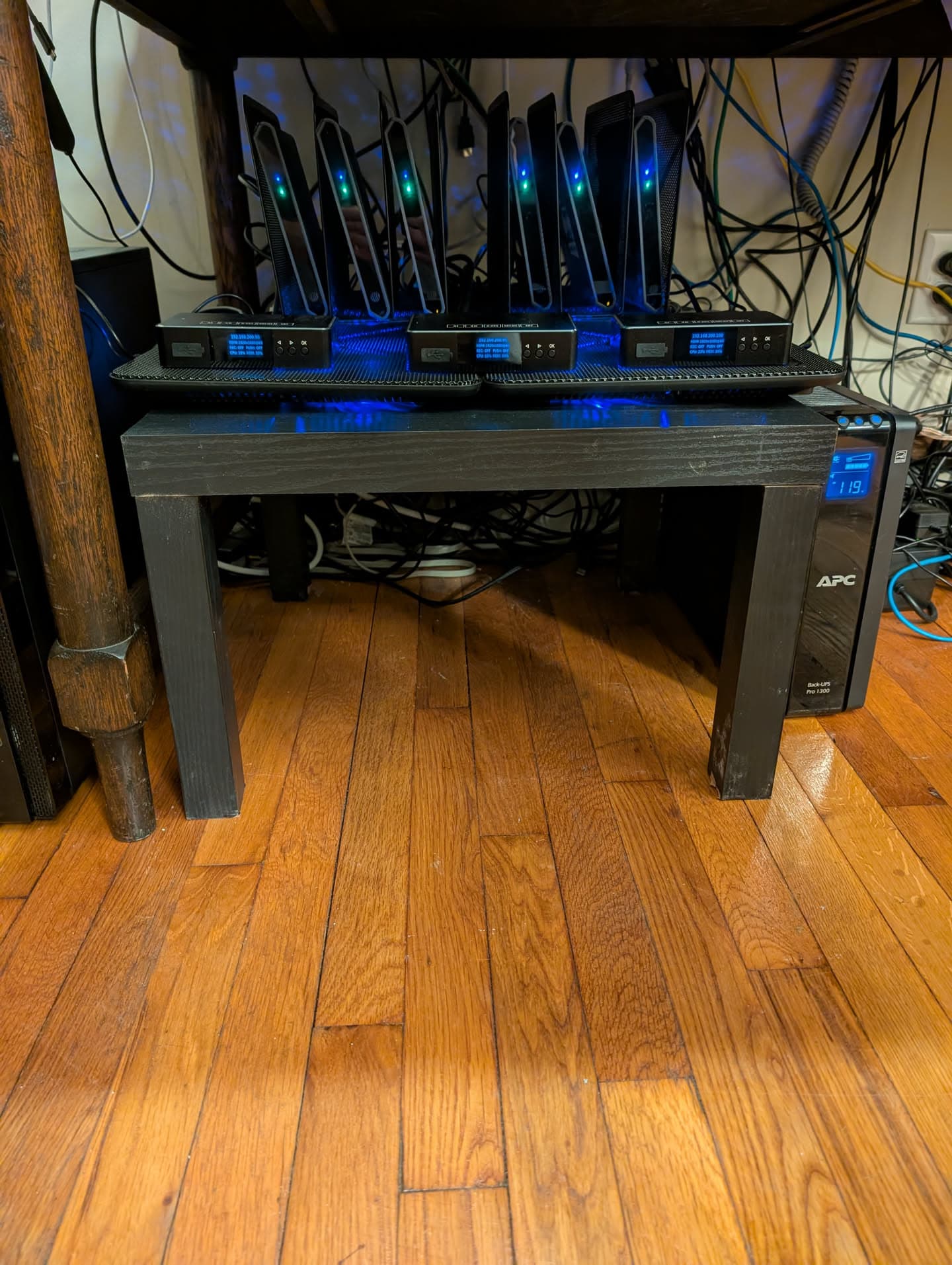
This is how I've structured my current setup. I use a couple of laptop coolers to mitigate them being always on that I purchased off of Amazon, along with a cut-down little end table from Walmart (I cut the legs off of it). I believe this table is similar to a LACK from IKEA, but it is from Walmart.
This setup keeps everything organized and cool, and I use a little folder organizer I purchased from Staples. Anything will do that will fit the Osprey boxes in its slots, but I recommend anything that is used to organize folders.
I saw that keep active is available in adbtuner now. I wonder if that combined with enabling the built in screen saver would atleast kill the streams after 4 hours of not being used.
also just noticed last night that the ONN boxes only come in 2gb and 3gb varieties.. osprey doesn't seem so outdated now..
That might be a good option.
However, I tried enabling the built-in screensaver and disabling it with a command. I had a config that did it and it was very slow honestly.
I mean right now I tune in in three to four seconds. I'm not willing to give that up to stop it from constantly streaming. That's why I bought coolers so they would stay around fifty degrees Celsius.
Also I have unlimited streams in the home, so I really don't care. I have a gigabit line, so for me, bandwidth isn’t an issue.
Osprey boxes were designed to act like a traditional cable box. They excel at tuning TV channels, which is what makes their use in Channels DVR automation so great. Highlights include:
Cheap on the used market.
Supported by Vendor (DirecTV)
Built-in Ethernet
The ability to tune by Deep Link or by Channel Number Input (unique to Osprey)
Do not have streaming limits or "Are you still watching" prompts like the DTV App (unique to Osprey)
Work with ADBTuner and AH4C!
Hardware Versions
C71KW-200 (Osprey/Late 2018) - The original, made by Samsung. Oldest and slowest.
C71KW-400 SKU 60164 (Osprey/2019) - Made by Wistron NeWeb Corporation, updated version, 2GB RAM.
C71KW-400 SKU 60233 (Osprey/late 2019) - Made by Wistron NeWeb Corporation, updated version, 4GB RAM.
C71KW-400 (Gemini)* - The black sticker, DirecTV refresh (away for AT&T). AFAIK, same as the 60233, manufactured all the way through 2023
Gemini Air - Dongle (Chromecast) style, can buy from DirecTV, super expensive but faster than Osprey.
Sourcing Used Hardware
New or refurb devices are no longer available from DirecTV. The best sources I found is eBay, but others report luck with Walmart and Amazon. When selecting a device, look for screenshots of the DirecTV Login screen in the postings pictures. There is a slight chance some of the very old AT&T versions will not update firmware.
I purchased four of the 60164 models from this eBay vendor, and they worked just fine. I have no affiliation with this seller: Security Measure | eBay
Black Label Ospreys
The newest, and last revision of the Osprey boxes were the Gemini versions produced from 2021 to about 2023. The are identical to the C71KW-400 SKU 60233 model, but have a distinct black label instead of green one. If you find these, you will be getting the best hardware version of the Osprey with 4GB of RAM. But there is a catch.
Starting sometime in 2023, these devices could be used for either DirecTV Satellite or Streaming. You may get one with Satellite firmware, which will not work on Streaming. Most models made 2022 or earlier will be safe to use for Streaming. If you find you have satellite firmware, you can use this document to try and convert. I have not confirmed this is functional: DirecTV Stream C71KW-400 Flip Satellite > Stream - Google Docs
Gemini Air
They are the newest hardware, in dongle form. IMHO they offer low value due to cost. They should work just as any normal Osprey. I would recommend avoiding them for now.
2GB RAM (60164) vs 4GB RAM (60233)
There is a difference in performance, mainly in tuning speed when waking the device. However, the quality of the stream is the same. While the larger amount of RAM is nice, I would not fret if you find a good deal on the more common 2GB model. I have a mix of both in my setup.
Sleep or No Sleep - Power Savings and Heat
The Osprey boxes are older, with a design all the way back to 2018. They are don't use a ton of power, but they can get warm, especially if you stack a few together. I let my Osprey boxes sleep between each channel tuning. This takes a little longer to wake for next tune, but it keeps my network quiet. Others, including @mackid1993 have a different take.
Prepping for Production
Over the years I've tested the Osprey Boxes to get the most out of my LinkPi Encoder and ADBT/AH4C tuner setups. Here are a few recommendations, all found in settings (somewhere, doing this from memory):
Disable HDMI CEC
Disable HDR
Set Preference on Wake to return to Last Channel, not Home Screen.
Disable Surround Sound, set to Stereo
Set to automatically select your DirecTV profile (if you have multiple) on reboot.
Disable Deep Sleep or sleep after four hours if you intend to let them run all the time.
Use ADB to disable DOZE setting, to avoid deep sleep, especially for the DirecTV app (launcher on the Osprey)
Tune a Channel with sports, turn off sports mode, or score mode (forget what it's called)
Advanced: Remove any unnecessary apps using ADB shell. This speeds things up.
Quick Cleanup of Unwanted Apps using Windows Batch File
You can copy the following into a batch file, run once connect to Osprey via ADB Shell to bulk de-bloat preloaded apps.
@echo off
FOR %%P IN (

com.peacocktv.peacockandroid
com.pandora.android.atv
com.espn.score_center
com.playworks.freegames
com.amazon.amazonvideo.livingroom
com.discovery.discoveryplus.mobile
com.hulu.livingroomplus
com.wbd.stream
com.glance.tv.directv
com.disney.disneyplus


) DO (
    echo Uninstalling %%P...
    adb shell pm uninstall -k --user 0 %%P
)
echo Done.
pause
Both are great ways to use Osprey boxes. I tested and contributed the config to use AH4C to tune Osprey boxes using Channel Number input back in 2024 (ish). This works really well as the channel numbers don't change. Very reliable.
ADBTuner is what I use currently, with deep links. This work really well, is faster and more seamless than by channel number.
If Deep Links every stop working, you can always fall back to AH4C to tune. Options are good.
Using Osprey for other Android Apps
Yes. You can. I recommend you don't. Where the Ospreys tune DirecTV channels extremely well, opening apps is not great. For the few apps I like to use, I have Onn 4K Plus boxes which are much faster and more predicable for automating deep links.
ADBTuner Setup Sample
Once you get ADBTuner setup, and your Osprey connected, you will need a tuning configuration and a channel list. Let's start with the configuration.
The example below is a copy of my working Config for Ospreys. You don't techncially need a custom config, but it makes onboarding a little easier.
Create a new config, copy in everything below. You can rename it whatever you like. This is my working DirecTV Osprey Deep Link (DODL) that runs my production every day.
Second, you'll need is a list of channels. Here is a channel export, sorted to match DirecTV channel numbers. It should cover most all channels on DirecTV, but you may need to add any extra channels you have manually. This list also matches the Configuration UUID from the previous step. You will need to copy this list into a JSON file, then import into ADBTuner.
Please Note: Matching channels to DirecTV numbers and allowing my Ospreys to sleep after each tune is just my preference. There are other ways to build your config. Feel free to ask questions in this thread. Plenty of Osprey users happy to share setups.
EDIT July 2026: Based on testing by @mackid1993 there is an alternate URL schema that may provide more reliable tuning for deep link in ADBTuner:
The above would replace the https deeplink format from the shared JSON above.
Dealing with a used Osprey that is attached to an existing DTV Account - The Auto Login Challenge
When purchasing used Osprey, you may run into one that is still attached to an previous owners DirecTV Account. This Auto Login is a feature of DirecTV. Where is convenient when you factory reset your device, you can't de register with a normal reset or from any menu options. Luckily there is a way to work around this challenge.
Do a factory reset by holding the red button on side for 10+ seconds.
Plug the Osprey into Ethernet, power up and allow all updates to complete.
Do a second factory reset by holding the red button on side for 10+ seconds.
Walk through the initial setup until you get to "checking for updates".
The second the updates complete pull the Ethernet Cable.
Wait for the Account Login Screen, plug Ethernet back in.
Log in and complete setup.
I have tested this and confirmed to work on a Black Label Osprey.
Consolidating Transformers, Use of POE - DC Power Sizes
The Osprey uses a 5.5 x 3.3mm Male Plug with a center pin for DC Power. Since the default Osprey power brick is a laptop size transformer, you may want to consolidate into a multiple tap adapter, or convert from PoE. Great info from @jagrim below.
Channels reloading after five mintues - Wildvine challenge
Based on an expereis shared by @mackid1993 certian setups with Ospreys may have a five minute time out after tuning. This is suspected to be due to Windvine timing out, needing to re-auth. If you experienced, this the following method may help resolve:
adb shell pm clear com.att.ngc.core adb reboot
What else?
You tell me! Or more accurately, ask me or any one of the awesome Community Members in this thread. If you are interested in taking the Osprey journey, do it. We'll help.
Edit Disclaimer: I may go back and periodically add new info to this post, or fix grammar issues found on revision read.
At one time I had my custom configs in ADBT post tune to a the screen saver. You just need to trigger Day Dream by ADB shell. This worked, but I didn't like keeping my Ospreys on all the time. In my testing it did save wake-to-tune time though.
I don't remember doing this to mine, but have no issues with ah4c. i'm still using your default config that puts them to sleep, because I don't really channels surf, just watch the recordings.
I knew there was a good write-up somewhere, thanks again for all the hard work.
fyi: there was as kernel update for atleast the 60164 box on Jan 22 2026
I personally like to disable the cast receiver and katniss, which is Google Assistant. I don't like all my Ospreys polluting the cast devices on my network and someone potentially casting to them. And I also don't like someone potentially trying to talk on one of my Google speakers and stopping one of my Ospreys from streaming.
This is immensely helpful @spammedeeper & @mackid1993 - thank you very much for putting this together. Just to add another resource here, I came across another post from @spammedeeper from back in December which included some more config examples.
Happy to help. Started with Ospreys back in 2023. I've written many guides, shared lots of my challenges and solutions over the years. I'm slowly migrating all my info into this thread for future members of Team Osprey. Let me know how I may assist (which will be most likely on weekends when I have more time).
Anyone aware of how to get past the remote pairing step? I was able to use a keyboard to get into the Android TV device settings by mashing random Function keys (somewhere between F7-F11) so I was able to force firmware updates from the remote pairing screen... but I'm not sure how to get past remote pairing.
Edit: oh interesting, remote setup seems to get skipped after installing the latest firmware. just took me straight to the QR code login page.
Glad you got it working. IIRC the remote setup will eventually time out and you can continue with a keyboard. I will need to test this theory and add to my notes.
Adapting the bloatware uninstall script slightly for folks on unix-based systems. Here is an example assuming you have adb installed in /Applications on macOS. Linux would be the same, just update the path to the adb install location. Unix users can copy this into a new text file, chmod +x <filename> to make it executable, and then run it like any other shell script ./<filename>
In case this comes up again, it's 'Press and hold 'Fast Forward & Rewind' at the same time for 5-10 seconds. Should get a message - remote is ready to use.
So glad to find this thread - hope we can keep it updated. I've 4 of these for over 2 years -thanks to @spammedeeper's recommendation back then. Just received 5 more and setting them up. Nice to everything in one place.