DirecTV TVE websocket url timeout reached

I've been using this program for a few years now and i love it. Way better than plex or Jellyfin for live tv. The only issue i have is now DirecTV stopped working and wont connect to most of my channels. i keep getting websocket url timeout reached when i scan the channels now. I'm on the latest Chrome Version 139.0.7258.67 (Official Build) (64-bit). It was working fine last week so i don't know if there was some sort of update.

I even tried to log into my next door neighbor's Hulu live tv and it gave me the same error.

Is anyone else having this issue???
1 Like

just trying to uninstall removed all chrome related files with revo uninstaller and reinstalled after restarting my tower and now i get.

chrome failed to start: chrome_crashpad_handler: --database is required Try 'chrome_crashpad_handler --help' for more information. [78377:78377:0810/142922.253101:ERROR:socket.cc(120)] recvmsg: Connection reset by peer (104)

What is happening????

1 Like

Did you do the troubleshooting steps in order

What version is your Channels DVR Server at?
Latest pre-release is DVR Pre-Release Notes - #1799 by fancybot

i have tried every trouble shooting step i could find. I'm running the Nvidia version 2025.08.01.1845 which I'm guessing is the most recent stable release. Tonight i will try the per-release version which looks like it was last nights push 2025.08.09.2304.... I'm running this in Truenas scale 25.04.2 which is a version of docker for their apps now.

See the same error in this topic, but don't see a resolution there

Ya I'm not sure what happened but everything was working great until 8/1/25 then i started seeing things not playing any more that did before. and now i cant even add a different provider. i tried removing the link to directv and put hulu and when i go to log into hulu i get this.

chrome failed to start: chrome_crashpad_handler: --database is required Try 'chrome_crashpad_handler --help' for more information. [80476:80476:0811/001505.376217:ERROR:socket.cc(120)] recvmsg: Connection reset by peer (104)

It looks like there is a community app, is that what you're using? Maybe they updated chrome recently?

Seems like it just uses our tve image? Is that the option you selected?

I know community apps some times are not the latest and greatest. I have been using the nvidia image for 3 months now and it had been working great. I pulled it from https://hub.docker.com/r/fancybits/channels-dvr/tags. I had been using that one because i knew i was moving to a bigger server that i was going to install a nvidia p4000 for the channels app to match the p4000 that i have for plex. And i wanted to make sure it was working properly. After the move to the new server transcoding seams to work as long as i don't check the h265 option. When i do it seams to buffer every 5 seconds. But now that GPU transcoding is working TVE for Directv and any other live tv log in stopped. I was able to log into ABC and a few other stations with the Directv log in and stream to my computer without an issue.

I tried the Prerelease version after everyone went to bed and now it doesn't read any channels. Only my antenna works and that is hit or miss depending on the wind if the channel will come in or not.

On Windows or Truenas scale?

revo uninstaller is a Windows program

What does Windows Chrome have to do with the NVIDIA docker in Truenas scale?

Well then I don't know what trouble shooting steps i should do. If you could point me to the steps I'd appreciate it. I am running it in a docker container like i have for years. All i did was move the drives over reload my backup from my previous truenas scale install which already had this version installed booted up and started making sure everything worked as before. I will try uninstalling the app removing all the config data and reinstall it with a backup that worked before.

I'm a moron who was in a rush. It was broken all because i set the portal to HTTP instead of HTTPS. I realized it as i was setting everything back up after i cleaned out the config and the DVR files other than my Backup Database. For anyone on Truenas scale setting it up this is the config that works properly.

Custom Apps

Application Name*
channels-dvr

Image repository*
fancybits/channels-dvr

Image Tag
tve or nvidia

Timezone
"your time zone"

Restart Policy*
Unless Stopped

Disable Builtin Healthcheck check

Host Network check

!!Storage!!
!!App Config Storage!!

Mount Path*
/channels-dvr

Host Path*
/mnt/"dataset you keep your configs separated by app"

!!storeage for recordings!!
Mount Path*
/shares/DVR

Host Path*
/mnt/"dataset you want to keep the recordings"

!!Portal Configuration !!
X Enable WebUI Portal

Portal Name*
Web UI
Protocol for Portal*
HTTPS Protocol (Very important)

Use Node IP for Portal IP/Domain Check

Port
8089
Path*
/

1 Like

Hello,

How do I enable the Protocol for Portal HTTPS Protocol?

I am having issues with the TVE image in TrueNAS Apps.

Are you using the one in the apps Discover Apps or setting up a Custom App. The guide above is for setting up using Custom Apps.

Discover Apps

I had no luck getting that one to work go to Discover Apps then Custom Apps and set it up using the guide above. The initial setup takes a little bit but works way better. Mine has been running flawless since.

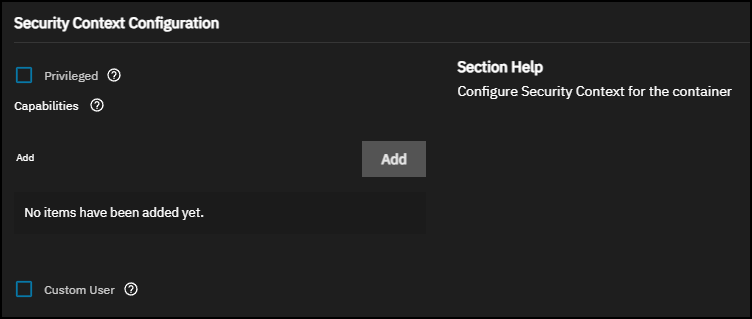
Anything under the "Security Context Configuration"?

No if i don't have anything there you can skip that section.

I took the discover app an converted it to a custom app.

I removed "user: '568:568'" from the yaml and it works.

that's good to hear