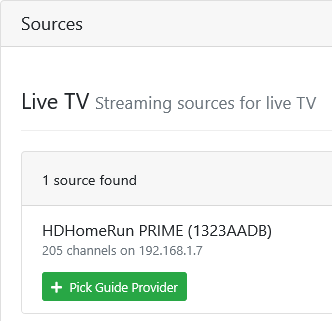
[ERR] Failed to load HDHR lineup

Seeing this error in the DVR log after every DVR update and restart.
dial tcp 192.168.1.7:80: connect: no route to host

Wondering if it's a timing issue at CDVR startup since I can access the HDHR tuner and the lineup url from my DVR Server on the Mac-Mini.

2026/01/12 19:35:08.506269 [SYS] Starting Channels DVR v2026.01.11.0154 (darwin-arm64 pid:1418) in /Users/chDVRuser/Library/Application Support/ChannelsDVR8089/data
2026/01/12 19:35:08.630316 [SYS] Started HTTP Server on 8089
2026/01/12 19:35:09.089282 [ERR] Failed to load HDHR #1323AADB lineup: Get "http://192.168.1.7/lineup.json?tuning&show=found": dial tcp 192.168.1.7:80: connect: no route to host
2026/01/12 19:35:09.089359 [HDR] Found 1 devices
2026/01/12 20:09:50.043830 [DVR] Recording engine started in /Volumes/ChDVR8089mm

2026/01/13 16:33:31.371335 [SYS] Downloading new version v2026.01.13.2217
2026/01/13 16:33:36.471993 [SYS] Update downloaded and verified successfully.
2026/01/13 16:33:36.597840 [SYS] Shutting down for upgrade from v2026.01.11.0154 to v2026.01.13.2217
2026/01/13 16:33:36.599678 [DVR] Recording engine stopped.
2026/01/13 16:33:37.602205 [SYS] Goodbye.
2026/01/13 16:33:37.686064 [SYS] Starting Channels DVR v2026.01.13.2217 (darwin-arm64 pid:7671) in /Users/chDVRuser/Library/Application Support/ChannelsDVR8089/data
2026/01/13 16:33:37.738128 [SYS] Started HTTP Server on 8089
2026/01/13 16:33:38.141066 [ERR] Failed to load HDHR #1323AADB lineup: Get "http://192.168.1.7/lineup.json?tuning&show=found": dial tcp 192.168.1.7:80: connect: no route to host
2026/01/13 16:33:38.141112 [HDR] Found 1 devices
2026/01/13 16:33:38.977100 [DVR] Recording engine started in /Volumes/ChDVR8089mm

2026/01/13 17:31:07.344022 [SYS] Downloading new version v2026.01.14.0118
2026/01/13 17:31:13.600191 [SYS] Update downloaded and verified successfully.
2026/01/13 17:31:13.787064 [SYS] Shutting down for upgrade from v2026.01.13.2217 to v2026.01.14.0118
2026/01/13 17:31:13.787307 [DVR] Recording engine stopped.
2026/01/13 17:31:14.793436 [SYS] Goodbye.
2026/01/13 17:31:14.873468 [SYS] Starting Channels DVR v2026.01.14.0118 (darwin-arm64 pid:8027) in /Users/chDVRuser/Library/Application Support/ChannelsDVR8089/data
2026/01/13 17:31:14.922594 [SYS] Started HTTP Server on 8089
2026/01/13 17:31:15.372857 [ERR] Failed to load HDHR #1323AADB lineup: Get "http://192.168.1.7/lineup.json?tuning&show=found": dial tcp 192.168.1.7:80: connect: no route to host
2026/01/13 17:31:15.372914 [HDR] Found 1 devices
2026/01/13 17:31:16.100390 [DVR] Recording engine started in /Volumes/ChDVR8089mm
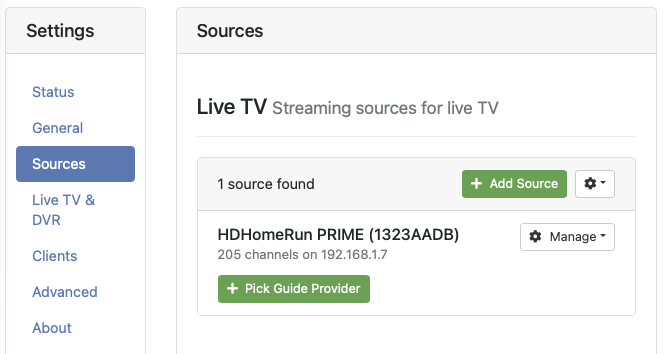
Screenshot 2026-01-13 at 17.58.23

In case this helps, DVR Logs have been submitted as 39dfb8b4-f7fe-4562-8cc9-9b71ce0c5c72
Happened again with the new prerelease update

2026/01/14 11:18:21.743009 [SYS] Downloading new version v2026.01.14.1601
2026/01/14 11:18:25.983105 [SYS] Update downloaded and verified successfully.
2026/01/14 11:18:26.137380 [SYS] Created database snapshot: backup-20260114.191825
2026/01/14 11:18:26.198535 [SYS] Shutting down for upgrade from v2026.01.14.0118 to v2026.01.14.1601
2026/01/14 11:18:26.198936 [DVR] Recording engine stopped.
2026/01/14 11:18:27.202648 [SYS] Goodbye.
2026/01/14 11:18:27.288314 [SYS] Starting Channels DVR v2026.01.14.1601 (darwin-arm64 pid:11957) in /Users/chDVRuser/Library/Application Support/ChannelsDVR8089/data
2026/01/14 11:18:27.338531 [SYS] Started HTTP Server on 8089
2026/01/14 11:18:27.769869 [ERR] Failed to load HDHR #1323AADB lineup: Get "http://192.168.1.7/lineup.json?tuning&show=found": dial tcp 192.168.1.7:80: connect: no route to host
2026/01/14 11:18:27.769924 [HDR] Found 1 devices
2026/01/14 11:18:28.495740 [SYS] Created database snapshot: backup-20260114.191828
2026/01/14 11:18:28.514415 [DVR] Recording engine started in /Volumes/ChDVR8089mm

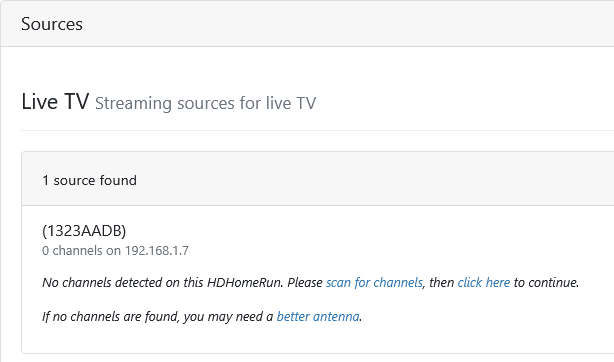
96 seconds after the update completed my Source looked like this
Screenshot 2026-01-14 at 11-20-03 Channels Settings

Less than a minute later it was back to normal
Screenshot 2026-01-14 at 11-20-58 Channels Settings

Sounds like it's a macOS network issue not allowing the Channels DVR daemon network access immediately on launching?

Logs have been submitted as ad7b88fa-bc21-492a-97a9-2703d670ee14

I have a DVR server installed on my Synology in a docker container seeing the same source HDHR (that I also haven't picked a guide provider for) and it doesn't get that error after a DVR update.

2026/01/14 11:43:31.209722 [SYS] Downloading new version v2026.01.14.1601
2026/01/14 11:43:41.879528 [SYS] Update downloaded and verified successfully.
2026/01/14 11:43:42.100572 [SYS] Created database snapshot: backup-20260114.194341
2026/01/14 11:43:42.100806 [SYS] Removing old backup backup-20251222.201655
2026/01/14 11:43:42.121200 [SYS] Shutting down for upgrade from v2026.01.14.0118 to v2026.01.14.1601
2026/01/14 11:43:42.122134 [DVR] Recording engine stopped.
2026/01/14 11:43:43.254853 [SYS] Starting Channels DVR v2026.01.14.1601 (linux-x86_64 pid:8) in /channels-dvr/data
2026/01/14 11:43:43.332738 [SYS] Started HTTP Server on 8089
2026/01/14 11:43:43.796317 [HDR] Found 1 devices
2026/01/14 11:43:44.328448 [DVR] Recording engine started in /volume1/ChDVR8089

Yes, this sounds like a security thing. If you go into System Settings and Privacy & Security, there's a setting for local network access that may need to be enabled.

When it's running as a Daemon it only prompts to approve Local Network access the first time it runs.
I did approve it the first time.
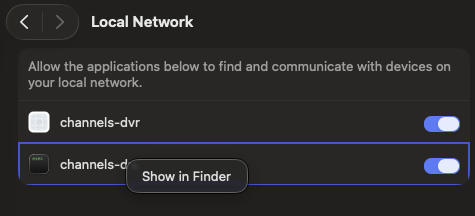
Screenshot 2026-01-14 at 12.44.00

That first entry is from me trying to figure out how to launch multiple instances

The second entry is the one I'm running in
/Users/chDVRuser/Library/Application Support/ChannelsDVR8089/latest/channels-dvr
that launches as a Daemon from
/Library/LaunchDaemons/com.getchannels.dvr.8089.plist

Is anyone else running into this situation? My macOS system is a major release or two behind, so this could be a newer development.

Is your Channels DVR Server running as a Daemon or a User Agent?
I quit running it as a User Agent because I would get prompted to allow Local Network Access for channels-dvr every time I did a pre-release update.

I my research of running down many rabbit holes, I saw something in the Apple Developer Forum that the user prompt to allow a program Local Network access is based on some UUID in the program. All I remember is someone was complaining about the same thing happening every time Chrome updated.

Can you clarify what you mean by User Agent? I have the launchd plist for the DVR in $HOME/Library/LaunchAgents.

UserAgent

I found this helpful as a new Mac user https://www.launchd.info/

Ah, I see you mean a user-based Launch Agent. Yes, that is what I'm using on macOS Sonoma 14.7.7.