
I understand and agree with you, as my YT live channels also work via PLM...
I'm just tracking this with you, as since the custom channels was added, I could never get YT live channels to work in FC, so I'm like you, still using PLM (which feeds VLC and my other iptv player).
@KineticMan Does the following provide any clues to you:
# yt-dlp --version
2026.06.09
# yt-dlp https://www.youtube.com/@KittenAcademy/live
[youtube:tab] Extracting URL: https://www.youtube.com/@KittenAcademy/live
[youtube:tab] @KittenAcademy/live: Downloading webpage
[youtube] Extracting URL: https://www.youtube.com/watch?v=T4XZmMPQ9Kw
[youtube] T4XZmMPQ9Kw: Downloading webpage
WARNING: [youtube] No supported JavaScript runtime could be found. Only deno is enabled by default; to use another runtime add  --js-runtimes RUNTIME[:PATH]  to your command/config. YouTube extraction without a JS runtime has been deprecated, and some formats may be missing. See  https://github.com/yt-dlp/yt-dlp/wiki/EJS  for details on installing one
[youtube] T4XZmMPQ9Kw: Downloading android vr player API JSON
[youtube] T4XZmMPQ9Kw: Downloading m3u8 information
[info] T4XZmMPQ9Kw: Downloading 1 format(s): 96
[download] Destination: Kitten Academy Live Stream 2026-06-13 08_16 [T4XZmMPQ9Kw].mp4
ERROR: m3u8 download detected but ffmpeg could not be found. Please install
ERROR: Unable to download video: [Errno 2] No such file or directory: 'Kitten Academy Live Stream 2026-06-13 08_16 [T4XZmMPQ9Kw].mp4.part'
#
I'm not a dev, so I have no clues if it's important...
1 Like
I had 3 YT Live channels working and did recordings from all 3.
That's why I didn't push it, I saw other folks had it working, so I figured it was something on my end...Plus I had my workaround in PLM
1 Like
Thank you
Here's mine for comparison
root@c7d72d55d4ec:/app# which yt-dlp
/usr/local/bin/yt-dlp

root@c7d72d55d4ec:/app# yt-dlp --version
2026.06.09

root@c7d72d55d4ec:/app# yt-dlp -U
Latest version: [email protected] from yt-dlp/yt-dlp
yt-dlp is up to date ([email protected] from yt-dlp/yt-dlp)

root@c7d72d55d4ec:/app# yt-dlp -F https://www.youtube.com/@KittenAcademy/live
[youtube:tab] Extracting URL: https://www.youtube.com/@KittenAcademy/live
[youtube:tab] @KittenAcademy/live: Downloading webpage
[youtube] Extracting URL: https://www.youtube.com/watch?v=T4XZmMPQ9Kw
[youtube] T4XZmMPQ9Kw: Downloading webpage
WARNING: [youtube] No supported JavaScript runtime could be found. Only deno is enabled by default; to use another runtime add  --js-runtimes RUNTIME[:PATH]  to your command/config. YouTube extraction without a JS runtime has been deprecated, and some formats may be missing. See  https://github.com/yt-dlp/yt-dlp/wiki/EJS  for details on installing one
[youtube] T4XZmMPQ9Kw: Downloading android vr player API JSON
[youtube] T4XZmMPQ9Kw: Downloading m3u8 information
[info] Available formats for T4XZmMPQ9Kw:
ID EXT RESOLUTION FPS ¦   TBR PROTO ¦ VCODEC      ACODEC
-----------------------------------------------------------
91 mp4 256x144     15 ¦  290k m3u8  ¦ avc1.42C00B mp4a.40.5
92 mp4 426x240     30 ¦  546k m3u8  ¦ avc1.4D4015 mp4a.40.5
93 mp4 640x360     30 ¦ 1210k m3u8  ¦ avc1.4D401E mp4a.40.2
94 mp4 854x480     30 ¦ 1569k m3u8  ¦ avc1.4D401F mp4a.40.2
95 mp4 1280x720    30 ¦ 2969k m3u8  ¦ avc1.4D401F mp4a.40.2
96 mp4 1920x1080   30 ¦ 5421k m3u8  ¦ avc1.640028 mp4a.40.2
Looks like SLM is using an older yt-dlp
root@84221e15c7fb:/app# which yt-dlp
/usr/local/bin/yt-dlp

root@84221e15c7fb:/app# yt-dlp --version
2026.03.17

root@84221e15c7fb:/app# yt-dlp -U
Current version: [email protected] from yt-dlp/yt-dlp
Latest version: [email protected] from yt-dlp/yt-dlp
ERROR: You installed yt-dlp from a manual build or with a package manager; Use that to update

root@84221e15c7fb:/app# yt-dlp -F https://www.youtube.com/@KittenAcademy/live
[youtube:tab] Extracting URL: https://www.youtube.com/@KittenAcademy/live
[youtube:tab] @KittenAcademy/live: Downloading webpage
[youtube] Extracting URL: https://www.youtube.com/watch?v=T4XZmMPQ9Kw
[youtube] T4XZmMPQ9Kw: Downloading webpage
WARNING: [youtube] No supported JavaScript runtime could be found. Only deno is enabled by default; to use another runtime add  --js-runtimes RUNTIME[:PATH]  to your command/config. YouTube extraction without a JS runtime has been deprecated, and some formats may be missing. See  https://github.com/yt-dlp/yt-dlp/wiki/EJS  for details on installing one
[youtube] T4XZmMPQ9Kw: Downloading android vr player API JSON
[youtube] T4XZmMPQ9Kw: Downloading m3u8 information
[info] Available formats for T4XZmMPQ9Kw:
ID EXT RESOLUTION FPS ¦   TBR PROTO ¦ VCODEC      ACODEC
-----------------------------------------------------------
91 mp4 256x144     15 ¦  290k m3u8  ¦ avc1.42C00B mp4a.40.5
92 mp4 426x240     30 ¦  546k m3u8  ¦ avc1.4D4015 mp4a.40.5
93 mp4 640x360     30 ¦ 1210k m3u8  ¦ avc1.4D401E mp4a.40.2
94 mp4 854x480     30 ¦ 1569k m3u8  ¦ avc1.4D401F mp4a.40.2
95 mp4 1280x720    30 ¦ 2969k m3u8  ¦ avc1.4D401F mp4a.40.2
96 mp4 1920x1080   30 ¦ 5421k m3u8  ¦ avc1.640028 mp4a.40.2
Unfortunately, I'm out of my depths here...Hopefully KineticMan sees something useful.
1 Like
I just tested the share link and it detected fine for me. Possible you have some ad block on network? Just guessing.
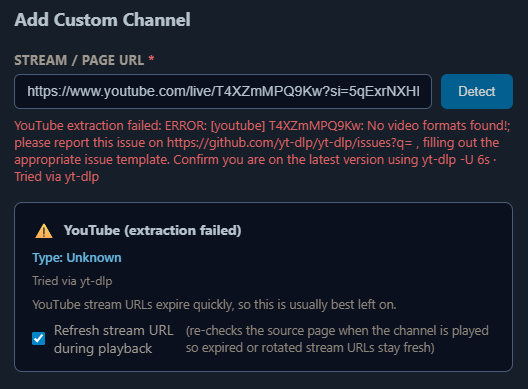
All three of these result in the same error.
https://www.youtube.com/@KittenAcademy/live
https://www.youtube.com/watch?v=T4XZmMPQ9Kw
https://www.youtube.com/live/T4XZmMPQ9Kw?si=5qExrNXHHEvabOS8
All three urls work with SLM.
FastChannels and SLM are both installed in containers on the same Synology NAS and both are using my ISP DNS. I have no ad blocker in use.
You can see the output from the FC and SLM containers yt-dlp in this post
Do any of these work for you?
https://www.youtube.com/@KittenAcademy/live
https://www.youtube.com/watch?v=T4XZmMPQ9Kw
https://www.youtube.com/live/T4XZmMPQ9Kw?si=5qExrNXHHEvabOS8
1 Like
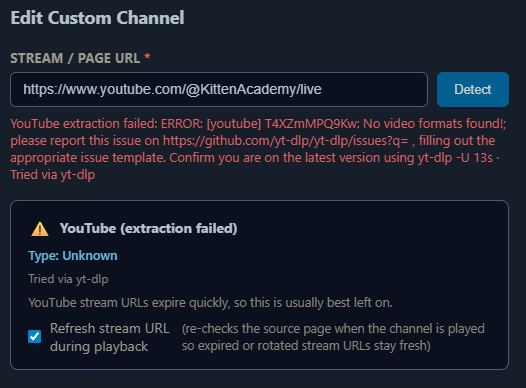
All of my YouTube streams have stopped working. I'm pretty sure the FOBBV nest cam was working early this morning and am certain it was working yesterday.
The Channels Android TV client shows "403 forbidden" for all of them. Redetect fails as shown in your screenshots.
1 Like
No clue what would be different between mine and y’all’s. Working 100% here. Same exact image you guys are on too. I’ll keep looking.
I'm also clueless.
Just for grins, I overrode the container DNS server to Cloudflare in case my ISP was doing DNS filtering.
Synology NAS
root@nas-1019:~# cat /etc/resolv.conf
nameserver      75.75.75.75
SLM Container
# cat /etc/resolv.conf
nameserver      75.75.75.75
FC Container
# cat /etc/resolv.conf
nameserver      75.75.75.75
FC Portainer stack compose
services:
  fastchannels:
    # GitHub home for this project: https://github.com/kineticman/FastChannels
    # Docker container home for this project: https://github.com/kineticman/FastChannels/pkgs/container/fastchannels
    image: ghcr.io/kineticman/fastchannels:latest
    container_name: fastchannels
    environment:
      # Set the timezone to your local timezone
      - TZ=America/Los_Angeles
    network_mode: "bridge"
    ports:
      - "5523:5523"
    restart: unless-stopped
    volumes:
      - db_data:/data
volumes:
  db_data:
override DNS server to Cloudflare
services:
  fastchannels:
    # GitHub home for this project: https://github.com/kineticman/FastChannels
    # Docker container home for this project: https://github.com/kineticman/FastChannels/pkgs/container/fastchannels
    image: ghcr.io/kineticman/fastchannels:latest
    container_name: fastchannels
    environment:
      # Set the timezone to your local timezone
      - TZ=America/Los_Angeles
    network_mode: "bridge"
    dns:
      - "1.1.1.1" # override host OS DNS servers with Cloudflare
    ports:
      - "5523:5523"
    restart: unless-stopped
    volumes:
      - db_data:/data
volumes:
  db_data:
FC Container
# cat /etc/resolv.conf
nameserver 1.1.1.1
Same error.
Sorry to hear that, but good to know it's not just me and Waffles.
Do you have SLM to try?
Out of the box, you do not even need to have PLM turned on to take advantage of these features. With just a base installation of Streaming Library Manager , you can input the following:
Some examples for the[URL_TO_CONTENT](and certainly not limited to) are:
- YouTube Live Stream (Specific):
https://www.youtube.com/watch?v=R7vrbiDi0Tc- YouTube Live Stream (Latest for Channel):
https://www.youtube.com/@KittenAcademy/live- Twitch Live Stream:
https://www.twitch.tv/timthetatmanvods- CBS News Live Stream:
https://www.cbsnews.com/live
thats whats so strange. i haven't touched that code in weeks- and SLM and FC use the same plugin (yt-dlp).
Have you updated yt-dlp recently?
SLM is using an older version.
could be that.
can u run this and send me the output pls?
docker exec fastchannels yt-dlp -v -F --extractor-args "youtube:player_client=web_safari" "https://www.youtube.com/@KittenAcademy/live" 2>&1 |
  grep -iE "pot|sign in|bot|403|throttl|JS runtime"
root@nas-1019:~# docker exec fastchannels yt-dlp -v -F --extractor-args "youtube:player_client=web_safari" "https://www.youtube.com/@KittenAcademy/live" 2>&1 | grep -iE "pot|sign in|bot|403|throttl|JS runtime"
[debug] JS runtimes: none
[debug] [youtube] [pot] PO Token Providers: none
[debug] [youtube] [pot] PO Token Cache Providers: memory
[debug] [youtube] [pot] PO Token Cache Spec Providers: webpo
FULL OUTPUT from inside container
# yt-dlp -v -F --extractor-args "youtube:player_client=web_safari" "https://www.youtube.com/@KittenAcademy/live"
[debug] Command-line config: ['-v', '-F', '--extractor-args', 'youtube:player_client=web_safari', 'https://www.youtube.com/@KittenAcademy/live']
[debug] Encodings: locale UTF-8, fs utf-8, pref UTF-8, out utf-8, error utf-8, screen utf-8
[debug] yt-dlp version [email protected] from yt-dlp/yt-dlp [821bef0f0]
[debug] Lazy loading extractors is disabled
[debug] Python 3.12.13 (CPython x86_64 64bit) - Linux-4.4.302+-x86_64-with-glibc2.41 (OpenSSL 3.5.6 7 Apr 2026, glibc 2.41)
[debug] exe versions: none
[debug] Optional libraries: Cryptodome-3.23.0, brotli-1.2.0, certifi-2026.05.20, curl_cffi-0.15.0, mutagen-1.47.0, requests-2.34.2, sqlite3-3.46.1, urllib3-2.7.0, websockets-16.0, yt_dlp_ejs-0.8.0
[debug] JS runtimes: none
[debug] Proxy map: {}
[debug] Request Handlers: urllib, requests, websockets, curl_cffi
[debug] Plugin directories: none
[debug] Loaded 1739 extractors
[youtube:tab] Extracting URL: https://www.youtube.com/@KittenAcademy/live
[youtube:tab] @KittenAcademy/live: Downloading webpage
[debug] [youtube] [pot] PO Token Providers: none
[debug] [youtube] [pot] PO Token Cache Providers: memory
[debug] [youtube] [pot] PO Token Cache Spec Providers: webpo
[debug] [youtube] [jsc] JS Challenge Providers: bun (unavailable), deno (unavailable), node (unavailable), quickjs (unavailable)
[youtube] Extracting URL: https://www.youtube.com/watch?v=T4XZmMPQ9Kw
[youtube] T4XZmMPQ9Kw: Downloading webpage
[debug] [youtube] Forcing "main" player JS variant for player 445213fb
        original url = /s/player/445213fb/player_es6.vflset/en_US/base.js
WARNING: [youtube] T4XZmMPQ9Kw: n challenge solving failed: Some formats may be missing. Ensure you have a supported JavaScript runtime and challenge solver script distribution installed. Review any warnings presented before this message. For more details, refer to  https://github.com/yt-dlp/yt-dlp/wiki/EJS
[debug] [youtube] T4XZmMPQ9Kw: Detected experiment to bind GVS PO Token to video ID for web_safari client
ERROR: [youtube] T4XZmMPQ9Kw: No video formats found!; please report this issue on  https://github.com/yt-dlp/yt-dlp/issues?q= , filling out the appropriate issue template. Confirm you are on the latest version using  yt-dlp -U
Traceback (most recent call last):
  File "/usr/local/lib/python3.12/site-packages/yt_dlp/YoutubeDL.py", line 1726, in wrapper
    return func(self, *args, **kwargs)
           ^^^^^^^^^^^^^^^^^^^^^^^^^^^
  File "/usr/local/lib/python3.12/site-packages/yt_dlp/YoutubeDL.py", line 1882, in __extract_info
    return self.process_ie_result(ie_result, download, extra_info)
           ^^^^^^^^^^^^^^^^^^^^^^^^^^^^^^^^^^^^^^^^^^^^^^^^^^^^^^^
  File "/usr/local/lib/python3.12/site-packages/yt_dlp/YoutubeDL.py", line 1941, in process_ie_result
    ie_result = self.process_video_result(ie_result, download=download)
                ^^^^^^^^^^^^^^^^^^^^^^^^^^^^^^^^^^^^^^^^^^^^^^^^^^^^^^^
  File "/usr/local/lib/python3.12/site-packages/yt_dlp/YoutubeDL.py", line 2954, in process_video_result
    self.raise_no_formats(info_dict)
  File "/usr/local/lib/python3.12/site-packages/yt_dlp/YoutubeDL.py", line 1191, in raise_no_formats
    raise ExtractorError(msg, video_id=info['id'], ie=info['extractor'],
yt_dlp.utils.ExtractorError: [youtube] T4XZmMPQ9Kw: No video formats found!; please report this issue on  https://github.com/yt-dlp/yt-dlp/issues?q= , filling out the appropriate issue template. Confirm you are on the latest version using  yt-dlp -U
Is this related to the YT issue that @babsonnexus had issues with earlier this year?
The issue I'm referring to was with PLM/SLM...
Pretty sure it's related to the JS Challenge solving @babsonnexus had to incorporate in SLM
[debug] [youtube] [jsc] JS Challenge Providers: bun (unavailable), deno (unavailable), node (unavailable), quickjs (unavailable)
WARNING: [youtube] T4XZmMPQ9Kw: n challenge solving failed: Some formats may be missing. Ensure you have a supported JavaScript runtime and challenge solver script distribution installed. Review any warnings presented before this message. For more details, refer to  https://github.com/yt-dlp/yt-dlp/wiki/EJS