
Why, though? And how do you combine their outputs? Or do you just manually switch between them, from the client? Just curious.
1 Like
Many reasons. One is recording the same airing from multiple sources at the same time via a pass.
They each record to their own shared folders (named for the port#) on my NAS
/volume1/ChDVR8089
/volume1/ChDVR8090
/volume1/ChDVR8189
/volume1/ChDVR8190
/volume1/ChDVR8289
/volume1/ChDVR8389
/volume1/ChDVR8489
Yes, you can easily switch servers from a client.
Mine are all at the same IP address, they just use different ports.
Very interesting, thanks, I enjoy learning about such unique configurations and different use cases.
1 Like
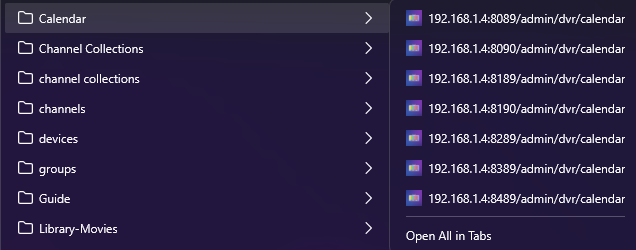
To make admin a bit easier, I created Bookmark Folders in my browser, each folder containing bookmarks for all 7 servers.
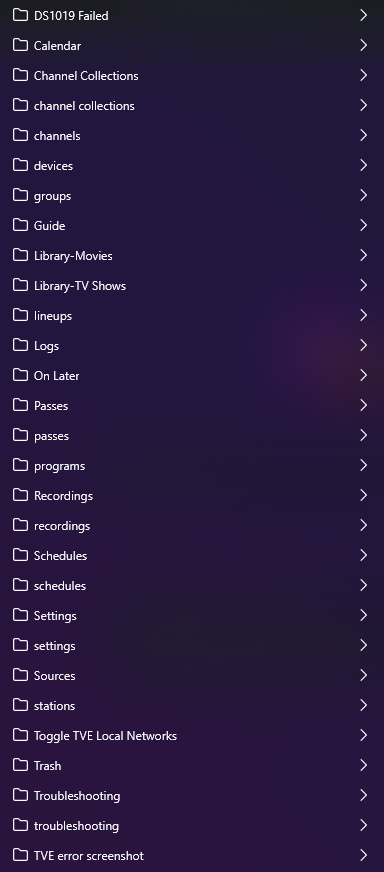
In each folder I just have to click Open All in Tabs to get each server on it's own browser tab.
Have you considered adding one more Channels DVR server who's import's folder contains each of the other servers recording folder. Then all of your content would be visible on that one server.
2 Likes
Good thought, but actually tried that before.
Would have to rename the recorded files and hope I don't end up with lots of incorrect matches.
Renaming the recorded files would cause issues with the server that recorded them not being able to find and play them.
Channels DVR can't even correctly import something it recorded.
I have NOVA recordings from Channels DVR that when imported on another server get mismatched because the Season and Episode that gracenote had when they were recorded are now different in gracenote and TMDB is different than gracenote.
Too much work. Not worth the effort.
I have an active premium Fubo subscription and configured FC with my credentials. When I run a stream audit, most of the channels are showing as dead. The FAST channels are the obvious exception. Channels like CBS, YES, MSG, etc. aren't DRMd with Fubo, so they should work. I checked the log for a recording that failed and see this error message:
app.routes.play: [play] channel confirmed dead ip=192.168.215.1 source=fubo channel_id=16689 channel_name=CBS: Fubo channel 16689 not in subscription: station 16689 is not in allowed list
I'm able to play CBS in the Fubo app, so it's clearly part of my subscription. I've turned Fubo off and on and removed and re-added my user info but the problem persists. @KineticMan what might the issue be?
That error comes right from their api. By chance, does your password have any special characters? I’ve heard on the other Fubo project that it doesn’t like those.
1 Like
No.
Solid feature request. I'd definitely like to get a working solution for PrismCast for the DRM stations and this sounds like a good way to interface the two. My PrismCast hasn't been working and I honestly haven't put much effort into fixing but this is a good time to do so. Although, that developer has been MIA for awhile - hope everything is ok.
Regardless, I'll add this to the to-do.
2 Likes
That would be great if you could make that work. I've turned off Amazon as a source since I can't really do anything with it at present.
Ya, I used PrismCast as the example, however if I were developing this I would probably add it as a DRM proxy setting with default showing PrismCast syntax as an option but then that opens the door for others to build or use other pipelines too. My biggest struggle was pumping through curl and determining when a stream was DRM to know when to apply the proxy or not which is why I thought it might be a good extension to FastChannels. I'm a C++, Java, C# coder, else I would take a swing at adding it myself but by adding the feature it opens the door for others like myself to add a pipeline extension to help process DRM content from different providers or generically like Prismcast does.
appreciate it. Already started on it a little bit last night- my goal is to create a DRM-Bridge feature that (if enabled) will create a separate feed for Channels that will funnel DRM-channels through PrismCast. If a channel has native HLS, it'll just flow that directly to CDVR. End result will be seamless to user - all streams will play in CDVR regardless of HLS direct or DRM-Bridge.
I'll allow it to be opt-in if a user doesn't care to use this feature FYI.
6 Likes

My goodness, you are a machine of features. This one tool will probably become the Swiss Army Knife of streaming, within Channels or outside of it. The community will be eternally grateful to you.
This is going to be great.
Looking forward to checking it out.
1 Like
I would be interested for that DRM bridge. That'll prevent me from having 2 FAST Channels containers just to get the DRM'd feeds and non-DRM feeds.
So...what you're proposing is basically two feeds? 1 for DRM feeds which could be used with Prismcast to get by DRM and 1 for non-DRM feeds, right?
As of right now, I am leaving it up to users to decide. I’ll leave the OG feed of only HLS streams for those that don’t want to use the bridge. Then a “sub-feed” that is a combo of HLS and DRM bridged through Prism. No config required on Prism - it uses its API to call the stream.
I got a prototype working right now. Only caveat- FastChannels and PrismCast must be on same server due to the HTTP/HTTPS restrictions. Not a darn thing I can do to get around Chrome restrictions for that.
I would ok with that. I have a Fubo Latino sub and some channels are DRM'd so having that option is nice since Prismcast can be a bit weird with fubo stuff. Using FAST Channels for that would be fine
When my wife says something is “fine”, that means she doesn’t approve. 
1 Like