got it.
Like @babsonnexus said, it's likely upstream issue. I'll take another look at it - maybe if nothing else, I could re-name the sub-channels PBS World, or PBS Create?

got it.
Like @babsonnexus said, it's likely upstream issue. I'll take another look at it - maybe if nothing else, I could re-name the sub-channels PBS World, or PBS Create?
I have a few questions.
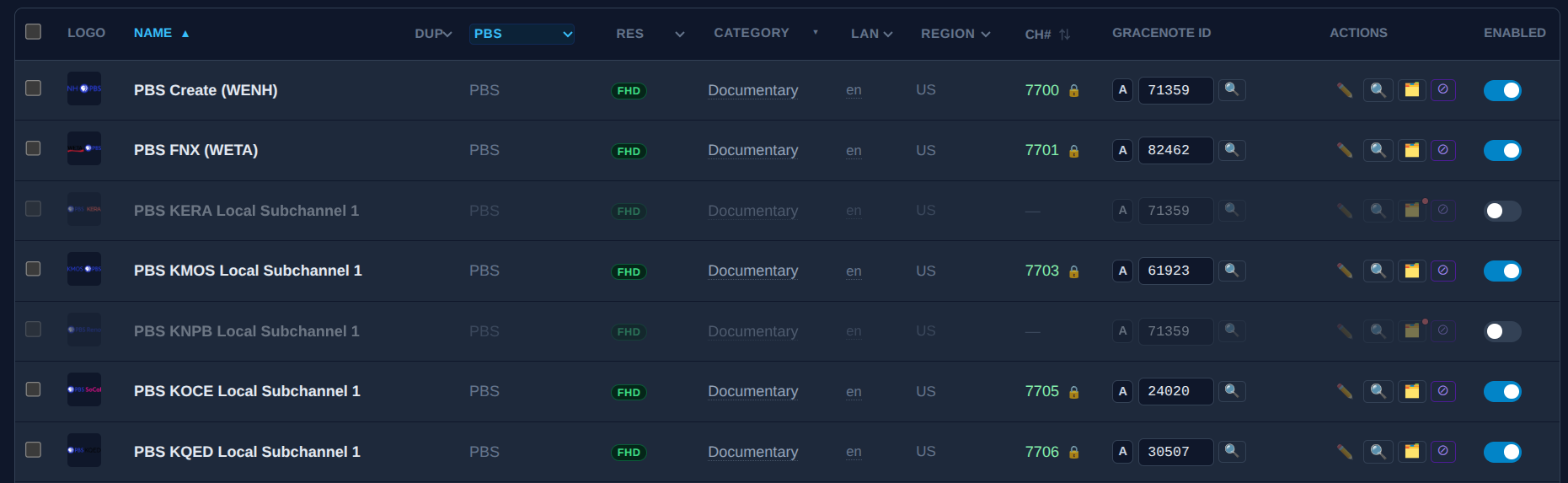
At some point in updating to FC v5.0.2 or v5.0.3, my PBS channels started auto populating Gracenote id #'s. Likely because I have the "Auto-assign Gracenote IDs" option enabled in FC Settings.
Where are these ID numbers coming from?
Are they from scraped data for each channel?
If so, can they be assumed to be accurate?
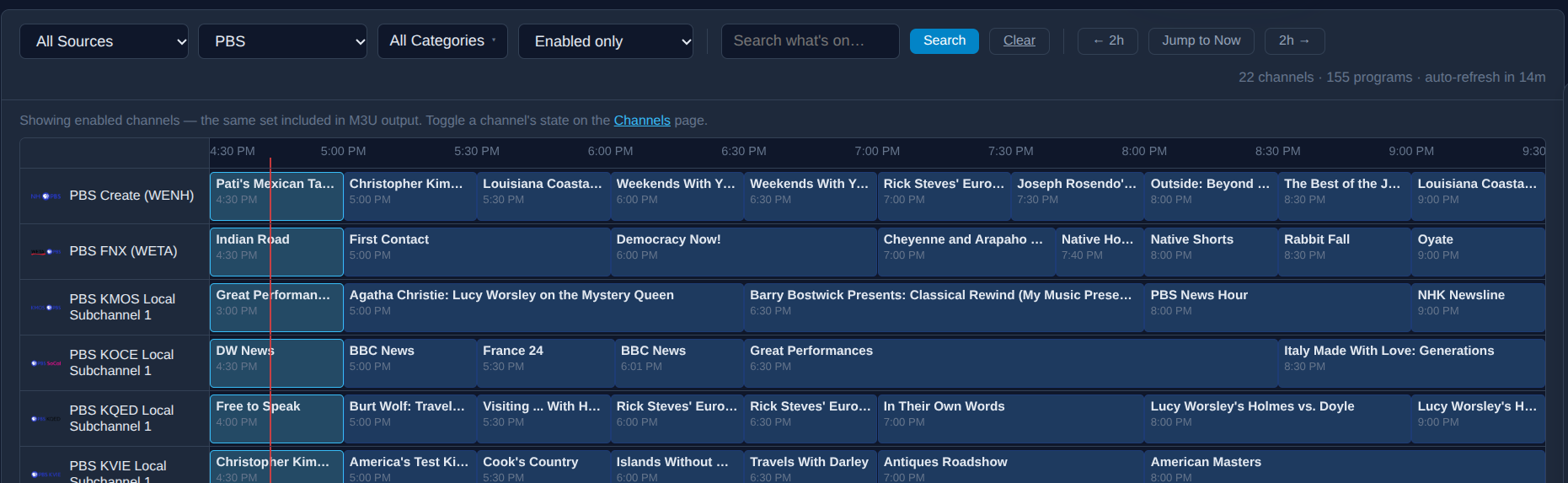
With these automatically assigned Gracenote IDs, is this the GN guide info we are seeing when viewing the guide through the FC GUI?
No. In that guide view you're viewing the FastChannels scraped EPG.
From our friend @babsonnexus work. I merged his mapping he did on SLM into the community sourced Gracenote IDs. If they’re wrong, publicly shame him 
I'm pretty confident that @babsonnexus matched Gracenote IDs up carefully. I have used Playlist Manager from within Streamlinks Manager for my PBS feeds for quite some time. Most, if not all of my recordings have matched up well.
Before SLM, I couldn't make much sense of PBS gracenote info. Every time I thought I had a good match, a couple of oddball local shows would come on to prove me wrong.
Source Samsung TV Plus is out of scraped guide data.
Notified Matt
FastChannels 5.0.4 — What's New
 Guide data: duplicate/repeating episodes fixed on a lot of channels
If your DVR (Channels DVR, etc.) was showing the same episode number over and over on channels like Pluto's Big Brother cameras, news blocks, game-show rotations, or other 24/7-style channels — and only recording/keeping one airing instead of each one — that's fixed. Turns out a bunch of these live/rotating channels were sending duplicate or placeholder episode info upstream, which made your DVR think every airing was a rerun of the same thing. No migration to old data, but as your run new scrapes, the fix will be in those programs.
Fixed across: Pluto, LG Channels, LocalNow, Plex, Roku, Xumo, Vizio, Tubi, TCL, Sling, Cox, Fubo, Warner (TBS/TNT/truTV), AMC Networks, and Philo. (Frndly TV got the same protection preemptively — will confirm once we can re-test it.)
 TV Everywhere (TVE) fixes
 Playback reliability
 Smaller fixes
When do you sleep man???
Thanks, it's not a big issue. I was just looking for a way to get PBS NewsHour at 6:00 p.m. ET instead of 7:00 p.m. because our PBS Feeds app has gone in the weeds apparently. I looked in the guide and saw that some of the channels had it at 6:00 p.m. so I tried one and quickly discovered that it wasn't actually the main PBS feed.
for sure- PBS stations DRM their Main and Kids feeds. I threw in a selection of other feeds they don't DRM, but if you have DRM-Bridge setup with Prismcast, you are able to watch the Main/Kids feeds now.
We've just released the ability to have a single Custom Source that mixes XMLTV and Gracenote channel mappings that should simplify configuration in the future:
I'm currently struggling with Prismcast not working as it should in Xfinity. I think it's having trouble realizing that I'm logged in. (I'd go into more detail, but that probably belongs more in the Prismcast discussion than here....). However, it seems to be having trouble with secure browser access:
http://192.168.2.160:5523 reports window.isSecureContext=false.
Fix: For an HTTP LAN origin, enable chrome://flags/#unsafely-treat-insecure-origin-as-secure for this exact origin and relaunch Chrome, or use HTTPS.
The thing is, I do have that enabled in Chrome, and it's worked before - but now it's decided not to work. I double-checked, and the setting is on, with the correct origin included.
While I'm struggling with that, I'm trying to figure out how to enable the PBS features. Are there instructions somewhere on that?
Did you happen to upgrade? They changed something and I pushed an update yesterday or Thursday
I'm subscribed to beIN Sports Connect through SlingTV. Most of these channels are offline until the start of the broadcast of soccer match. When I select the channel and the match has already started, it plays at the beginning of the broadcast and not live. I know in the Sling App, there is an option to start the match at the beginning or it defaults to live.
When I play these channels directly through PrismCast they go straight to the live match, but playing these channels through FastChannels plays at the beginning.
Is this something that I can change in my settings???
Thanks!!!
I had upgraded earlier in the week, but just upgraded after your message. All is working now.
Thanks!
Yo- you mind sharing the logs when you hit play? I’ll dig into it
here is my logs from prismcast, Could the time setting be wrong?? And why would the time in PrismCast be different from my computer??
[2026/08/15 12:56:13.956 PM] [0.1-7kgcvb] Stream ended after 1m 25s.
[2026/08/15 02:36:34.936 PM] Restarting browser for scheduled maintenance (uptime: 6h 5m).
[2026/08/15 02:36:35.587 PM] Chrome ready: Chrome/148.0.7778.167 (GPU: llvmpipe (LLVM 19.1.7 256 bits)).
[2026/08/15 02:36:35.692 PM] Browser restart complete. Fresh instance is ready.
[2026/08/15 02:42:48.954 PM] [0.1-7a8ca0] Streaming http://127.0.0.1:5523/watch/10125: 0.1, keyboardFullscreen, FFmpeg [H264]. Tuned in 3.4s (direct).
[2026/08/15 02:45:54.211 PM] [0.1-7a8ca0] Stream ended after 3m 9s.
[2026/08/15 02:46:00.184 PM] [0.1-zqsdrv] Streaming http://127.0.0.1:5523/watch/10125: 0.1, keyboardFullscreen, FFmpeg [H264]. Tuned in 2.9s (direct).
[2026/08/15 02:46:54.213 PM] [0.1-zqsdrv] Stream ended after 57s.
[2026/08/15 04:40:24.272 PM] [0.1-bykmij] Streaming http://127.0.0.1:5523/watch/10125: 0.1, keyboardFullscreen, FFmpeg [H264]. Tuned in 3.3s (direct).
[2026/08/15 04:41:06.553 PM] [0.1-s3dtsp] Streaming http://127.0.0.1:5523/watch/10128: 0.1, keyboardFullscreen, FFmpeg [H264]. Tuned in 4.0s (direct).
[2026/08/15 04:41:24.459 PM] [0.1-bykmij] Stream ended after 1m 4s.
[2026/08/15 04:42:04.434 PM] [0.1-d5iy0v] Streaming http://127.0.0.1:5523/watch/10129: 0.1, keyboardFullscreen, FFmpeg [H264]. Tuned in 3.5s (direct).
[2026/08/15 04:42:24.467 PM] [0.1-s3dtsp] Stream ended after 1m 22s.
[2026/08/15 04:45:24.474 PM] [0.1-d5iy0v] Stream ended after 3m 23s.
[2026/08/15 04:46:01.249 PM] [0.1-xoahl3] Streaming http://127.0.0.1:5523/watch/10128: 0.1, keyboardFullscreen, FFmpeg [H264]. Tuned in 3.5s (direct).
[2026/08/15 04:46:25.948 PM] [0.1-6qrlrt] Streaming http://127.0.0.1:5523/watch/10129: 0.1, keyboardFullscreen, FFmpeg [H264]. Tuned in 3.4s (direct).
[2026/08/15 04:51:01.763 PM] [0.1-4j9u4b] Streaming http://127.0.0.1:5523/watch/10131: 0.1, keyboardFullscreen, FFmpeg [H264]. Tuned in 3.7s (direct).
[2026/08/15 04:51:34.493 PM] [0.1-xoahl3] Stream ended after 5m 37s.
[2026/08/15 04:51:34.502 PM] [0.1-6qrlrt] Stream ended after 5m 12s.
Last few logs in FastChannels:
2026-08-15 11:35:55,859 INFO app.routes.play: [play] request_id=dfb5cf38f3a4f1d6 ip=192.168.1.79 source=frndlytv channel_id=54 channel_name=MOVIES!
2026-08-15 11:35:56,722 INFO app.routes.play: [play] request_id=81eeda3313e7ab39 ip=192.168.1.79 source=plex channel_id=639a0b83812b6c1429f7acd1 channel_name=BritBox Mysteries
2026-08-15 11:38:36,345 INFO main: [scheduler] Enqueued roku (interval=60m, age=60m)
2026-08-15 11:38:36,722 INFO app.worker: [roku] Scrape job started
2026-08-15 11:38:37,563 INFO app.scrapers.roku: [roku] 814 channels fetched
2026-08-15 11:38:37,698 INFO app.scrapers.roku: [roku] EPG skip: 813/814 channels (fresh, no-schedule, or disabled), skipping content proxy
2026-08-15 11:38:38,302 INFO app.worker: [xml-cache] enqueued refresh job
2026-08-15 11:38:38,302 INFO app.worker: [roku] Scrape complete — 814 channels, 0 programs (1.6s)
2026-08-15 11:38:38,313 INFO app.routes.images: [images] pre-warm starting: 814 URLs — 814 already fresh, 0 to fetch (4 workers)
2026-08-15 11:38:38,313 INFO app.routes.images: [images] pre-warm done: 0 cached, 814 already fresh, 0 failed (of 814 total)
Hello KineticMan,
I have v5.0.4 running in Docker. Now the Series ID is back but it has a fastchannels/ prefix instead of a pluto/ prefix. So it's not recognizing my existing passes and recordings.
For example: SeriesID == fastchannels/6a6a558f8a82c01510251277.
Should be: SeriesID == pluto/6a6a558f8a82c01510251277.
Would it fix my issue if I edit line 246 of xmltv.py to replace 'fastchannels' with 'pluto':
246: SubElement(el, 'series-id', system='fastchannels').text = series_id
Would this break any of the other Pluto functionality? I am using the Native (scraped-only) endpoints — advanced URLs with the Pluto feed. I'm not using it for any other feeds.
Thank you!
retrostream
--- UPDATE ---
I also had to edit line 196 of the xmltv.py file to get the Series ID is recognized and mark the recorded episodes.
196: system = 'dd_progid' if _is_tms_id(episode_id) else 'pluto'
However, the episodes no longer show up in the guide -- either the Channels guide or the localhost:5523/admin/guide. Any idea how to fix this?
In an unrelated issue, the Native M3U file points the channel logo to localhost, not the container hostname. For example:
tvg-logo="http://localhost:5523/logos/08e03280659b3b9be49c4e86b6c55be8.png"
I am not running the docker container on the same device as the Channels DVR, so I edited line 1029 of the m3u.py file, by explicitly changing it to http://hostname_of_docker_container:5523 and it loads all of the logo URLs properly. Thanks.