
So I finally have a shipment for that shiny M4 Pro mini (Hopefully it will arrive). I'm planning on using that to run PrismCast & Fast Channels on. Will still run CDVR on Synology NAS. Let me know if there’s anything you need tested on a virgin machine
Given how fast you include features and how good this project already is, the community can wait for you to get the PrismCast properly embedded into it. That is my impression.
Just an FYI, the Prismcast bridge is working fine on my native Windows install of Prismcast.
One thing though, the channels FC pulled down were not all "free" channels, it pulled quite a few channels that needed a paid subscription in Prime.
1 Like
glad it works for someone!
i'll look into Amazon to see if i can seperate entitlements out.
Anyone else seeing the gracenote IDs disappear? I noticed my Channels DVR guide for the Roku gracenote channels said it was loading for a very long time and came to realize there were no longer any channels in there after checking channels tab in FastChannels:

Plex is also completely empty. Pluto has dramatically fewer (9 total):
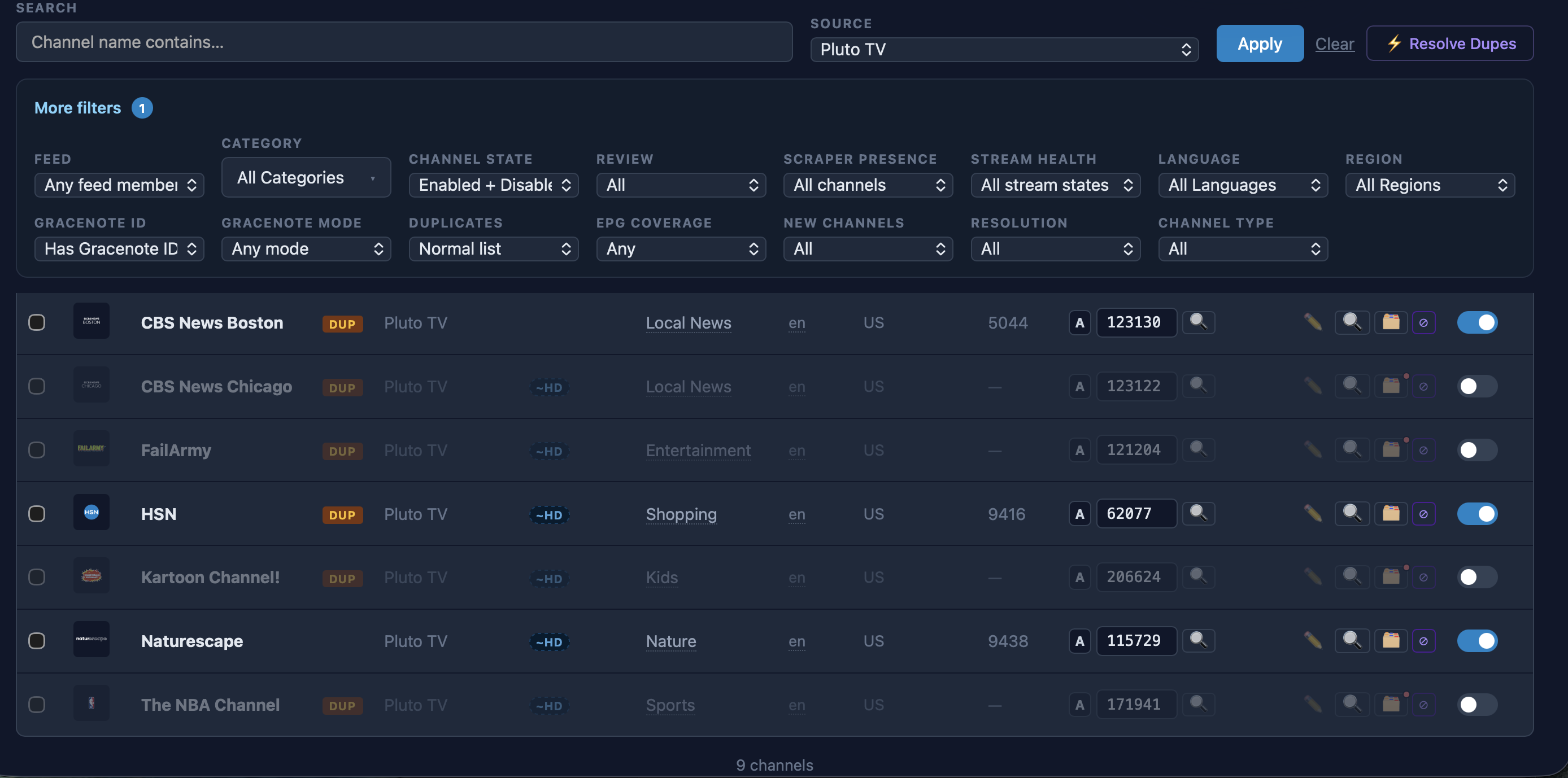
Maybe there is a way to try to force them to re-match?
Have you thought about how VOD content might be integrated into FastChannels? Maybe some way to create a pseudo-channel with a VOD playlist so the content could be recorded by CDVR?
Unsure what would have caused that but I’ll check into it. I suspect maybe the channelID changed upstream and we didn’t carry the Gracenote along with it.
@KineticMan very small request if possible...
In the Help/Links section, could you add a direct link for/to the Channels/FastChannels page?
Thanks.
1 Like
Continuation of the weirdness. Where I posted earlier:
I've been playing Comedy Central for the last 7 hours. The glitch in the matrix happened multiple times today. It randomly jumps backwards half-hour to an hour, then it will jump forward to near-live stream. It happens when it pauses/goes black/recovers, but it doesn't happen every time. Channels always show it's on live stream. Logs look the same as the ones I sent earlier and posted the other day. Chrome is ahead of what's showing up on TV, currently the TV is about 5 minutes behind, but Channels can't FF to catch up, it thinks it's live. If I stop the stream and wait for the tab in Chrome to go away and start the stream again, the TV lags behind ~10 seconds. It almost always goes into the pause/black screen/recovery within 2 minutes when starting a new stream. I just started a new stream and after it recovered, the lag is ~20 seconds behind. CPU usage on the Mac mini is maintaining low 20s% utilization until it has to recover, then it goes up to nearly 30%. I went back and looked at the CPU usage log and I don't see anything higher than 27%. This is still on the 2018 i5 6-core Mac mini - I haven't had the time to get the new M4 Pro set up yet.
I'll PM the entire logs to you in a few minutes.
I loaded v4.99 this morning. Here is what I got with DirectTV Stream.
- All my channels from DTV test good when I click on the righthand hour glass.
(Live 1920x1080) - When I click on the underlined name in the channel list and select "Play Here", they all play fine.
- None of the channels show up in ChannelsDVR. All other FastChannels from other sources do show up and work fine.
- Running PrismCast (DRM Bridge) Test fails on "End to end capture", See screen shot.
- I copied the diagnostics below.
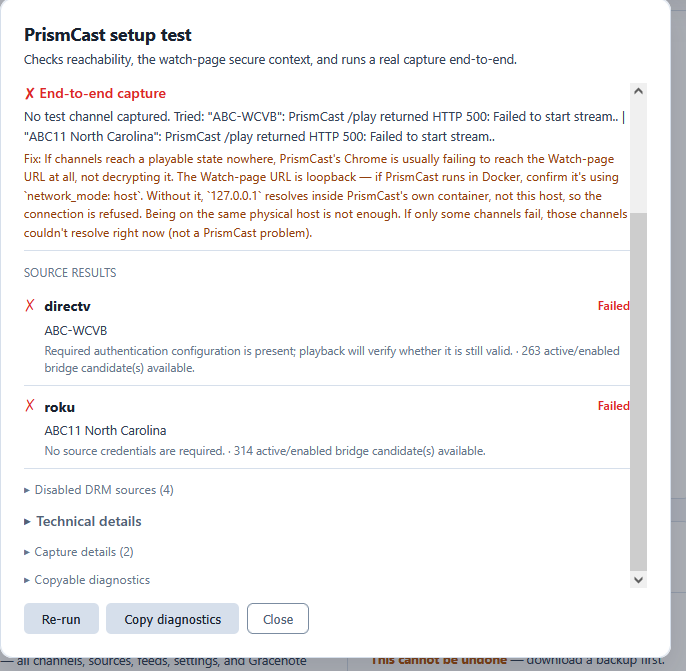
PrismCast setup diagnostics
Overall: FAIL

Settings:
  Public Base URL: http://localhost:5523
  PrismCast Server URL: http://192.168.0.232:5589
  Watch-page URL base: http://localhost:5523
  Channels DVR URL: http://192.168.0.232:8089
  Bridge DRM enabled: true
  PrismCast max height: 0
  Browser origin: http://localhost:5523
  Browser isSecureContext: true

PrismCast health:
  Status: healthy
  Version: 1.10.3
  Chrome: Chrome/148.0.7778.167
  Capture mode: ffmpeg
  FFmpeg available: true
  Initial streams: 0/10

PrismCast API probes:
  /status: HTTP 404, 6ms, available false, content-type text/html; charset=utf-8
  /debug/streams: HTTP 404, 6ms, available false, content-type text/html; charset=utf-8
  /metrics: HTTP 404, 5ms, available false, content-type text/html; charset=utf-8

PrismCast port probes:
  PrismCast API: 192.168.0.232:5589 open (1ms)
  HDHomeRun emulation (optional): 192.168.0.232:5004 open (1ms)
  noVNC (optional): 192.168.0.232:6080 open (1ms)

PrismCast health snapshots:
  before_capture: HTTP 200, 6ms, status healthy, streams 0/10
  before_play:4018: HTTP 200, 6ms, status healthy, streams 0/10
  after_play:4018: HTTP 200, 10ms, status healthy, streams 0/10
  before_play:1955: HTTP 200, 9ms, status healthy, streams 0/10
  after_play:1955: HTTP 200, 10ms, status healthy, streams 0/10

DRM candidates:
  amazon_prime_free: no selected channel; active/enabled 0; bridge candidates 0
    Auth: Required authentication configuration is present; playback will verify whether it is still valid.
    Readiness: Not tested: source is disabled or EPG-only.
    Fix: Enable the source before running the PrismCast test.
  cox: no selected channel; active/enabled 0; bridge candidates 0
    Auth: Required source configuration is missing: username, password.
    Readiness: Not tested: source is disabled or EPG-only.
    Fix: Enable the source before running the PrismCast test.
  directv: selected ABC-WCVB (#4018); active/enabled 263; bridge candidates 263
    Auth: Required authentication configuration is present; playback will verify whether it is still valid.
    Readiness: 263 active/enabled bridge candidate(s) available.
  philo: no selected channel; active/enabled 0; bridge candidates 0
    Auth: No source credentials are required.
    Readiness: Not tested: source is disabled or EPG-only.
    Fix: Enable the source before running the PrismCast test.
  roku: selected ABC11 North Carolina (#1955); active/enabled 319; bridge candidates 314
    Auth: No source credentials are required.
    Readiness: 314 active/enabled bridge candidate(s) available.
  sling: no selected channel; active/enabled 0; bridge candidates 0
    Auth: No source credentials are required.
    Readiness: Not tested: source is disabled or EPG-only.
    Fix: Enable the source before running the PrismCast test.

Checks:
  [ok] PrismCast server reachable: http://192.168.0.232:5589 responded (version 1.10.3, capture ffmpeg, Chrome/148.0.7778.167, streams 0/10)
  [info] PrismCast API capabilities (optional endpoints): Available optional endpoints: none detected; unavailable: /status=404, /debug/streams=404, /metrics=404
  [ok] Watch-page URL is a secure context: http://localhost:5523 — loopback — a valid secure-context address. This only checks the URL's shape; see "End-to-end capture" below to confirm PrismCast can actually reach it.
  [info] Loopback watch-page routing: The Watch-page URL uses loopback. That is correct only when PrismCast Chrome shares the host network namespace.
      Note: For Docker PrismCast, use `network_mode: host`. In bridge networking, 127.0.0.1 points inside the PrismCast container.
  [ok] This browser secure context: http://localhost:5523 reports window.isSecureContext=true.
  [ok] DRM bridge candidates: Selected one candidate per source: directv (ABC-WCVB), roku (ABC11 North Carolina).
  [fail] End-to-end capture: No test channel captured. Tried: "ABC-WCVB": PrismCast /play returned HTTP 500: Failed to start stream.. | "ABC11 North Carolina": PrismCast /play returned HTTP 500: Failed to start stream..
      Fix: If channels reach a playable state nowhere, PrismCast's Chrome is usually failing to reach the Watch-page URL at all, not decrypting it. The Watch-page URL is loopback — if PrismCast runs in Docker, confirm it's using `network_mode: host`. Without it, `127.0.0.1` resolves inside PrismCast's own container, not this host, so the connection is refused. Being on the same physical host is not enough. If only some channels fail, those channels couldn't resolve right now (not a PrismCast problem).

Proxy failures during diagnostic:
  (none)

Capture attempts:
  Attempt 1: ABC-WCVB (directv/8628)
    Diagnostic ID: eef1627d1ec9f29f
    Watch URL: http://localhost:5523/watch/4018?debug=1&capture_probe=1&fc_request_id=eef1627d1ec9f29f
    PrismCast /play URL: http://192.168.0.232:5589/play?url=http%3A%2F%2Flocalhost%3A5523%2Fwatch%2F4018%3Fdebug%3D1%26capture_probe%3D1%26fc_request_id%3Deef1627d1ec9f29f&profile=keyboardFullscreen
    /play status: 500
    /play body: Failed to start stream.
    Health before /play: before_play:4018: HTTP 200, 6ms, status healthy, streams 0/10
    Health after /play: after_play:4018: HTTP 200, 10ms, status healthy, streams 0/10
    HLS statuses: (none)
    Segments: 0
    Elapsed seconds: 7.8
  Attempt 2: ABC11 North Carolina (roku/ce021f67f6595e8a8a8cca45a5561440)
    Diagnostic ID: aff058673f9588ef
    Watch URL: http://localhost:5523/watch/1955?debug=1&capture_probe=1&fc_request_id=aff058673f9588ef
    PrismCast /play URL: http://192.168.0.232:5589/play?url=http%3A%2F%2Flocalhost%3A5523%2Fwatch%2F1955%3Fdebug%3D1%26capture_probe%3D1%26fc_request_id%3Daff058673f9588ef&profile=keyboardFullscreen
    /play status: 500
    /play body: Failed to start stream.
    Health before /play: before_play:1955: HTTP 200, 9ms, status healthy, streams 0/10
    Health after /play: after_play:1955: HTTP 200, 10ms, status healthy, streams 0/10
    HLS statuses: (none)
    Segments: 0
    Elapsed seconds: 7.9
hey - i think yours should be straight forward. are you running Prismcast in Docker?
if so, in your Prismcast compose file, change it to network_mode: host
not sure I follow -- what page do you want linked?
@KineticMan, thanks again for helping me get PrismCast working. I've pulled in the Philo channels and they are working great. Question.....the use of your PrismCast in FastChannels is using PrismCast to access Philo (Philo.com) website to access channels (such as HGTV), or is it using HGTV's website (HGTV.com) with Philo's credentials? Not that it really matters at this point, but I believe Philo limits you to 3 concurrent devices (streams) but if you access via HGTV's website (or others for that matter), then it doesn't count against stream limitations.
Thinking if there's a future state where we were to use Sling TV through FC using Prism, Sling limits you to 1 stream for ESPN based content, but if you access via ESPN.com's website, I believe that circumvents the stream limit.
I may be totally off base here, so course correct me if I have any of this wrong, but just curious.
Jay
1 Like
I posted a few days ago on how it works, but the generic architecture is this.. I scrape most sources API. Then, I grab the raw HLS links and provide it to the m3u so CDVR can ingest.
For the DRM sources, same idea. But one step more, FC talks to their DRM license server and proxys that to Shaka (the embedded player). Shaka then decodes it (with the secure Chrome EME) and plays it back. It does NOT decrypt DRM. It's all done through Shaka and Chrome 100% legally.
To answer your question about concurrent streams.... I don't know- I suspect it might still trigger their concurrent stream detection, but I truly don't know.
Directly to the FastChannels page...
Currently, if I click the link in the Help page, it takes me to the Channels Community page and I have to then look for or search for the FastChannels page. Sometimes it's under the Latest list, but sometimes it's not....
sure.. Chrome has a cool way to bookmark pages, too 
I ran 5 instances of Dispatcharr and tuned to 5 different channels within Philo and no error popped up. Not a guarantee that this works for other services with stream/device limits, but is promising when looking to replace TVE's value add of not counting against stream/device limits.
Thanks again.
Yes, I'm running PrismCast in Docker. There was no reference to "network_mode" in my compose file, so I added:
- NETWORK_MODE=${NETWORK_MODE:-HOST}
I'm not sure if this is what I was supposed to do, but the FastChannels test of PrismCast still fails. My full compose file is below.
services:
  prismcast:
    # 2026.03.13
    # GitHub home for this project with setup instructions: https://github.com/hjdhjd/prismcast.
    # Docker container home for this project: https://github.com/hjdhjd/prismcast/pkgs/container/prismcast.
    image: ghcr.io/hjdhjd/prismcast:${TAG:-latest}
    container_name: prismcast
    hostname: prismcast
    dns_search: ${DOMAIN:-localdomain}
    shm_size: '2gb'
    #devices:
      #- /dev/dri:/dev/dri
    ports:
      - ${HOST_PORT:-5589}:${PORT:-5589}
      - ${HOST_VNC_PORT:-5900}:${VNC_PORT:-5900}
      - ${HOST_NOVNC_PORT:-6080}:${NOVNC_PORT:-6080}
      - ${HOST_HDHR_PORT:-5004}:${HDHR_PORT:-5004}
    environment:
      - HOST=${HOST:-0.0.0.0}
      - NETWORK_MODE=${NETWORK_MODE:-HOST}
      - PORT=${PORT:-5589}
      - VNC_PORT=${VNC_PORT:-5900}
      - NOVNC_PORT=${NOVNC_PORT:-6080}
      - HDHR_PORT=${HDHR_PORT:-5004}
      - DISPLAY_NUM=${DISPLAY_NUM:-99}
      - SCREEN_WIDTH=${SCREEN_WIDTH:-1920}
      - SCREEN_HEIGHT=${SCREEN_HEIGHT:-1080}
      - SCREEN_DEPTH=${SCREEN_DEPTH:-24}
      - LIBVA_DRIVER_NAME=${LIBVA_DRIVER_NAME:-iHD} # Override below with LIBVA_DRIVER_NAME=i965 for older Intel GPUs (pre-Gen 9 aka Skylake).
    healthcheck:
      test: ["CMD", "wget", "-q", "--spider", "http://localhost:${PORT:-5589}/health"]
      interval: 30s
      timeout: 10s
      retries: 3
      start_period: 30s
    volumes:
      - prismcast-data:/root/.prismcast
    restart: unless-stopped
volumes:
  prismcast-data:
1 Like
Not sure if this helps.....
Here's my PrismCast Stack:
version: "3.8"

services:
  prismcast:
    image: ghcr.io/hjdhjd/prismcast:latest
    container_name: prismcast
    hostname: prismcast
    network_mode: host

    dns_search: ${DOMAIN:-localdomain}
    shm_size: ${SHM_SIZE:-2gb}

    devices:
      - /dev/dri:/dev/dri

    environment:
      - PORT=${PORT:-5589}
      - VNC_PORT=${VNC_PORT:-5900}
      - NOVNC_PORT=${NOVNC_PORT:-6080}
      - HDHR_PORT=${HDHR_PORT:-5004}
      - DISPLAY_NUM=${DISPLAY_NUM:-99}
      - SCREEN_WIDTH=${SCREEN_WIDTH:-3840}
      - SCREEN_HEIGHT=${SCREEN_HEIGHT:-2160}
      - SCREEN_DEPTH=${SCREEN_DEPTH:-24}
      - LIBVA_DRIVER_NAME=${LIBVA_DRIVER_NAME:-iHD}

    healthcheck:
      test: ["CMD", "wget", "-q", "--spider", "http://localhost:${PORT:-5589}/health"]
      interval: 30s
      timeout: 10s
      retries: 3
      start_period: 30s

    volumes:
      - /opt/prismcast:/root/.prismcast

    restart: unless-stopped
Here's my FastChannel Stack:
version: "3.9"

services:
  fastchannels:
    image: ghcr.io/kineticman/fastchannels:latest
    container_name: fastchannels
    restart: unless-stopped
    ports:
      - "5523:5523"
    volumes:
      - fastchannels_data:/data

volumes:
  fastchannels_data:
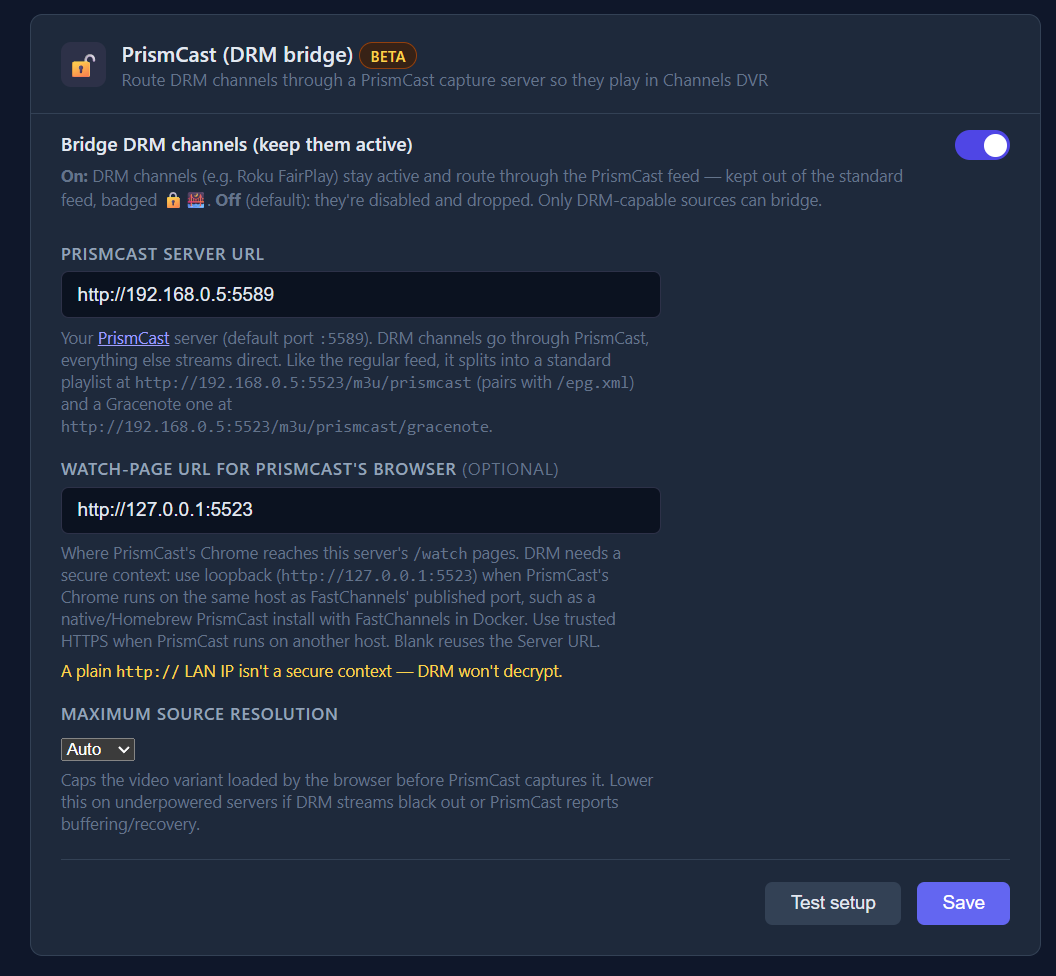
And FC Settings for PrismCast feature:
It doesn't go in the environment block, it needs its own. I'd suggest inserting it right above restart:, like this:
    volumes:
      - prismcast-data:/root/.prismcast
    network_mode: host
    restart: unless-stopped
If you're running on Windows, you'll also need to enable host networking in Docker Desktop settings. You'll need a PC with well above average specs to run this successfully in Docker on Windows. Windows 11 with all the latest updates is likely required as well.
1 Like