
Plex and pluto work great when they are playing the content from their own cdn.
When they try to replay or relay someting like xite r x metel, the channel doesn't transition smoothly between the break and main feed.
in my opinion, LG channels seems to have the transition down solid.
roku is ok however i had an issue where the live channel would go to a break and play the promos and go back to the feed. it would play for a brief period and play part of the break again and restart the feed.
I don't think the ad insertion and the feeds are at the same bit rate.
I would have to try other stuff.
1 Like
I already had the setting mentioned (had it for some time, actually and have relaunched multiple times since).
When I open a prismcast Roku channel all I get in Chrome is a blank screen.
What I see in the full-screen fast channels guide screen varies:
On Channel 3 Eyewitness News I get the message "Stream uses AES-128 encryption — requires Safari or a native HLS player."
On BBC Drama I get the message "Click, Space, or F to play fullscreen · C toggles captions." When I do that I get only a still image related to the program.
On The Goldbergs I get "Could not load stream: Shaka Error 6001."
As noted above, my Chrome screen stays completely blank during this.
This happens from the Guide page both with Roku & Amazon bridges.
HOWEVER,
If I I go to the Channels guide & watch an Amazon bridge channel (or a direct Prismcast channel that doesn't go through FC), I get the expected stream.
If I pick one of the Roku Bridge channels from the Channels guide, I at least get a display in my Chrome, but it's an error message:
Great British Baking Channel: Shaka error 6012.
Inspector Gadget channel: also 6012 error
Tried a few more and they all give the same error.
Prismcast bridge setup:
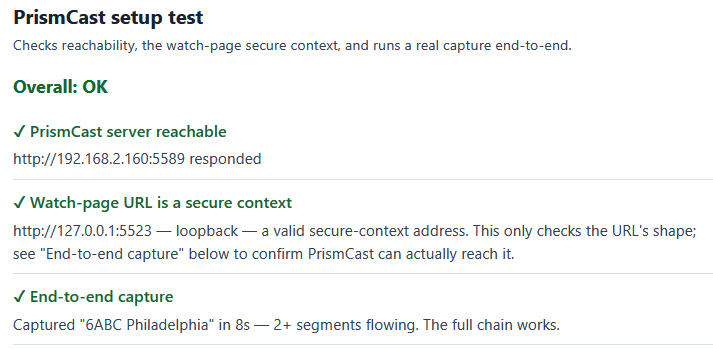
Note that unlike some others I've seen posted here, the setup test makes no effort to do a Roku test, which makes me wonder whether I need to get 4.9.9 of FC to make this work (I'm at 4.9.5 currently), or whether I have a configuration issue on my end.
ETA: I updated to 4.9.9 and no change.
It's always somewhat cumbersome for me to update. Since I don't have a Docker Compose setup (I don't really understand how that works), I'm r unning this batch file that someone sent me a few weeks ago:
docker container stop --timeout 30 fastchannels
docker container rm fastchannels
docker image rm ghcr.io/kineticman/fastchannels
docker run -d --name fastchannels --restart unless-stopped -p 5523:5523 -v fastchannels_data:/data ghcr.io/kineticman/fastchannels:latest
It works, but takes a while and makes me kinda nervous because it's deleting stuff before it regenerates it, so I tend to put off updates until I'm feeling brave. 
The problem I'm having with Docker Compose is that your instructions call for running it from "your fastchannels directory." But I don't seem to have such a directory - at least not one I can access. I think it is hiding somewhere in docker-land (a frightening place of which I have no understanding). I don't suppose I can just create a fastchannels directory somewhere now and have the Compose command know which docker app I'm asking it to update.
1 Like
VOD would be nice to have. There are, however, other ways to record that content. I use PlayOn for sources it supports and Audials for others.
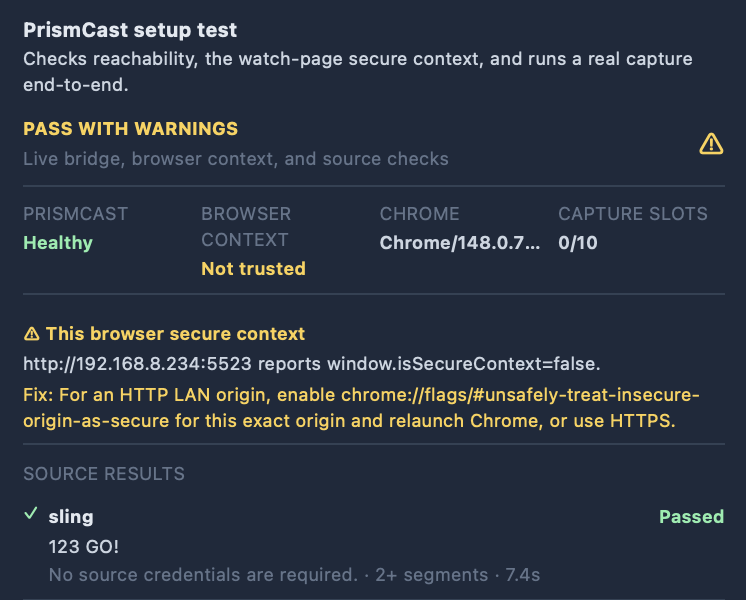
I keep getting the "This browser secure context" error and I cannot figure out why.
- Both my PrismCast and FastChannels Docker containers are running on host networking
- I have insecure origin set to my FastChannels URL (192.168.8.234:5523)
- I have watch page URL set to http://127.0.0.1:5523
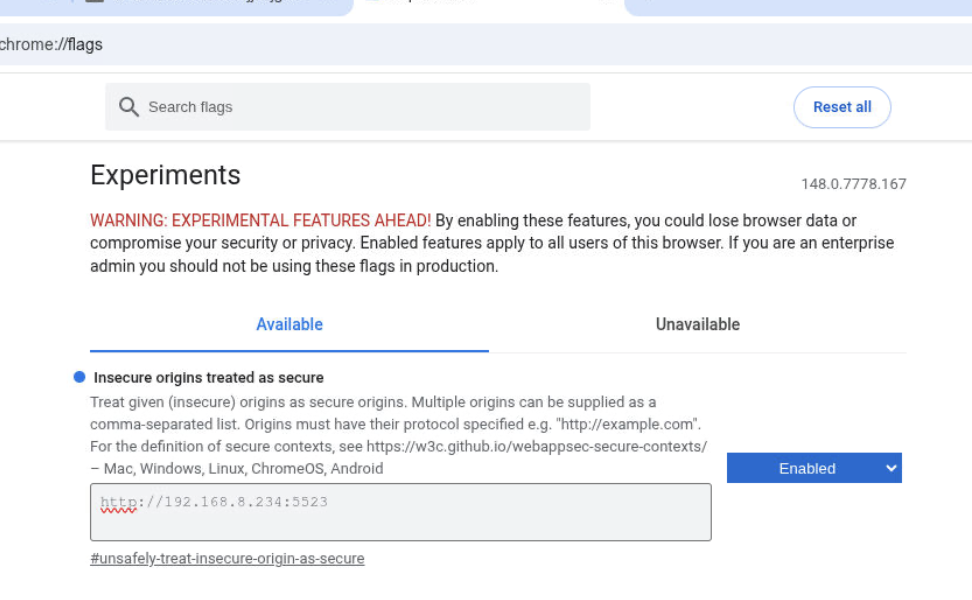
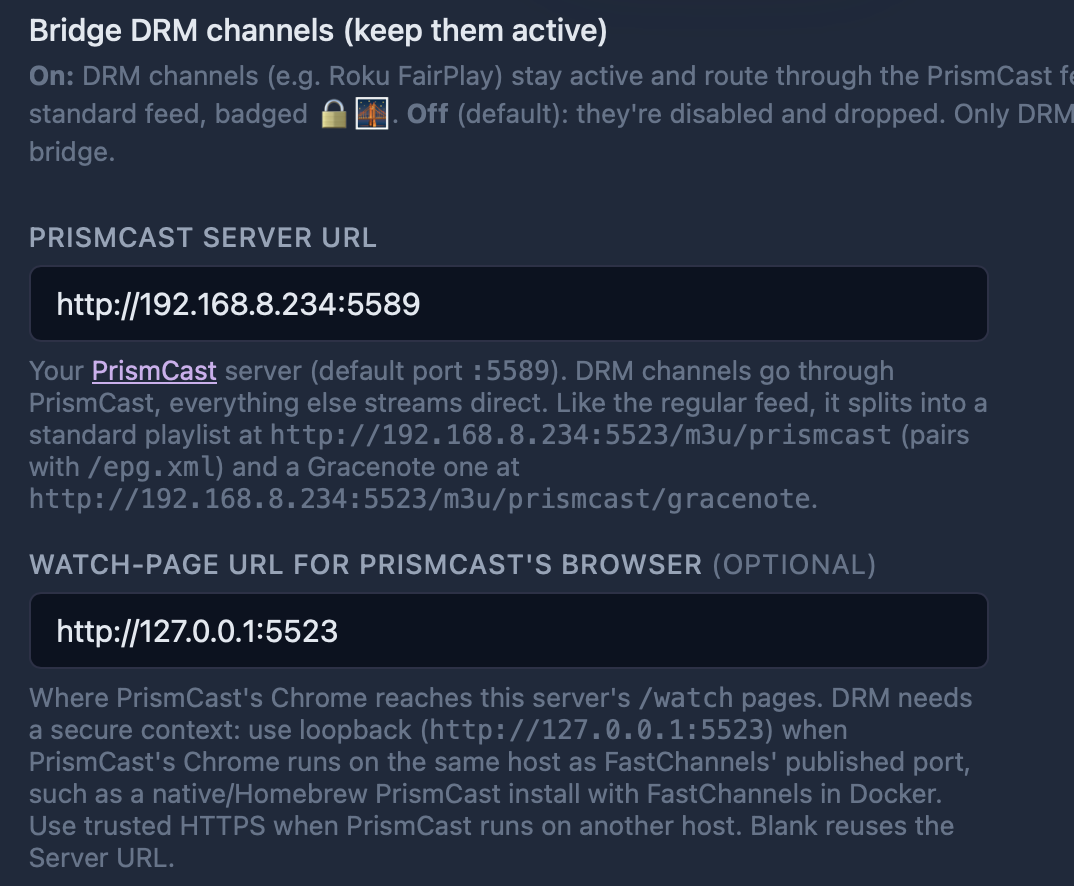
Here is the error I get
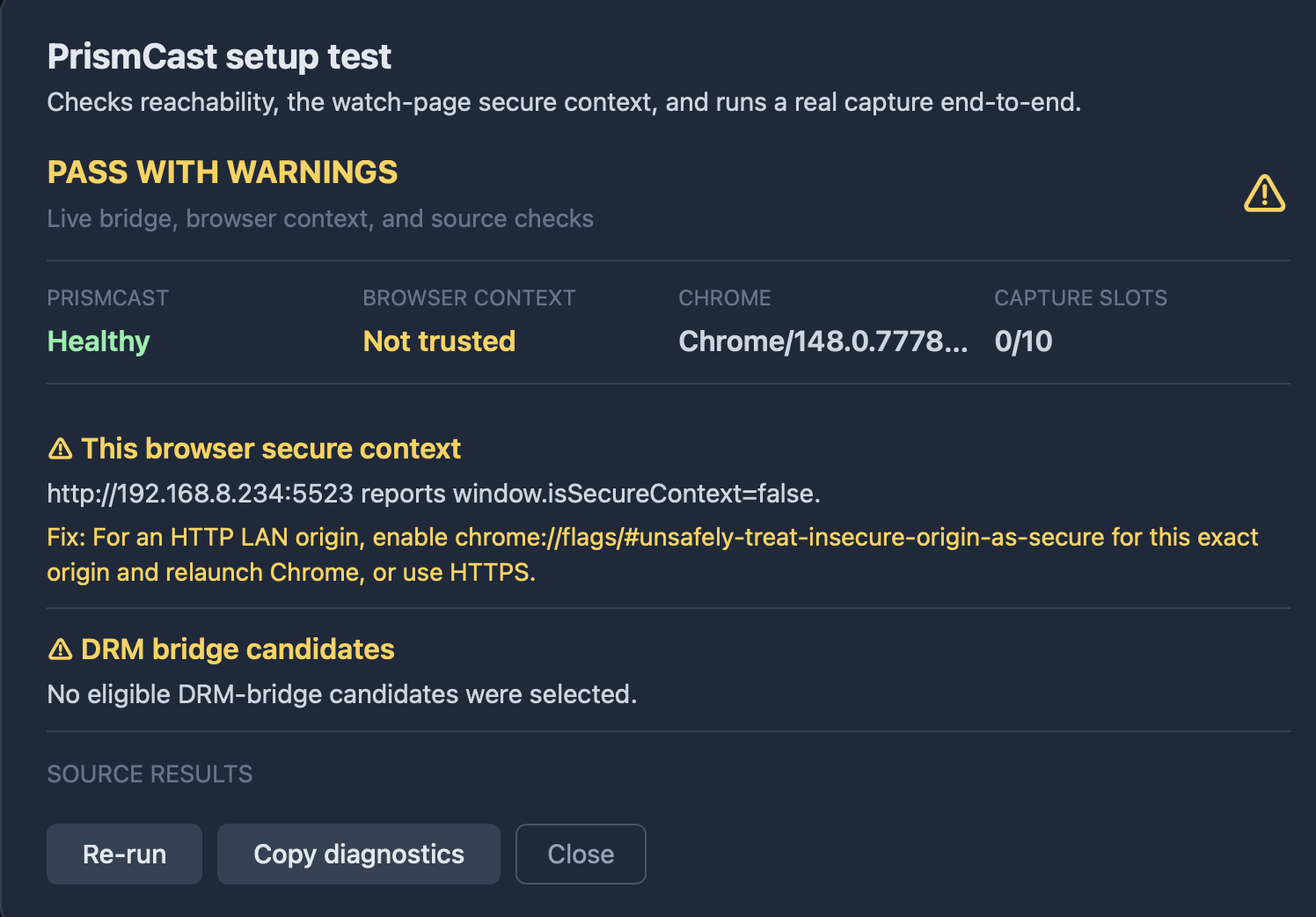
Here are the diagnostics
PrismCast setup diagnostics
Overall: PASS WITH WARNINGS

Settings:
  Public Base URL: http://192.168.8.234:5523
  PrismCast Server URL: http://192.168.8.234:5589
  Watch-page URL base: http://127.0.0.1:5523
  Channels DVR URL: http://192.168.8.234:8089
  Bridge DRM enabled: false
  PrismCast max height: 0
  Browser origin: http://192.168.8.234:5523
  Browser isSecureContext: false

PrismCast health:
  Status: healthy
  Version: 1.10.3
  Chrome: Chrome/148.0.7778.167
  Capture mode: ffmpeg
  FFmpeg available: true
  Initial streams: 0/10

PrismCast API probes:
  /status: HTTP 404, 2ms, available false, content-type text/html; charset=utf-8
  /debug/streams: HTTP 404, 2ms, available false, content-type text/html; charset=utf-8
  /metrics: HTTP 404, 2ms, available false, content-type text/html; charset=utf-8

PrismCast port probes:
  PrismCast API: 192.168.8.234:5589 open (0ms)
  HDHomeRun emulation (optional): 192.168.8.234:5004 open (0ms)
  noVNC (optional): 192.168.8.234:6080 open (0ms)

PrismCast health snapshots:
  before_capture: HTTP 200, 3ms, status healthy, streams 0/10

DRM candidates:
  amazon_prime_free: no selected channel; active/enabled 0; bridge candidates 0
    Auth: Amazon cookie/session header is missing; playback cannot authenticate.
    Readiness: Not tested: source is disabled or EPG-only.
    Fix: Enable the source before running the PrismCast test.
  cox: no selected channel; active/enabled 0; bridge candidates 0
    Auth: Required source configuration is missing: username, password.
    Readiness: Not tested: source is disabled or EPG-only.
    Fix: Enable the source before running the PrismCast test.
  directv: no selected channel; active/enabled 0; bridge candidates 0
    Auth: Required source configuration is missing: username, password.
    Readiness: Not tested: source is disabled or EPG-only.
    Fix: Enable the source before running the PrismCast test.
  philo: no selected channel; active/enabled 0; bridge candidates 0
    Auth: No source credentials are required.
    Readiness: Not tested: source is disabled or EPG-only.
    Fix: Enable the source before running the PrismCast test.
  roku: no selected channel; active/enabled 0; bridge candidates 0
    Auth: No source credentials are required.
    Readiness: Not tested: source is disabled or EPG-only.
    Fix: Enable the source before running the PrismCast test.
  sling: no selected channel; active/enabled 0; bridge candidates 0
    Auth: No source credentials are required.
    Readiness: Not tested: no active/enabled channels are marked for bridging (0 active/enabled channels found).
    Fix: Run Stream Audit and enable Bridge DRM channels, then rerun this test.

Checks:
  [ok] PrismCast server reachable: http://192.168.8.234:5589 responded (version 1.10.3, capture ffmpeg, Chrome/148.0.7778.167, streams 0/10)
  [info] PrismCast API capabilities (optional endpoints): Available optional endpoints: none detected; unavailable: /status=404, /debug/streams=404, /metrics=404
  [ok] Watch-page URL is a secure context: http://127.0.0.1:5523 — loopback — a valid secure-context address. This only checks the URL's shape; see "End-to-end capture" below to confirm PrismCast can actually reach it.
  [info] Loopback watch-page routing: The Watch-page URL uses loopback. That is correct only when PrismCast Chrome shares the host network namespace.
      Note: For Docker PrismCast, use `network_mode: host`. In bridge networking, 127.0.0.1 points inside the PrismCast container.
  [warn] This browser secure context: http://192.168.8.234:5523 reports window.isSecureContext=false.
      Fix: For an HTTP LAN origin, enable chrome://flags/#unsafely-treat-insecure-origin-as-secure for this exact origin and relaunch Chrome, or use HTTPS.
  [warn] DRM bridge candidates: No eligible DRM-bridge candidates were selected.
  [warn] sling candidate readiness: Not tested: no active/enabled channels are marked for bridging (0 active/enabled channels found).
      Fix: Run Stream Audit and enable Bridge DRM channels, then rerun this test.
  [skip] End-to-end capture: Skipped — no active, enabled DRM-bridge channel is available to test.
      Fix: Enable Bridge DRM channels, scrape or audit a DRM-capable source, then rerun this setup test.

Proxy failures during diagnostic:
  (none)

Capture attempts:
  (none)
1. Open chrome://flags/#unsafely-treat-insecure-origin-as-secure
  2. Set it to Enabled
  3. Add this exact FastChannels origin (whatever your server IP is)

     http://192.168.0.5:5523

  4. Relaunch Chrome completely.
  5. Reopen the stream preview.
1 Like
I see you have had a few days where someone hasn't pinged you on issues so I feel a bit guilty posting but wanted to let you know that for the Sling channels I still don't get any subscription channels in the scrape. I have it set as follows:
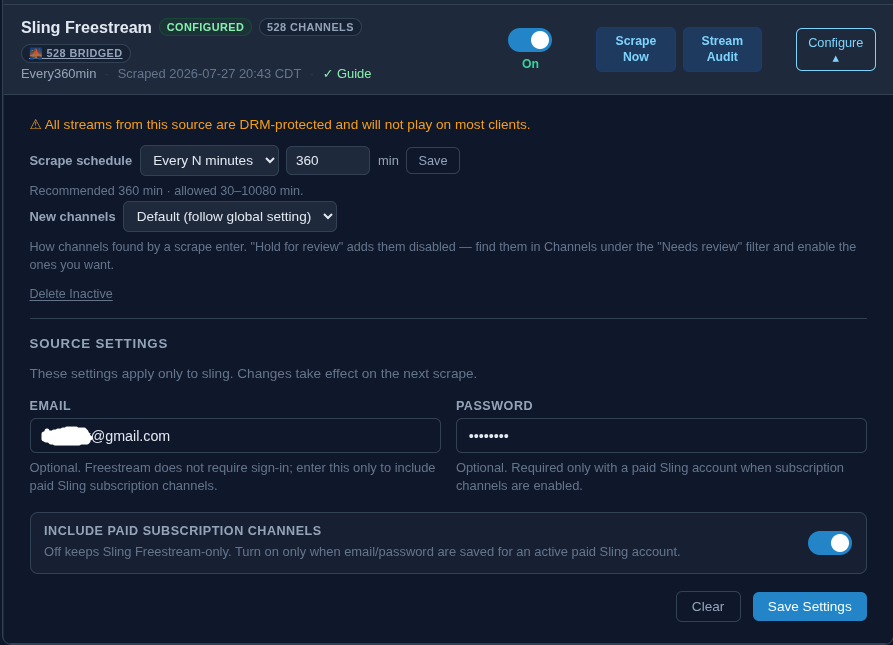
and no matter what I do I only get 528 channels and when I filter down to Sports channels for example I don't get any ESPN, FS1, Big10, NFL, etc. It isn't a huge deal because I may experiment with the encode capture stuff but figured I would let you know that I still am not seeing that.
Having tuner lost with Pluto every few minutes. Not sure if it just the CA South Park channels yet....
403 Forbidden.
Also, i see DRM mentioned in the m3u URL???
2026/07/28 12:40:24.764833 [TNR] Closed connection to M3U-FastChannelsPLUTO2 for ch2002 South Park: Welcome to Canada! (CA)
2026/07/28 12:40:24.764849 [TNR] Error during live stream for ch2002 South Park: Welcome to Canada! (CA): Failed to download segment 24: https://siloh-ns1.plutotv.net/770_pluto/clip/6409ed87183a5400134b37c4_625225bd-5312-434b-961e-0d5c758a08ec/1080pDRM/20250520_191800/hls/688075-964513/hls_2400-00024.ts: GET: https://siloh-ns1.plutotv.net/770_pluto/clip/6409ed87183a5400134b37c4_625225bd-5312-434b-961e-0d5c758a08ec/1080pDRM/20250520_191800/hls/688075-964513/hls_2400-00024.ts: 403 Forbidden
2026/07/28 12:42:03.485779 [M3U] stream timestamps: pluto.663115d923e24f000843b49c: start_at=2026-07-28T12:42:03-05:00 end_at=2026-07-28T12:42:23-05:00 live_delay=15s
Sorry for maybe a dumb question....but how would you set this on a headless debian server running FastChannels and PrismCast in docker?
You'd use the noVNC included in the PrismCast container to interact Chrome.
Got it....Thanks!
i'm seeing something similar for plex:
Error during live stream for ch4228 Hong Kong Fight Club: Could not fetch playlist from epg.provider.plex.tv: GET: https://epg.provider.plex.tv/library/{removed}
i've only tried plex via fastchannels, but my non-fast channel sources work fine. i moved back to my old plex container last night and haven't had any drops yet.
EDIT: just to add, i feel like the complexity of this project is growing exponentially. stop asking the LLM for new features constantly and iron out the core of the system.
Feel free to delete it. I don’t do this for you or anyone else. Last time I checked, I don’t receive a penny for my efforts.
6 Likes
Your more then welcome to test out what i am working on just dm me
1 Like
You can't please everyone 
I appreciate your work 
2 Likes
No doubt. Just on a little family vacation this week then I’ll be back at it.
Got some cool stuff coming up that you guys might like. I know the PrismCast stuff hasn’t been super user friendly but just doing my attempt to bridge the gap with TVE going away it seems. My #1 goal the whole project was to be user friendly.
9 Likes
Your doing a fantastic job, enjoy the vacation time.
I've been enjoying th eproject here. Watching Xite rock music channels using th eplex option.
noticed that d;ring ad breaks, it will play the ads as expected then the stream drops.
I simply press play on channels and re-connect. I suspect the issue is on there and and it's not a huge deal.
I found that plex had a better version of the channel and that they filled the empty space better without having to watch filler stuff.
Enjoy the time off the project and have a good time with family.
Thanks
Nice thing about FastChannels is you can get that Xite channel with Samsung, Pluto and TCL
1 Like
I tried Pluto and it was good while in the feed but they don't do well transitioning in and out of ads.
I agree the other sources are a great option.
for now i'm sticking with Plex to see if maybe it is just an ad in a compaign messing with things.
I may give TCL a shot.
No complaints here at all. Very pleased with the setup.