
I don’t even remember now why I did that. I’ll experiment.
Thanks, I’ll check it out when I get home after the holiday.
Dang you guys! Once I get something going, you come up with something else that might be better! 
1 Like
And of course I'm running into a problem.
I'm running ah4c without problems now, so adb debugging is on and the firestick is working. But when I try to install the FastChannels Player I get the same message as @rpaulmerrell and the firestick does not show the adb confirmation box.
I've entered the correct ip address for the firestick without the port and even tried with the port specified.
Did you add the additional Docker Volume for the adb keys, as shown in the updated yaml file in the FastChannels repo? The FastChannels adb authorizations are separate from the ah4c authorizations.
looks like that'll work - shaves a half second or so. will add to next version.
Test: Cold launch → playing
Result: 1,717 / 1,225 / 1,165 ms
Test: Warm stop → retune → playing
Result: 996 / 788 / 875 ms
Average: 1,369 ms cold vs. 886 ms warm
Average improvement: ~483 ms faster
1 Like
Sweet! BTW, I just added my Sling premium movie channels via the FastChannels ah4c bridge, and they're tuning just as fast a Philo. I'd say you're really on to something -- but I think you know that. 
he asked me about an ONN stick (which I haven't personally tested yet - maybe I need another step there with straight Android device).. you say you have Firestick? That's what I have been developing with. There's something else called "Wireless Debugging" but I'm not well versed in the difference yet.
try these steps:
- Enable Developer Options.
- Turn on Network Debugging or Wireless Debugging.
- Retry the FastChannels connection/install.
- Watch for an “Allow USB debugging?” prompt on the TV.
- Select “Always allow from this computer,” then choose Allow.
If the prompt doesn’t appear:
- Go to Developer Options → Revoke USB debugging authorizations.
- Turn Network/Wireless Debugging off and back on.
- Retry the FastChannels connection/install.
If that fails:
- On the Android TV or onn. box, install and open the Downloader app.
- Go to Settings → Security/Privacy → Install unknown apps, then allow Downloader to install apps.
- Enter this URL in Downloader:https://github.com/kineticman/FastChannels/releases/latest/download/FastChannelsPlayer.apk
- Download the APK and select Install when prompted.
- Enable Network Debugging or Wireless Debugging in the device’s Developer Options.
- In FastChannels, go to Settings → FastChannels Player and enter the device’s ADB address.
- When FastChannels connects, approve the “Allow USB debugging?” prompt on the TV. Select “Always allow from this computer,” then choose Allow.
Skipping the bloat makes a big difference eh
1 Like
Adding the new volumes from the yaml file did the trick. Now onto more testing.
It took a couple tries including a device reset to get it working for me.
It's working with my no-name HDMI-to-USB dongle. Also appreciate the new PBS feature!
OTOH, I still can't get the TVE stuff working. I have xfinity/Comcast. I entered & saved credentials and can confirm I entered them correctly because I get a successful signin message in the popup browser window for NBCUniversal. However I can't seem to tune any of the associated channels. I had to give up on "sign in to all" because it stalls if one sign-in in the chain fails. But even for one I successfully signed into, I can't get any output.
Here are error messages displaying for the sign-in attempts overall:
Last attempt failed 20d ago: 401 Client Error: Unauthorized for url: https://login.cox.com/api/v1/authn
AMC Networks TVE Never signed in
Last attempt failed 17d ago: AMC: Failed to perform, curl: (47) Maximum (30) redirects followed. See libcurl - Error Codes first for more details.; BBC America: Failed to perform, curl: (47) Maximum (30) redirects followed. See libcurl - Error Codes first for more details.; IFC: F
Discovery TVE Never signed in
Last attempt failed 20d ago: not entitled — Discovery TVE: Comcast XFINITY is not a participating TV provider for Discovery.
Note the reference to Cox even though I selected Xfiinity as my provider. According to the URL for Curl errors:
" CURLE_TOO_MANY_REDIRECTS (47)
Too many redirects. When following redirects, libcurl hit the maximum amount. Set your limit with CURLOPT_MAXREDIRS.
I had the same issue with FYI login stalling (apart from setting up the Android bridge). Once one stalls, the rest of the sign-ins stall.
not gonna lie guys - this TVE thing has been an absolute nightmare. I'll keep trying - every provider is different. No wonder the CDVR devs have a full-time job maintaining it.
3 Likes
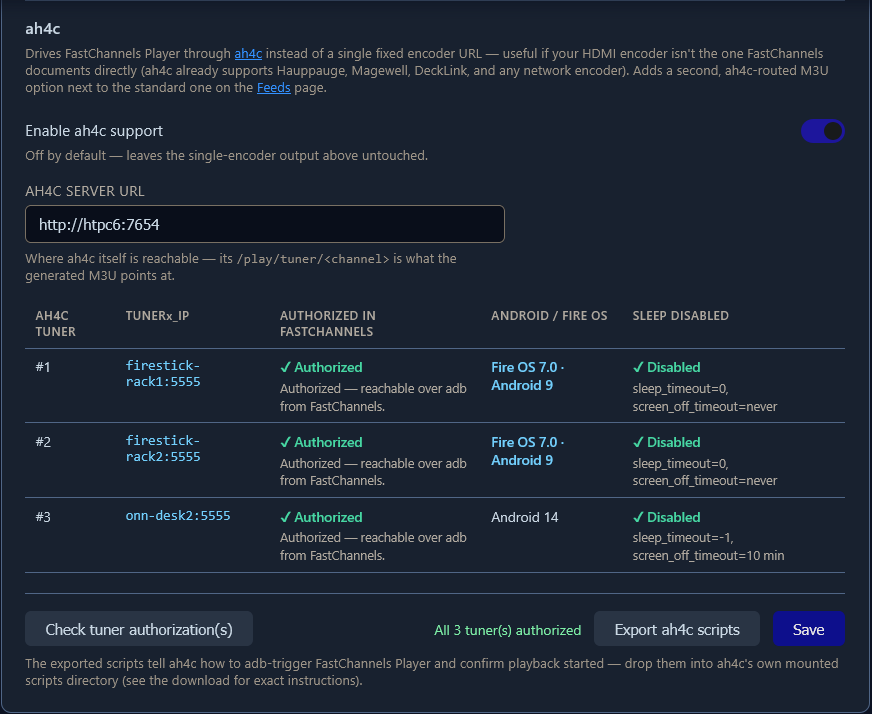
@KineticMan PR#42 includes a tuner authorization and sleep disable check, that works with both FireOS and AndroidTV devices. Tested with FireStick 4K Max and ONN 4K Plus:
1 Like
Personally, TVE seems to be becoming less and less important as the providers roll out more DRM. 
So I do have it running and when I try to tune a channel, it unfortunately it stops at the "Your TV" page. I think the problem might be something I ran into with the other projects in that I use Directv Satellite and not Directv Stream so the channel numbers are not the same. But to double check, in the line below, is the :881 representative of the channel number it's trying to tune? If so, that would be the issue I believe.
2026/09/04 07:14:02 [EXECUTE] Running [./scripts/firetv/dtvstreamdeeplinks/stopbmitune.sh 192.168.88.113:5555 directv:881]
It looks to me like you haven't added the FastChannels scripts, nor changed your STREAMER_APP value to scripts/firetv/fastchannels. You should have a fresh look at the setup instructions for the FastChannels ah4c bridge -- these requirements are spelled out there.
"useful if your HDMI encoder isn't the one FastChannels documents directly". My encoder is on the same machine and is the only one, so I assumed it was the one FastChannels documented directly. How would I know it wasn't?
Could you clarify if your intention is to setup FastChannels to use your "virtual encoder" directly (no ah4c involved), or if you're wanting to set it up to use the ah4c bridge? That's what the quote you referenced is referring to, whether you'll use a "CAPTURE/ENCODER STREAM URL" or an "AH4C SERVER URL". It's one or the other.
EDIT: The former supports a single device, the latter (ah4c) supports multiple, managed tuners.