
You recommend any particular one for use with FastChannels / Channels / Emby to capture Spectrum channels? Or would your Built-in Capture be good for that? Thnx
hardware (in my humble opinion) is still the king, BUT i'm diggin this new software version.
my vote - if u have a semi-powerful PC with decent RAM, software might just scratch the itch. i think its worth at least trying it first, and if it aint enuf, then upgrade to hardware version.
1 Like
Looks really interesting, and I prefer software over lots of hardware (like, where do I find more places to plug the additional stuff in?) as much as possible. I like Prism when it works, but it's not stable enough to trust an important recording to.
Toggling GPU via Docker Compose may be a problem for me, since I have FC set up via Docker Run because I simply don't understand how to set up Compose & make it work. How do you even switch over from using Docker Run to Docker Compose? Is there a way to enable GPU in the Docker Run command or can some kind and patient person explain to me how to switch from my Docker Run setup to Docker Compose?
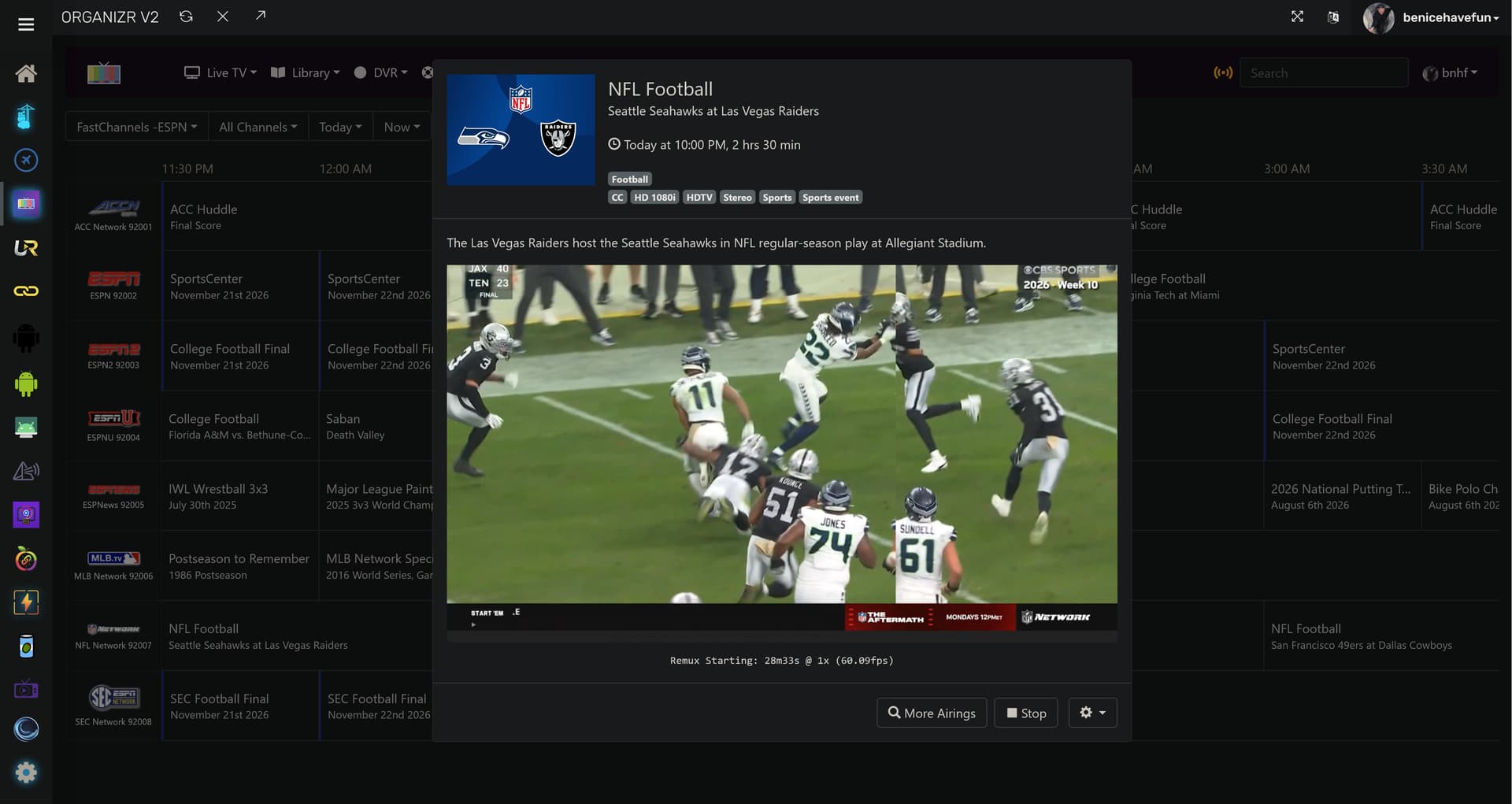
From your image, it looks like each "tuner" gets its own dedicated feed - is that correct?
I'll document as much as possible for ya.
and think of the "tuner" as just a pool of browsers that it could pick from. i set the max to 8 but unless you got a ton of ram, 3-4 will probably be the max it would run comfortably.
I can't afford a ton of ram, so do you think 64 GB is enough? All my containers run in Docker Desktop on Win 11 with Nvidia GPU but I'm thinking about moving FC to my Linux box to get iGPU (AMD R7 5700U) with your new feature.
That's one of the great things about docker containers. You can use multiple tools to manage them. For example, I use the docker command from the command line, Portainer, Tugtainer, and Dockage. Each has it's advantage.
You should not need a lot of RAM or CPU. I run Windows 11 on a Beelink N100 mini PC with 16-GB of RAM. On this computer I'm running Channels DVR, SLM, Plex, and Macrium Site Backup. Those are all windows apps and I'm also running Hyper-V to run a virtual Ubuntu Server and it hosts my docker containers. I allocated 4-GB to the Ubuntu VM and still have 8.1 GB of free RAM. Even with all this running the CPU is rarely very busy. One of my containers is DVR tuner and it dose software capture similar to what KineticMan is working on.
Yes but I was simply thinking of moving FC to my Linux box because the Nvidia GPU won't pass to the browser, Chrome anyway and it sounded like that was the browser being used. It's purely a GPU in use issue for me.
I have 16G on my Channels box.
5 posts were split to a new topic: Recap regarding problems understanding and using anything other than the command line for managing and deploying Docker containers
@KineticMan Early testing of the built-in capture is very positive, though like you, I'll emphasize that using a network hardware-based encoder is still the best approach.
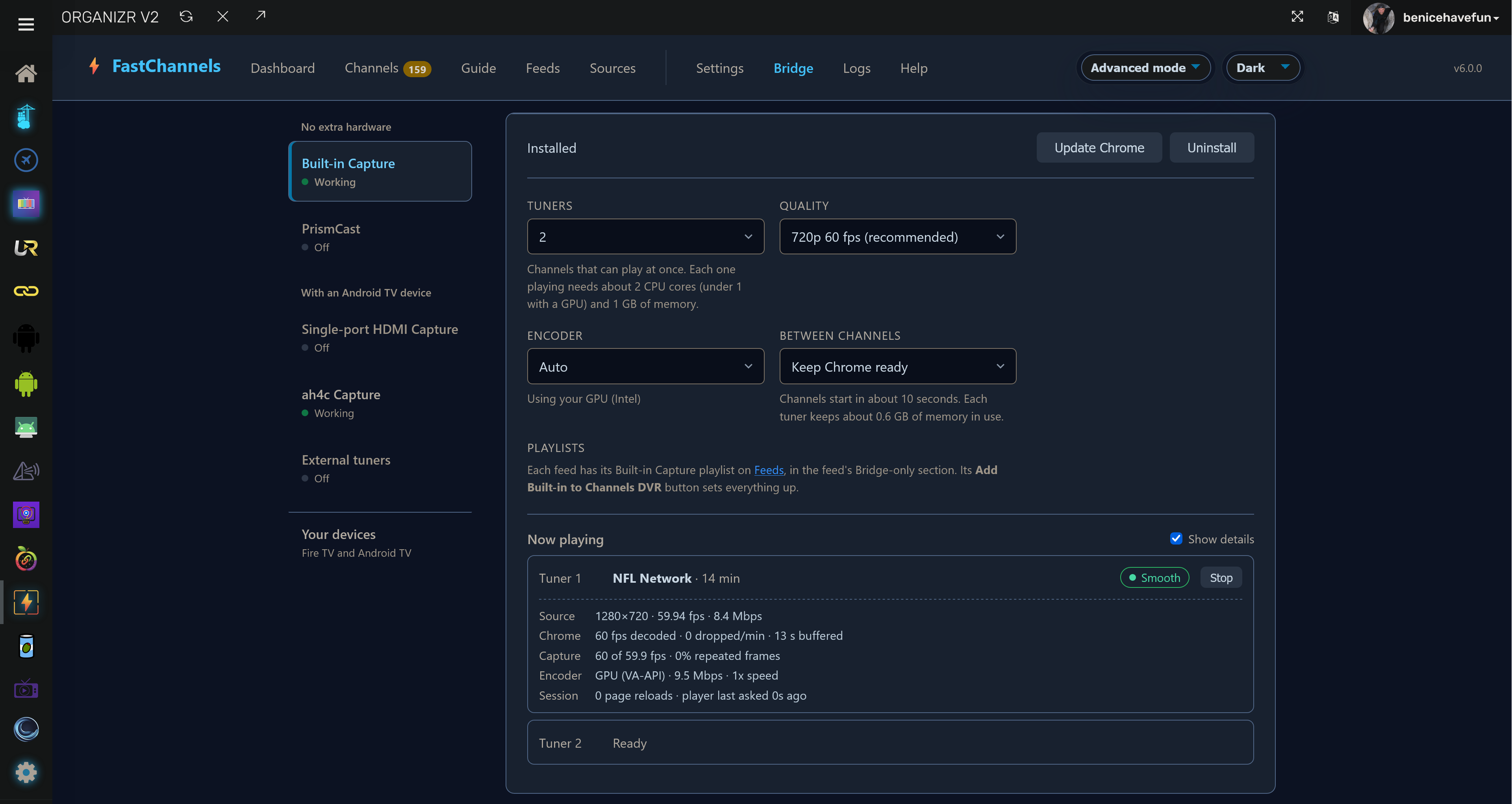
FastChannels stats for a single stream, with Docker running in a Debian LXC under Proxmox:
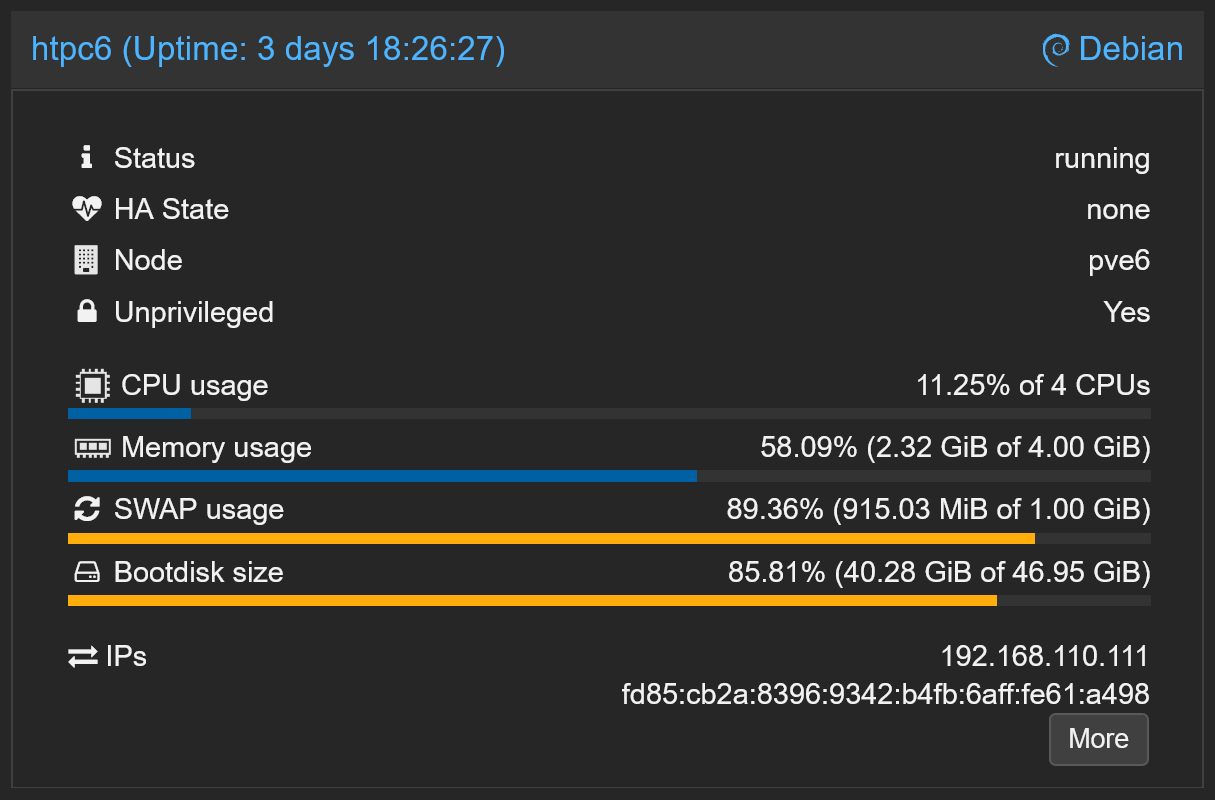
The resources usage for that LXC, which is running under Proxmox on a 14th Gen i9, with 4 vCPUs and 4GB of RAM allocated:
iGPU stats from the Proxmox host, via intel_gpu_top:
intel-gpu-top: Intel Raptorlake_s (Gen12) @ /dev/dri/card1 -   99/ 702 MHz;  57% RC6;      134 irqs/s

         ENGINES     BUSY                                                                                          MI_SEMA MI_WAIT
       Render/3D    3.19% |██▊                                                                                   |      0%      0%
         Blitter    0.00% |                                                                                      |      0%      0%
           Video    5.54% |████▉                                                                                 |      0%      0%
    VideoEnhance    0.00% |                                                                                      |      0%      0%

    PID      MEM      RSS        Render/3D                Blitter                  Video                VideoEnhance       NAME
1477437   59972K   47460K |▊                     ||                      ||█▎                    ||                      | ffmpeg
 943840   61956K   61956K |                      ||                      ||                      ||                      | chrome
  42639   40120K   40120K |                      ||                      ||                      ||                      | Xvfb
Note that it's only ffmpeg that's using the GPU atm, so some potential improvements may be possible there.
Overall, I'd say this is a very, very nice implementation.  Neither MacOS or Windows users will have the hardware acceleration option of course, so it's something of an open question regarding how performance will be for them.
EDIT: Looking at the code, it appears hardware acceleration may be an option for some Windows users, depending on hardware.
1 Like
dang 64GB - richey rich! that's more than enough.
for example, i am running it on a UBuntu mini-pc with 8gb and it runs 2-3 streams fine (with a small built-in gpu).
Thank you for testing! As always, my main goal is ease for end-users.
My only windows box has a whopping 4-gig of ram (don't judge me). But, I did get it to run with the little GPU built-in, and it worked but obviously quite a bit under-powered. I don't have any Apple silicon to test it on, but added some experimental support -- more to come there. I've been eyeing a Mac Mini - hopefully some decent holiday deals out there.
Well I was lucky as I got it mid 2024 and then maxed it's ram while the prices were still (normal) low. It seems to work well.
Host Profile: mini-t (Channels DVR Core & Storage Host)
A comprehensive architectural specification and operational profile for a dedicated, energy-efficient Channels DVR host. This profile outlines hardware configuration, BIOS and power tuning, direct-attached storage (DAS) stability solutions under Linux, and volatile RAM transcode disk configurations for high-throughput streaming.

1. Hardware & Platform Specifications
The core server is built on a compact AMD Ryzen mini-PC platform selected for its balanced 8-core/16-thread multi-core throughput, integrated 2.5 GbE networking, and quiet 15W sustained power envelope.

Component	Specification	Operational Notes
System Model	AOOSTAR R7 (OEM: TianBei WTR PRO)	Motherboard identifies as TianBei WTR PRO; BIOS v0.33
Processor	AMD Ryzen 7 5700U	8 Cores / 16 Threads (1.80 GHz base, up to 4.30 GHz boost)
System Memory	64.0 GB DDR4	3200 MT/s Dual-Channel
Host Storage	2 TB M.2 PCIe 3.0 TLC NVMe SSD	OS root (/), home (~), and application databases
Operating System	Zorin OS 18.1 Core (Ubuntu 24.04 LTS Base)	X11 (Xorg) Windowing System
Linux Kernel	7.0.x-generic	Modern kernel branch with optimized AMD P-State EPP drivers
Primary Network	2.5 GbE Intel I226-V Controller	Hardwired to core 2.5 GbE backplane (MAC: XX:XX:XX:XX:XX:XX)
2. Storage Architecture & Drive Matrix
The storage topology combines fast internal NVMe flash for application databases and operating system files, a dedicated direct-attached storage (DAS) enclosure for mass recording capacity, and an allocated volatile RAM disk for live HLS transcoding buffers.

2.1 Physical Disk & Mount Map
Block Device	Role	Drive Specification	Mount Target	Filesystem
/dev/nvme0n1	OS & Databases	2 TB M.2 NVMe SSD (Serial: <REDACTED>)	/ and /home/<user>	ext4
/dev/sda1	SnapRAID Parity	12 TB Seagate IronWolf Pro CMR (Serial: <REDACTED>)	/mnt/parity1	ext4
/dev/sdb1	Pool Data 1	12 TB Enterprise HDD (Serial: <REDACTED>)	/mnt/data1	ext4
/dev/sdc1	Pool Data 2	12 TB Enterprise HDD (Serial: <REDACTED>)	/mnt/data2	ext4
tmpfs	Transcode Cache	32 GB Volatile RAM Disk Buffer	/dev/shm/Streaming	tmpfs
mergerfs	Unified Pool	22 TB Aggregated Capacity (data1 + data2)	/mnt/storage-pool	MergerFS
Storage Pool Configuration: Data drives (data1 and data2) are pooled into a unified 22 TB virtual volume at /mnt/storage-pool using MergerFS.

Parity Protection: Parity calculations are handled out-of-band by SnapRAID using the dedicated 12 TB parity drive. SnapRAID provides bit-rot protection and single-drive failure recovery without requiring real-time drive striping, allowing inactive data drives to remain completely spun down during single-stream playback.

Persistent Mount Flags (/etc/fstab):

# MergerFS storage pool combining data1 and data2 with systemd ordering guards
/mnt/data1:/mnt/data2 /mnt/storage-pool mergerfs defaults,cache.files=partial,symlinkify=true,dropcacheonclose=true,x-systemd.requires-mounts-for=/mnt/data1,x-systemd.requires-mounts-for=/mnt/data2 0 0

# Dedicated RAM disk buffer for Channels DVR HLS streaming segments
tmpfs /dev/shm/Streaming tmpfs rw,nodev,nosuid,size=32G,mode=0777,uid=1000,gid=1000 0 0
Streaming Transcode Link: The transcode buffer directory is symlinked directly into the pool:

sudo ln -s /dev/shm/Streaming /mnt/storage-pool/DVR/Streaming
2.2 Storage & Channels DVR I/O Performance Baselines
Benchmarking across the storage subsystem confirms sustained throughput without mechanical bottlenecking:

Channels DVR Troubleshooting Disk I/O: 9.8 GB/s sequential write and 21.1 GB/s sequential read measured through the Linux page cache and MergerFS mount (/mnt/storage-pool/DVR).
Direct Uncached Disk I/O (O_DIRECT): 159 MB/s write and 165 MB/s read measured directly across 12 TB enterprise platters in the external Syba DAS.
Active Transcode Footprint: Live multi-stream playback maintains an active footprint of ~15–18 MB within the volatile RAM buffer (61–75 MB Kernel Shmem), eliminating all random disk write cycles during active playback.
3. Storage Enclosure Stability: Solving USB DAS Sleep & Bus Drops
A critical engineering challenge when running a multi-bay USB 3.2 Gen 2 direct-attached storage (DAS) enclosure (such as the Syba 8-Bay USB-C enclosure powered by ASMedia bridge silicon) is preventing bus resets and unprompted sleep states.

3.1 The Windows vs. Linux Architectural Difference
The Windows Limitation: While the enclosure operated reliably under early Windows releases, a cumulative Windows update introduced changes to the USBXHCI/UAS (USB Attached SCSI) driver stack. Despite updating the host motherboard BIOS to v0.33 and flashing custom ASMedia bridge firmware to disable power-saving states, Windows frequently encountered USB bus resets and controller dropouts under sustained I/O.
The Linux Resolution: Migrating the host to Linux permanently resolved the bus drops. The native Linux SCSI/UAS kernel stack handles continuous multi-drive streaming traffic across USB 3.2 without link instability.
3.2 Heartbeat Script to Prevent ASMedia Enclosure Spin-Down
Certain ASMedia bridge chips enforce a hardcoded 3-minute idle sleep timer in firmware, ignoring operating system power configurations. To ensure drives never spin down mid-day or drop off the bus during quiet recording intervals, an automated lightweight micro-read script runs every 60 seconds:

#!/bin/bash
# /usr/local/bin/homelab_heartbeat.sh
# Performs a small 4MB uncached read across member disk UUIDs to bypass enclosure sleep
for uuid in "<UUID_DATA1>" "<UUID_DATA2>" "<UUID_PARITY1>"; do
  dd if="/dev/disk/by-uuid/$uuid" of=/dev/null bs=1M count=4 iflag=direct status=none
done
3.3 SnapRAID Temperature Query Optimization
Standard SMART queries can sometimes trigger false sleep reports through USB-SATA bridge chips. Configuring audit_pool.sh to explicitly pass SAT encapsulation flags ensures accurate thermal and health telemetry:

smartctl -d sat -a /dev/sdX
4. Channels DVR Server Configuration & Performance Tuning
Channels DVR Server runs bare-metal under systemd (channels-dvr.service) to minimize virtualization overhead and maximize raw I/O throughput.

4.1 Transcoding & Volatile Memory Architecture
Pure CPU Software Encoding (libx264): Configured for clean software encoding. With 16 logical threads on the Ryzen 7 5700U, software transcoding achieves pristine stream quality while maintaining low CPU utilization and avoiding hardware-driver segmentation faults.
Volatile RAM Transcode Buffer: By mapping /mnt/storage-pool/DVR/Streaming directly to tmpfs (/dev/shm/Streaming), all live HLS video segments, temporary audio chunks, and trick-play scrubber files are created and destroyed in system RAM. This prevents thousands of small temporary files from thrashing spinning hard disks.
4.2 CPU Power Envelope & Frequency Scaling
To balance rapid background commercial detection with quiet, low-wattage idle acoustics:

UEFI Configuration:
15W Configurable TDP (cTDP): Locked to 15W POR in the AMD CBS NBIO/SMU menu to limit chassis heat and power draw.
Core Performance Boost (CPB): Enabled to allow dynamic frequency bursts during CPU-intensive tasks.
OS Frequency Management (cpupower-tune.service):
Governor: powersave
Energy-Performance Preference (EPP): balance_performance
Frequency Scaling Bounds: Floor at 400 MHz, ceiling at 3,000 MHz
Operational Result: The CPU scales dynamically up to 2.94 GHz during commercial detection and audio fingerprinting, then immediately throttles down to ~412 MHz at idle. Package power holds steady at 10W–13W PPT under load and ~4.0W PPT at idle, keeping operating temperatures around +55°C to +66°C with silent cooling.
4.3 Commercial Detection & Parity Exclusions
Volatile runtime and diagnostic files are excluded from SnapRAID parity tracking to prevent unnecessary parity recalculations and array bloat. In /etc/snapraid.conf:

exclude /DVR/Logs/
exclude /DVR/Metadata/
exclude /DVR/Streaming/
exclude .Trash-*/
Channels DVR's neural network commercial detection models and master database (recorder.db) reside securely on the fast internal NVMe SSD (~/channels-dvr/data/), ensuring instant guide navigation and rapid detection passes without spinning up mass storage drives.

5. Active Network & Port Map
The server maintains a low network footprint, serving local playback clients and whole-home companion services across a dedicated local subnet.

Port / Protocol	Service / Process	Purpose
8089 / TCP	Channels DVR Core	Primary Web Admin UI, REST API (/status, /dvr, /api/v1/*), and adaptive HLS playback
8089 / UDP	Channels Discovery	Bonjour / SSDP local player discovery
8080 / TCP	Companion Web Engine	Lightweight web server for custom dashboards and channel artwork
5005 / TCP	Audio API Bridge	REST API bridge relay for whole-home soundbar control
3493 / TCP	Network UPS Tools (NUT)	Master NUT server daemon (nut-server) providing UPS telemetry to client nodes
6. Scheduled Automation & Timers
Scheduled tasks are managed via systemd timers to ensure reliable, non-overlapping maintenance windows:

Cadence	Systemd Unit	Functional Scope
Daily @ 12:00 AM	deja-dup-scheduled.timer	Encrypted differential system configuration backup to secondary NAS vault (configured with Persistent=false to prevent daytime catch-up storms)
Mon–Sat @ 03:00 AM	snapraid-audit.timer	Incremental SnapRAID parity validation sweep
Sunday @ 03:00 AM	snapraid-scrub.timer	Deep block-level integrity scrub across 12% of the array
1st of Month @ 12:00 AM	frag-audit.timer	Background ext4 filesystem fragmentation audit
7. Operational Cheatsheet & CLI Reference
A collection of quick shell shortcuts and diagnostics for administering Channels DVR and underlying storage:

7.1 Channels DVR Service & Process Inspection
# Check Channels DVR service status
sudo systemctl status channels-dvr

# Live process monitoring (CPU and memory footprint)
top -p $(pgrep -d',' -f channels-dvr)

# Inspect active video processing, commercial detection, or active streams
curl -s http://localhost:8089/dvr | jq '.activity'

# Watch real-time processing queue updates
watch -n 2 "curl -s http://localhost:8089/dvr | jq '.activity'"

# Query active hardware transcode capabilities
curl -s http://localhost:8089/hls/hwaccel

# Restart the Channels DVR service
sudo systemctl restart channels-dvr

# Stream live service logs
sudo journalctl -u channels-dvr -f --no-pager
7.2 Storage Pool & Array Monitoring
# Verify MergerFS pool mount and member disk utilization
df -h | grep -E 'storage-pool|data'

# Check real-time hard drive temperatures across the DAS
sudo smartctl -d sat -A /dev/sdb | grep -i temperature

# Inspect active RAM transcode disk usage
df -h /dev/shm/Streaming

# Monitor live kernel and USB bus events for ASMedia controller stability
sudo dmesg -wT | grep -iE 'usb|ata|scsi'

# Check SnapRAID array health and parity synchronization status
sudo snapraid status

# Trigger an immediate manual SnapRAID parity sync
sudo snapraid sync
7.3 CPU Frequency & Power Verification
# Check CPU scaling governor and current frequencies across threads
cpupower frequency-info | grep -E '(current policy|boost state)'

# Monitor live CPU core scaling frequencies
sudo cpupower monitor -m Mperf

# Verify AMD boost switch state
cat /sys/devices/system/cpu/cpufreq/boost
It’ll purr like a kitten on that machine!
I'd be interested in testing the beta drm bridge if/when you are interested in less technically competent people needing implementation help. I had prismcast working until a reboot and haven't, so far, been able to get it working again.
Windows 10 i7 6th gen 48gb ram
Amd rx 580 gpu (& i7/6 imbedded Intel HD Graphics 530)
FC docker/portainer
You had mentioned docker commands to leverage the gpu(s). In a perfect world, I'd (eventually) be interested in the portainer setup to offload to one, or both, of them. Obviously, not needed for initial testing unless it's one of the things you would like tested.
===============
Channels included in (default) feed guide?
I'm sure I'm missing something simple when determining what channels end up in a feed/guide. I dedupe, review channels, disable most of them, and end up with ~ 200 "enabled" channels. This is the number shown next to "mixed" on the feed page. But opening the guide tab shows hundreds more than this (all?). Same result when exporting the feed/epg to a client, in my case NextPVR. The number of channels reports the, "correct", ~200, but the guide has several hundred more.
Any guidance appreciated!
In the Duplicate Helper, if your current channel has Gracenote off (explicitly off, not just empty Gracenote ID) and the channel you want to move to has a Gracenote ID, it copies the Gracenote off state from the current channel if you attempt a move.
I think it would be better to retain the Gracenote status of the new channel. Is there a rationale for the current behavior?
trying to follow this -- are you saying from the admin/guide page the output doesn't match your expected feed?
That's my job. 
2 Likes
sounds like just an oversight on my part - will fix, tnx.