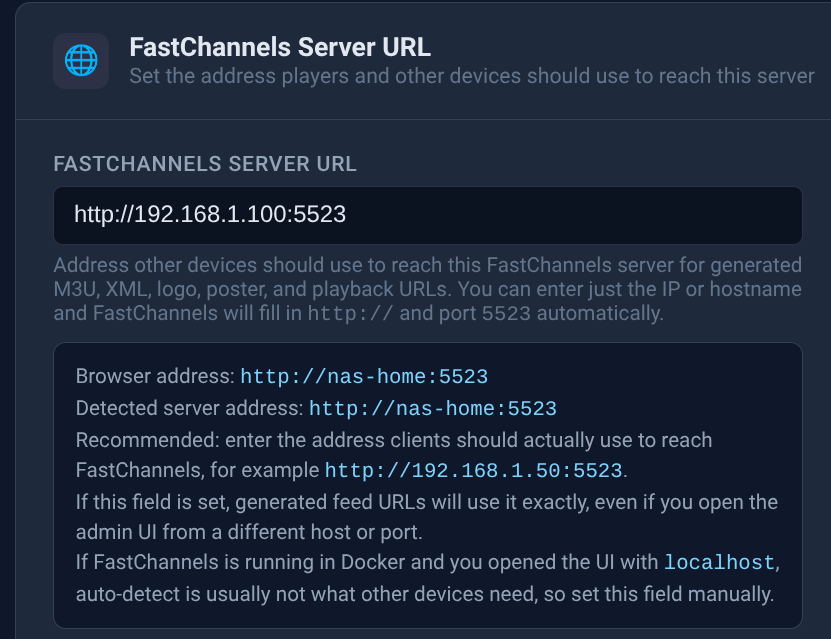
These are the labels on my nas-home

I don't seem to have an exit node. How do I go about establishing one?
(I think that we may have tried this before, and it clashed with my LAN addresses at my other location)

These are the labels on my nas-home
I don't seem to have an exit node. How do I go about establishing one?
(I think that we may have tried this before, and it clashed with my LAN addresses at my other location)
Do both locations use the same subnet range (like 192.168.1.xxx)? If so, you'll need to approach this another way -- unless you're willing to change one range or the other.
It could also be remotely the images are being servers over http and are blocked because they are not on a secure connection. Locally, it doesn't matter.
Yes. That was the problem I had before. It fouled everything up because there were duplicated IP addresses.
I don't remember any of this being an issue when I was running all the other separate Fast channel containers.
@KineticMan can answer this best, but as I recall all the logos are coming (proxied?) from this container, rather than from the Internet.
I’m slightly unique as FastChannels caches a lot of the images (and some sources need an proxy) and hence needs public IP out of the house. If you truly wanted remote access, you could put all clients on TailScale or possibly use port forwarding and open FC to the web.
Do you derive the base for a logo's URL from an env var (e.g. $FASTCHANNELS_SERVER_URL)?
Yep- priority list for that:
This didn't seem to do the trick.
So, opening port :5523 might do it? That's not too hard to test...
Yea and then set public IP as whatever your public IP is (not 192.x.x.x).
Full disclosure - I doubt any security risks opening FC to the web but just thought id mention!
You lost me here. My CDVR server and FastChannels server are both on my Synology NAS. 192.168.1.100. I have port forwarded 192.168.1.100:8089 and 192.168.1.100:5523.
I know my public IP where the NAS/server resides. When you say to set my public IP, where do you mean for me to do that?
Like your internet facing IP. Whatever your ISP assigns to your router
Yeah, I know what that IP is. Where do you suggest that I need to enter that? Here, in place of my local IP? If I do that, the local clients may not have access. I do have a No-IP address. Perhaps I could use that?
It would if you change the base URL from http://192.168.1.100:5523 to http://nas-home:5523. Be aware though that all of your clients need to be running Tailscale. So, this is one option.
The other option is to change the subnet on your remote LAN to something like 192.168.2.xxx, and implement a subnet router.
I would not recommend opening FastChannels to the Internet.
I agree. For now, I will have to be content knowing that FastChannels works fine at home. I give up on trying to get it to work properly when accessing CDVR remotely. I need things to be much more simple. I need a one-time set-up to work for both local and remote streaming. I'm too old and slow for all this fiddlin' around. I'm going to have CDVR prefer channels logos from guide data. I think that should at least bring in the Gracenote-matched channel logos.
Keep in mind this is not just for FastChannels. What we're talking about are issues with how your Tailnet is configured. For any of us with multiple homes, or that spend significant periods of time in locations other than "home", having a properly configured mesh VPN makes the entire Internet our own personal LAN. 
I would contend that using MagicDNS hostnames everywhere is simple, using IPs (sometimes one for local and another for remote) is what's complicated.
I'd like to get things set up correctly. Today I pushed myself past my limit. My brain got overloaded, and I got frustrated. I want FastChannels and everything else to work well at both homes. I understand that each LAN should have different subnet ranges, so that they don't overlap or duplicate addresses.
I'm at the second home for a while. It has less devices, and more importantly, less static IP devices to reconfigure. So, it is likely the better place to make a change to my subnet addresses.
Home is 192.168.1.###, Can I change the cabin LAN to something simple like: 192.168.2.###?
After I make that change, can I expect that combining both homes to behave like a single local network will be possible?
(I'm thinking that this conversation should be split from FastChannels into a separate topic...)
Yes.
Yes, with the addition of a subnet router -- which it looks like you have setup already, but not enabled.
You helped me set up a subnet router before. But, with the duplicated addresses, I had to disable it until I was on site to make changes to my second LAN. I'm here for a while, so, I'll try to work on it before I head home.
Is there anything I should know about making the switch to 192.168.2.###? I suspect that most of it is a matter of making a change on my router.
Dynamically assigned devices will likely find their new address automatically. I suppose that for static devices, I should release them to dynamic, so that they also can automatically find a place, then I can make new static assignments after the fact.