
i'm looking at it now. but yea i think clarifying and replacing the disable/clear Gracenote is in order. i'll add to next version.
This may be a big ask, I'm not sure. When editing or creating a new feed, would it be possible to make that screen a little wider and add a column in the list of channels that would show what other feeds the channels are on (if any)? It would just be easier when making a feed to see any channels that are not on another feed already. Even if you could just have a check or make the entry a different color if it is on another feed. It would just be easier to see what is already on another feed so the user doesn't duplicate. Does that make sense?
Do you get the Gracenote m3u? Does it play? I created a brand new feed and got the same results, an empty m3u .
Yes and Yes
Thank you. Very strange...
Sorry to beat a dead horse, but this recent discussion about Gracenote leads me to think there is value to my earlier request to have a way to get the scraped (XMLTV) guide data for the channels that have Gracenote IDs.
In my case, I use FastChannels with CDVR, so I don't want to disable Gracenote. But I also enjoy probing the FastChannels data outside of CDVR and would appreciate access to the additional guide data.
1 Like
Are you running the latest version 3.7.0 ?
Do those Roku gracenote channels appear in the Default gracenote feed ?
http://server:5523/feeds/default/m3u/gracenote
ok fine
i wonder if he has a weird filter setup on that feed
edit - i misread your question.
to answer it right, yes that Feed creator modal always bothered me too. let me polish that up.
Yeah, something is different with his setup
I am recording some stuff now and I do not want to disturb the system, but I will redownload the container later today. It is supposed to upgrade automatically tomorrow anyway. I am currently running 3.6.0 . I do not have any filters, the feed is simply created selecting The Roku Channel as source and that is it. Apparently, that is what you did too and got the m3u . I will post more tomorrow.
1 Like
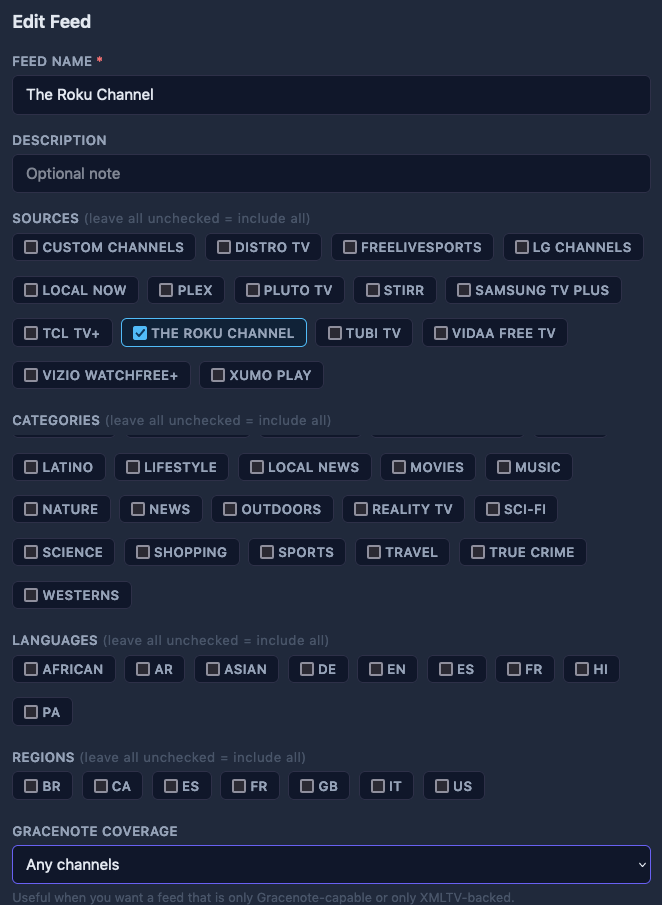
Curious before you update
Good catch. No, they do not. Vizio, Pluto, and Tubi do, but not The Roku Channel.
That's definitely strange. Wonder if there's something with one of the Roku channels you have enabled causing it to choke on the data.
Maybe leave the feed alone, but update FC, disable and re-enable the Roku source, then scrape and audit again.
I had some "hangover" source channels that were scraped before he added regions that caused issues.
Will do and report back. Thanks for the help. As I said I am not in a hurry as I still have the old Roku m3u for now. I am just very happy with this container and want to move all sources to it and disable the old ones. This is a fantastic project in my view. @KineticMan is to be commended.
Agree.
I have moved off and retired my other containers I was using for FAST channels.
1 Like
I'm also trying to figure out how to update. I initially installed with Portainer, but have abandoned that since I can't log into it anymore. So it's running in Docker and, not being a Docker user except for this app, I have no idea what to do to update it (and am always nervous that updating anything risks breaking more than it fixes). So is there just a command I can run somewhere that will do it? I don't want to set up an entire Docker ecosystem.
What operating system you running Docker on? Windows / Linux / Apple?