
@KineticMan New Request: Not sure if this is possible, so if it's not, no worries...
Currently, when you're on the Channels page and do a "Play Here", the video plays... if you move your mouse outside the video window, the channels are scrollable, so you can move up or down the list...
Is this feature possible on the Guide page?
When the video window appears on the Guide page, you can move the mouse outside the window, but you cannot scroll it...
Why I'm requesting this feature? When I have a video playing, I would like to scroll thru the channel/epg list to see if something more interesting is available...
Thanks.
@KineticMan - I'm not sure if this is just a me problem. My Feeds page takes about 13 seconds to load, and the Channels page takes roughly 10 seconds. Is that expected? I don't have a crazy number of feeds (about 10).
Thanks!
That sounds rather long. Both of those pages load in one or two seconds for me.
2 Likes
 System Stats at the bottom of the Settings tab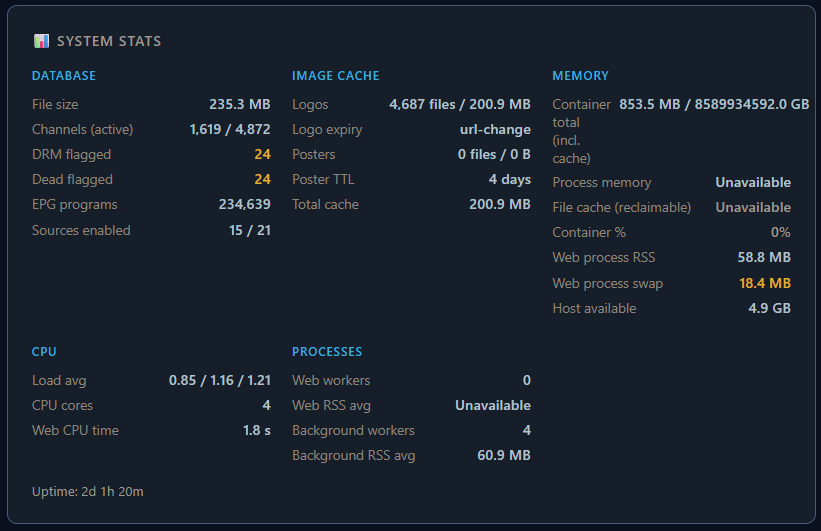
Nothing new on feeds page, but that new guide wasn’t designed very well. It loaded everything into memory. I have it setup now to lazy load which takes memory down considerably. Will push out new version tomorrow.
Assume that’s what dragging down other pages cuz the Chrome tab used a lot.
Probably not. Couldn’t you just open externally or open a new tab?
No worries, I just had to ask...
Thanks.
Starting with release 3.9.0, trying to build a docker image fails on a headless Debian Trixie host. Here's the output from trying to build the latest 4.1.0 release.
sudo docker build --tag fastchannels .
[+] Building 1.0s (12/13)                                                                                docker:default
 => [internal] load build definition from Dockerfile                                                               0.0s
 => => transferring dockerfile: 792B                                                                               0.0s
 => [internal] load metadata for docker.io/library/python:3.12-slim                                                0.9s
 => [internal] load .dockerignore                                                                                  0.0s
 => => transferring context: 229B                                                                                  0.0s
 => [1/9] FROM docker.io/library/python:3.12-slim@sha256:090ba77e2958f6af52a5341f788b50b032dd4ca28377d2893dcf1ecb  0.0s
 => => resolve docker.io/library/python:3.12-slim@sha256:090ba77e2958f6af52a5341f788b50b032dd4ca28377d2893dcf1ecb  0.0s
 => [internal] load build context                                                                                  0.0s
 => => transferring context: 2.61MB                                                                                0.0s
 => CACHED [2/9] WORKDIR /app                                                                                      0.0s
 => CACHED [3/9] RUN apt-get update && apt-get install -y --no-install-recommends     gcc     libpq-dev     curl   0.0s
 => CACHED [4/9] COPY requirements.txt .                                                                           0.0s
 => CACHED [5/9] RUN pip install --upgrade pip && pip install -r requirements.txt                                  0.0s
 => CACHED [6/9] RUN pip install --force-reinstall "yt-dlp[default] @ https://github.com/yt-dlp/yt-dlp/archive/ma  0.0s
 => CACHED [7/9] RUN playwright install-deps chromium && playwright install chromium                               0.0s
 => ERROR [8/9] COPY . .                                                                                           0.0s
------
 > [8/9] COPY . .:
------
WARNING: current commit information was not captured by the build: failed to read current commit information with git rev-parse --is-inside-work-tree
Dockerfile:24
--------------------
  22 |     RUN playwright install-deps chromium && playwright install chromium
  23 |
  24 | >>> COPY . .
  25 |
  26 |     RUN chmod +x /app/entrypoint.sh
--------------------
ERROR: failed to build: failed to solve: failed to prepare fkqrp4rjaieyvnlsmgej8g6s0 as
rfci6aarwreqinve7ymjb4zzo: parent snapshot fkqrp4rjaieyvnlsmgej8g6s0 does not exist: not found
something corrupt in your cache for the build.
I'd recommend grabbing a DB backup first (just to be safe) under admin/settings. then try this:
  docker builder prune -f
  docker build --tag fastchannels .
if that doesn't solve it, try:
  docker system prune -f
  docker build --tag fastchannels .
1 Like
Thanks! The 'builder prune' fixed things up. I'm only barely docker literate, so have learned something new.
I've seen that the docker stack has been getting updated every 1-2 weeks. I'm guessing that one of the updates may have had a glitch.
New version 4.2.0 pushed
New stuff:
- Whale TV+ scraper added
- EPG quality tiers now factor into duplicate resolution priority scoring
- Guide got a bunch of polish: sticky nav/toolbar, lazy-loaded program tracks (for better memory usage and speed loading), alphabetical sorting, keyboard shortcuts (ESC/arrows) in preview modals, next/previous buttons
- Dashboard shows "In a Feed" indicator
Bug fixes:
- Fixed a modal crash on channel names containing quotes
- Fixed audit partial results and backoff logic for geo-blocked sources
- Improved a few queries in admin/feeds that might cause slowdown on installs with lots of feeds
5 Likes
After days of installing FastChannels, and fine tuning, I have resolved every problem except one.
In addition to FastChannels, I still have channels from HD-HomeRun and TVE everywhere. Everything seems to coexist with everything else.
My problem is on my TVs using the Firestick Beta Channels app (upgraded to latest). On the Guide screen, all of the non-FastChannels channels show the channel logo, so I can see what the channel is. However, all of the FastChannels channels have no logo, just a channel number which doesn't tell me anything useful.
Anything I can do to correct this?
I suspect you have some unique network setup between your server and client.
In short, I setup a proxy to cache logos to help with this but it doesn’t work in all situations. I do have a way to shut off image proxy- go to Admin/Settings and shut it off. You’ll need to refresh CDVR database after for it to kick in. Settings — Live TV — scroll to bottom and hit delete.
This is amazing!! do you know if we could possibly get our streaming channels from HBOMAX or from DISNEYPLUS?
1 Like
thanks, glad you like it.
I wish I had better news for you regarding those sources. Those content providers unfortunately chose corporate control rather than consumer choice and have DRM on all their streams. And thus, aren't compatible with this software.
Great! This fixed all but 4 of them. The 4 that are still blank are the 4 channels I get from Hallmark. Is there any way I can manually fix this? The logos show up fine on the Windows server.
1 Like
I do got all of my HBO Max deeplink channels on hand if you need it for adbtuner. No clue about Disney+
Maybe @bnhf and @babsonnexus can cook up something on adbtuner and then it can just be added using Olivetin?
I don't have Disney+ so I can't add anything myself over there
ahh Hallmark logos are actually self-hosted on the server as well, and whatever is causing your network issue will prevent those.
workaround- if you click on the logo(s) on the admin/channels page, I have support for custom logos. Replace them with the image links from GitHub perhaps?
use the raw link for each image -- ie:

1 Like
What is your FastChannels Server URL set to?
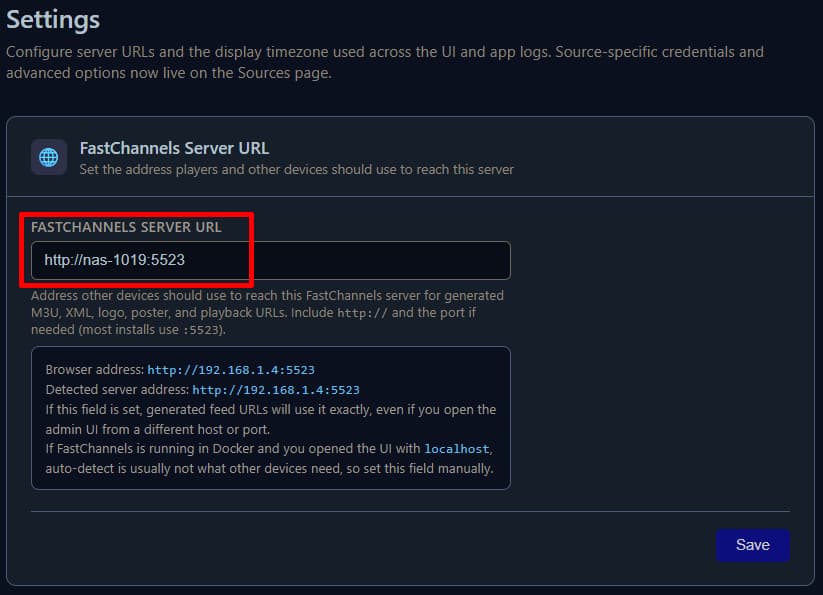
That URL is used in all Output Feeds playlists

and XMLTV

1 Like
The links you gave me were dead ends. Maybe they are private folders?