
Another idea.
Bulk disable all the channels in the new source.
Then as you find the ones you want, just enable them.
But that wouldn't let you use the guide tab for it.
1 Like
That was my first thought on this subject. Then the Guide tab came along.
FastChannels v4.3.0
-
New browser player — Replaced the old video engine with Shaka Player, which supports DASH streams and DRM-protected content natively in the browser. Lots of polish followed: volume controls, mute behavior, stats overlay, mobile layout fixes.
-
Amazon & Sling improvements. With new built-in player, you can watch streams from these sources inside a Chrome browser (DRM still restricts watching on CDVR). A few limitations exist with watching on a HTTP (non-HTTPS) server.
-
Fullscreen watch page — New /watch page for a proper fullscreen viewing experience, with keyboard shortcuts and closed caption toggle. Preview modal buttons were unified to match.
-
Channel number duplicate fix — Fixed a bug where tvg-chnum values could collide between the standard and Gracenote M3U partitions, causing duplicate channel numbers for newly added or re-enabled channels.
-
Guide performance — Cut the initial guide page load from ~2.7 MB down to ~470 KB by lazy-loading program data as you scroll.
-
PrismCast M3U output — New M3U format for browser-based IPTV players.
-
Mobile polish — Stats button, volume slider, and action buttons all behave better on small screens.
3 Likes
FYI - the new embedded player has a PIP function so this should work. You'll have to enter PIP mode fyi
1 Like
@KineticMan Hmmm... am I doing something wrong?
I open the player, then do the option for PIP... player does open in the external window...
However, if I close the "Play Here" window, the pip stops, or should I say pauses, but remains on screen... I don't see an option to (re)start playing...
I wouldn't put any more effort on your part... your original suggestion to just open it externally works for me... it just opens it in a new web tab...
Then I can close the original "play here" window and then can scroll down...
So I'm good to go with this for now.
Oh snap, when I got your email notification, I did the steps... then I noticed that you had just published V4.3.0... let me try that and see if it works...
@KineticMan Yes... the PIP process in V4.3.0 does work as expected...
Meaning if I play a channel in PIP, and then close the original "Play Here" window, the PIP continues to play and I can continue scrolling the list of channels...
So thank you for this new version.
Imagine my surprise when I checked the FastChannels web to make sure everything was OK and found out BOTH Fubo and Frndly! This is getting better by the day! Congratulations!
1 Like
Any reason why 4.3.0 removed the Auto assign ID to the FrndlyTV channels, I went to channels selected FrndlyTV source and apply, list comes back with Gracenote off (O)
How do I scrape custom channels? I have 2 and one shows at risk, I've edited and detected the streams and they both test good, but dashboard shows a next scrape date in yellow of a week ago. I think I put myself into this state by doing a force complete refresh of sources about a week ago. Should the custom channels source be omitted from the complete refresh? I don't ever remember seeing a next scrape date for those channels on the dashboard.
My bag, had to do a run audit and they appeared assign…
that's very strange.. you shouldn't even be able to "scrape" custom channels. It's exempt from that process as that's kind of the whole idea of them. It's basically just a static list of video files/hls/mpeg/youtube etc.
i'm not able to replicate what you're seeing either. perhaps try turning Custom Channels source off, then back on?
Tried turning off and on, the first rule of tech support  no joy.

I have not tried removing completely and re adding, was hoping to avoid the copy paste exercise. When the custom channels are turned off, the next scrape date goes to disabled, but returns when re-enabled.
I don't remember the dates being there before, so my only guess is the custom channels got caught in the force complete refresh from the sources page.


From your perspective, does this now make Fubo TV Project unnecessary if you’re running both?
Good guess. Ill check into it and fix next version.
1 Like
Hmm. I was thinking I'd get rid of that one now, but I do see a big discrepancy between the number of channels offered between the two and I haven't had the time to compare and contrast, to see which channels are missing, as well as which ones are listed on the Fubo TV Project but not actually working, due to DRM or whatever. Anyone else?
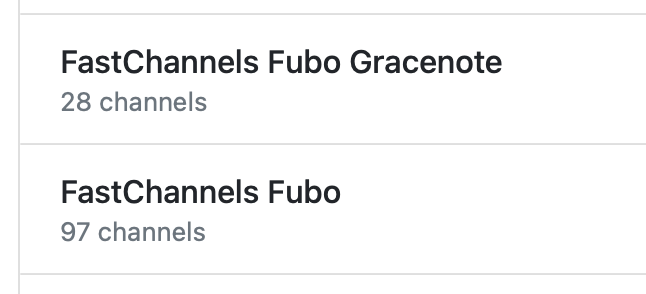
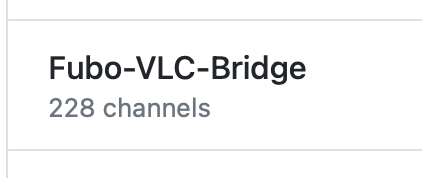
looks like I have a bug there. I was only looking at channels with EPG data <1 hour from now. I fixed it for next version - should see a lot more channels. Also, if you're a fully paid Fubu user, make sure you unclick "Fast Channels" only in source config for Fubu.
Can we add the m3u tag tvg-shift to a gracenote channel.
I'm pretty sure I found the correct GNID for Drone TV (164334), but the listings are 4 hours later.
I can't find a Drone TV Pacific or Drone TV Western GNID, but tvg-shift="-4" fixes the epg.
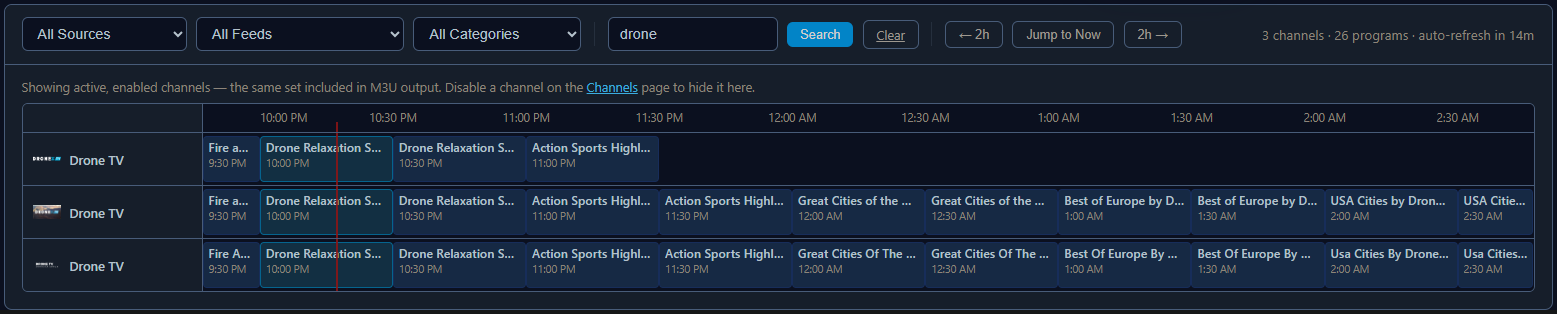

Was thinking of something like this, where selecting Shifted instead of Manual lets you key in the GNID and the shift +/- offset

Resulting in this in the m3u playlist output
#EXTINF:-1 channel-id="distro.US:129395" tvc-guide-stationid="164334" tvg-shift="-4" tvg-name="DroneTV" group-title="Travel"
I noticed that Fubo has very short guide data, which seems like 24 hours, whereas the Fubo VLC Bridge has a multiple-day guide. Is that the correct behavior? The channels work fine, and the number of channels is almost the same.
VLC bridge uses gracenote where possible. The guy here is scraping the guide data.
If you want best results with all these projects, use Gracenote where possible.