
hey - i've only got it to work on Chrome. Have you tried it on a desktop Chrome version (from admin/guide)
you do know that channels can act as this intermediary right?
I didn't honestly. any info on that?
edit - wow i completly forgot about this. i'll play around with it - but looks like it should just work?
it just works - and you can pass through a channel collection - it does order by number tho and not your order and no virtual channels work
well cool.. you just saved me a ton of time.
I was looking into having FC export a restore type file to Threadfin, then also some Dispatcharr same idea. But if Channels has it, I'd just be duplicating work. Maybe I can just document a process for users interested in using Plex with FC.
1 Like
Not currently. I've considered it, just never got too far into it. Curious what categories you would consider adding?
I love this one  used it today
Thanks for this FEATURED channel fix!
Appears to be only Vizio right now.
Yea I considered just hard coding those channels from Vizio but added this feature in case we find others in the future.
And I knew you’d like that review feature
1 Like
I have tried in desktop chrome (Prime channels don't play), but I gather there are settings for "trusted source." I couldn't find instructions on how to do that.
chrome://flags/#unsafely-treat-insecure-origin-as-secure
Then type your FastChannels url
http://192.168.1.100:8080
1 Like
Ok, got it. I put in both 8080 per your example and :5523, since the latter is where I normally go to for Fast. Why do some of the channels work & others not? For example CNN Originals gives
Shaka error 1001 (NETWORK.BAD_HTTP_STATUS): Shaka Error 1001. manifest or segment request failed; check HTTP status, CORS, and network filtering Details: ["http:/play/amazon_prime_free/amzn1.dv.gti.841532e5-efeb-46e5-b990-e1d8ea085ec8/dash.mpd",502,"<!doctype html>\n<html lang=en>\n<title>502 Bad Gateway</title>\n<h1>Bad Gateway</h1>\n<p>The proxy server received an invalid response from an upstream server.</p>\n",{"connection":"close","content-length":"161","content-type":"text/html; charset=utf-8","date":"Tue, 23 Jun 2026 01:09:23
while BBC Earth just plays - at least in the Guide. In Channels itself, though, it wouldn't play. I scheduled a recording on one of them to see what happens, so will report back.
1 Like
Odd - I had some in mind, but have now forgotten. Maybe just a way to add & assign on the fly? I was also thinking about being able to (in the filters) check off multiple categories. For example, if I want to disable all or most kids, sports, and crime channels, selecting them all in the filter would streamline the process.
That's OK. He won't let me have Weather as a category 
Update - scheduled recordings failed. So channels that played in the FastChannels Guide appear invisible to Channels. More settings-changes needed?
Channels DVR won't record DRM
In that case, what is the recommended method to consume the Amazon Prime channels? I see there's a note in the configuration area about Prismcast - is adding them there the way to go? That seems to correlate with the settings for Chrome, since that's what Prismcast uses.
Don't know if Amazon Prime channels work in PrismCast. Maybe someone else knows.
There's a Prismcast-related "copy" button, but having just opened Prismcast, there's no obvious place to paste it; you can add individual channels but not m3u feeds.
1 Like
Maybe Import M3U Playlist?
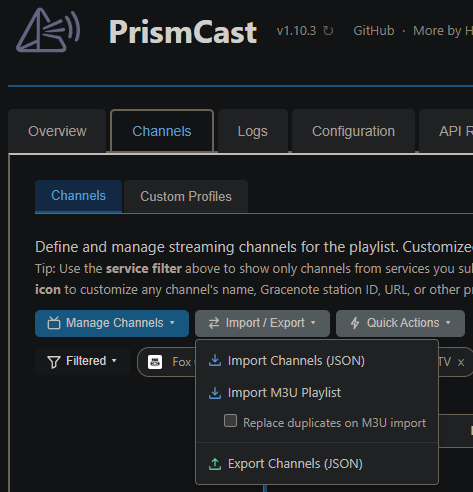
Thanks - I didn't pull down the dropdown. How does the guide data get added?
1 Like