FastChannels - FAST Channels aggregator/manager

I was able to import the M3U into Prismcast, but that's pretty much where the success ended. I put the chrome: etc. command you supplied in 3 Chrome instances: (1) the one that Prismcast opens to do its capture; (2) the "regular" Chrome on my server, and (3) the regular chrome on the most-used client PC (all run Windows 10 or 11). I have the cookie set in the Fast configuration. In Prismcast, I click the button to authenticate the source, and the feed will play, overlaid with a message "click space, or F to play fullscreen; C toggles captions" plus in larger print the name of the channel. At that point I can tell Prismcast that I'm done authenticating. Then go back to the Fast channels list and play it in full screen, and successfully play it there (after clicking a space to clear the overlaid message).

Channels, however, can't play or record this. I can watch what Prismcast is up to while attempting to watch in Channels, and it opens windows titled "about:blank" but they are indeed blank, and nothing plays in channels (running in Chrome for testing this), which displays a message "The media could not be loaded, either because the server or network failed or because the format is not supported."

For anyone who can make any sense of them, here's some log excerpts:

Prismcast logs say:

[2026/06/23 10:58:31.827 PM] [ERROR] [the-carol-burnett-show-jz9ijo] Stream setup failed for http://192.168.2.160:5523/watch/9290: Stream initialization timed out.

[2026/06/23 10:58:31.844 PM] [the-carol-burnett-show-jz9ijo] Stream ended after 10s (setup failed).

[2026/06/23 10:58:31.844 PM] [WARN] Stream setup failed for the-carol-burnett-show: Failed to start stream.

Channels log:

2026/06/23 22:57:56.710592 [TNR] Opened connection to M3U-Prismcast for ch9121 The Carol Burnett Show
2026/06/23 22:57:56.710592 [TNR] Closed connection to M3U-Prismcast for ch9121 The Carol Burnett Show
2026/06/23 22:57:56.728363 [TNR] Opened connection to M3U-Prismcast for ch9121 The Carol Burnett Show
2026/06/23 22:57:56.728938 [HLS] Starting live stream for channel 9121 from 192.168.2.174
2026/06/23 22:57:57.412724 [HLS] Session ch9121-dANY-ip192.168.2.174 started in 683.8024ms
2026/06/23 22:57:58.124515 [HLS] Probed live stream in 1.3943505s: h264 1280x720 progressive 149648bps
2026/06/23 22:58:29.618020 [HLS] Stopping inactive session ch9121-dANY-ip192.168.2.174
2026/06/23 22:58:29.618020 [HLS] Stopping transcoder session ch9121-dANY-ip192.168.2.174 (out=5.322ms finished=false first_seq=1 last_seq=1)
2026/06/23 22:58:29.625135 [TNR] Closed connection to M3U-Prismcast for ch9121 The Carol Burnett Show
2026/06/23 22:58:29.625135 [SNR] Buffer statistics for ch9121 The Carol Burnett Show: buf=0% drop=0%
2026/06/23 22:58:29.625135 [SNR] Streaming statistics for ch9121 The Carol Burnett Show: timeouts=0 segment_timeouts=0 playlist_timeouts=0

I personally pick a feed for what i want
for instance one feed would be my fast channel faves. I then hand pick what i want from what service.
My Fubo tv subscription has its' own feed.
FRNDLY has its own feed.
These are just free channels. I can take them or leave them. Not worth a ton of time spent.
I even use the custom option to handle some custom city council or links i have that are very specific.

1 Like

Not sure what is up with mine. I have the latest version 4.5.0, but my page loads are still very slow (22 seconds for the Feeds, Guide 7 seconds, Sources 1.3 seconds , Channels 5 seconds, Dashboard 10 seconds).

I have a few other containers running, and everything else is fast and snappy. Computer is not under any load.

What other containers are you running on the machine at one time?
I recently had to shift activity off the Synology due to resource limits and things seem to have smoothed out.
The projects out in the community tend to take up resources at times.

It's running on an Intel NUC, other containers are seer, portainer, jacket and mysql. As a test I turned off all the other containers, and I still have the slowness. 3GB of RAM is free and CPU was under 50%.

I cloned FastChannels and ran it in my wsl instance, I imported the database backup from my container instance. It's nice and snappy! I'm not sure why it's so slow in the docker container.

I'm not really sure how to clean it up. Maybe I need to do a fresh docker install and then re-import from my database backup.

I stopped my container, removed /data/*, started the container and imported my backup, then restarted the container. It's still very slow :frowning:

Bizarre.. Working great over here. Not even sure what to recommend for you to try. I wonder if your DB is corrupt? Does it work fine with a fresh container by chance (without re-importing the old DB?)

1 Like

Hi, yeah it's odd! Just tried with a fresh container (without re-importing the old DB) and it is super quick.

I don't think my database is corrupt though, as I mentioned earlier I cloned your repo to my Ubuntu wsl instance, and then imported the same database backup that I tried in the container, and it works fine, I have all my data and it's really quick.

Maybe I'll have to manually recreate my feeds and copy across my other settings.

[EDIT]: I started from scratch, it seems as soon as I add new feeds (I added 2) it really slows down the Feed page again. My volume is mapped to my Windows pc, perhaps I'll recreate it and leave the volume inside the docker-desktop wsl instance. Will report back.

[EDIT]: Welp, that seems to be it! So it must have been just very slow reading the database through my volume mount.

I'm using this now:

services:
  fastchannels:
    image: ghcr.io/kineticman/fastchannels:latest
    container_name: fastchannels
    restart: unless-stopped
    ports:
      - "5523:5523"
    volumes:
      - db_data:/data

volumes:
  db_data:

Previously I was doing this (which is what I normally do with my volumes):

services:
  fastchannels:
    image: ghcr.io/kineticman/fastchannels:latest
    container_name: fastchannels
    restart: unless-stopped
    ports:
      - "5523:5523"
    dns:
      - 192.168.1.100
    volumes:
      - C:\\utils\\Docker\\volumes\\fastchannels\\data:/data

2 Likes

See guys- it’s always the network :nerd_face:

Accessing the Windows filesystem from a WSL2 Linux distro is known to be slow.

This is a good heads-up for anyone using Docker Desktop. If you're using a container the requires a fair amount of disk I/O to a binding, either use a Docker Volume or bind mount to a directory in your Linux distro.

2 Likes

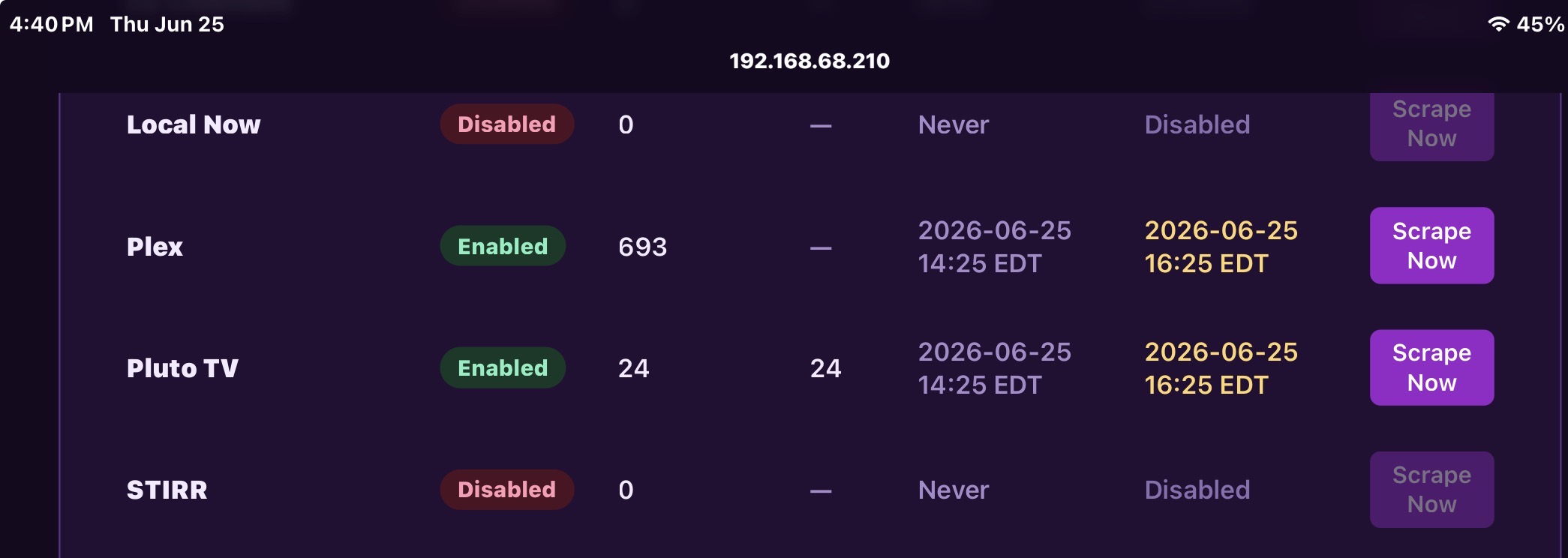
Any reason why it won’t scape per the settings (120 minutes set in FC) I have two Macmini (m2) one setup as primary works fine, the second is basically a test unit setup the same other than the latest version of FC 4.5 and the primary is still on 4.2, looking at the logs my 4.5 version is not showing multiple scrape jobs when filter on Pluto, just one on the 23rd and none for the 24th today, while another one appears to scrape as scheduled. Probably why I losing my guide data on certain channels.

That's a question for @KineticMan
All my enabled sources are scraping on time.

Looks like Fubo Brought back nbc channels
Bravo and Cozi tv are in the clear.
NBC in Los Angeles is DRM protected. Hope your locals are in the clear and available to watch.

no clue.. working fine here. I do wonder if you have a "stuck" Pluto job. Humor me and restart the container and force a manual scrape. Double check your settings and logs and see if anything looks odd after you do the above.

Just letting my gentleman thief know there's a specific reason for Node v24.13.0 as I've (unfortunately) discovered that versions higher than that run into a whole host of issues, especially in Windows environments (not really a concern for you, but just an FYI). yt_dlp prefers for us to use Deno, but I already had Node and was accustomed to it, so that's the only reason I went with it. As such, up to you if you want to keep that same parity with SLM or not, but you are always free to "steal" :stuck_out_tongue_closed_eyes:

2 Likes

I don't think I got to express how awesome it is after all these years to finally have guide data for these stations!

2 Likes

@KineticMan Would you please take a look at this link and see if this is something that the community would be interested in?
If yes, is there any possibility to create a virtual playlist with the channels listed?
https://ihavenotv.com/listofalldocumentaries

1 Like

Yeah I might have to nuke a few things, did as mention and appears nothing is getting re-scraped as scheduled and my up next schedule is highlighted in yellow.

Anything in logs catching your eye?

I’m adding some additional logging in next version btw.