
does your Food feed even have any Gracenote channels in it?
btw - that site is wild. it'd take a full dedicated proxy to get m3u out of that one. never seen so many anti-bot, anti-ad blockers on one site. they even inject custom javascript to make it hard to use DevTools on chrome.
juice aint worth the squeeze on this one.
My favorite JS they use is this too:
(https://cdnjs.cloudflare.com/ajax/libs/fuckadblock/3.2.1/fuckadblock.min.js)
No worries then... don't waste any more effort on it...
Yeah, I just liked some of the documentaries...
It has 11 Gracenote channels and 19 standard. Lots of food channels!
troubleshooting tips:
-
open Chrome on a networked PC and type in that M3U link and see if you actually get something back: the link you gave me was
http://192.168.68.120:5523/feeds/food/m3u/gracenote -
if that fails, go back to your FastChannels and double check the feed. you can go to Feed tab and test the Gracenote url from that feed right in the card. should look like this as example
http://192.168.86.72:5523/feeds/movies/m3u/gracenote
The brute-force way on Channels admin portal is Settings/Live TV & DVR/Guide Data then Delete & Recreate DB. You can also just go to Admin/Sources/then select your Source and hit Reload M3U. But, to ensure everything syncs, use the hammer.
Thanks for pointing me in this direction. Does doing this risk losing any important data?
No.
It just deletes the guide database and reloads it with a fresh pull (like scraping sources in FC).
It will refresh every source m3u playlist and repull all guide data for all sources.
You can watch the DVR log to see what it does after kicking it off.
It's safe to use, just takes a bit to complete.
First and foremost, I wanted to say thank you, FastChannels is a fantastic addition to Channels DVR given the decline of TV Everywhere. Recently I opted to create a new Channels stack and move completely to a Linux host via Docker opening up a new line of experimentation for me. Given the TV Everywhere decline, I have run into the roadblock of DRM content for the must have channels so I have been playing with the Amazon Prime Free Channels provider (ideally I would love is Sling included the pay channels too).
Regardless, this got me thinking about feature option for simplicity that to me would be helpful as you add more and more DRM related content. The 1st obstacle I encountered is that FastChannels default is http and pumping the harvested PrismCast feed output through Prismcast caused the Chrome browser to complain about http vs https security. Therefore, to best work around it here is my thought on a 3 step feature option that might be helpful:
- Either part of the overall setup or the source parameters itself, gather the Prismcast URL as an optional or required parameter.
- Once you have that, you can generate the standard m3u provider as all non-DRM Channels DVR feeds.
- Behind the scenes however, in the proxy layer instead of passing directly to the m3u from the provider (Amazon Prime in this case), you can morph that URL to something like this: http://[prismcast ip]:5589/play?url=http://[fastchannels ip]:5523/watch/2699 (actually in this case you would be passing in the Amazon URL for the URL here in place of the fastchannels one I provide here).
3.1) As an option, you could also pass in the fastchannels generated m3u the prismcast IP and the proposed raw Amazon direct m3u to avoid the extra proxy layer. (in this case, the m3u could pass the URL I used in #3 example).
I know I may be missing something in how this setup works but I'm struggling with providers like Sling and using Prismcast because it looks so unpolished when you see web page pop-up, mouse move or setting delay to be like 30 seconds and to me using a tool like FastChannels to manage the harvest of these connections makes great sense while still leveraging a tool like Prismcast to work around DRM issues.
Thanks again and hopefully I don't sound like an idiot.
2 Likes
Any particular reason for having FrndlyTV set for 12 hours? I have noticed some missing guide slots, but after refreshing in and out of other guide collections it populates back in.
I'm also running the official FrndlyTV container and it refreshes once per day. So figured twice a day was often enough to get 72hrs of XML guide data (since it's mostly all gracenote channels). I'll probably end up setting the refresh interval to once per day.
For the rest of the sources, I'm still trying to figure out optimal refresh intervals. That's one of my projects for next weekend.
1 Like
How do you handle the duplicate source, assign same channels id? When I initially setup FC, I also had the original FrndlyTV container but when added with FC I ended up with duplicates throughout my guide.
I run 7 Channels DVR Servers and they're on different servers 
Besides, the channel-id are different between them
Official FrndlyTV uses channel-id="frndly-38"
FC FrndlyTV uses channel-id="frndlytv.38"
So if you let Channels DVR assign the channel numbers you will have all of them on different channel numbers (and you will have dup channel names)
2 Likes
Wait…. What?? 
2 Likes
All seven servers are running in containers on my Synology NAS.
One server has the FrndlyTV container for sources.
Another server has the FastChannels container for sources.
Another server has my HDHR Prime as a source.
Another server has PrismCast as a source.
Another server has Xfinity TVE and the ePlusTV container as sources.
Another server running in a custom Channels DVR TVE container has YouTube TVE as a source.
Another server is used for testing sources and other things.
Why, though? And how do you combine their outputs? Or do you just manually switch between them, from the client? Just curious.
1 Like
Many reasons. One is recording the same airing from multiple sources at the same time via a pass.
They each record to their own shared folders (named for the port#) on my NAS
/volume1/ChDVR8089
/volume1/ChDVR8090
/volume1/ChDVR8189
/volume1/ChDVR8190
/volume1/ChDVR8289
/volume1/ChDVR8389
/volume1/ChDVR8489
Yes, you can easily switch servers from a client.
Mine are all at the same IP address, they just use different ports.
Very interesting, thanks, I enjoy learning about such unique configurations and different use cases.
1 Like
To make admin a bit easier, I created Bookmark Folders in my browser, each folder containing bookmarks for all 7 servers.
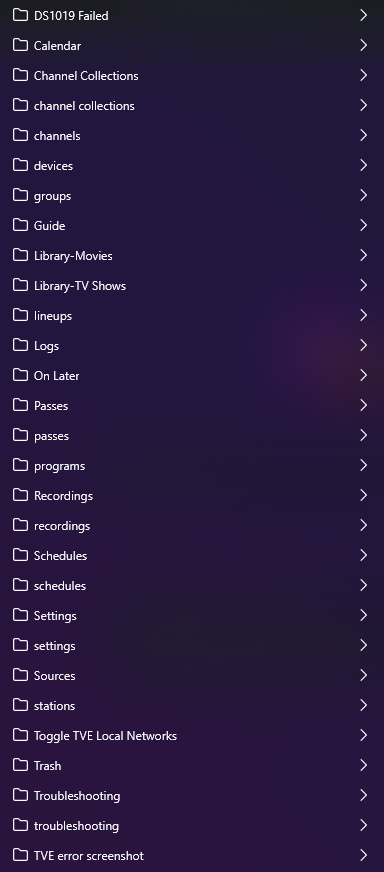
In each folder I just have to click Open All in Tabs to get each server on it's own browser tab.
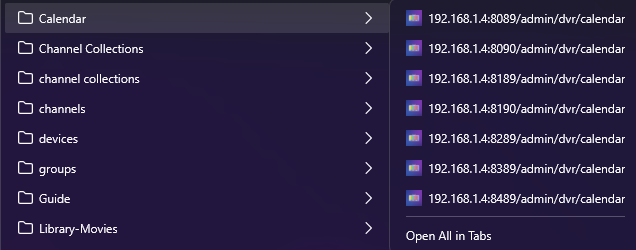
Have you considered adding one more Channels DVR server who's import's folder contains each of the other servers recording folder. Then all of your content would be visible on that one server.
2 Likes
Good thought, but actually tried that before.
Would have to rename the recorded files and hope I don't end up with lots of incorrect matches.
Renaming the recorded files would cause issues with the server that recorded them not being able to find and play them.
Channels DVR can't even correctly import something it recorded.
I have NOVA recordings from Channels DVR that when imported on another server get mismatched because the Season and Episode that gracenote had when they were recorded are now different in gracenote and TMDB is different than gracenote.
Too much work. Not worth the effort.