
I know this is a stupid question but where do I find the actual address of the container?
The IP address of the device you're running it on and the port you assigned to it.
Like 192.168.1.3:8183
Most likely the connection is working and you just have to look at the container log.
added that now 
I tried the full IP address and that didn't work. What am I looking for in the Container log? It looks like I'm getting a username and password error in the logs
You would have to post the error portion from the log <redacting> your username and password.
I usually get Exception happened during processing of request from... in the log when Channels DVR logs a 500 error.
Below is what I get in the logs
### frndlytv-for-channels
da81a2853378
[matthuisman/frndlytv-for-channels:latest](app://dd/dashboard/images/local/details?imageId=sha256%3A279c6e901c7809775ebaad60c61e9401d963a387dfb33e4f6d0433f0912a9a4b&nameHint=matthuisman%2Ffrndlytv-for-channels%3Alatest&nameHintType=image-identity)
[8183:80?](http://localhost:8183/)
**STATUS**
Running (8 minutes ago)
LogsInspectBind mountsExecFilesStats
Starting server on port 80
192.168.65.1 - - [24/Apr/2025 02:38:25] "GET / HTTP/1.1" 200 -
192.168.65.1 - - [24/Apr/2025 02:38:26] "GET /favicon.ico HTTP/1.1" 404 -
Requesting: [https://frndlytv-api.revlet.net/service/api/v1/tvguide/channels?skip_tabs=0?](https://frndlytv-api.revlet.net/service/api/v1/tvguide/channels?skip_tabs=0)
401
Unauthorized access
logging in....
USERNAME and PASSWORD are required
Requesting: [https://frndlytv-api.revlet.net/service/api/v1/tvguide/channels?skip_tabs=0?](https://frndlytv-api.revlet.net/service/api/v1/tvguide/channels?skip_tabs=0)
401
Unauthorized access
logging in....
USERNAME and PASSWORD are required
Requesting: [https://frndlytv-api.revlet.net/service/api/v1/tvguide/channels?skip_tabs=0?](https://frndlytv-api.revlet.net/service/api/v1/tvguide/channels?skip_tabs=0)
401
Unauthorized access
logging in....
USERNAME and PASSWORD are required
192.168.65.1 - - [24/Apr/2025 02:39:19] "GET /playlist.m3u8?gracenote=include HTTP/1.1" 500 -
----------------------------------------
Exception happened during processing of request from ('192.168.65.1', 32769)
Traceback (most recent call last):
File "/usr/local/lib/python3.8/socketserver.py", line 683, in process_request_thread
self.finish_request(request, client_address)
File "/usr/local/lib/python3.8/socketserver.py", line 360, in finish_request
self.RequestHandlerClass(request, client_address, self)
File "./app.py", line 25, in __init__
super().__init__(*args, **kwargs)
File "/usr/local/lib/python3.8/socketserver.py", line 747, in __init__
self.handle()
File "/usr/local/lib/python3.8/http/server.py", line 435, in handle
self.handle_one_request()
It appears to me that the Container cannot get Frndly to let it login.
Also could it be that I signed up for the basic plan and that only has SD so it won't pull the HD feeds?
Your container doesn't have your username and password.
Look at the container environment variables.
When you post logs or other long text, enclose them in code blocks between lines of three backticks
```
post here
```
I figured it out! In the variables, there were " at the beginning of username and password and the end of the actual username and password. I deleted all of those and we're good to go. I apologize for all of the back and forth. I really appreciate your help!
Try using Portainer or OliveTin to create the container instead of using docker command line.
It's been working for me.
version: '3.9'
services:
  # GitHub home for this project: https://github.com/matthuisman/frndlytv-for-channels
  # Matt Huisman's webpage for this project: https://www.matthuisman.nz/2021/11/frndly-tv-for-channels.html
  # Docker Hub home for this project: https://hub.docker.com/r/matthuisman/frndlytv-for-channels
  frndlytv-for-channels:
    image: matthuisman/frndlytv-for-channels:latest
    container_name: frndlytv-for-channels
    ports:
      - 8183:80
    environment:
      #- IP=                    # For Geo-locating FrndlyTV to a different area
      #- KEEP_ALIVE=            # number of minutes between auth token checks. Default is 5, 0 to disable. If auth token has expired, it will renew it.
      - [email protected]  # FrndlyTV username (the email you used to sign-up)
      - PASSWORD=monkey123      # FrndlyTV password (the password you chose when you signed-up)
      - TZ=America/Los_Angeles  # Add your local timezone in standard linux format. E.G. US/Eastern, US/Central, US/Mountain, US/Pacific, etc
    restart: unless-stopped
My Gracenote=exclude source2 also has "Western Bound", and three "Dove" Channels in the list.
Is there any chance that these have migrated to the "Gracenote" side? I'm not seeing them there...
Note that the cheapest plan only includes SD video. The Frndly docker pulls the HD, so I would suggest subscribing to Silver plan to align with that and also limit your streams in Channels Source setup to match what your plan allows. I always have this fear that Frndly will try and block this if too many people are scamming the system.
What do you mean by scamming you still need a paid subscription to Friendly ... If not for this docker how many people that use Channels DVR you think will keep subscribing to Friendly ?
I know the only reason I subscribe is because of this Docker.
I agree with you from an ethical standpoint, so I opted for the middle-tier plan to ensure I get HD. When you pay yearly, it's a great deal. I combine that with my subscriptions to DirecTV Mysports, ESPN+ and MLB.TV. When you add those sources, plus HDhomerun for locals, Pluto, Tubi, etc., Channels offers an unmatched experience.
Channels is hard to beat.
I only subscribe becuase of the docker use.
I pay yearly for the middle plan.
I like the service in general.
"137": {
		"gracenote": 113306,
		"slug": "stingray_greatest_hits"
	},
"138": {
		"gracenote": 149883,
		"slug": "stingray_holidayscapes"
	},
"142": {
		"gracenote": 113303,
		"slug": "stingray_classic_rock"
	},
"143": {
		"gracenote": 113308,
		"slug": "stingray_flashback_70s"
	},
"144": {
		"gracenote": 113300,
		"slug": "stingray_hot_country"
	},
"145": {
		"gracenote": 113304,
		"slug": "stingray_remember_the_80s"
	},
"146": {
		"gracenote": 110289,
		"slug": "cleo"
	},
"179": {
		"gracenote": 68385,
		"slug": "reelz"
	}
1 Like
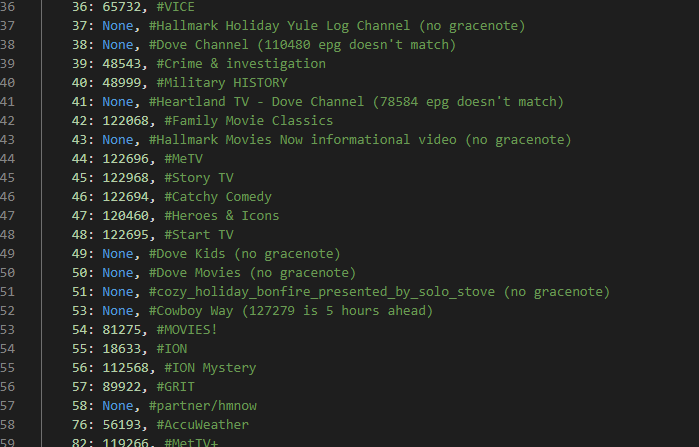
I happened to look at the FRNDLY app at 9:00 AM Pacific time. The Frndly 53 live channel is called "Western Bound, wrangled by INSP". The program which started at 9:00 AM matched the same program in my Frndly NON-Gracenote, source2. It doesn't seem to be off by five hours as we previously noted.
I'd like to help move this channel to the Gracenote side of things.
Can someone show me how to look up Gracenote guide data for related channels to seek a proper match?
I just checked Gracenote guide data from some of my other sources. Plex has the "Western Bound" channel with what appears to be a match.
Use the OliveTin-for-Channels Action for this purpose, and search for western bound -- it's there.
1 Like
Thank you! That's a great start. How can I use those results (as below) to view current guide data to identify which one matches what is currently showing?
type: Streaming, name: Western Bound, callSign: CWBOYUK, stationId: 139097, affiliate: null, logo:
type: Streaming, name: Western Bound, callSign: XALCOW, stationId: 151350, affiliate: null, logo: https://tmsimg.fancybits.co/assets/s151350_ll_h15_aa.png?w=360&h=270
type: Streaming, name: Western Bound Wrangled by INSP, callSign: COWBOYW, stationId: 127279, affiliate: null, logo: https://tmsimg.fancybits.co/assets/s127279_ll_h15_ae.png?w=360&h=270```