
The scrape grabs NBA currently -- i wonder if it'll grab WNBA in season -- will have to check it out in season.
1 Like
This seemed to test out well for Prime Video for regular AndroidTV with close to ten tries of it:
{
    "name": "FruitDeeplinks Prime Video For AndroidTV",
    "author": "nateg",
    "version": "1.0",
    "description": "Prime Video for FruitDeepLinks with select for user and tuning to the Live feed.",
    "uuid": "40c81359-f241-4c63-af69-bbd76208b065",
    "global_options": {
        "wait_for_video_playback_detection": false,
        "use_fixed_delay": true,
        "fixed_delay_seconds": 8,
        "check_for_and_clear_whos_watching_prompts": false,
        "wait_after_post_playback_start_commands_seconds": 0
    },
    "pre_tune_commands": [
        "input keyevent KEYCODE_MEDIA_STOP",
        "input keyevent KEYCODE_HOME"
    ],
    "tune_commands": [
        "am start -W -a android.intent.action.VIEW -d '||TARGET_URL_OR_IDENTIFIER||' '||TARGET_PACKAGE_NAME||'"
    ],
    "post_playback_start_commands": [
        "input keyevent KEYCODE_DPAD_CENTER",
        "sleep 3",
        "input keyevent KEYCODE_DPAD_CENTER",
        "sleep 3",
        "input keyevent KEYCODE_DPAD_CENTER"
    ],
    "post_tune_commands": [
        "input keyevent KEYCODE_MEDIA_STOP",
        "input keyevent KEYCODE_HOME"
    ]
}
1 Like
I pushed a new bnhf/olivetin:latest (aka bnhf/olivetin:2025.12.26) this morning, including what I hope is a universal ADBTuner Custom Configuration for Prime Video. In the interest of having fewer configs to maintain, and also in the interest of supporting users that have both FireTV and AndroidTV devices configured in the same instance of ADBTuner, thses configs are meant to be cross-device.
This particular config is the first I'm adding to the Create Fruit ADBTuner Lanes + CDVR Custom Channels Action as a "standard" CONFIG_NAME that will be listed in the dropdown:
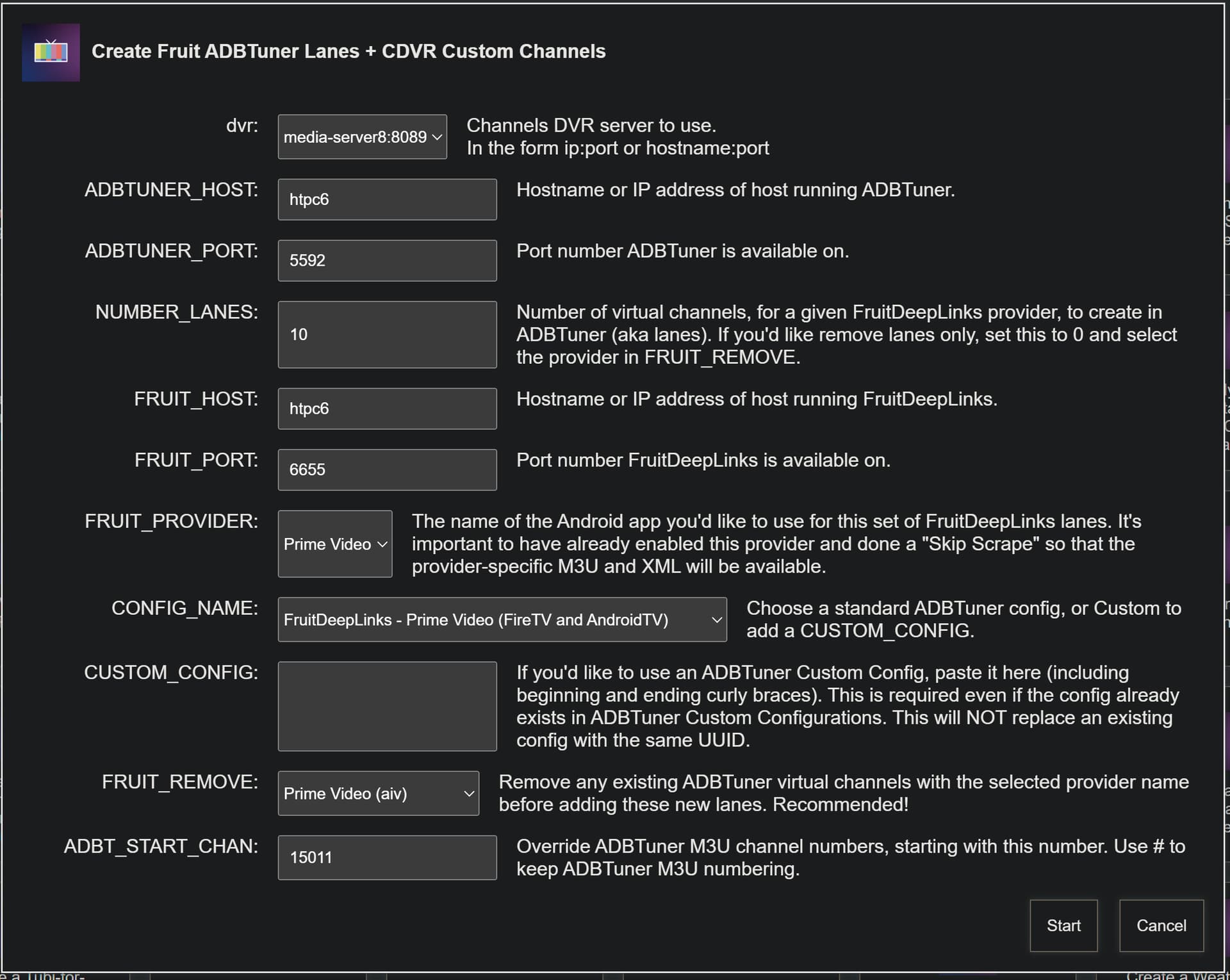
This type of standard custom config, or any entered in the field below it, will now replace any existing custom configs with the same UUID -- giving us an update process for these configurations.
The config itself looks like this:
{
    "name": "FruitDeepLinks - Prime Video v2.0 (FireTV and AndroidTV)",
    "author": "bnhf",
    "version": "2.0",
    "description": "Prime Video for FruitDeepLinks with select for User and tuning to the Live feed. Compatible with FireTV and AndroidTV devices.",
    "uuid": "a176643f-b3b6-47fb-8527-47908d089695",
    "global_options": {
        "wait_for_video_playback_detection": false,
        "use_fixed_delay": true,
        "fixed_delay_seconds": 8,
        "check_for_and_clear_whos_watching_prompts": false,
        "wait_after_post_playback_start_commands_seconds": 0
    },
    "pre_tune_commands": [
        "input keyevent KEYCODE_MEDIA_STOP",
        "input keyevent KEYCODE_HOME"
    ],
    "tune_commands": [
        "am start -n $(dumpsys package '||TARGET_PACKAGE_NAME||' 2>/dev/null | awk '/https:/{getline; print $2; exit}') -d '||TARGET_URL_OR_IDENTIFIER||'"
    ],
    "post_playback_start_commands": [
        "test -z '$(getprop ro.build.version.fireos)' && ( input keyevent KEYCODE_DPAD_CENTER; sleep 3 )",
        "input keyevent KEYCODE_DPAD_CENTER"
    ],
    "post_tune_commands": [
        "input keyevent KEYCODE_MEDIA_STOP",
        "input keyevent KEYCODE_HOME"
    ],
    "timed_keep_active_commands": []
}
A couple of comments to expand on what's happening here:
The "am start" command includes logic to identify the correct package/activity for https:// schemes. This has been verified to work great on both Android versions.
The "test -z '$(getprop ro.build.version.fireos)' &&" line allow commands to be sent to AndroidTV devices, that are not required on FireTV. Basically, the initial test determines whether the device is a FireTV, and if it's not -- execute one or more commands.
If you'd like contribute to this and future standard configs, be sure to start with the latest version of the standard config and make changes from there.
See the post just above this one for what I'm trying to accomplish with these configs. Though we can certainly have device-specific configs, I think we'd all prefer to have fewer configs that work wherever -- I know I would.
I have a CCwGTV with me (which I didn't think was going to be of much value since it's not encoder connected and had updated to Android 14) in addition to a FireStick 4k Max Gen2, however now that I've worked out this new ADB pairing/connecting process it's been useful for testing commands.
I tested the basics of the config you posted, in the interest of incorporating it into the standard config, but pretty quickly ran into an issue. That sequence of 3x KEYCODE_DPAD_CENTER commands can cause one to end being subscribed to a premium service, if attempting to tune to an event on a channel requiring a subscription without having one. This happened to me on the FireTV device, and it appeared this would also happen on the AndroidTV device.
Anyway, if you're willing/interesting in contributing, please start with the standard config I posted and adjust it from there -- assuming it doesn't work for you as-is. I'm planning to create "standard" custom configs for ESPN, Paramount+, Peacock and NFL at a minimum -- which hopefully will work on all devices.
I see, sorry about that. Three center clicks was what was required to get me all the way to live, as one of them was required to get past user screen. I don't know how to do it any other way, as the detect who's watching feature doesn't work I think when the user name only pops up without those magic words. This might require help from ADBTuner developer to get around that otherwise.
I had to select the user too on my CCwGTV, but then the deeplink should take you to the event where you can select to watch live. What was the 3rd DPAD_CENTER for?
For me, clicking watch live seemed to create another opportunity to watch from beginning, if I remember right, so it required a second click related to watch live (third total including user screen) to get all the way to the live event.
I’m all for universality by the way, but it may not be in the cards. You set up your Paramount+ config with two clicks because you said you couldn’t get the who’s watching to get past it consistently. This caused me problems on my device because it doesn’t always show up on some apps all the time. I agree an extra click can be problematic. So I made my own config that put The Who’s watching detect back in and it worked for me fine. That’s one of the nice things about that check is that it hunts it down and handles it. Universal behavior may also never be achieved because Fire devices are running really old OSes and software behavior of apps may never be guaranteed because of that. I’m sharing what I found useful for my hardware in the hopes it may help some, but realistically understanding it may not help all.
I'm trying to tune to the Central Michigan football game on ESPN right now, and FruitDeepLinks is returning this:
{"channel_id":"sportscenter08","channel_name":"ESPN","deeplink":"sportscenter://x-callback-url/showWatchStream?playChannel=espn1&x-source=AppleUMC","deeplink_format":"scheme","event_end_utc":"2025-12-26T21:35:00+00:00","event_start_utc":"2025-12-26T18:00:00+00:00","lane_number":8,"provider_code":"sportscenter","start_utc":"2025-12-26T18:00:00+00:00","status":"success","stop_utc":"2025-12-26T21:35:00+00:00","title":"College Football: Central Michigan Chippewas vs. Northwestern Wildcats"}
ESPN4cc4c (via ADBTuner with the same custom config), on the other hand, returns this for the same event:
{"ok":true,"lane":3,"event_uid":"d63f8008-07e3-4cb8-aaf4-87c94594a004:de88609fa0fd4e0781f6c8767b3ccc52","at":"2025-12-26T19:52:27+00:00","deeplink_url":"sportscenter://x-callback-url/showWatchStream?playID=d63f8008-07e3-4cb8-aaf4-87c94594a004"}
ESPN4cc4c works, but FruitDeepLinks does not. The returned deeplink in FruitDeepLinks does not appear correct...
Here's what the Event Inspector shows:
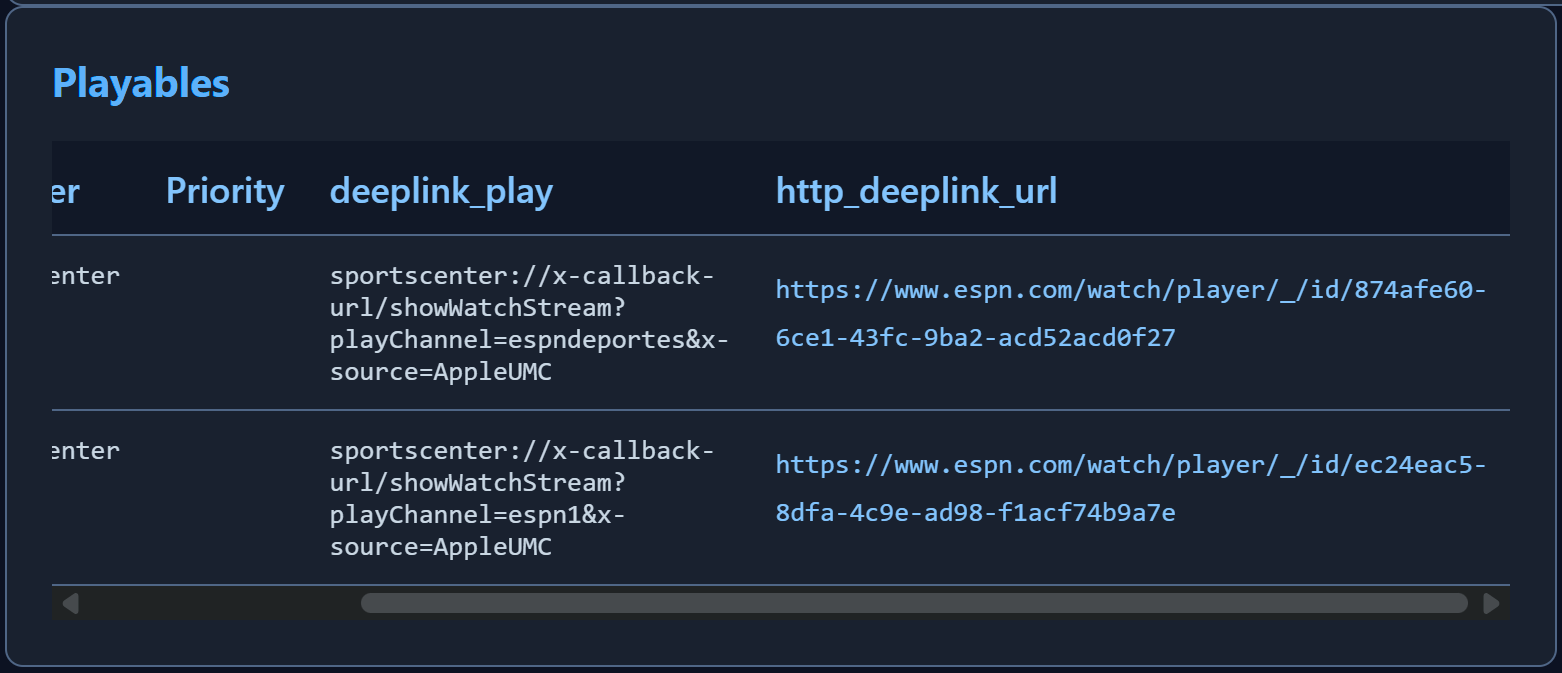
got it.. I suspect Apple is kicking back both the Spanish and English deeplinks for ESPN (both showing same event).
good catch - I'll have to add some filtering for ESP / English and to grab proper link.
To me, it looks like the deeplink_play value is the problem:
sportscenter://x-callback-url/showWatchStream?playChannel=espn1&x-source=AppleUMC
Rather than:
sportscenter://x-callback-url/showWatchStream?playID=d63f8008-07e3-4cb8-aaf4-87c94594a004
Given that we're trying to use the sportscenter:// scheme in this case...
got it.. well, i think both things are an issue but fixable!
anyway, i think with those lineral events on espn4cc4c, i had to guess the URL by combining event ID and some other field. looks like Apple reports it "properly" in their eyes (and i think does work on tvOS) but must not for Fire/Android.
luckily, all the info is in the scrape i'd just have to figure out how to deciphre it and export the working kind for ADB outputs.
2 Likes
FYI, as @bnhf said, that game plays fine in ESPN4CC, but using the CC4C version of Fruitdeeplinks takes me to a landing page only.
bad news-- the apple scrape does return some similar data, but it's not good enough for firestick. it looks similar, but different. it doesnt open the stream 
good news- i think i can fix, but gonna take me scraping the espn API and merging into this DB.
before i go down this path, do you all want ALL espn events, or just append the apple events with the working schema? i'm kinda thinking just like adding it as a whole new service (like i did with Kayo) and have capability to turn on/off "Apple ESPN" and "ESPN Direct API"
edit-- i changed my mind. i'm just going to scrape the ESPN api, create it's own DB and use that DB to create good espn deeplinks for ADB outputs. cleaner to debug. ill get crackin'
2 Likes
OK you guys owe me a beer.
Just wrapped up a pretty big update to FruitDeepLinks that fixes ESPN compatibility with ADBTuner and Fire TV devices.
The Problem:
ESPN deeplinks from Apple TV's API were broken on Fire TV/Android - they'd either launch the wrong game or fail completely. This was because Apple provides playChannel-style deeplinks that only work on Apple TV, not the playID format that Fire TV needs.
The Solution:
I've integrated ESPN's Watch Graph API to get the correct Fire TV-compatible deeplinks. The system now:
Scrapes ESPN's Watch Graph API daily (gets about 2,000+ events covering 14 days out)
Matches Apple TV events with ESPN events using program IDs
Automatically uses the ESPN Graph deeplinks instead of Apple's broken ones
Falls back to Apple IDs if no match exists (for events outside ESPN's 14-day window)
The Results:
All current ESPN events should now work properly with ADBTuner
This affects all three export types - ADB provider lanes, virtual lanes, and direct channels. Also added daily cleanup to keep the database fresh and remove old events automatically. Also, first crack at language filtering.
3 Likes
No doubt!
I'll spin this up soon and let you know how it goes.
@KineticMan I did a full refresh, which shows as a success, but there was one error in the logs:
Day 8/14: 2026-01-03 [watch-graph] HTTP 503 body=<!DOCTYPE html> <html> <head> <title>503 Backend fetch failed</title> </head> <body> <h1>Error 503 Backend fetch failed</h1> <p>Backend fetch failed</p> <h3>Guru Meditation:</h3> <p>XID: 3313806</p> <hr> <p>Varnish cache server</p> </body> </html>
→ 346 events
ESPN deeplinks look good visually -- but it'll be an hour or so before I have anything live to try...
I noticed those errors too. I think it’s just when their API crapped out. It seems like it’s grabbing all the data though so I will investigate that further but I think it might be an ignore type of error.
1 Like
looks like it's just some sort of error when we hammer their API too fast. I'm going to add some defensive/circuit-breaker steps in there, but good news all current retries in the code got all the events.
tl;dr - don't worry about those errors
testers, please let me know if you get any time to test the new espn endpoints today. i think i found an alternative schema that might work too if this fails. been testing it on tvOS and seems more accurate than the one i am providing from latest update.