@KineticMan and @bnhf,
HBOMax also opens up correctly, but lands on a "Watch Live" or "From Beginning" page.

@KineticMan and @bnhf,
HBOMax also opens up correctly, but lands on a "Watch Live" or "From Beginning" page.
As I understand it, the cron jobs will try to restart if it misses the start time (I could be wrong though). I'm running the same containers except for the samsung one as well as the node version of CC4C, so I'm wondering if the samsung container might be causing a problem.
Will check into the refresh stuff. I’ll tell ya- I had nothing but problems with auto refresh on ESPN4CC4C too. Maybe I need to take a fresh approach.
FWIW- mine works fine but maybe something I’m overlooking!
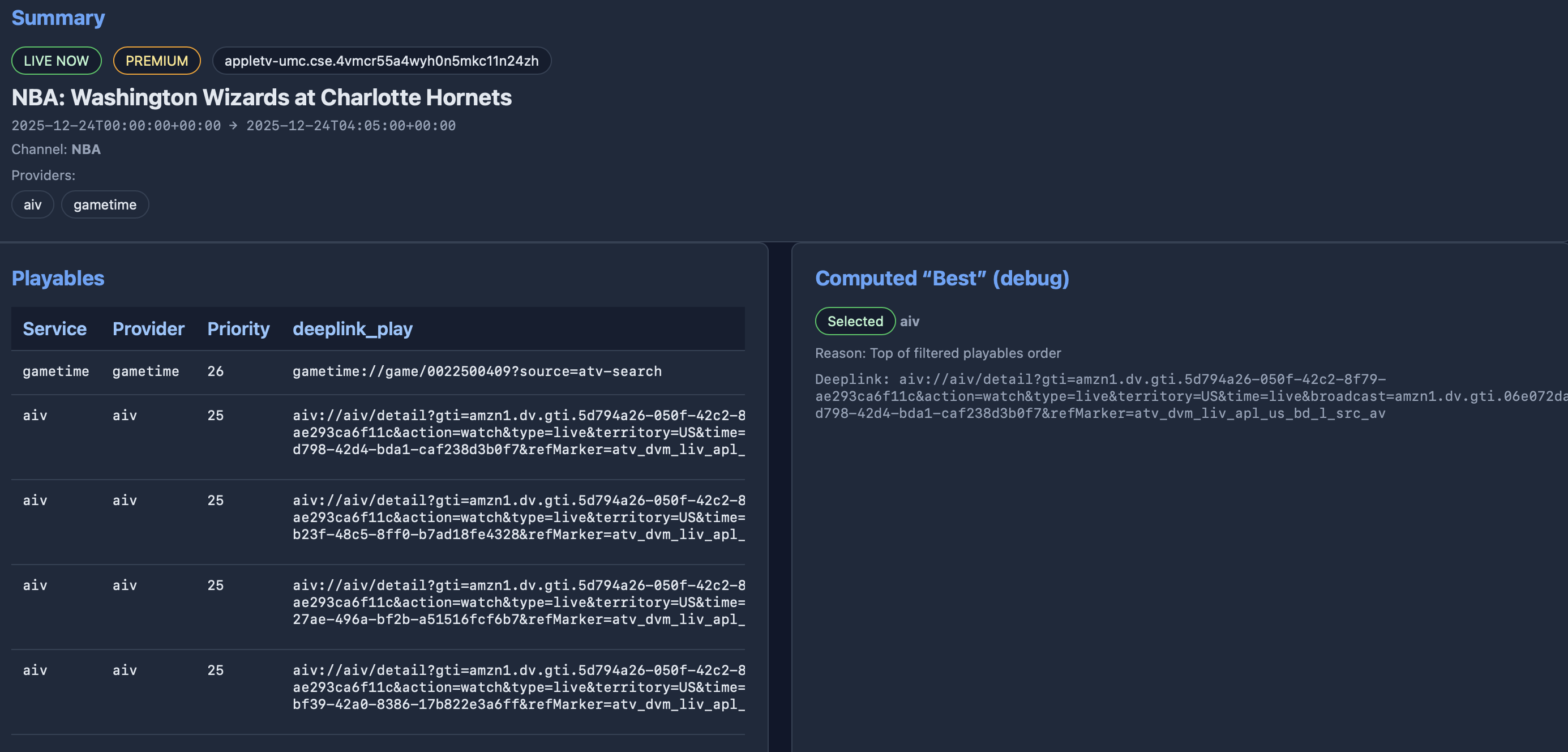
gametime:// is NBA app. Created a test channel in ADBTuner using gametime:// link found in image here.
So deeplink that worked for this event looks like this: gametime://game/0022500409
So this looks like it should work. Maybe scrubbing the query string relating it to ATV for deep links that will be used outside of ATV is a good thing in general.
Excited that there is likely another app that fruit is going to be able to support going forward.
Yup, lots of these are going to. If using ADBTuner use this:
If using CC4C use @bnhf suggestion above to get past that.
Pushed update tonight-- attempt to fix the APScheduler error (added 5 minute grace period to allow for busy CPU), and renamed TNF Amazon to NBA/Gametime.
I'll update Project One-Click. What are you seeing as a package name for the NBA app on generic Android?
Amazingly Peacock deeplinks work on FireTV, despite the lack of a registered scheme, and as a bonus it appears to bypass the profile selection screen.
This ADBTuner Custom Config is for FireSticks only atm, but if somebody can confirm what's needed for generic Android -- I believe I can make it dual purpose:
{
    "name": "FruitDeepLinks - Peacock",
    "author": "bnhf",
    "version": "1.0",
    "description": "Peacock for FruitDeepLinks with tuning process visible. Currently FireTV only.",
    "uuid": "7a0a4dc6-4f88-42f7-b545-2fbaadc24197",
    "global_options": {
        "wait_for_video_playback_detection": false,
        "use_fixed_delay": true,
        "fixed_delay_seconds": 0,
        "check_for_and_clear_whos_watching_prompts": false,
        "wait_after_post_playback_start_commands_seconds": 0
    },
    "pre_tune_commands": [
        "input keyevent KEYCODE_MEDIA_STOP"
    ],
    "tune_commands": [
        "am start -n ||TARGET_PACKAGE_NAME||/com.peacock.peacocktv.AmazonMainActivity -d '||TARGET_URL_OR_IDENTIFIER||'"
    ],
    "post_playback_start_commands": [],
    "post_tune_commands": [
        "input keyevent KEYCODE_MEDIA_STOP",
        "input keyevent KEYCODE_MEDIA_PAUSE",
        "input keyevent KEYCODE_HOME"
    ],
    "timed_keep_active_commands": []
}
I'd like to add some pre-built ADBTuner Custom Configurations to the dropdown in the
Create Fruit ADBTuner Lanes + CDVR Custom Channels Project One-Click Action. When selected, these would replace any previous custom config with the same UUID, allowing them to be updated.
Here are the ones I'm using, and am planning to include:
ESPN+:
{
    "name": "FruitDeepLinks - ESPN+",
    "author": "bnhf",
    "version": "2.0",
    "description": "Load content via ESPN+ deep link URLs (where supported). Jump to live.",
    "uuid": "51af5028-092f-4ddc-b4ea-d5e5fca58cac",
    "global_options": {
        "wait_for_video_playback_detection": false,
        "use_fixed_delay": true,
        "fixed_delay_seconds": 5,
        "check_for_and_clear_whos_watching_prompts": false,
        "wait_after_post_playback_start_commands_seconds": 0
    },
    "pre_tune_commands": [
        "input keyevent KEYCODE_MEDIA_STOP"
    ],
    "tune_commands": [
        "am start -n '||TARGET_PACKAGE_NAME||'/com.espn.startup.presentation.StartupActivity -d '||TARGET_URL_OR_IDENTIFIER||'"
    ],
    "post_playback_start_commands": [
        "sleep 20",
        "input keyevent KEYCODE_DPAD_DOWN",
        "sleep 1",
        "input keyevent KEYCODE_DPAD_DOWN",
        "sleep 1",
        "input keyevent KEYCODE_DPAD_RIGHT",
        "sleep 1",
        "input keyevent KEYCODE_DPAD_CENTER"
    ],
    "post_tune_commands": [
        "input keyevent KEYCODE_MEDIA_STOP",
        "input keyevent KEYCODE_MEDIA_PAUSE",
        "input keyevent KEYCODE_HOME"
    ],
    "source_file": "/app/.config/user_configurations/51af5028-092f-4ddc-b4ea-d5e5fca58cac.json"
}
Paramount+:
{
    "name": "FruitDeepLinks - Paramount+",
    "author": "bnhf",
    "version": "2.0",
    "description": "Paramount+ for FruitDeepLinks with timing-based profile selection, and a Select for tuning to the Live feed.",
    "uuid": "62a01c95-94f8-41b7-b56b-4838859ab42d",
    "global_options": {
        "wait_for_video_playback_detection": false,
        "use_fixed_delay": true,
        "fixed_delay_seconds": 0,
        "check_for_and_clear_whos_watching_prompts": false,
        "wait_after_post_playback_start_commands_seconds": 0
    },
    "pre_tune_commands": [
        "input keyevent KEYCODE_MEDIA_STOP",
        "am force-stop ||TARGET_PACKAGE_NAME||"
    ],
    "tune_commands": [
        "am start -W -a android.intent.action.VIEW -d '||TARGET_URL_OR_IDENTIFIER||' '||TARGET_PACKAGE_NAME||'"
    ],
    "post_playback_start_commands": [
        "sleep 8",
        "input keyevent KEYCODE_DPAD_CENTER",
        "sleep 8",
        "input keyevent KEYCODE_DPAD_CENTER"
    ],
    "post_tune_commands": [
        "input keyevent KEYCODE_MEDIA_STOP",
        "input keyevent KEYCODE_MEDIA_PAUSE",
        "input keyevent KEYCODE_HOME",
        "am force-stop ||TARGET_PACKAGE_NAME||"
    ],
    "timed_keep_active_commands": []
}
Peacock (this one needs be made compatible with non-FireSticks, but I need to know the proper package/activity @anyone?):
{
    "name": "FruitDeepLinks - Peacock",
    "author": "bnhf",
    "version": "1.0",
    "description": "Peacock for FruitDeepLinks with tuning process visible. Currently FireTV only.",
    "uuid": "7a0a4dc6-4f88-42f7-b545-2fbaadc24197",
    "global_options": {
        "wait_for_video_playback_detection": false,
        "use_fixed_delay": true,
        "fixed_delay_seconds": 0,
        "check_for_and_clear_whos_watching_prompts": false,
        "wait_after_post_playback_start_commands_seconds": 0
    },
    "pre_tune_commands": [
        "input keyevent KEYCODE_MEDIA_STOP"
    ],
    "tune_commands": [
        "am start -n ||TARGET_PACKAGE_NAME||/com.peacock.peacocktv.AmazonMainActivity -d '||TARGET_URL_OR_IDENTIFIER||'"
    ],
    "post_playback_start_commands": [],
    "post_tune_commands": [
        "input keyevent KEYCODE_MEDIA_STOP",
        "input keyevent KEYCODE_MEDIA_PAUSE",
        "input keyevent KEYCODE_HOME"
    ],
    "timed_keep_active_commands": []
}
Prime Video (this one also needs be made compatible with non-FireSticks @nateg?):
{
    "name": "FruitDeepLinks - Prime Video",
    "author": "bnhf",
    "version": "1.0",
    "description": "Launch Prime Video Deep Links",
    "uuid": "a176643f-b3b6-47fb-8527-47908d089695",
    "global_options": {
        "wait_for_video_playback_detection": false,
        "use_fixed_delay": false,
        "fixed_delay_seconds": 0,
        "check_for_and_clear_whos_watching_prompts": false,
        "wait_after_post_playback_start_commands_seconds": 0
    },
    "pre_tune_commands": [
        "input keyevent KEYCODE_MEDIA_STOP"
    ],
    "tune_commands": [
        "am start -n com.amazon.firebat/com.amazon.firebatcore.deeplink.DeepLinkRoutingActivity -a android.intent.action.VIEW -d '||TARGET_URL_OR_IDENTIFIER||'"
    ],
    "post_playback_start_commands": [],
    "post_tune_commands": [
        "input keyevent KEYCODE_MEDIA_STOP",
        "input keyevent KEYCODE_MEDIA_PAUSE",
        "input keyevent KEYCODE_HOME"
    ],
    "timed_keep_active_commands": []
}
Since it's always required to insert a custom config in the Action (to extract the UUID), even if it already exists, I'm thinking I'll have it replace any existing config with that same UUID. Comments?
Also, if it's possible, I'm going to start removing any existing CDVR Custom Channel Source that has the name we're using prior to POSTing the new one. Seems cleaner and safer than replacing it.
The APscheduler grace period fix worked for me! The refresh succesfully ran even though it was 4 seconds late to call.
regarding feature request for live/new tagging. easy fix, but i must note-- there's not a great flag in the scrape for live/new so it would probably have to be a blanket add for all output. you guys think that's safe? i assume all events are indeed live/new sporting events so probably fine - just wanted your guys input!
Could you try this custom config to see if it works for you with the Prime Video app?
{
    "name": "FruitDeepLinks - Prime Video",
    "author": "bnhf",
    "version": "2.0",
    "description": "Launch Prime Video Deep Links",
    "uuid": "a176643f-b3b6-47fb-8527-47908d089695",
    "global_options": {
        "wait_for_video_playback_detection": false,
        "use_fixed_delay": false,
        "fixed_delay_seconds": 0,
        "check_for_and_clear_whos_watching_prompts": false,
        "wait_after_post_playback_start_commands_seconds": 0
    },
    "pre_tune_commands": [
        "input keyevent KEYCODE_MEDIA_STOP"
    ],
    "tune_commands": [
        "am start -n $(dumpsys package '||TARGET_PACKAGE_NAME||' 2>/dev/null | awk '/https:/{getline; print $2; exit}') -d '||TARGET_URL_OR_IDENTIFIER||'"

    ],
    "post_playback_start_commands": [],
    "post_tune_commands": [
        "input keyevent KEYCODE_MEDIA_STOP",
        "input keyevent KEYCODE_MEDIA_PAUSE",
        "input keyevent KEYCODE_HOME"
    ],
    "timed_keep_active_commands": []
}
If this doesn't work, please capture the ADBTuner log entries related to the failed tune and post them here.
can confirm Prime Video V1.0 was not replaced or installed with FruitDeepLinks - Prime Video V1.0
got "same uuid error". I deleted then updated manually ok. so yes we need to remove first to update succesfully
{
"name": "Prime Video",
"author": "bnhf",
"version": "1.0",
"description": "Launch Prime Video Deep Links",
"uuid": "a176643f-b3b6-47fb-8527-47908d089695",
Could someone try this custom config to see if it works with the Peacock app, especially on a non-FireStick?
{
    "name": "FruitDeepLinks - Peacock",
    "author": "bnhf",
    "version": "2.0",
    "description": "Peacock for FruitDeepLinks with tuning process visible.",
    "uuid": "7a0a4dc6-4f88-42f7-b545-2fbaadc24197",
    "global_options": {
        "wait_for_video_playback_detection": false,
        "use_fixed_delay": true,
        "fixed_delay_seconds": 0,
        "check_for_and_clear_whos_watching_prompts": false,
        "wait_after_post_playback_start_commands_seconds": 0
    },
    "pre_tune_commands": [
        "input keyevent KEYCODE_MEDIA_STOP"
    ],
    "tune_commands": [
        "am start -n $(dumpsys package '||TARGET_PACKAGE_NAME||' 2>/dev/null | awk '/https:/{getline; print $2; exit}') -d '||TARGET_URL_OR_IDENTIFIER||'"
    ],
    "post_playback_start_commands": [],
    "post_tune_commands": [
        "input keyevent KEYCODE_MEDIA_STOP",
        "input keyevent KEYCODE_MEDIA_PAUSE",
        "input keyevent KEYCODE_HOME"
    ],
    "timed_keep_active_commands": []
}
If this doesn't work, please capture the ADBTuner log entries related to the failed tune and post them here.
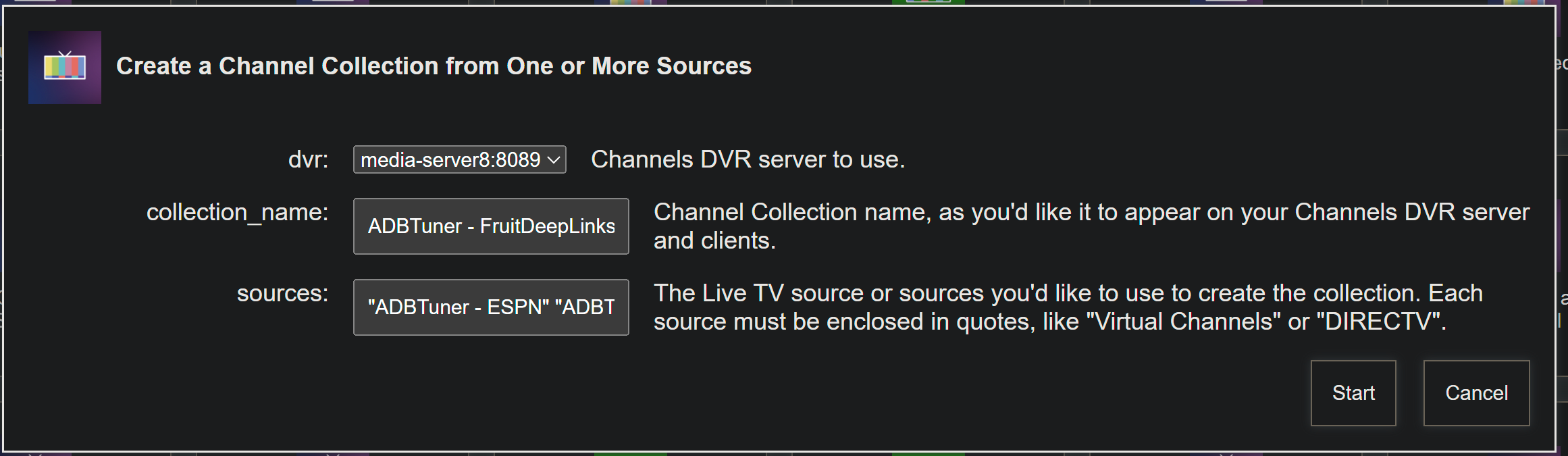
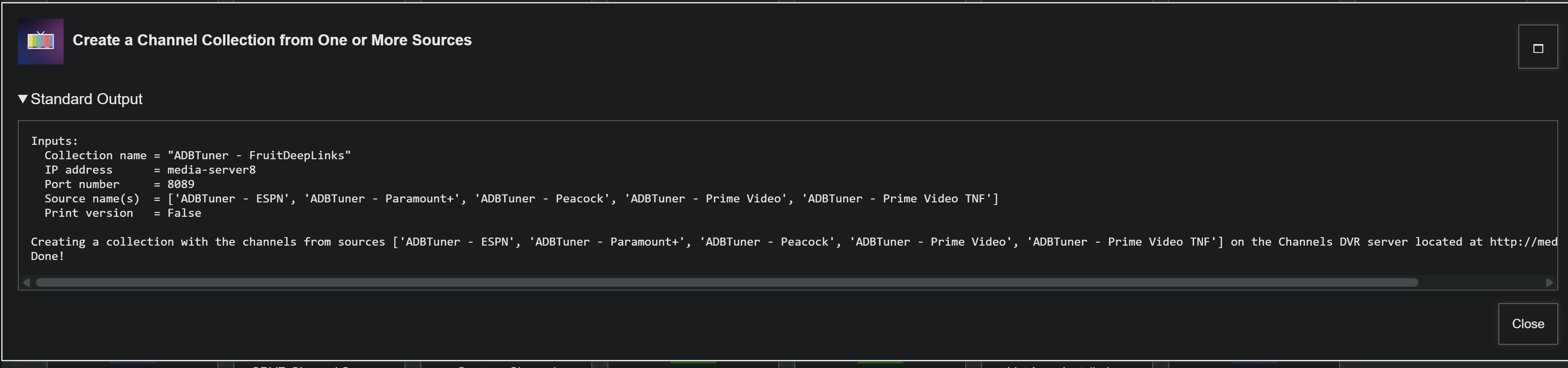
Just a little reminder for those that would like to combine one or more of their ADBTuner FruitDeepLinks sources into a single CDVR Channel Collection:
There's an OliveTin-for-Channels Action for that!
Contrary to this example, a shorter collection name actually looks better in the guide on a CDVR client. So, something like ADBFruit is recommended.
Name your collection, and add as many sources as you like, space-separated and enclosed in double quotes -- and a Channel Collection will be created.
FYI I renamed gametime to NBA - i had it incorrectly labeled as Amazon TNF .. not sure if that broke anything you had built for ADB
I pushed an update that includes this fix overnight. Anybody that used the Action for Amazon Video TNF can just re-run it to update to NBA.
Thanks for what you're doing with this project -- it's really coming together!
com.nbaimd.gametime.nba2011
My experience has been with doing testing, that if it is showing up in this database it is new. I saw a few events on Paramount+ app that were streaming, but seemed to be replays, that didn't seem to be showing in database. My vote would be to do the blanket add, it would help with some of CDVR's sorting of channels. I could create a live sports channel collection that way.
I can probably give it a go tomorrow evening on TNF. I don't have a lot of options for live sports with prime video usually. I was actually experimenting with Prime Video yesterday, and was getting pretty good results with the native Show Tuning Process configurations. I was randomly getting the select user page while opening links. I experimented with the regular and compatibility version and there was no rhyme or reason when it would show up. The ADBTuner who's watching check wouldn't work because it doesn't use those words on that page, which is what ADBTuner is actually using in an image grab to get past it, as I understand it. The live events I was playing with had a watch live button like many apps do, so that would have to be gotten past as well. So maybe two different timed DPAD_CENTER actions would do the trick. Hopefully an extra DPAD_CENTER wouldn't have negative consequences if the click user page didn't show up randomly.
I think maybe you are having a harder time with the prime video app on your fire sticks because they are so deeply ingrained within the fire devices. Seems like it might not be all that hard outside of that world.
Also, other note, the NBA app has a watch live button that needs to be pressed on the splash page for the event, if you are interested in taking that one on too. Otherwise native show tuning process configurations seemed to work.