
I believe all he has to do is add provider in Channels (probably Osprey dependent):
Settings>Sources>Manage>Add Provider
1 Like
Isn't that for TVE? When you're talking about a Custom Channels Source, as far as I know, the options are to have the Gracenote Station ID in the M3U or match them channel by channel. If there's another option I'd be happy to know about it... 
I am a little confused at this point because of all the options, but by coincidence I had just added the provider as "DirecTV Portland" and it did fix my issue with the USA channel which is the only one I've added to my guide so far.
You can select provider for the entire m3u file.
1 Like
And as you add more channels they should auto populate.
1 Like
Where? Screenshot?
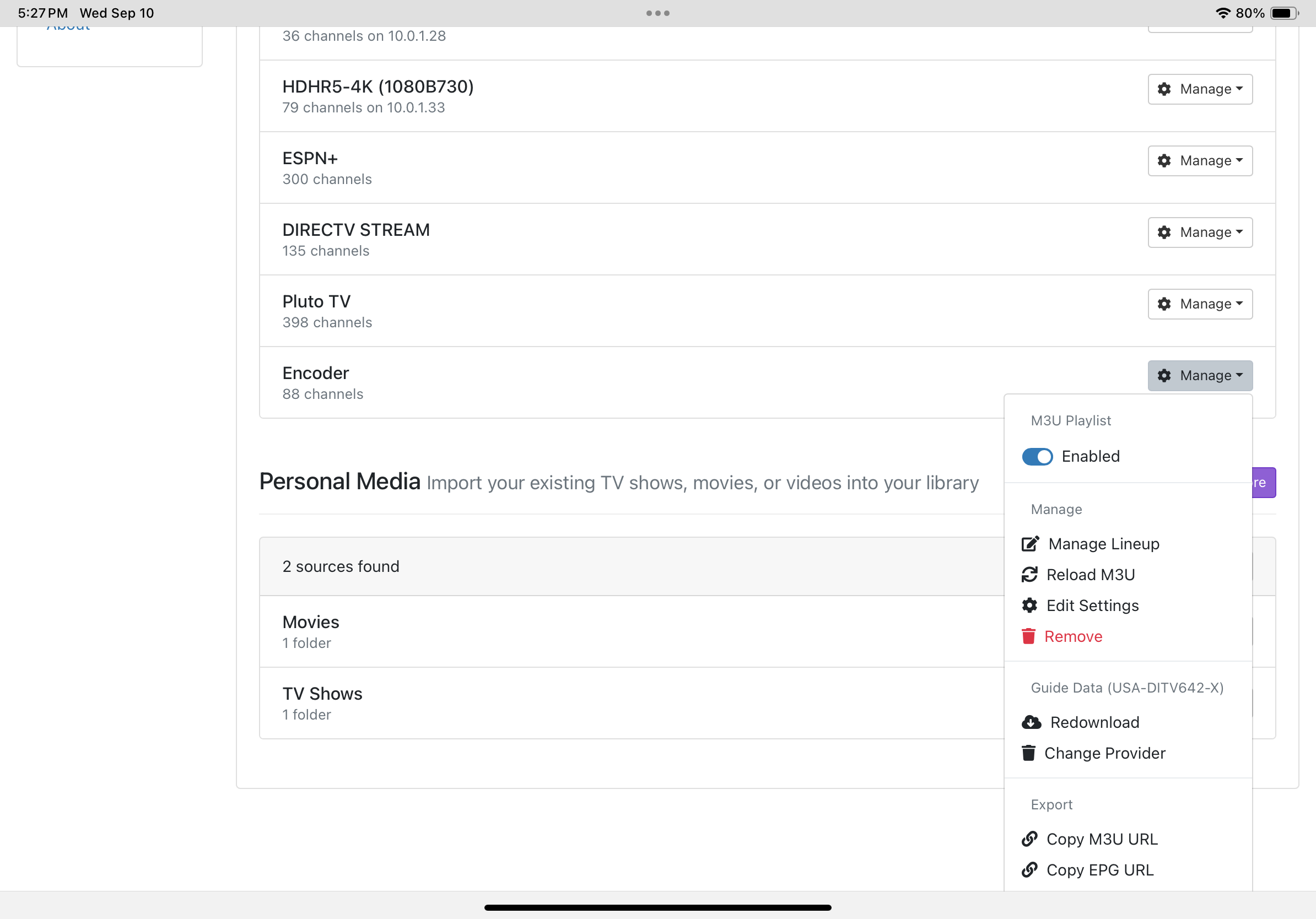
I've never noticed that before! Very cool. How is the matching done, by channel number, channel name or something else?
I’m assuming by Channel Name. I remember having to change the m3u for the correct call sign for my locals and some other additions. Also, on some I added station id if I knew it.
1 Like
It's worth mentioning, since you have OliveTin-for-Channels installed, there's an Action for monitoring your encoder-connected streaming devices that will send you an e-mail if any are reporting anything other than "connected":
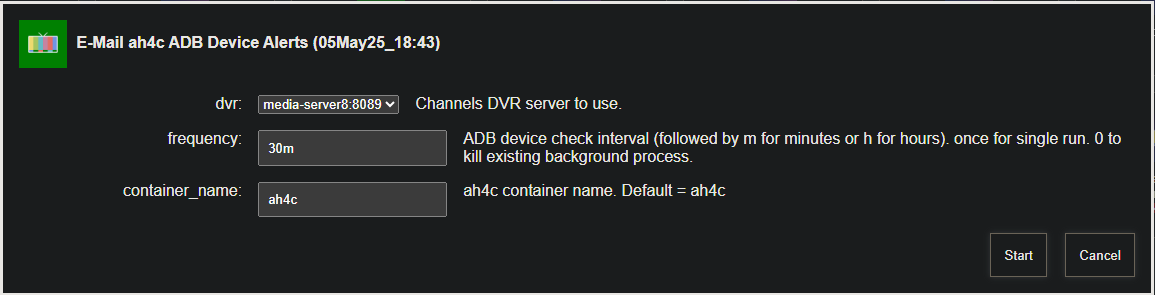
What's the best way to determine if there's an update to ah4c? Just periodically check the GitHub page?
You can use Project One-Click to install Watchtower in RUN_ONCE mode. It'll show in your list of containers in an exited state, until you're ready to check for updates on all of your running containers. Then, select Watchtower and click start. After Watchtower exits, any containers with updates available will have been updated including Portainer.
This is the best way to to do it imo, rather than doing updates automatically. This way if anything isn't working right you'll know immediately an update was likely responsible.
My LinkPi ENC1-V3 encoder box should arrive today, so I should hopefully be fully up and running this evening. Once I can get Channels to records Premier League games on the USA channel, then I can unplug my TiVo mostly likely for the last time 
1 Like
Is there a specific post or tutorial for how to configure the LinkPi?I have everything plugged in, and in the LinkPi admin console I can see the DirecTV boot screen, but then I get no video when I assume the guide or home page is loaded. I haven't changed any of the default settings yet, though I gave it a static IP.
Am I going to need a TV plugged into the output to complete this? I was hoping not.
You can skip the stuff about ADBTuner, but there are few useful tips about the LinkPi here:
That'll tell you your HDMI connections are OK, but that's about it.
What are you seeing in the ah4c Portainer log when you try to tune, and what are you seeing in the CDVR log for that same attempt at tuning a channel? You might want to restart the container, and then try one tune, followed by analyzing the logs. You can post them here too if needed.
Channels can tune to the USA channel now, but I still just see the "NO SIGNAL" image which is the same image I see in the LinkPi console. If I reboot the Osprey, I briefly see the DirecTV logo and boot, but the end result is the same:
Last updated: 9/15/2025, 6:52:16 PM
2025/09/15 18:51:13 [START] ah4c is starting
2025/09/15 18:51:13 [ENV] Not loading env
2025/09/15 18:51:13 [ENV] IPADDRESS 10.10.10.10:7654
2025/09/15 18:51:13 [ENV] ALERT_SMTP_SERVER smtp.gmail.com:587
2025/09/15 18:51:13 [ENV] ALERT_AUTH_SERVER smtp.gmail.com
2025/09/15 18:51:13 [ENV] ALERT_EMAIL_FROM [email protected]
2025/09/15 18:51:13 [ENV] ALERT_EMAIL_PASS fciojjiplxbpmrtz
2025/09/15 18:51:13 [ENV] ALERT_EMAIL_TO [email protected]
2025/09/15 18:51:13 [ENV] ALERT_WEBHOOK_URL
2025/09/15 18:51:13 [ENV] ALLOW_DEBUG_VIDEO_PREVIEW
2025/09/15 18:51:13 [ENV] Creating tuner 1
2025/09/15 18:51:13 [ENV] ENCODER1_URL http://10.10.10.25/live/stream0
2025/09/15 18:51:13 [ENV] TUNER1_IP 10.10.10.24:5555
2025/09/15 18:51:13 [ENV] CMD1
2025/09/15 18:51:13 [ENV] TEECMD1
2025/09/15 18:51:13 [ENV] PRE SCRIPT ./scripts/osprey/dtvosprey/prebmitune.sh
2025/09/15 18:51:13 [ENV] START SCRIPT ./scripts/osprey/dtvosprey/bmitune.sh
2025/09/15 18:51:13 [ENV] STOP SCRIPT ./scripts/osprey/dtvosprey/stopbmitune.sh
2025/09/15 18:51:13 [ENV] REBOOT SCRIPT ./scripts/osprey/dtvosprey/reboot.sh
2025/09/15 18:51:13 [START] ah4c is ready
2025/09/15 18:51:29 Attempting network tune for device http://10.10.10.25/live/stream0 10.10.10.24:5555 242
2025/09/15 18:51:29 [EXECUTE] Running [./scripts/osprey/dtvosprey/prebmitune.sh 10.10.10.24:5555 242]
2025/09/15 18:51:33 [EXECUTE] Stdout: 'already connected to 10.10.10.24:5555
Waking 10.10.10.24:5555
prebmitune.sh is exiting for 10.10.10.24:5555 with exit code 0
'
2025/09/15 18:51:33 [EXECUTE] Stderr: '+ streamerIP=10.10.10.24:5555
+ streamerNoPort=10.10.10.24
+ adbTarget='adb -s 10.10.10.24:5555'
+ mkdir -p 10.10.10.24
+ trap finish EXIT
+ main
+ adbConnect
+ adb connect 10.10.10.24:5555
+ local -i adbMaxRetries=3
+ local -i adbCounter=0
+ true
+ adb -s 10.10.10.24:5555 shell input keyevent KEYCODE_WAKEUP
+ local adbEventSuccess=0
+ [[ 0 -eq 0 ]]
+ break
+ adbWake
+ adb -s 10.10.10.24:5555 shell input keyevent KEYCODE_WAKEUP
+ sleep 2
+ echo 'Waking 10.10.10.24:5555'
+ touch 10.10.10.24/adbAppRunning
+ finish
+ echo 'prebmitune.sh is exiting for 10.10.10.24:5555 with exit code 0'
'
2025/09/15 18:51:33 [EXECUTE] Finished running ./scripts/osprey/dtvosprey/prebmitune.sh in 4.023474502s
2025/09/15 18:51:33 [EXECUTE] Running [./scripts/osprey/dtvosprey/bmitune.sh 242 10.10.10.24:5555]
2025/09/15 18:51:34 [EXECUTE] Stdout: 'bmitune.sh is exiting for 10.10.10.24:5555 with exit code 0
'
2025/09/15 18:51:34 [EXECUTE] Stderr: '+ channelID='"242"'
+ specialID=242
+ streamerIP=10.10.10.24:5555
+ streamerNoPort=10.10.10.24
+ adbTarget='adb -s 10.10.10.24:5555'
+ m3uName=dtvosprey.m3u
+ trap finish EXIT
+ main
+ matchEncoderURL
+ case "$streamerIP" in
+ encoderURL=http://10.10.10.25/live/stream0
+ tuneChannel
+ adb -s 10.10.10.24:5555 shell input text '"242"'
+ finish
+ echo 'bmitune.sh is exiting for 10.10.10.24:5555 with exit code 0'
'
The Channels logs show look correct as well, I think. Could I have done something wrong when I previously set up the Osprey? It feels like it could be stuck on a screen, but for kicks I clicked the OK button on the remote but no change. HDCP error or something?
2025/09/15 18:49:01.748146 [M3U] Refreshed lineup for ah4c with 83 channels
2025/09/15 18:49:02.228466 [ERR] No stations available in lineup X-M3U during guide data download
2025/09/15 18:49:15.982092 [DVR] Indexed 83 channels (27888 airings + 672 replaced) with placeholders [14s index]
2025/09/15 18:49:17.103087 [IDX] Pruned 0 expired groups from X-M3U in 4ms.
2025/09/15 18:49:18.658522 [DVR] Waiting 19h40m41s until next job 1758058200-2 Pardon the Interruption
2025/09/15 18:51:33.097163 [TNR] Opened connection to M3U-ah4c for ch242 USA Network
2025/09/15 18:51:33.097316 [HLS] Starting live stream for channel 242 from 10.10.10.100
2025/09/15 18:51:33.338344 [HLS] Probed live stream in 240.610822ms: h264 1920x1080 progressive 201283bps
2025/09/15 18:51:33.923509 [HLS] Session ch242-dANY-ip10.10.10.100 started in 826.177201ms
2025/09/15 18:58:27.908146 [HLS] Stopping transcoder session ch242-dANY-ip10.10.10.100 (out=6m58.154667s finished=false first_seq=1 last_seq=1)
2025/09/15 18:58:27.908216 [TNR] Closed connection to M3U-ah4c for ch242 USA Network
2025/09/15 18:58:27.911404 [SNR] Buffer statistics for ch242 USA Network: buf=0% drop=0%
I'd like to see the ah4c Portainer log from startup, and including one channel tune. What you posted above is just a partial log -- nothing from container start, and it doesn't show the full tuning cycle.
@spammedeeper or @jagrim might need to jump in here, but I would imagine you'd see the channel number show on the captured Osprey screen briefly. Which would be 242 in this case, if everything is working properly.
Here's the whole log after a restart from Portainer:
[GIN-debug] GET    /favicon.ico              --> main.run.(*RouterGroup).StaticFile.func24 (2 handlers)
[GIN-debug] HEAD   /favicon.ico              --> main.run.(*RouterGroup).StaticFile.func24 (2 handlers)
[GIN-debug] Loaded HTML Templates (11):
	- index.html

	- logs.html
	- routes.html
	- status.html
	- status_and_logs.html
	-

	- edit.html

	- m3us.html
	- stream.html
	- config.html
	- editm3u.html
[GIN-debug] GET    /static/*filepath         --> github.com/gin-gonic/gin.(*RouterGroup).createStaticHandler.func1 (2 handlers)
[GIN-debug] HEAD   /static/*filepath         --> github.com/gin-gonic/gin.(*RouterGroup).createStaticHandler.func1 (2 handlers)
[GIN-debug] GET    /                         --> main.run.func1 (2 handlers)
[GIN-debug] GET    /routes                   --> main.run.func2 (2 handlers)
[GIN-debug] GET    /play/tuner:tuner/:channel --> main.run.func3 (2 handlers)
[GIN-debug] GET    /m3u/:channel             --> main.run.func4 (2 handlers)
[GIN-debug] GET    /env                      --> main.run.func5 (2 handlers)
[GIN-debug] GET    /logs/text                --> main.run.func6 (2 handlers)
[GIN-debug] GET    /logs                     --> main.run.func7 (2 handlers)
[GIN-debug] GET    /status/andlogs           --> main.run.func8 (2 handlers)
[GIN-debug] GET    /logs/json                --> main.run.func9 (2 handlers)
[GIN-debug] GET    /video                    --> main.run.func10 (2 handlers)
[GIN-debug] GET    /status                   --> main.statusPageHandler (2 handlers)
[GIN-debug] GET    /api/status               --> main.apiStatusHandler (2 handlers)
[GIN-debug] GET    /stream                   --> main.run.func11 (2 handlers)
[GIN-debug] GET    /test/webhook             --> main.run.func12 (2 handlers)
[GIN-debug] GET    /test/email               --> main.run.func13 (2 handlers)
[GIN-debug] GET    /status/channelsactivity  --> main.run.func14 (2 handlers)
[GIN-debug] GET    /edit                     --> main.run.func15 (2 handlers)
[GIN-debug] POST   /save                     --> main.run.func16 (2 handlers)
[GIN-debug] POST   /m3usave/:file            --> main.run.func17 (2 handlers)
[GIN-debug] GET    /m3us                     --> main.run.func18 (2 handlers)
[GIN-debug] GET    /editm3u/:file            --> main.run.func19 (2 handlers)
[GIN-debug] GET    /config                   --> main.run.func20 (2 handlers)
[GIN-debug] POST   /configsave               --> main.run.func21 (2 handlers)
[START] ah4c is ready
[GIN-debug] Listening and serving HTTP on :7654
> [email protected] start
> node ./index.js
Listening on:
	http://ah4c:8000/ http://localhost:8000/
	http://127.0.0.1:8000/ http://172.19.0.2:8000/
	http://[::1]:8000/
Attempting network tune for device http://10.10.10.25/live/stream0 10.10.10.24:5555 242
[EXECUTE] Running [./scripts/osprey/dtvosprey/prebmitune.sh 10.10.10.24:5555 242]
[EXECUTE] Stdout: 'already connected to 10.10.10.24:5555
Waking 10.10.10.24:5555
prebmitune.sh is exiting for 10.10.10.24:5555 with exit code 0
'
[EXECUTE] Stderr: '+ streamerIP=10.10.10.24:5555
+ streamerNoPort=10.10.10.24
+ adbTarget='adb -s 10.10.10.24:5555'
+ mkdir -p 10.10.10.24
+ trap finish EXIT
+ main

+ adbConnect
+ adb connect 10.10.10.24:5555
+ local -i adbMaxRetries=3
+ local -i adbCounter=0
+ true
+ adb -s 10.10.10.24:5555 shell input keyevent KEYCODE_WAKEUP
+ local adbEventSuccess=0
+ [[ 0 -eq 0 ]]
+ break

e
+ adb -s 10.10.10.24:5555 shell input keyevent KEYCODE_WAKEUP

2
+ echo 'Waking 10.10.10.24:5555'
+ touch 10.10.10.24/adbAppRunning
+ finish
+ echo 'prebmitune.sh is exiting for 10.10.10.24:5555 with exit code 0'
'
[EXECUTE] Finished running ./scripts/osprey/dtvosprey/prebmitune.sh in 4.119581877s
[EXECUTE] Running [./scripts/osprey/dtvosprey/bmitune.sh 242 10.10.10.24:5555]
[EXECUTE] Stdout: 'bmitune.sh is exiting for 10.10.10.24:5555 with exit code 0
'
[EXECUTE] Stderr: '+ channelID='"242"'
+ specialID=242
+ streamerIP=10.10.10.24:5555
+ streamerNoPort=10.10.10.24
+ adbTarget='adb -s 10.10.10.24:5555'
+ m3uName=dtvosprey.m3u
+ trap finish EXIT
+ main
+ matchEncoderURL
+ case "$streamerIP" in
+ encoderURL=http://10.10.10.25/live/stream0
+ tuneChannel
+ adb -s 10.10.10.24:5555 shell input text '"242"'
+ finish
+ echo 'bmitune.sh is exiting for 10.10.10.24:5555 with exit code 0'
'
[EXECUTE] Finished running ./scripts/osprey/dtvosprey/bmitune.sh in 1.320340714s
Still not the full log. You typically need to increase the number of log lines to view, I usually change the 100 to 100000, and stop the auto refresh. Then grab from the beginning until after stopbmitune.sh has run. One full startup and one full tune should tell the story.