Getting ah4c Running

Channels can tune to the USA channel now, but I still just see the "NO SIGNAL" image which is the same image I see in the LinkPi console. If I reboot the Osprey, I briefly see the DirecTV logo and boot, but the end result is the same:

Last updated: 9/15/2025, 6:52:16 PM
2025/09/15 18:51:13 [START] ah4c is starting
2025/09/15 18:51:13 [ENV] Not loading env
2025/09/15 18:51:13 [ENV] IPADDRESS 10.10.10.10:7654
2025/09/15 18:51:13 [ENV] ALERT_SMTP_SERVER smtp.gmail.com:587
2025/09/15 18:51:13 [ENV] ALERT_AUTH_SERVER smtp.gmail.com
2025/09/15 18:51:13 [ENV] ALERT_EMAIL_FROM [email protected]
2025/09/15 18:51:13 [ENV] ALERT_EMAIL_PASS fciojjiplxbpmrtz
2025/09/15 18:51:13 [ENV] ALERT_EMAIL_TO [email protected]
2025/09/15 18:51:13 [ENV] ALERT_WEBHOOK_URL
2025/09/15 18:51:13 [ENV] ALLOW_DEBUG_VIDEO_PREVIEW
2025/09/15 18:51:13 [ENV] Creating tuner 1
2025/09/15 18:51:13 [ENV] ENCODER1_URL http://10.10.10.25/live/stream0
2025/09/15 18:51:13 [ENV] TUNER1_IP 10.10.10.24:5555
2025/09/15 18:51:13 [ENV] CMD1
2025/09/15 18:51:13 [ENV] TEECMD1
2025/09/15 18:51:13 [ENV] PRE SCRIPT ./scripts/osprey/dtvosprey/prebmitune.sh
2025/09/15 18:51:13 [ENV] START SCRIPT ./scripts/osprey/dtvosprey/bmitune.sh
2025/09/15 18:51:13 [ENV] STOP SCRIPT ./scripts/osprey/dtvosprey/stopbmitune.sh
2025/09/15 18:51:13 [ENV] REBOOT SCRIPT ./scripts/osprey/dtvosprey/reboot.sh
2025/09/15 18:51:13 [START] ah4c is ready
2025/09/15 18:51:29 Attempting network tune for device http://10.10.10.25/live/stream0 10.10.10.24:5555 242
2025/09/15 18:51:29 [EXECUTE] Running [./scripts/osprey/dtvosprey/prebmitune.sh 10.10.10.24:5555 242]
2025/09/15 18:51:33 [EXECUTE] Stdout: 'already connected to 10.10.10.24:5555
Waking 10.10.10.24:5555
prebmitune.sh is exiting for 10.10.10.24:5555 with exit code 0
'
2025/09/15 18:51:33 [EXECUTE] Stderr: '+ streamerIP=10.10.10.24:5555
+ streamerNoPort=10.10.10.24
+ adbTarget='adb -s 10.10.10.24:5555'
+ mkdir -p 10.10.10.24
+ trap finish EXIT
+ main
+ adbConnect
+ adb connect 10.10.10.24:5555
+ local -i adbMaxRetries=3
+ local -i adbCounter=0
+ true
+ adb -s 10.10.10.24:5555 shell input keyevent KEYCODE_WAKEUP
+ local adbEventSuccess=0
+ [[ 0 -eq 0 ]]
+ break
+ adbWake
+ adb -s 10.10.10.24:5555 shell input keyevent KEYCODE_WAKEUP
+ sleep 2
+ echo 'Waking 10.10.10.24:5555'
+ touch 10.10.10.24/adbAppRunning
+ finish
+ echo 'prebmitune.sh is exiting for 10.10.10.24:5555 with exit code 0'
'
2025/09/15 18:51:33 [EXECUTE] Finished running ./scripts/osprey/dtvosprey/prebmitune.sh in 4.023474502s
2025/09/15 18:51:33 [EXECUTE] Running [./scripts/osprey/dtvosprey/bmitune.sh 242 10.10.10.24:5555]
2025/09/15 18:51:34 [EXECUTE] Stdout: 'bmitune.sh is exiting for 10.10.10.24:5555 with exit code 0
'
2025/09/15 18:51:34 [EXECUTE] Stderr: '+ channelID='"242"'
+ specialID=242
+ streamerIP=10.10.10.24:5555
+ streamerNoPort=10.10.10.24
+ adbTarget='adb -s 10.10.10.24:5555'
+ m3uName=dtvosprey.m3u
+ trap finish EXIT
+ main
+ matchEncoderURL
+ case "$streamerIP" in
+ encoderURL=http://10.10.10.25/live/stream0
+ tuneChannel
+ adb -s 10.10.10.24:5555 shell input text '"242"'
+ finish
+ echo 'bmitune.sh is exiting for 10.10.10.24:5555 with exit code 0'
'
The Channels logs show look correct as well, I think. Could I have done something wrong when I previously set up the Osprey? It feels like it could be stuck on a screen, but for kicks I clicked the OK button on the remote but no change. HDCP error or something?

2025/09/15 18:49:01.748146 [M3U] Refreshed lineup for ah4c with 83 channels
2025/09/15 18:49:02.228466 [ERR] No stations available in lineup X-M3U during guide data download
2025/09/15 18:49:15.982092 [DVR] Indexed 83 channels (27888 airings + 672 replaced) with placeholders [14s index]
2025/09/15 18:49:17.103087 [IDX] Pruned 0 expired groups from X-M3U in 4ms.
2025/09/15 18:49:18.658522 [DVR] Waiting 19h40m41s until next job 1758058200-2 Pardon the Interruption
2025/09/15 18:51:33.097163 [TNR] Opened connection to M3U-ah4c for ch242 USA Network
2025/09/15 18:51:33.097316 [HLS] Starting live stream for channel 242 from 10.10.10.100
2025/09/15 18:51:33.338344 [HLS] Probed live stream in 240.610822ms: h264 1920x1080 progressive 201283bps
2025/09/15 18:51:33.923509 [HLS] Session ch242-dANY-ip10.10.10.100 started in 826.177201ms
2025/09/15 18:58:27.908146 [HLS] Stopping transcoder session ch242-dANY-ip10.10.10.100 (out=6m58.154667s finished=false first_seq=1 last_seq=1)
2025/09/15 18:58:27.908216 [TNR] Closed connection to M3U-ah4c for ch242 USA Network
2025/09/15 18:58:27.911404 [SNR] Buffer statistics for ch242 USA Network: buf=0% drop=0%

I'd like to see the ah4c Portainer log from startup, and including one channel tune. What you posted above is just a partial log -- nothing from container start, and it doesn't show the full tuning cycle.

@spammedeeper or @jagrim might need to jump in here, but I would imagine you'd see the channel number show on the captured Osprey screen briefly. Which would be 242 in this case, if everything is working properly.

Here's the whole log after a restart from Portainer:

[GIN-debug] GET    /favicon.ico              --> main.run.(*RouterGroup).StaticFile.func24 (2 handlers)
[GIN-debug] HEAD   /favicon.ico              --> main.run.(*RouterGroup).StaticFile.func24 (2 handlers)
[GIN-debug] Loaded HTML Templates (11): 
	- index.html

	- logs.html
	- routes.html
	- status.html
	- status_and_logs.html
	- 

	- edit.html

	- m3us.html
	- stream.html
	- config.html
	- editm3u.html
[GIN-debug] GET    /static/*filepath         --> github.com/gin-gonic/gin.(*RouterGroup).createStaticHandler.func1 (2 handlers)
[GIN-debug] HEAD   /static/*filepath         --> github.com/gin-gonic/gin.(*RouterGroup).createStaticHandler.func1 (2 handlers)
[GIN-debug] GET    /                         --> main.run.func1 (2 handlers)
[GIN-debug] GET    /routes                   --> main.run.func2 (2 handlers)
[GIN-debug] GET    /play/tuner:tuner/:channel --> main.run.func3 (2 handlers)
[GIN-debug] GET    /m3u/:channel             --> main.run.func4 (2 handlers)
[GIN-debug] GET    /env                      --> main.run.func5 (2 handlers)
[GIN-debug] GET    /logs/text                --> main.run.func6 (2 handlers)
[GIN-debug] GET    /logs                     --> main.run.func7 (2 handlers)
[GIN-debug] GET    /status/andlogs           --> main.run.func8 (2 handlers)
[GIN-debug] GET    /logs/json                --> main.run.func9 (2 handlers)
[GIN-debug] GET    /video                    --> main.run.func10 (2 handlers)
[GIN-debug] GET    /status                   --> main.statusPageHandler (2 handlers)
[GIN-debug] GET    /api/status               --> main.apiStatusHandler (2 handlers)
[GIN-debug] GET    /stream                   --> main.run.func11 (2 handlers)
[GIN-debug] GET    /test/webhook             --> main.run.func12 (2 handlers)
[GIN-debug] GET    /test/email               --> main.run.func13 (2 handlers)
[GIN-debug] GET    /status/channelsactivity  --> main.run.func14 (2 handlers)
[GIN-debug] GET    /edit                     --> main.run.func15 (2 handlers)
[GIN-debug] POST   /save                     --> main.run.func16 (2 handlers)
[GIN-debug] POST   /m3usave/:file            --> main.run.func17 (2 handlers)
[GIN-debug] GET    /m3us                     --> main.run.func18 (2 handlers)
[GIN-debug] GET    /editm3u/:file            --> main.run.func19 (2 handlers)
[GIN-debug] GET    /config                   --> main.run.func20 (2 handlers)
[GIN-debug] POST   /configsave               --> main.run.func21 (2 handlers)
[START] ah4c is ready
[GIN-debug] Listening and serving HTTP on :7654
> [email protected] start
> node ./index.js
Listening on:
	http://ah4c:8000/ http://localhost:8000/
	http://127.0.0.1:8000/ http://172.19.0.2:8000/
	http://[::1]:8000/
Attempting network tune for device http://10.10.10.25/live/stream0 10.10.10.24:5555 242 
[EXECUTE] Running [./scripts/osprey/dtvosprey/prebmitune.sh 10.10.10.24:5555 242]
[EXECUTE] Stdout: 'already connected to 10.10.10.24:5555
Waking 10.10.10.24:5555
prebmitune.sh is exiting for 10.10.10.24:5555 with exit code 0
'
[EXECUTE] Stderr: '+ streamerIP=10.10.10.24:5555
+ streamerNoPort=10.10.10.24
+ adbTarget='adb -s 10.10.10.24:5555'
+ mkdir -p 10.10.10.24
+ trap finish EXIT
+ main

+ adbConnect
+ adb connect 10.10.10.24:5555
+ local -i adbMaxRetries=3
+ local -i adbCounter=0
+ true
+ adb -s 10.10.10.24:5555 shell input keyevent KEYCODE_WAKEUP
+ local adbEventSuccess=0
+ [[ 0 -eq 0 ]]
+ break

e
+ adb -s 10.10.10.24:5555 shell input keyevent KEYCODE_WAKEUP

2
+ echo 'Waking 10.10.10.24:5555'
+ touch 10.10.10.24/adbAppRunning
+ finish
+ echo 'prebmitune.sh is exiting for 10.10.10.24:5555 with exit code 0'
'
[EXECUTE] Finished running ./scripts/osprey/dtvosprey/prebmitune.sh in 4.119581877s
[EXECUTE] Running [./scripts/osprey/dtvosprey/bmitune.sh 242 10.10.10.24:5555]
[EXECUTE] Stdout: 'bmitune.sh is exiting for 10.10.10.24:5555 with exit code 0
'
[EXECUTE] Stderr: '+ channelID='"242"'
+ specialID=242
+ streamerIP=10.10.10.24:5555
+ streamerNoPort=10.10.10.24
+ adbTarget='adb -s 10.10.10.24:5555'
+ m3uName=dtvosprey.m3u
+ trap finish EXIT
+ main
+ matchEncoderURL
+ case "$streamerIP" in
+ encoderURL=http://10.10.10.25/live/stream0
+ tuneChannel
+ adb -s 10.10.10.24:5555 shell input text '"242"'
+ finish
+ echo 'bmitune.sh is exiting for 10.10.10.24:5555 with exit code 0'
'
[EXECUTE] Finished running ./scripts/osprey/dtvosprey/bmitune.sh in 1.320340714s

Still not the full log. You typically need to increase the number of log lines to view, I usually change the 100 to 100000, and stop the auto refresh. Then grab from the beginning until after stopbmitune.sh has run. One full startup and one full tune should tell the story.

Yeah gimme a few minutes to get to computer and get up to speed.

1 Like

Sorry, I think I figured out the "NO SIGNAL" error, and once I did everything worked!

I moved my Osprey back into my living room and connected it to my TV. The first boot got stuck at an error that there was no internet connection. I unplugged ethernet and plugged it back in, and the LED on the ethernet port turned green, which I hadn't noticed was not on previously.

I think this Osprey might have a flaky ethernet port, because the same thing happened the first time I put everything back in place with the LinkPi. I got the NO SIGNAL again and this time I noticed no green LED for the ethernet port. However, I unplugged/replugged again, and everything immediately started working. So, I just need to keep an eye on this ethernet port, I think. I guess the Osprey stops outputting video if there's an error screen at boot.

Sorry for the confusion, and thanks again for the help!

2 Likes

The link to that post helped too, so in case anyone else finds this thread...

In the LinkPi, I had to do one thing, which was go to "Stream" in the left sidebar (assuming newest firmware) and then "Overall config." Then, I needed to slide the slider to "On" for "http" and click "Apply to all" to save it.

The last thing I had to do was verify the URL for the LinkPi in the ah4c settings, which since I am using IP's was: http://10.10.10.25/live/stream0

2 Likes

Life got in the way of me getting back to my computer, but glad you figured it out. I’m here now.

AH4C and Osprey channel tuning is very reliable. Deep Links may change, but the channel numbers won’t. I tested and shared those scripts so long ago, but never had many problems. Occasionally an Android update would apply and I had to re-auth adb keys, maybe twice in as many years.

I have a test AH4C docker spun up and am testing deep links sent to Osprey with AH4C for fun. It also works well, mostly from the benefit of the Osprey being a “turn on and watch” design. And it’s a touch faster than channel input being a less complex, single line tune command. I have more testing to do, and will share my final testing.

Enjoy your setup and feel free to ping me with any Osprey or LinkPi questions.

One thing of note. The stream URL format presented by the LinkPi is actually a redirect. For your link example:

http://10.10.10.25/live/stream0

Is actually this less pretty link with the port number.

http://10.10.10.25:8090/stream0

Some systems, like ADBTuner, don’t like the “live” alias.

Thanks for the extra info. This is pretty awesome.

I have a couple minor questions that I couldn't find in the search.

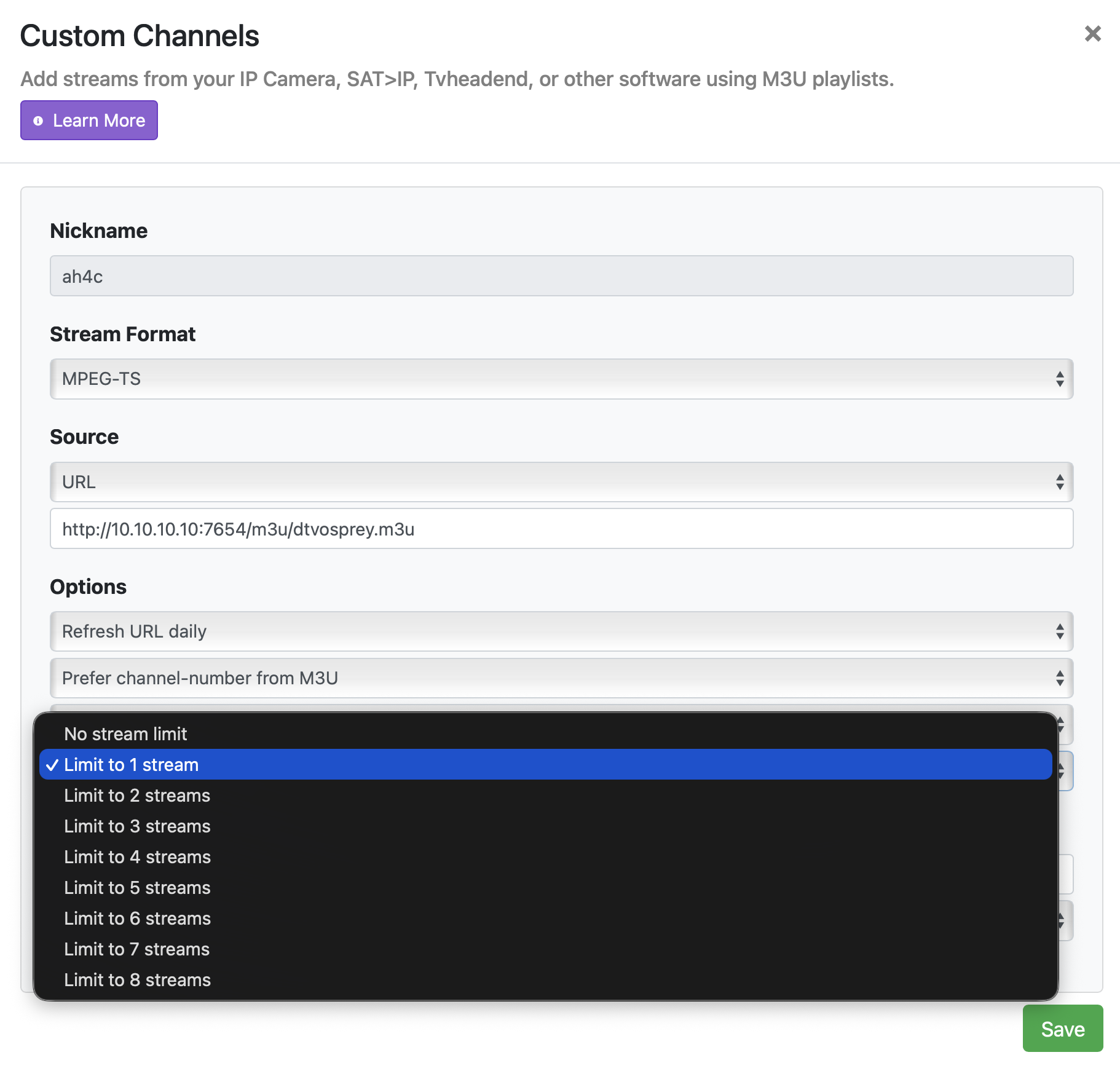
If I have one Osprey box and no other tuners configured in ah4c, do I select "Limit to 1 stream" in the pulldown menu for the ah4c "Source" settings? Is the number related to the number of Ospreys/tuners I have?

Or, a related question using the USA channel as an example, if I have two AppleTV's, do I need to be careful not to select USA at the same time on each AppleTV? Is this where the number of simultaneous streams comes into play for the Source settings?

I believe the tuner will be shared between the Apple TV's. I have a series pass for a sports team. When it's recording, if I select watch live, it shares the tuner and does not open a second stream.

That is behavior that I see. When I select a channel, I see:

  1. The 'No Signal' screen
  2. The DTV screen with last channel backdrop
  3. The channel tune request in the lower left side
  4. The new channel broadcast.
    All of this takes about 13 seconds on first boot.

This is what I see too now that I have everything working.

The reason I asked is because I forgot I had an AppleTV watching USA, so on my computer I tuned into USA in a browser, and the whole stream froze in both places. My setting is currently "Limit to 1 stream"

I can’t find this setting in my ah4c container nor a pulldown menu. Could you eleaborate where this is? Of course, it could be just the differences in our setups.

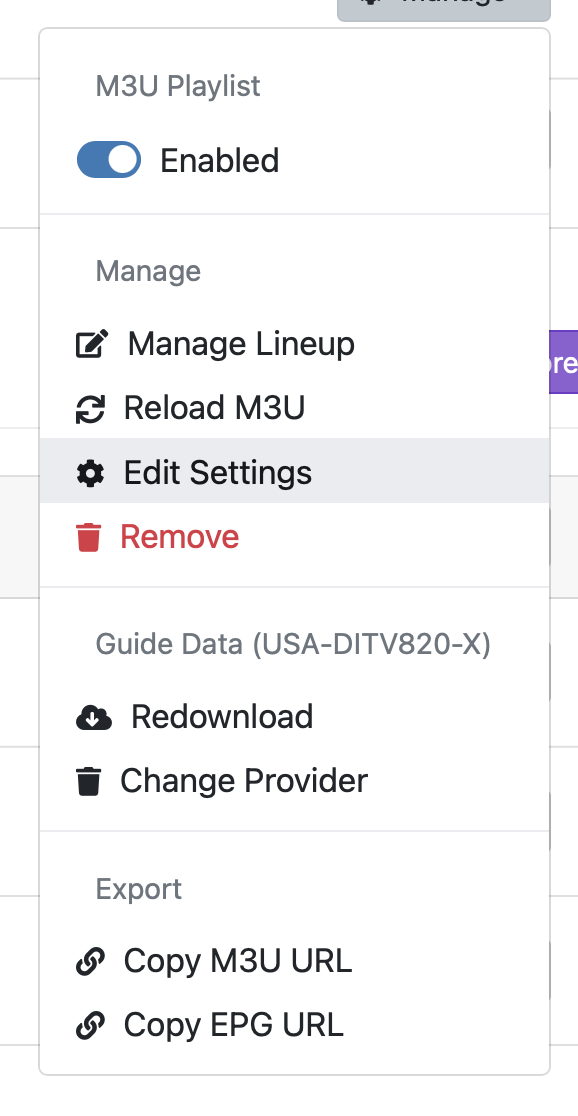
Sorry, I meant in the Channels console:


I’d go with no stream limit. That's what I use.

Ok, thanks. I guess I assumed this was related to the number of Tuners, like I'd pick 2 if I had 2 Osprey boxes.

That's a Channels setting. That might be why your stream froze earlier (guess).
All of my custom sources have no limit.