
Not sure what I'm doing here . . . Where do I type "chmod a+x /opt/opendct/*.sh"?
Just FYI and this may be only my area (Daytona) - the ONN 4K TV box is unobtainium at Walmart. Can't have it shipped and can't pick it up anywhere.
Not surprising given the features and the price for this little box, they massively underestimated demand I guess.
When I got one last week, searching on the WalMart site showed none available, and the product listing on WalMart's site showed it was out of stock. But if I did a Google search, and used the "shopping" tab in the Google results, it had a link to the WalMart product page, and if I followed that link to the WalMart product page, it showed some in stock (in-store, not online), even though it looked like the exact same page that showed none in stock if visited directly. Sure enough, when I went to a store, they had a few in stock.
1 Like
Mine arrived quickly from Amazon for $29:
Same place you are running the go android binary from. I am assuming you are running linux since you are using an /opt directory?
1 Like
On Mac, I use Terminal.app
And if it still doesn't work for you, maybe just move the androidhdmi-for-channels folder elsewhere and change the directory listed in the "pre," "start" and "stop" lines in main.go to match. Here's mine again:
Thank you. So when I run that in Terminal (after first using cd to go to the androidhdmi-for-channels directory), I get:
zsh: no matches found: /opt/opendct/*
Follow my next bit of advice, then... put the androidhdmi-for-channels folder elsewhere and start over.
1 Like
Thanks so much!
I'm showing my ignorance, but your post made me realize my lack of understanding of what parts I needed to configure — I didn't realize the "/opt/opendct/*" in main.go was supposed to be something I changed to reflect my environment (perhaps the original should be changed to "/your/path/here" to make this clear?) Changing that, and running the "chmod a+x" I no longer get the "no such file or directory" error. It still isn't changing the channel, though, and I get several errors, all similar to this:
/Users/cyberskier/androidhdmi-for-channels-main/prebmitune.sh: line 9: adb: command not found
Here is my prebmitune file:
#!/bin/bash
CONNECT="connect 192.168.7.168"
WAKE="input keyevent KEYCODE_WAKEUP"
HOME="input keyevent KEYCODE_HOME"

adb $CONNECT
adb $CONNECT
adb $CONNECT
adb shell $WAKE
adb shell $WAKE
#adb shell $WAKE
adb shell $HOME; sleep 2
#adb shell am start com.google.android.youtube.tvunplugged; sleep 2
#adb shell am force-stop com.google.android.youtube.tvunplugged
When I was testing this very early on in Terminal (before I even got to the Channels part), I had to replace any reference to "adb" to be "./adb". Do I need to do that here? Or I recall seeing people mention putting in some sort of reference to the exact local IP address after "adb". Maybe that's it?
No
You need to add the port at the end of this IP address, for example:
CONNECT="connect 192.168.7.168:5555"
2 Likes
You certainly can't trust the Walmart stock availability, I went to one near me yesterday that said it had some and they had none. Even had the gal in electronics check and she said there were none in the store.
So has anyone tried one of those HDMI to USB hardware encoders?
Thanks for all the help. I terminated the app, and made the change with the port number:

I then rebuilt it, and ran it, and I still get the same "adb: command not found" error in several places (I think wherever I use the "add" command). I'm running this on a very old MacBook Air, running macOS Catalina.
Maybe I need to specify where ADB (platform-tools) is installed? I have them in separate locations. I vaguely recall when installing ADB, via some instructions I found online, there was talk about including the path, whatever that means, and the instructions I was using mentioned installing Android Studio to get the path, which I didn't do.
Here's some help:
What does Terminal.app say when you run the adb devices command?
The first time you run adb that way, on the CDVR server, keep an eye on the Android TV screen for the "authentication approval" checkbox that appears. Looks like this:
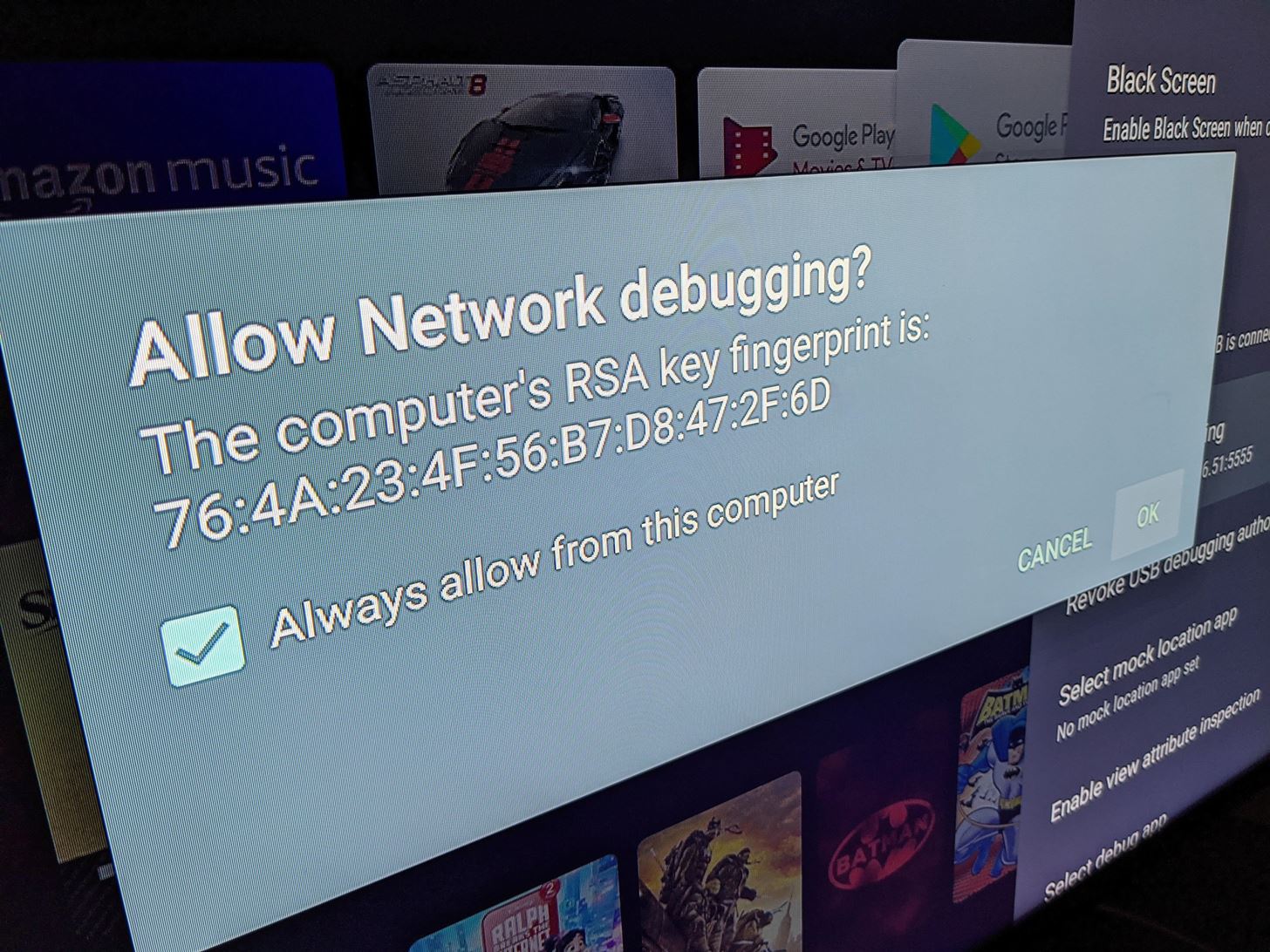
adb devices should confirm it's connected to that device by its IP address.
Oh -- and make sure you've turned Developer Mode on, for the Android TV dongle you're using.
I have ADB installed, and was able to send commands with it via Terminal, but I didn't go the Homebrew method to install it (I did it manually). I think my method didn't set a path, so I'm currently uninstalling it right now, and installing Homebrew, so I can set things up again that way. Might take a while.
So that was the issue. Installing ADB via Homebrew (as opposed to my manual install) took care of the "adb: command not found" errors. I'm down to one final error:
[ERR] Failed to run start script: fork/exec /Users/evankline/androidhdmi-for-channels-main/bmitune.sh: exec format error
Here is my bmitune file:
HOME="input keyevent KEYCODE_HOME; sleep 1"
PRIME1="input keyevent 19 19 19 19; sleep 1; input keyevent 21 21 21; sleep 1; input keyevent 22; sleep 1; input keyevent 23; sleep 1"
PRIME2="input keyevent 19; sleep 1"
PRIME3="input keyevent --longpress 67 67 67 67 67 67 67 67 67 67 67 67 67 67 67 67 67 67 67 67 67 67 67 67 67 67 67 67 67 67 67 67 67 67 67 67"
SEARCH1="input keyevent 66; sleep 2"
SEARCH2="input keyevent 66"

#NBC
if [ $1 = "101" ];then
HOME="input keyevent KEYCODE_HOME; sleep 1"
adb shell am start -a android.intent.action.VIEW -d https://tv.youtube.com/watch/cQDDAyx_fWM -n com.google.android.youtube.tvunplugged/com.google.android.apps.youtube.tvunplugged.activity.MainActivity
fi
I had the same error with quotes around the YouTube TV url.
(I'm just using one channel for now until I get this working)
Thanks for the help!!
Change "101" to "NBC" -- that should do it. To match the way you set up this Custom Channel in your M3U.
1 Like
Can you please share your working bmitune.sh? I just experienced that same black screen weirdness on a recording so now want to dial things in and prioritize reliability over speed.
Thanks for the suggestion, but same error after a rebuild. Dang.
1 Like
So I take that back — Success! I was using NBC instead of nbc (lowercase). Changing that, and it works!
Thank you so much for the help! Next step will be to see what others are using for their files to tweak this, and to add in additional channels.
1 Like
I ran into some strange issue where Amazon Fire device went to sleep and then adb said connected but when issuing commands errored out with not connected. I ended up turning off the screen saver in hopes that it no longer sleeps. I also added adb disconnect to the stop file. Fingers crossed its a bit more stable now.