Hidden Channels Groundhog Day Like Loop - Please Help Me

I have been in hidden channel hell for a few months now and I would like to figure out how to stop this or fix it.

Scenario: I go into System > Settings > Sources.
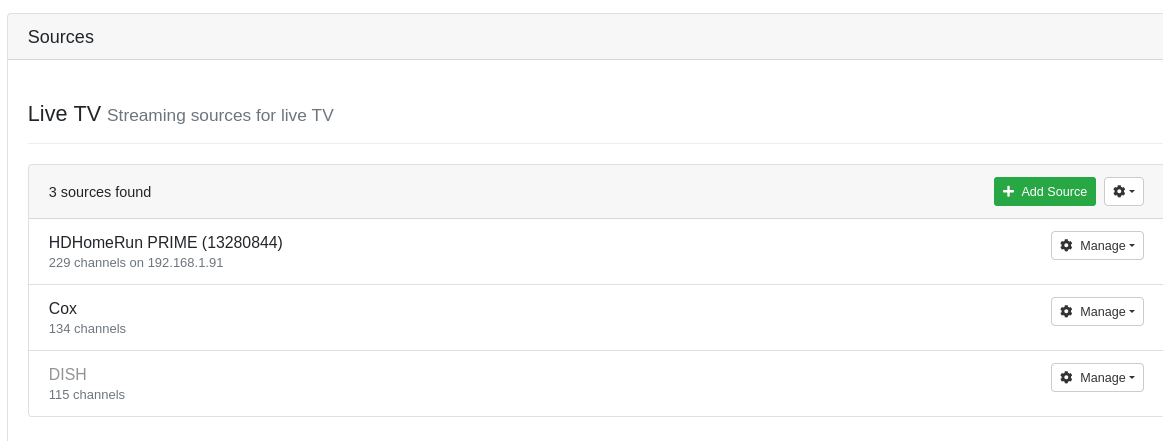
My HDHomerun shows 229 channels but then.

image

It says 203 hidden channels. I did not hide these. They are just set to hidden by default?

I then go in and unhide each channel i set up some things to record. some things record and then like 3 or 4 hours later. The channels are hidden again and all my recordings stop. I do it again and rinse and repeat.

I have called the cable company my card and My HDHomerun Prime are working perfectly no errors no issues.

How do I get it to stop doing this? Is there conf file or something? I am losing my mind here. I have tried resetting the clients and the clients show the hidden channels but noone in my house has hidden any of these channels.

I tried finding older posts here in channels forum but could not.

A bit more info for context. had a old mac that I was using as my dvr. it was doing this on my old mac and I thought ok, so maybe if I put the dvr on a differnt machine it will fix the hidden problem cause the software is out of support. Moved to a fresh linux install everything is working but it is still doing this hidden channel thing.

Is there anyway i can keep my scheduled recordings and go into a conf file or something and tell the system to not hide any channels? Is this even a thing? Any help would be greatly appreciated. I am still hunting for fix. I will post back if something changes.

Its really weird that it works fine for like 3 hours and then it hides channels again.
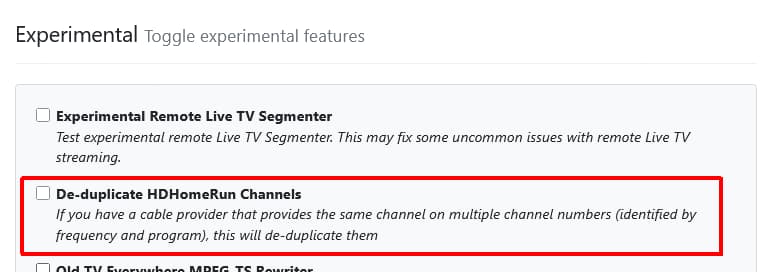
Uncheck this option?
Settings > Advanced > Experimental > De-duplicate HDHomeRun Channels

Nope that didn't do it. I unhid a bunch of channels when I posted an hour ago. I unticked the de-duplicate as you recommended. The channels I unhid are once again hidden. they were fine for like an hour. But now its back to hiding channels again.

1 Like

If you have that option checked it will automatically hide channels.
I would leave the option unchecked. Hide the channels you want hidden, then delete and recreate the guide database.

Just thought of something.

If you have another Channels DVR Server running using your HDHR Prime for a source you should shut it down. If it has that option checked, you will be fighting it trying to de-dup the channels and when it hides channels, it does it on the HDHR Prime.

If a channel is hidden on the hdhr web page ui , channels will import those settings.
Visit your hdhr lineup at 192.168.1.91 and verify they are not hidden in the hdhr page

Thanks for the replies. Ok so My old server was shutdown properly I migrated my server following the instructions on the channels website on how to move your dvr to a new machine. No channels are hidden on the hdhomerun.

I backed up my database and when restored it properly. I really think there is a database issue with hidden channels or something deeper going on. Here is a fun thing that just happened about 15 mins ago.

To test some more things I randomly clicked on favorite next to a few hidden channels. the hidden icon disappeared and the heart icon was turned on. I went to the guide and I could see the channel there and all was normal. I played something it played. all was good. and then

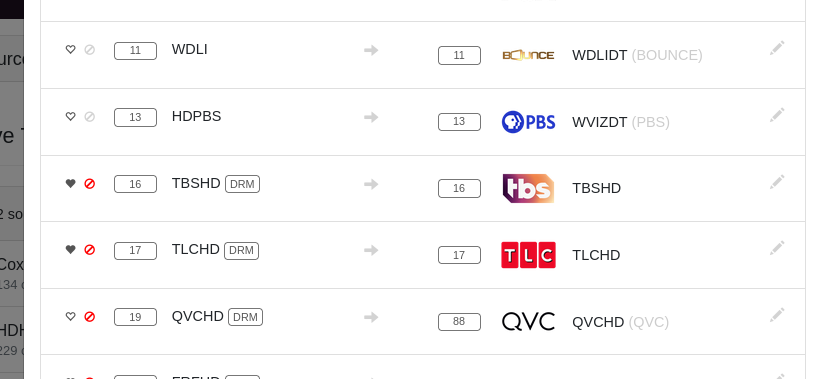
10 mins after that it disappeared again. I went back to the settings tab and saw this:

When I remove the hidden icon and make it favorite it just then adds the hidden icon to the favorite. So the server is hiding these channels for some reason. Why?

They are drm Channels can’t play drm so it blocks them

1 Like

using a cable card. Cox cable confirmed all channels are authorized and set. I play the drm channels they come through just fine. then I go away for a bit and they stop?

Not in channels. Channels can’t play DRM.

1 Like

My guess is you think they are playing from the hdhr cable card but in reality when you play that channel it fails and then channels being smart sees this fail and then plays the channel from your cox TVE source. Logs will verify that the channel number on the hdhr is failing.

1 Like

Ok so after many hours of trying to figure this out. Just to close the loop. I found this on silicondust website. drm [Everything HDHomeRun]

It appears from this link that the playback is limited. What a bummer man. It was working fine for a long time and I guess the cable card drm insanity has caught up to my area now as well. thank you all for helping me. TVE is working just fine. there are a few stations I would have loved to have in channels dvr that are just not doable now.

2 Likes

Yep it’s a bummer. With out your in depth responses and your screenshots this undoubtedly would have been a tough solve. So props to you for including screenshots.

1 Like

So it was a combination of the De-duplicate HDHomeRun Channels setting and DRM channels not playable in Channels DVR?

Maybe? Not really? The de duplicate did not have any effect either way that i could see. The DRM channels everytime i would unhide it, it would show up in the channel guide I could hit play and it would play on my android tv. But then it would go to the server and it disappeard again. This is why I was getting confused. cause I could see it being added on the server side and I could see it on my nvidia shield and it would play. And then it would disappear on the server side. From reading silicon dust documentation looks like there are only a handful of devices that can play it. But the bummer is I can't record anything.

So this one I am going to chalk up to DRM shenanigens. I can view the channels and play them but i can't schedule a recording. This is what i wanted to do was schedule a recording. So it was a combo of settings and DRM and just all of that.

1 Like

Glad you have it figured out.
That would drive me nuts!

thanks. I have been using channels DVR for a long time without any huge hiccups like this one. This is the first time I had to post for help on the forums. and I think its so great that there are some nice people on here.

1 Like

you could look into ADBTuner, it should be possible, you'll just have a duplicate in the guide that you could client specific hide.