
I have been unable to connect either my encoder or my tuner in either adbtuner or ah4c for some time now, both install but there is no option to allow the usb in the tuner and on the adbtuner interface it says that it cannot connect to either the encoder or the tuner and I get no interface at all for AH4C even though it shows no error on install, the closest I got to what I thought was a possible solution was one time when I uninstalled docker desktop and when I installed it again and then adbtuner I was able to connect to my encoder and tuner briefly and then the same thing happened a few minutes later, if anyone can help me, I would really appreciate it. Thank you and God Bless!
Please provide more details on your current setup...
What are you running docker on for the ADBTuner/AH4C setup?
Linux? Windows? Mac?
What Hardware are you using as your encoder?
What Hardware are you using for your "tuners"?
Pick One or the other for now (ADBTuner/AH4C) and post your current Docker Compose and Environmental variable files
What service are you trying to tune...Youtubetv? HuluLive? Please pick only one for now for troubleshooting.
1 Like
Hello, how are you doing? Thank you so much for your response brother! (Im sorry I deleted my past responses because I don't think they were correctly replying specifically to you lol:) I really appreciate your help, I wrote the responses to the information that you need to help me below, as best I could, if there are any problems please let me know and I am so sorry about that.
1 I am running Docker on a Windows 11 Pro Beelink MiniPC.: the exact one is this one:Amazon.com: Beelink SER5 MAX Mini PC, AMD Ryzen 7 6800H(8C/16T, up to 4.7GHz), 32GB LPDDR5 500GB NVME SSD, SER5 Mini Computer Support 4K@144Hz, Triple Display, HDMI+DP, WiFi6, BT5.2, Type-C : Electronics
-
My encoder is a 4 Channel 4K Encoder the exact one is this one: Amazon.com
and like I said not only did it temporarily work when I uninstalled and reinstalled docker but I am also currently using it with the "[Chrome HDMI for Channels (CH4C)]" Chrome HDMI for Channels (CH4C): Chrome channel tuner plus HDMI encoder) application successfully. -
What Hardware are you using for your "tuners"? I am using a firestick and a Onn as my tuners and unfortunately neither connect, when trying to connect them with either adb tuner or by attempting to run the AH4C docker image. Additionally I get no GUI interface website for AH4C like I get for the adbtuner application it just shows that it installed correctly on portainer but I have no way to access it when I go to the corresponding url and port..
-
Here is the AH4C compose and the Environmental variables that I used:
version: '3.9'
services:
  # 2024.10.30
  # GitHub home for this project with setup instructions: https://github.com/sullrich/ah4c
  # Docker Hub home for this project: https://hub.docker.com/repository/docker/bnhf/ah4c
  ah4c:
    image: bnhf/ah4c:${TAG}
    container_name: ah4c
    hostname: ah4c
    dns_search: ${DOMAIN} # Specify the name of your LAN's domain, usually local or localdomain
    ports:
      - ${ADBS_PORT}:5037 # Port used by adb-server
      - ${HOST_PORT}:7654 # Port used by this ah4c proxy
      - ${WSCR_PORT}:8000 # Port used by ws-scrcpy
    environment:
      - IPADDRESS=${IPADDRESS} # Hostname or IP address of this ah4c extension to be used in M3U file (also add port number if not in M3U)
      - NUMBER_TUNERS=${NUMBER_TUNERS} # Number of tuners you'd like defined 1, 2, 3, 4, 5, 6, 7, 8 or 9 supported
      - TUNER1_IP=${TUNER1_IP} # Streaming device #1 with adb port in the form hostname:port or ip:port
      - TUNER2_IP=${TUNER2_IP} # Streaming device #2 with adb port in the form hostname:port or ip:port
      - TUNER3_IP=${TUNER3_IP} # Streaming device #3 with adb port in the form hostname:port or ip:port
      - TUNER4_IP=${TUNER4_IP} # Streaming device #4 with adb port in the form hostname:port or ip:port
      - TUNER5_IP=${TUNER5_IP} # Streaming device #5 with adb port in the form hostname:port or ip:port
      - TUNER6_IP=${TUNER6_IP} # Streaming device #6 with adb port in the form hostname:port or ip:port
      - TUNER7_IP=${TUNER7_IP} # Streaming device #7 with adb port in the form hostname:port or ip:port
      - TUNER8_IP=${TUNER8_IP} # Streaming device #8 with adb port in the form hostname:port or ip:port
      - TUNER9_IP=${TUNER9_IP} # Streaming device #9 with adb port in the form hostname:port or ip:port
      - ENCODER1_URL=${ENCODER1_URL} # Full URL for tuner #1 in the form http://hostname/stream or http://ip/stream
      - ENCODER2_URL=${ENCODER2_URL} # Full URL for tuner #2 in the form http://hostname/stream or http://ip/stream
      - ENCODER3_URL=${ENCODER3_URL} # Full URL for tuner #3 in the form http://hostname/stream or http://ip/stream
      - ENCODER4_URL=${ENCODER4_URL} # Full URL for tuner #4 in the form http://hostname/stream or http://ip/stream
      - ENCODER5_URL=${ENCODER5_URL} # Full URL for tuner #5 in the form http://hostname/stream or http://ip/stream
      - ENCODER6_URL=${ENCODER6_URL} # Full URL for tuner #6 in the form http://hostname/stream or http://ip/stream
      - ENCODER7_URL=${ENCODER7_URL} # Full URL for tuner #7 in the form http://hostname/stream or http://ip/stream
      - ENCODER8_URL=${ENCODER8_URL} # Full URL for tuner #8 in the form http://hostname/stream or http://ip/stream
      - ENCODER9_URL=${ENCODER9_URL} # Full URL for tuner #9 in the form http://hostname/stream or http://ip/stream
      - STREAMER_APP=${STREAMER_APP} # Streaming device name and streaming app you're using in the form scripts/streamer/app (use lowercase with slashes between as shown)
      - CHANNELSIP=${CHANNELSIP} # Hostname or IP address of the Channels DVR server itself
      - ALERT_SMTP_SERVER=${ALERT_SMTP_SERVER} # The domainname:port of the SMTP server you'll be using like smtp.gmail.com:587. This is for sending ah4c alerts if tuning fails.
      - ALERT_AUTH_SERVER=${ALERT_AUTH_SERVER} # The auth server for the e-mail you'll be using like smtp.gmail.com
      - ALERT_EMAIL_FROM=${ALERT_EMAIL_FROM} # The e-mail address you'd like your ah4c failure alert e-mails to show as being from.
      - ALERT_EMAIL_PASS=${ALERT_EMAIL_PASS} # Gmail and Yahoo both support the creation of app-specific e-mail passwords, and this is the way to go! It's NOT recommended to use your everyday e-mail password.
      - ALERT_EMAIL_TO=${ALERT_EMAIL_TO} # The e-mail address you'd like your alert e-mails sent to.
      #- ALERT_WEBHOOK_URL=""
      - LIVETV_ATTEMPTS=${LIVETV_ATTEMPTS} # For FireTV Live Guide tuning only, set maximum number of attempts at finding the desired channel
      - CREATE_M3US=${CREATE_M3US} # Set to true to create device-specific M3Us for use with Amazon Prime Premium channels -- requires a FireTV device
      - UPDATE_SCRIPTS=${UPDATE_SCRIPTS} # Set to true if you'd like the sample scripts and STREAMER_APP scripts updated whether they exist or not
      - UPDATE_M3US=${UPDATE_M3US} # Set to true if you'd like the sample m3us updated whether they exist or not
      - TZ=${TZ} # Your local timezone in Linux "tz" format
      - SPEED_MODE=${SPEED_MODE} # Set to false if you'd like the target streaming app to be closed after each tuning cycle (limited script support).
      - KEEP_WATCHING=${KEEP_WATCHING} # In supported scripts, set the delay before resending a tuning deeplink to prevent "Are you still watching?" type messages. Examples: Use 4h for 4 hours or 240m for 240 minutes.
    volumes:
      - ${HOST_DIR}/ah4c/scripts:/opt/scripts # pre/stop/bmitune.sh scripts will be stored in this bound host directory under streamer/app
      - ${HOST_DIR}/ah4c/m3u:/opt/m3u # m3u files will be stored here and hosted at http://<hostname or ip>:7654/m3u for use in Channels DVR - Custom Channels settings
      - ${HOST_DIR}/ah4c/adb:/root/.android # Persistent data directory for adb keys
    restart: unless-stopped

and the Environmental variable was:

TAG=latest
[DOMAIN=attlocal.net](http://domain=attlocal.net/)
ADBS_PORT=5037
HOST_PORT=7654
SCRC_PORT=7655
IPADDRESS=192.168.1.112:7654
NUMBER_TUNERS=1
TUNER1_IP=192.168.1.64:5555
ENCODER1_URL=http://192.168.1.13:8000/chn3
STREAMER_APP=scripts/firetv/fubo
CHANNELSIP=192.168.1.112:8089
ALERT_SMTP_SERVER=[smtp.gmail.com:587](http://smtp.gmail.com:587/)
ALERT_AUTH_SERVER=[smtp.gmail.com](http://smtp.gmail.com/)
ALERT_EMAIL_FROM=nguev4841@@gmail.com
ALERT_EMAIL_PASS=*
[[email protected]](mailto:[email protected])
UPDATE_SCRIPTS=true
UPDATE_M3US=true
TZ=America/New_York
SPEED_MODE=false
KEEP_WATCHING=4h
HOST_DIR=/data
Thank you so much brother I really appreciate it. God Blees You!
PS: Im sorry for the length of the response but I also forgot to note that when I attempt to connect to the firestick or the onn tuner through the cmd command prompt by typing:"adb connect ipaddress:port" I am able to connect successfully at all times but not on docker. And one final thing, (perhaps it matters lol) when I start my computer for whatever reason, I cannot start Docker Desktop unless I go to the task manager and end a docker task that is currently running, but that task does not in anyway show or allow me to use docker anywhere else at least not as far I have been able to do so, it just shows there. If you would need any other information please let me know, I will write my ipconfig/all information on my next message. Thanks
C:\Users\nguev>ipconfig/all
Windows IP Configuration
Host Name . . . . . . . . . . . . : Nephtali-Server
Primary Dns Suffix . . . . . . . :
Node Type . . . . . . . . . . . . : Hybrid
IP Routing Enabled. . . . . . . . : No
WINS Proxy Enabled. . . . . . . . : No
DNS Suffix Search List. . . . . . : attlocal.net
Ethernet adapter Ethernet:
Connection-specific DNS Suffix . : attlocal.net
Description . . . . . . . . . . . : Realtek PCIe GbE Family Controller
Physical Address. . . . . . . . . : E8-FF-1E-DE-15-15
DHCP Enabled. . . . . . . . . . . : Yes
Autoconfiguration Enabled . . . . : Yes
IPv4 Address. . . . . . . . . . . : 192.168.1.112(Preferred)
Subnet Mask . . . . . . . . . . . : 255.255.255.0
Lease Obtained. . . . . . . . . . : Monday, October 13, 2025 7:23:54 AM
Lease Expires . . . . . . . . . . : Wednesday, October 15, 2025 7:23:55 PM
Default Gateway . . . . . . . . . : 192.168.1.254
DHCP Server . . . . . . . . . . . : 192.168.1.254
DNS Servers . . . . . . . . . . . : 192.168.1.254
NetBIOS over Tcpip. . . . . . . . : Enabled
Wireless LAN adapter Local Area Connection* 1:
Media State . . . . . . . . . . . : Media disconnected
Connection-specific DNS Suffix . :
Description . . . . . . . . . . . : Microsoft Wi-Fi Direct Virtual Adapter
Physical Address. . . . . . . . . : EC-4C-8C-52-22-BE
DHCP Enabled. . . . . . . . . . . : Yes
Autoconfiguration Enabled . . . . : Yes
Wireless LAN adapter Local Area Connection* 2:
Media State . . . . . . . . . . . : Media disconnected
Connection-specific DNS Suffix . :
Description . . . . . . . . . . . : Microsoft Wi-Fi Direct Virtual Adapter #2
Physical Address. . . . . . . . . : EE-4C-8C-52-22-BD
DHCP Enabled. . . . . . . . . . . : Yes
Autoconfiguration Enabled . . . . : Yes
Wireless LAN adapter Wi-Fi:
Media State . . . . . . . . . . . : Media disconnected
Connection-specific DNS Suffix . : attlocal.net
Description . . . . . . . . . . . : Intel(R) Wi-Fi 6 AX200 160MHz
Physical Address. . . . . . . . . : EC-4C-8C-52-22-BD
DHCP Enabled. . . . . . . . . . . : Yes
Autoconfiguration Enabled . . . . : Yes
Ethernet adapter vEthernet (nat):
Connection-specific DNS Suffix . :
Description . . . . . . . . . . . : Hyper-V Virtual Ethernet Adapter
Physical Address. . . . . . . . . : 00-15-5D-38-3C-DE
DHCP Enabled. . . . . . . . . . . : No
Autoconfiguration Enabled . . . . : Yes
Link-local IPv6 Address . . . . . : fe80::dbf3:f574:ea81:902b%33(Preferred)
IPv4 Address. . . . . . . . . . . : 172.31.144.1(Preferred)
Subnet Mask . . . . . . . . . . . : 255.255.240.0
Default Gateway . . . . . . . . . :
DHCPv6 IAID . . . . . . . . . . . : 553653597
DHCPv6 Client DUID. . . . . . . . : 00-01-00-01-30-66-2C-F6-E8-FF-1E-DE-15-15
NetBIOS over Tcpip. . . . . . . . : Enabled
Ethernet adapter vEthernet (WSL (Hyper-V firewall)):
Connection-specific DNS Suffix . :
Description . . . . . . . . . . . : Hyper-V Virtual Ethernet Adapter #2
Physical Address. . . . . . . . . : 00-15-5D-99-8A-52
DHCP Enabled. . . . . . . . . . . : No
Autoconfiguration Enabled . . . . : Yes
Link-local IPv6 Address . . . . . : fe80::7c6c:aca2:838f:3453%50(Preferred)
IPv4 Address. . . . . . . . . . . : 172.21.224.1(Preferred)
Subnet Mask . . . . . . . . . . . : 255.255.240.0
Default Gateway . . . . . . . . . :
DHCPv6 IAID . . . . . . . . . . . : 838866269
DHCPv6 Client DUID. . . . . . . . : 00-01-00-01-30-66-2C-F6-E8-FF-1E-DE-15-15
NetBIOS over Tcpip. . . . . . . . : Enabled
Thanks for the information.
I am sure you are aware of this but I will say it just in case.
You know you can not have the same tuning device or encoder endpoint being used by both adbtuner and ah4c. They will interfere with each other and you will lose the adb link to the firetv or onn.
I believe you said you have the web interface working with adbtuner...
Is that correct???
What is your output when you go to the webpage for adbtuner???
http://{ADBTunerIPAddress}:5592/up)
I would recommend working on adbtuner first since it is easier and you said you have a user interface already...
BUT if you wish to work on ah4c instead we can...
I don't know if it matters but my system has the http added to the CHANNELSIP variable...so
CHANNELSIP=http://192.168.1.112:8089
I have only worked with these containers on linux and using portainer.
Step 1...
Let's first focus ONLY on getting the ah4c web interface to work.
We need to go to the logs for that stack/container inside Portainer. Ensure the container is running and go to the logs for it. Tell it something like the last 10000 lines and disable auto refresh so we can copy the output log.
Post that log here inside a code block by using 3 ` symbols before and after the pasted logs...
Neither the http:// or the 8089 are required for CHANNELSIP, but I'm glad to know it works using them.  Personally, I just use my hostname of
 media-server8, but one's network needs to be properly configured to use hostnames and many are not.
Hello how are you, Thank you so much for continuing to help me. And yes we can do ADB tuner first.
Here is my information you requested:
- Umm no I definitely do not have the same tuning device or encoder endpoint being used by both adbtuner and ah4c
2.I believe you said you have the web interface working with adbtuner...
Is that correct??? yes I do
-
When I type in http://{ADBTunerIPAddress}:5592/up) I get this:
[
{
"id": 1,
"name": "Firestick",
"device_ip_address": "192.168.1.64",
"device_connected": false,
"streaming_endpoint": "http://192.168.1.13:8000/chn2",
"streaming_endpoint_connected": false,
"lock_status": "Available"
}
] -
and when i go to the webpage for adbtuner I get this:
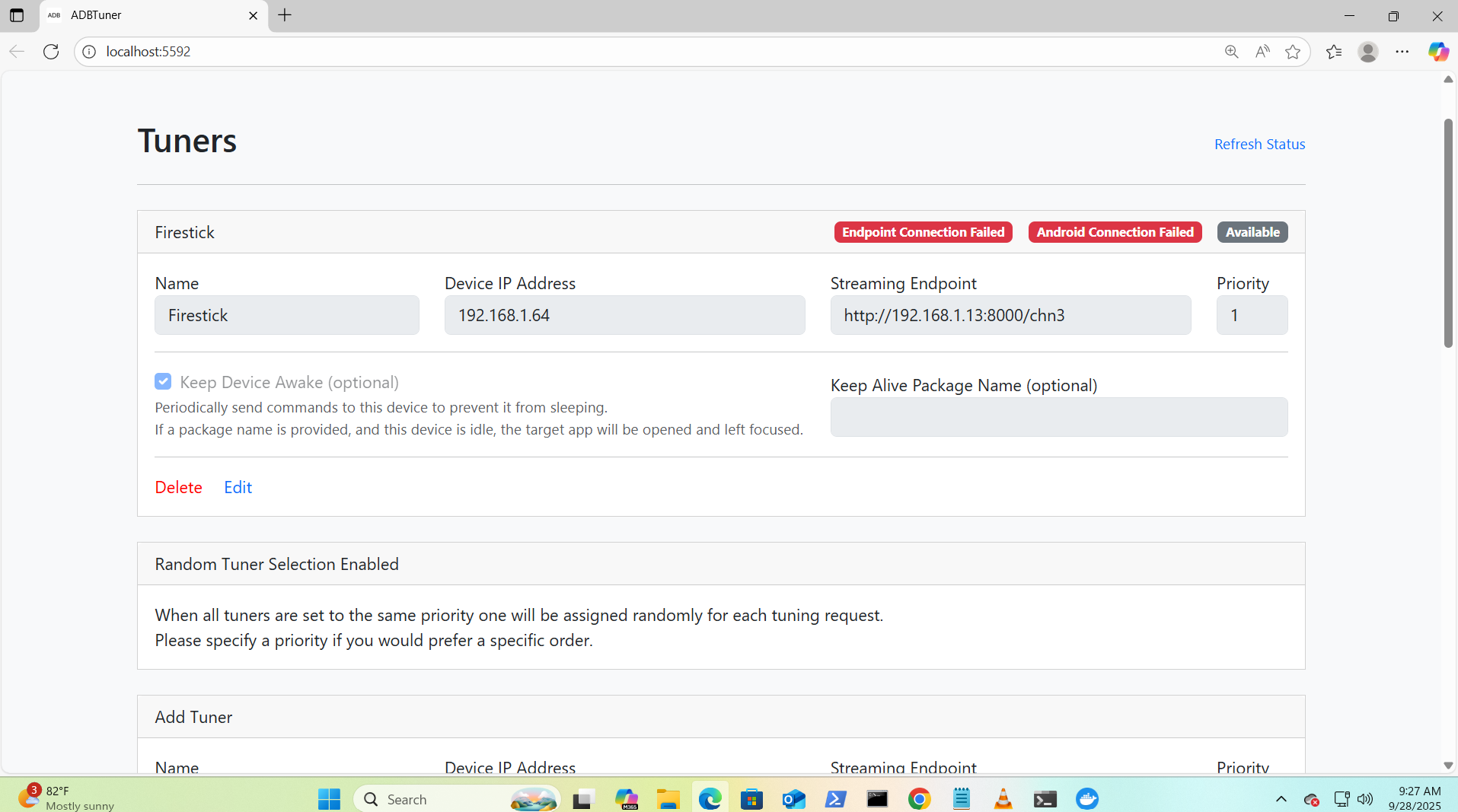
I appreciate your help brother hopefully you can fix it. God Bless!
Update: I am now able to get a GUI interface from AH4C but still does not connect to the firestick or encoder.?
We will focus on the ADBTuner for now...
Verify in the firetv that it is actually at ip 192.168.1.64
What Model Firetv are you using and what version of android is it running?
Verify that you have USB Debugging enabled on the firetv inside Developer Options.
Additionally can you post your setting inside the encoder specifically for chn2.
Let's verify the output stream from the encoder works by itself. Use vlc to see if you can see the stream through it....Make sure the output is set to http for output...
In VLC use Open Network Stream and use your endpoint... http://192.168.1.13:8000/chn2
Hello brother how are you? Thank you so much for your help, Im so sorry I havent answered, Ive been super busy, please dont think I mean any disrespect or that I am an ungrateful ass*ole, but at my job I have been temporarily assigned extra hours and I practically have no time for myself, let me see if this weekend I can apply the advices that you have given me and give you the information necessary to continue troubleshooting. Once again Im so sorry brother I hope you are not offended, take care, God Bless!!