Incorrect Channel Mapping

Just reinstalled Channels DVR (after going dark for a bit) and Comcast 810 NBC affiliate (NBC Boston) is being mapped to their Telemundo station. I've tried editing the mapping by doing a search for NBC and 810, but can't find the correct channel.

Is there anything that I can do or is this a backend change? Plex properly maps it just fine (although I want to get off of Plex (for DVR features anyway)).

Is it mapped correctly in the official HDHR app?

If so, hold SHIFT on your keyboard and click the circle refresh icon under your HDHR on the Channels DVR web UI

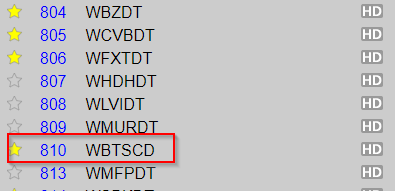
It is correctly showing in the HDHR app as "WBTS...". I'm not sure what should be after the 'S', but the HDHR guide correctly displays the English EPG data (and not Spanish). I can't say for certain, but appears the correct call letters for the channel are "WBTS-CD", but I might be wrong.

I'm running version 2019.10.28.1248, and I shift clicked the refresh button, yet it's still showing the Telemundo version in the guide and channel listing in Settings.


Yes, just checked the my.hdhomerun site, and sure enough, it's listed correctly as WBTSCD.

image

Please check the official HDHR app to see if it has correct guide data or not.

As stated, official HDHR has the correct English guide data.

Sorry I missed that. Does it show a logo for that channel in their app?

No problem. Yes, correct logo. Although it appears that you're mapping the channel to the Spanish affiliate, so the logo is going to be the same or very similar.

Can you post the output of http://192.168.20.114/discover.json

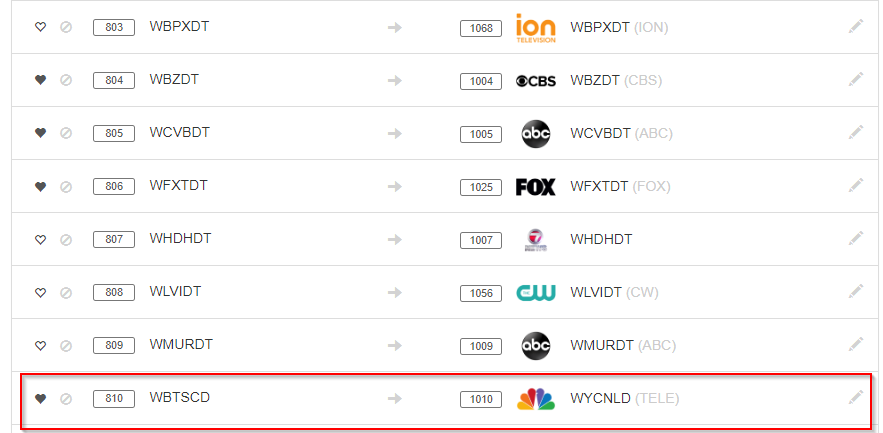
Sure. And looks like the channel logos are different. This is the Wiki for the correct station: https://en.wikipedia.org/wiki/WBTS-CD, and this is the wiki for the station you're mapping to: https://en.wikipedia.org/wiki/WYCN-LD.

{"FriendlyName":"HDHomeRun PRIME","ModelNumber":"HDHR3-CC","FirmwareName":"hdhomerun3_cablecard","FirmwareVersion":"20190621","DeviceID":"131E0820","DeviceAuth":"XphvenI1a7W4hnf1WXRjfIFh","BaseURL":"http://192.168.20.114:80","LineupURL":"http://192.168.20.114:80/lineup.json","TunerCount":3,"ConditionalAccess":1}

And it case it helps, the lineup.json:{"GuideNumber":"810","GuideName":"WBTSCD","VideoCodec":"MPEG2","AudioCodec":"AC3","HD":1,"Favorite":1,"URL":"http://192.168.20.114:5004/auto/v810"},

The guide data coming from SiliconDust appears incorrect:

http://api.hdhomerun.com/api/guide?DeviceAuth=XphvenI1a7W4hnf1WXRjfIFh

{
"GuideNumber": "810",
"GuideName": "WYCNLD",
"Affiliate": "TELE",
"ImageURL": "http://img.hdhomerun.com/channels/US101517.png",

It's mapped 810 as TELE and so that's what you're getting in Channels as well after the SHIFT+refresh.

Are you sure you're seeing it correct in their app for 810?

I'm 100% positive that it's showing the correct guide data in HDHR app as well as Plex.

And I just opened that API HDHR link you posted, and although it may reference "TELE", its showing the correct guide data (in ENGLISH), opposed to you who are displaying Spanish.

Both HDHR and Plex show Kelly Clarkson's new talk show at 3PM where you're displaying "Al rojo vivo con María Celeste" from 2:30 to 3:30, which HDHR is showing for channel 815 Telemundo (Plex isn't showing me anything as I have that channel excluded).

Looks like zap2it.com also has 810 mapped to telemundo for your cable provider. You can click the feedback link at the bottom of the zap2it.com page and report the issue to them directly.

To fix the mapping:

  • click the pencil icon under your HDHR.
  • click the + icon at the top of the dialog window after DVR: USA-XXXX
  • enter your local zipcode and select local broadcast
  • scroll down to 810
  • click the pencil icon at the right
  • type WBTS or NBC and select the correct mapping

Already tried your last step, both come up with results that are anything but the correct channel. I'll try reporting the issue to Zap2It I guess then.

I just used their online contact form to report incorrect programming. Hopefully they resolve it quickly.

The correct station ID for WBTS appears to be 91446. You could issue a curl command from Mac/Linux machine using the IP of your SHIELD as follows:

curl -XPUT --data '{"810":"91446"}' http://x.x.x.x:8089/dvr/guide/stations/USA-MA20428-X