
In your case, it looks like http://192.168.1.9:5589/#channels and http://192.168.1.9:5589/#logs.
Thanks, same error. Guess I need to re-install it.
Reinstall didn't fix it.
New Brew doesn't trust it.
Fixed it. Issue was with the last channel I added. I just deleted it from the channels.json file and it's working now.
1 Like
for those who have been using prism for a while - i'm getting a good amount of recoveries - i watched for about 30 minutes and it happened twice - is this just how it is or is there something i can do
I'm running prism as a container on linux
Local Fox channel via Fox One is still problematic.
Took over 3 minuted to start a recording.
What does this mean?
[WARN] Pretune attempt 1/5 failed for Fox (KTXL): Tune verification failed: Manifest URL is for channel "tx005", but "KTXL" was requested.
CDVR log
2026/06/21 13:30:00.000860 [DVR] Starting job 1782073800-ch10058 Seinfeld on ch=[10058]
2026/06/21 13:30:14.320603 [ERR] Failed to start stream on channel 10058 via M3U-PrismCastmacmini: M3U: Could not fetch playlist from 192.168.1.9:5589 (Timeout): Get "http://192.168.1.9:5589/hls/fox/stream.m3u8": net/http: timeout awaiting response headers
2026/06/21 13:30:23.763920 [ERR] Failed to start stream on channel 10058 via M3U-PrismCastmacmini: M3U: Could not fetch playlist from 192.168.1.9:5589: GET: http://192.168.1.9:5589/hls/fox/stream.m3u8: 502 Bad Gateway
2026/06/21 13:30:32.438946 [ERR] Failed to start stream on channel 10058 via M3U-PrismCastmacmini: M3U: Could not fetch playlist from 192.168.1.9:5589: GET: http://192.168.1.9:5589/hls/fox/stream.m3u8: 502 Bad Gateway
2026/06/21 13:30:44.632476 [ERR] Failed to start stream on channel 10058 via M3U-PrismCastmacmini: M3U: Could not fetch playlist from 192.168.1.9:5589: GET: http://192.168.1.9:5589/hls/fox/stream.m3u8: 502 Bad Gateway
2026/06/21 13:31:00.922089 [ERR] Failed to start stream on channel 10058 via M3U-PrismCastmacmini: M3U: Could not fetch playlist from 192.168.1.9:5589: GET: http://192.168.1.9:5589/hls/fox/stream.m3u8: 502 Bad Gateway
2026/06/21 13:31:26.200523 [ERR] Failed to start stream on channel 10058 via M3U-PrismCastmacmini: M3U: Could not fetch playlist from 192.168.1.9:5589: GET: http://192.168.1.9:5589/hls/fox/stream.m3u8: 502 Bad Gateway
2026/06/21 13:32:04.861681 [ERR] Failed to start stream on channel 10058 via M3U-PrismCastmacmini: M3U: Could not fetch playlist from 192.168.1.9:5589: GET: http://192.168.1.9:5589/hls/fox/stream.m3u8: 502 Bad Gateway
2026/06/21 13:33:18.332433 [M3U] stream timestamps: fox: start_at=2026-06-21T13:32:33-07:00 end_at=2026-06-21T13:33:11-07:00 live_delay=4.757432652s
2026/06/21 13:33:18.332559 [TNR] Opened connection to M3U-PrismCastmacmini for ch10058 Fox (KTXL)
2026/06/21 13:33:18.332890 [DVR] Recording for job 1782073800-ch10058 from M3U-PrismCastmacmini ch10058 into "TV/Seinfeld/Seinfeld S08E04 1996-10-10 The Little Kicks 2026-06-21-1333.mpg" for 26m51.060997647s
2026/06/21 14:00:04.762077 [TNR] Closed connection to M3U-PrismCastmacmini for ch10058 Fox (KTXL)
2026/06/21 14:00:05.135685 [MTS] Statistics for "TV/Seinfeld/Seinfeld S08E04 1996-10-10 The Little Kicks 2026-06-21-1333.mpg": discontinuity_detected=0 transport_errors=0 saw_pcr=true saw_pmt=true highest_pts=1611.843322
2026/06/21 14:00:05.229760 [DVR] Finished job 1782073800-ch10058 Seinfeld
PrismCast log
[2026/06/21 01:23:47.487 PM] Restarting browser for scheduled maintenance (uptime: 6h 5m).
[2026/06/21 01:23:48.327 PM] Chrome ready: Chrome/149.0.7827.156 (GPU: Apple M4 [AV1, H264, HEVC]).
[2026/06/21 01:23:48.704 PM] Browser restart complete. Fresh instance is ready.
[2026/06/21 01:23:53.328 PM] Starting channel lineup precaching for 3 services.
[2026/06/21 01:23:58.353 PM] Precached Fox: 14 channels (5s).
[2026/06/21 01:24:36.044 PM] Precached Sling TV: 372 channels (37.3s).
[2026/06/21 01:24:41.420 PM] Precached YouTube TV: 145 channels (5s).
[2026/06/21 01:24:41.822 PM] Channel lineup precaching complete: 3 services cached in 48.5s.
[2026/06/21 01:29:38.662 PM] [fox-qic97g] Stream ended after 9s (setup failed).
[2026/06/21 01:29:38.662 PM] [WARN] Pretune attempt 1/5 failed for Fox (KTXL): Tune verification failed: Manifest URL is for channel "tx005", but "KTXL" was requested.
[2026/06/21 01:29:50.298 PM] [fox-yboilx] Stream ended after 7s (setup failed).
[2026/06/21 01:29:50.299 PM] [WARN] Pretune attempt 2/5 failed for Fox (KTXL): Tune verification failed: Manifest URL is for channel "tx005", but "KTXL" was requested.
[2026/06/21 01:30:03.718 PM] [fox-mdtzdh] Stream ended after 8s (setup failed).
[2026/06/21 01:30:03.719 PM] [WARN] Pretune attempt 3/5 failed for Fox (KTXL): Tune verification failed: Manifest URL is for channel "tx005", but "KTXL" was requested.
[2026/06/21 01:30:23.710 PM] [fox-6jurdl] Stream ended after 8s (setup failed).
[2026/06/21 01:30:23.711 PM] GET /hls/fox/stream.m3u8 from 192.168.1.4 responded 502 in 8336.119 ms.
[2026/06/21 01:30:32.385 PM] [fox-1f3byi] Stream ended after 7s (setup failed).
[2026/06/21 01:30:32.386 PM] GET /hls/fox/stream.m3u8 from 192.168.1.4 responded 502 in 6654.381 ms.
[2026/06/21 01:30:44.579 PM] [fox-jhx2yl] Stream ended after 8s (setup failed).
[2026/06/21 01:30:44.580 PM] GET /hls/fox/stream.m3u8 from 192.168.1.4 responded 502 in 8172.680 ms.
[2026/06/21 01:31:00.869 PM] [fox-dvlvy0] Stream ended after 8s (setup failed).
[2026/06/21 01:31:00.869 PM] GET /hls/fox/stream.m3u8 from 192.168.1.4 responded 502 in 8196.075 ms.
[2026/06/21 01:31:26.147 PM] [fox-qanvr1] Stream ended after 9s (setup failed).
[2026/06/21 01:31:26.148 PM] GET /hls/fox/stream.m3u8 from 192.168.1.4 responded 502 in 9263.640 ms.
[2026/06/21 01:32:04.808 PM] [fox-g1xghj] Stream ended after 7s (setup failed).
[2026/06/21 01:32:04.809 PM] GET /hls/fox/stream.m3u8 from 192.168.1.4 responded 502 in 6598.618 ms.
[2026/06/21 01:33:15.068 PM] [fox-aa3ed7] Streaming Fox (KTXL): Fox One, foxLive, native HLS, H264 6.7Mbps 720p. Tuned in 6.2s.
[2026/06/21 02:00:35.948 PM] [fox-aa3ed7] Stream ended after 27m 27s.
I am thinking maybe PrismCast is out of sink from ChannelsDVRs channels list. Maybe Reload M3U?
1 Like
Nope. Nothing to do with Channels DVR.
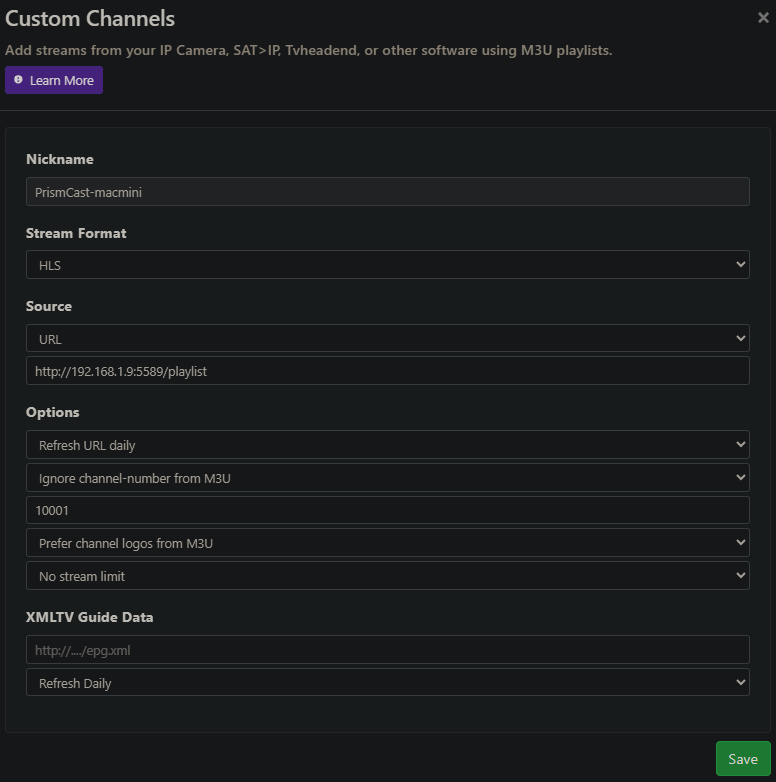
#EXTINF:-1 channel-id="fox" group-title="Local" tvg-logo="http://nas-1019:8089/dvr/uploads/2/content" tvg-name="Fox (KTXL)" tvc-guide-stationid="21211",Fox (KTXL)
http://192.168.1.9:5589/hls/fox/stream.m3u8
I just got done fighting with this app most of the day and in the end, it wasn't the app's fault. I was running it in a Linux container. I was testing it under Podman and had it working and then transferred the configuration to Docker on a different PC. The noVNC option stopped working at that point. After a LOT of troubleshooting, this was due to an old version of Docker.io on Debian 13. The latest version available in the Debian repo is 26.1.5. This has a compatibility issue with VNC under Debian 13. I had to install docker-ce which was version 29.6.0 and the VNC issue went away. It was then working fine with Emby but not with Channels DVR.
I had the URL in the Channels source and had to change that to an M3U file for Channels to start working. VNC would show the channel tune with Prism but Channels was saying that it was an invalid format and not play it. I ended up just using the M3U file that I created for Emby and that worked fine. I had it working before as a URL so I'm not sure what changed.
1 Like
I didn't get a response - but i'm pretty sure it was network issues - due to location stuff i was feeding the internet from my parents house - it was too low upload to handle the streams - fixed that and the recoveries happened less - looking at logs they were mainly 480p forced recoveries
No, I went through this already, as discussed above:
And how I resolved it:
Basically, manually shut everything, and I do mean everything. This includes exiting out of Docker Desktop entirely, shutting down WSL manually, shutting down any and all programs that may be running, anything in the background, any service, everything. Then turning off your computer for at least half an hour. Then, after all that, start up and it should clear out.
To be clear, this happened to me a second time since then. Something has happened in Windows + Chrome + Docker Desktop + Hyper V that sometimes just gets stuck, but heck if I can figure out what exactly is happening.
The only thing that fixed it for me was rolling back to an earlier version of Chrome - .148. What was happening is that the later Chrome was disabling the capture extension, and turning on Developer Mode didn't make any difference (as some had recommended).
Mine isn't using Docker (nor is my Channels - the only thing I have in Docker is FastChannels, and only because that's the only way it can be used), so I don't see how shutting down Docker or WSL would make any difference.
I found "C:\Users\myname\AppData\Roaming\npm\node_modules\prismcast\dist\streaming\setup.js", and found a function inside it named "export async function verifyCaptureSystem()", but didn't see any code that calls that function, so the only way I can guess to disable it would be to comment the whole function out.
eta: After I froze Chrome, I did replace the original PuppetterStream.js (by renaming) with the one provided by @daldana7296. However, I haven't let Chrome update, so can't confirm that this fixed version would work with newer versions of Chrome. At some point I may try setting it up on another box that already has a later Chrome installed for testing, before allowing the Chrome on my Channels & Prismcast box to update.
When trying to watch TBS TNT via website login I get and Incompatible browser message telling me to update Chrome BUT all other channels work fine Anyone else I am signed in to my Optimum account in the browser just when it goes to cast i get the pop up
Try a non chromium browser (Firefox, Safari, etc.)
1 Like
On my reg desktop win 10 latest updated chrome 149 I can load TBS and watch a live stream
On my Chanels PC win11 same exact recent updated Chrome it wont play In both Chrome that Prismcast launches and stand alone chrome ..... So weird for sure
Is @hjd still supporting this project?
He hasn't posted here in six weeks and hasn't logged in here for 3 weeks.
It seems he's still around, but has been busy. He replied to an issue on github a couple days ago:
I've just been busy in the real world and rarely look at the issues here in PrismCast versus the community threads.
I'm coming up for air again.
3 Likes
Good to hear he's OK.
If anyone is having problems with the HBO channels through HBO Max just edit the stream URL from the default https://play.hbomax.com to https://play.hbomax.com/channels. I recently enabled the HBO channels and discovered the default URL doesn't work since HBO seems to have changed where the channels are on their site. No other settings changes are needed once the URL is updated.
3 Likes
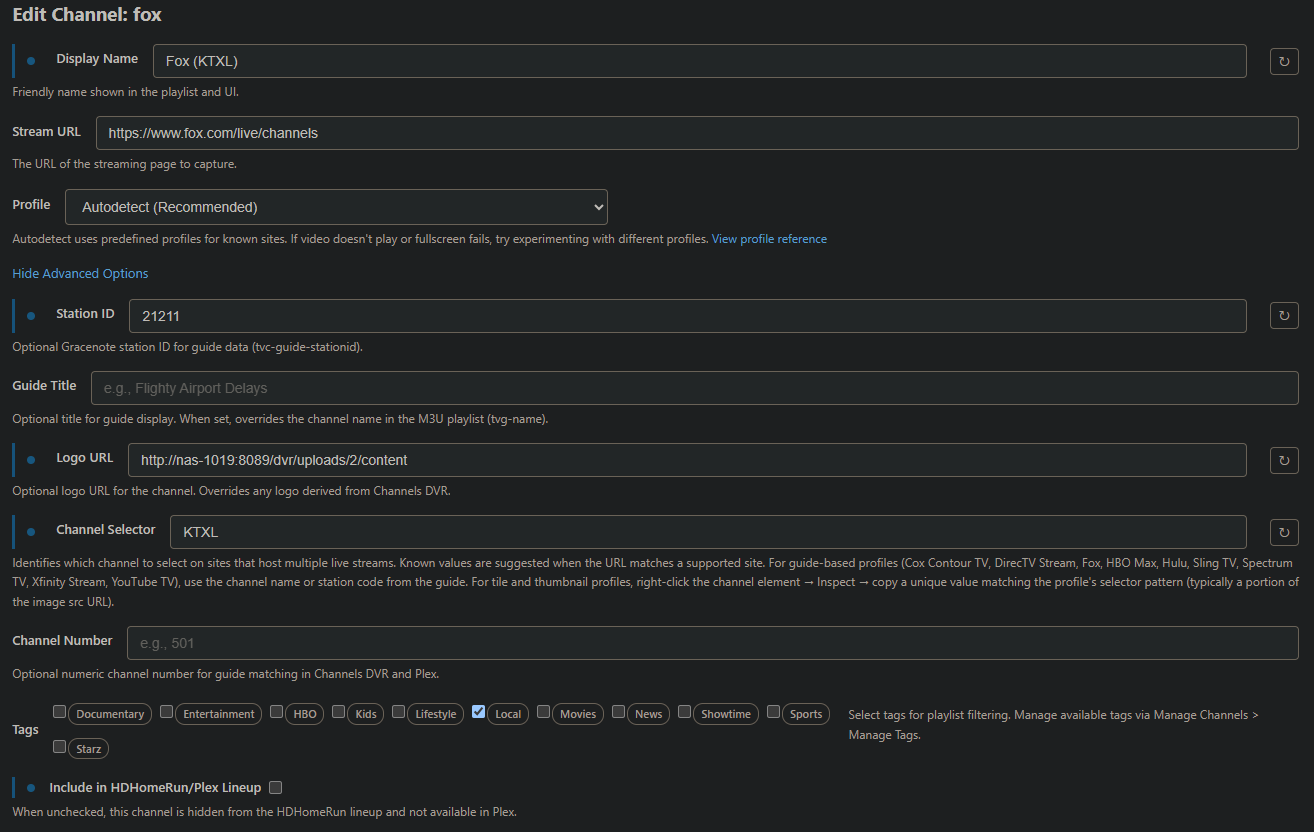
Is anyone else able to reliably get their local Fox station from Fox One?
Tried this with Selector KTXL and FOXD2C
and this (also tried with Selector KTXL)
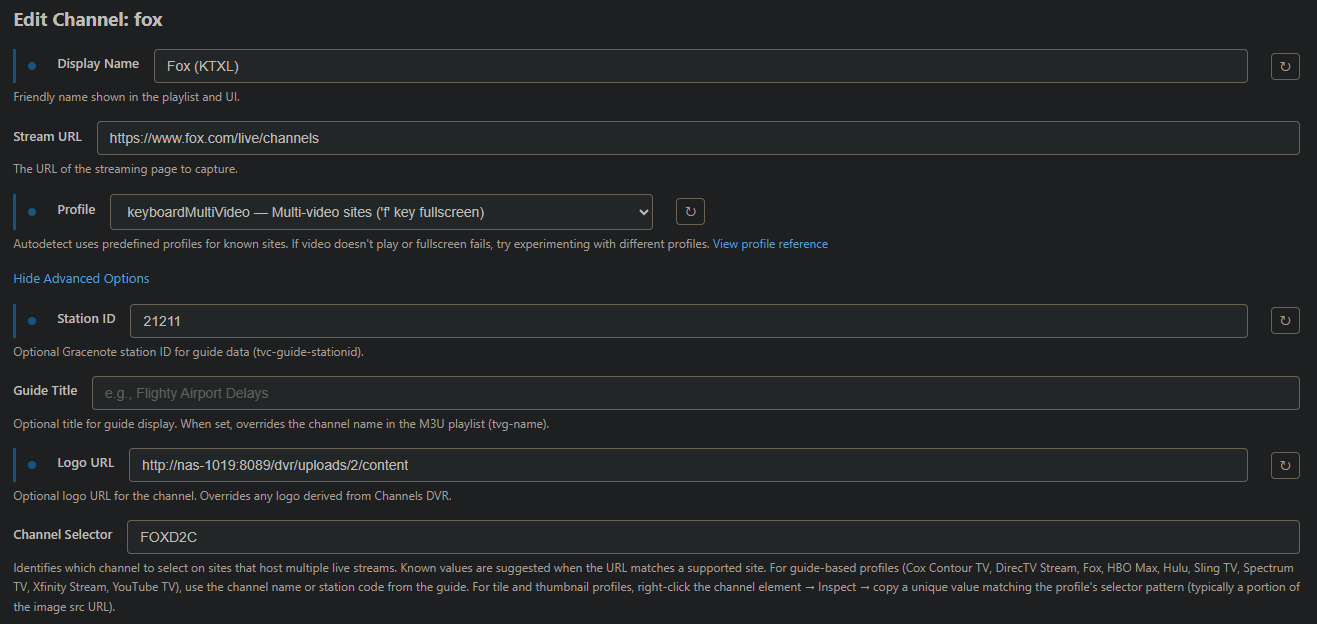
But more than half the time when I tune the channel, I get Fox News instead.
Fox News and Fox Business channels work fine, it's only my local Fox station having issues.
Thank you for that @Spartan504! Just noticed this issue over the weekend, but hadn't spent any time trying to figure it out.
@Spartan504 - could you explain this further? That is, where do you make this change? I added HBO to my services and logged in, but when I went to "browse service channels" it couldn't find any. Maybe that's due to the wrong stream URL, but I don't know where to change it.
When I log into HBOMax in my browser, I can see several live channels, so I know they're there somewhere. Just not clear on how do do what you're describing.
If anyone is having problems with the HBO channels through HBO Max just edit the stream URL from the default
https://play.hbomax.comtohttps://play.hbomax.com/channels. I recently enabled the HBO channels and discovered the default URL doesn't work since HBO seems to have changed where the channels are on their site. No other settings changes are needed once the URL is updated.