Introducing PrismCast: Browser-based Live TV Capture for Channels DVR and Plex

Thank you. Correct, I've logged into espn with my tv provider at espn.com and the tab that opens when i start the channel in CHDVR just goes to a blank page with the address, about.com. I've tested ABC, NBC and USA. they do no have the same issue.

What do you mean by the "correct lineup" in sources?

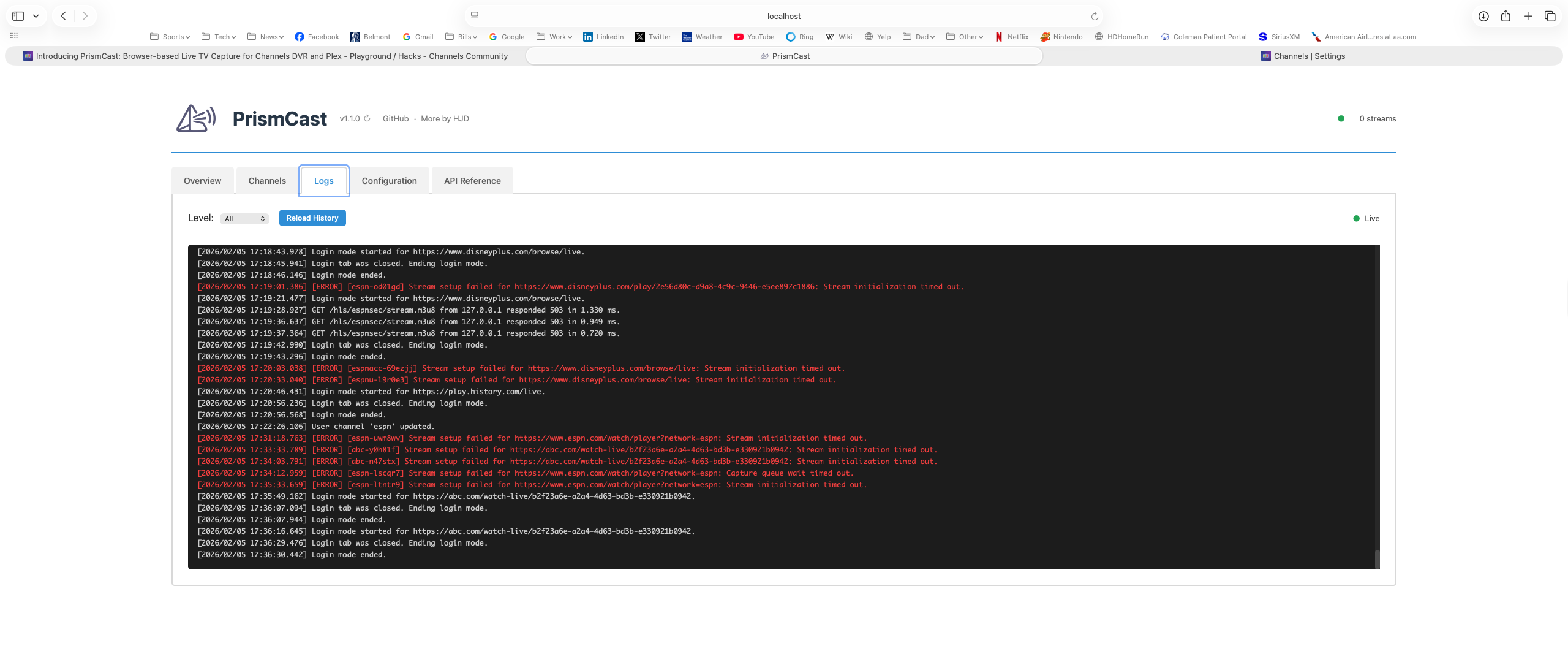
You did it right, so post the log from prismcast.

For the lineup question go to the channels DVR web admin page, then click on sources then click on manage lineup in your prism cast source. You might see what I'm talking about there, those two channels you modified may not be mapped to ESPN and ESPN2 for guide data now.

Has nothing to do with whether or not your channel works, but will totally mess up your guide.
I have it mapped correctly based on your directions.

Ok I think you're beyond me now and the dev will have to respond but can you put the espn URL in your Chrome instance and see if it works? If you can stream video from Chrome with that URL I don't know what the answer is.

By the way are you running a headless server?

I am so not techy. I did well to get my synology, hdhomerun, and channels all working.....with some help from this forum.

I guess I can just cast to the TV with my xfinity logins, but I really like the channels dvr interface and I've got elderly folks living with me, so it's important to keep all of their channels in one place.

Is this solution something that will work with my setup? Didn't know if it could be possible via the synology.

Ok, talk to me like I'm 12 :slight_smile: What do you mean by put the espn URL in your Chrome instance and see if it works"

I do not know what a headless server it. I just entered the simple command line from github in terminal and run it on a m2 Mac mini

Bring up your Chrome browser on your Mac that had the blank about page. Then copy/paste the ESPN URL that's configured for the channel in a new tab. If you can get video playing there, it should work for prism cast. And if you do I don't know why prism cast wouldn't work.

Headless server means you don't have a display attached, it sounds like yours does.

You are in luck because the dev that created this is on a Mac so he should be able to help if I can't.

1 Like

Thanks for trying to help. I did what you said and still got the streaming to the tuner error. It says all tuners in use as well. I'm not using any other tuner.

So can you stream the channel at espn.com in Chrome or not?

Yes, I can

Okay, thanks. You're beyond my help hopefully the dev will respond.

So I found out that the channels DVR stream timeout is 14 seconds or so from the logs, prismcast has to deliver HLS video before then. I can clearly see that is not doing so in some cases, it has to speed up video delivery for this to be stable on Windows.

One of the channels dev said that you can feed a static video stream and then switch to live to work around this. But I agree with him, 15 seconds is way too long to feed.

Did you look at the timestamps in the CDVR log and the PrismCast log to see what's taking so long?
Are you running it natively in Windows or in a container?

Yep, there's nothing. Natively on Windows, as I've said before I'm running a fast server and I can see video running in the browser a number of seconds before it appears in channels. Has to be fixed in the code.

Feature request. Allow ESPN login from Plus.ESPN.com instead of the mouse. Most of us w/ other subscriptions are have ESPN Unlimited from our providers.

Major update coming soon. I appreciate everyone pointing me to where some of these sites are...it seems endless some days. :smile:

2 Likes

The one issue I have is even though my display resolution is 1920x1080, prismcast keeps saying it is limiting to 720p high. Any idea why? Windows 11, native install.

While your display resolution may be 1920x1080, it's not really 1920x1080 for Chrome...since there's toolbars, etc, etc...TL;DR: your screen size needs to be larger than what you're targeting for quality. As I've mentioned before though...I don't think more than 720p is worthwhile for almost anyone, but hey...I put the functionality there because I figured people couldn't help themselves. :smile:

To fix - increase your screen size.

2 Likes

Yup this was a long-running CC4C issue as I posted above. You've got to have a display bigger than 1080p to get 1080p.

Does the PrismCast log show when it received the tune request from CDVR?
I haven't had time to install PrismCast and mess with it yet, but plan to.

There's no lag, when channels says it's tuning that's when prismcast gets it. As expected.

It's definitely worthwhile to install and play around with, I think that with some tuning it will be a great solution.

1 Like

Probably will this weekend.
I can imagine this topic will be flooded with newbies saying talk to me like I'm 12, I want to record the SB and don't know what I'm doing :cold_sweat: Just point me to a video on how to do it :rofl: