Introducing PrismCast: Browser-based Live TV Capture for Channels DVR and Plex

When this happens to me, the fix is to quit the Chrome instance running on the PrismCast server. The next time you try playing, it'll reopen Chrome and work. At least it does for me.

1 Like

That did it! Thank you! I hope I don't have to do that fix often though

I'm also now abel to add from other sources. I added World Fishing Network from my Freecase sub. The onlu issue with that is that it shows the sidebar instead of full screen. Any idea how to fix that? Also, now do I get the channels to load to full screen faster?

You'll have to try different profiles to see what fixes the fishing network. The loading times are a problem, they have to fix that.

1 Like

Ok I got this working!

I have a few questions
1)Can two TVs on same network connect to same M3U window that opens when you launch the channel?
2)I noticed (running on M4 Mac Mini) that it launches the Chrome window to play the video (of course) but if I stop watching the channel, the page still continues to play the video. Will it eventually stop or do I have to keep killing the tab?

Thank you for this, I think we have a viable solution now!

If you use Channels DVR and PrismCast as a source device through Custom M3U channels, Channels DVR can share the PrismCast source device with all of your Channels DVR clients.

Maybe someone can tune it for Windows and submit a PR

Thanks for posting this. I've been trying to get Xfinity Stream to work but was running into issues thanks to all the steps it takes to load the player. Now that I increased the loading timeout it is working.

Like you I'm getting the loading screen in the recording. A fix would be nice but I can deal with it for now by adding some padding onto the beginning of my recordings.

I've also noticed that when I try to watch live it takes just long enough to load the player that Channels times out, but if I hit the play button to retry it works right away since it's already running. For recordings it doesn't seem to be a problem since recordings automatically retry when a stream times out.

Yeah I hope so, I don't think it's windows but it's way too conservative. Feeding video in less than 10 seconds is a no brainer, doesn't matter what it is.

You could run a different CDVR Server with only PrismCast sources.
That way it doesn't fall over to alternate sources, but will retry the PrismCast sources.

The down side is if your PrismCast source fails, there's no fallback.

I know, because I run 7 CDVR Servers and one has no sources until this weekend when I trial this.
My pain point running multiple servers is keeping the Passes up to date.

I have confidence that with tuning they'll fix it.

Yes, the tab will close after a delay. It does that in case of disconnection and reconnection or other issues. Like if you had Channels recording and it lost the connection and retried. That way it won't have to load again from scratch.

1 Like

Thanks! If you can resolve the lag on video load to channels this will make it a completely reliable source.

You've got 14 seconds from what I've seen in the DVR logs, lol. And they won't change that timeout, you've got to feed some sort of video before that. Even if it's a static screen that switches to live when you get the actual feed, it has to be something. You can't time out on the http request.

Here's the logs:

2026/02/05 06:00:00.178866 [DVR] Starting job 1770289200-122 Eyewitness News This Morning at 6:00am on ch=[7000 6002]

2026/02/05 06:00:14.180838 [ERR] Failed to start stream on channel 7000 via M3U-Prismcast: M3U: Could not fetch playlist from localhost:5589 (Timeout): Get "http://localhost:5589/hls/abc/stream.m3u8": net/http: timeout awaiting response headers

2026/02/05 06:00:14.193018 [TNR] Opened connection to M3U-LocalChannelStreamlinks for ch6002 ABC

This isn't a cred issue, it loads and runs fine in the browser. It's just too slow sending the video to channels.

Thanks for this!

I am now very happy I upgraded my channels DVR to an m4 mini from an m1 mini!

Couple more questions:
1)is channels able to do commercial skip on these sources when it records?
2)how do you update the prismcast to the latest version when a new build is released?

Comskip is independent of the sources, it will run on all these channels.

I run npm update -g prismcast and then restart, might not be optimal but that's what I've tried.

The project is in flux, but the latest from the dev is this

Would be nice if that could be put on his github page Wiki or Readme for those not familiar with node and npm

Or ask your favorite AI agent the question and maybe it will read this forum or his github repo

Whether you run install or update it will retain settings on upgrade.

and of course -g means global
which we all knew because we know npm :exploding_head:

Sometimes developers just assume their users are developers too
But on the off chance a non-developer user uses their project, it would be nice to document such things.

A good example of this is a docker run time statement and a docker newbie doing a copy/paste :no_entry_sign:
What do you mean by mappings?

And don't get me wrong.
I appreciate that @hjd has shared this personal project as open source and is taking feedback.
It's just that some of his testers are not developers, don't have a github account and won't be submitting PR's there.

I've been setting this up on Windows using the OliveTin/One-Click version from @bnhf. My issue is that PrismCast doesn't seem to be launching an instance of Chrome for login to a channel or when attempting to tune to a PrismCast channel. Should I have chrome installed on the Debian WSL on my Windows host machine or do I need to make an alias of the installed Windows version of Chrome or something else?

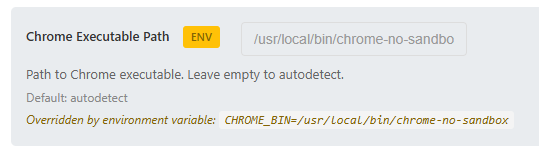
Screenshot of PrismCast's setting for Chrome's executable path.
image
It gets set in the OliveTin Dockerfile (relevant lines)

# Create Chrome wrapper script with --no-sandbox for container environments
RUN echo '#!/bin/bash\nexec /usr/bin/google-chrome-stable --no-sandbox --disable-setuid-sandbox "$@"' > /usr/local/bin/chrome-no-sandbox \
    && chmod +x /usr/local/bin/chrome-no-sandbox

# Environment variables
ENV CHROME_BIN=/usr/local/bin/chrome-no-sandbox

Thanks for this update! Using the keyboardMultiVideo profile with the ESPN channels and the newer link format got them to work for me too!

I was wondering if anyone has had any luck getting Disney Channel and Disney Jr. Channel to work? I already notified the DEV and he said he'd be working on this with a future update but just wanted to see if anyone else out there had some luck. Again, I don't have a Disney+ account, but I'm able to use my TV provider to login and watch live feeds through the following link format: https://disneynow.com/watch-live?brand=004

It is running in a docker container. To get to chrome you have to VNC into the container using the port under HOST_VNC_PORT which defaults to 5900.