Almost every damn time.
Looks like the dev has implemented a potential fix in the most recent release. I'm in a stable environment right now so not trying it until next weekend when I can carve out some time to spin up my test environment and put it through it's paces.
How do I update the install to the newest release? I' ve missed that post.
@bnhf installed via one click and having issues trying to add custom URL’s for new channels. Are you seeing the same? Specifically I’m using urls for spectrum like https://watch.spectrum.net/livetv?tmsid=59684 mostly it’s not launching a window inside vnc to authorize. It does launch a vnc window when using pre added included channels. Not sure if this is fixed in 1.2.1. Are you planning to update one click to pull latest?
I believe that's fixed in v1.2.1 -- and I just updated the PrismCast Project One-Click Action to use @hjd's repo. Use the delete Action in Project One-Click to get rid of the current version, update OliveTin and then run the PrismCast One-Click again.
Working great now thanks!
@hjd Thank You so much for your hard work on this project, it is much appreciated!! If I can find some time I’m going to dig up what I can for spectrum URL’s to add them in a future release like you did with the current Hulu and YouTube URL’s. Keep up the fantastic work!
edit: Unfortunately after gathering URL’s from around the country Spectrum does not use universal URL’s across regions. Adding Spectrum as a source in the drop down won’t be possible.
1 Like
Love what you're doing with this! It is sooooo much cleaner than CC4C! Your latest version 1.2.1 was much improved on my end compared to the prior version. I still do occasionally get a dump out of the channel though and a quick reload which I guess is that thing where it's opening a new tab. This didn't start happening though until a half hour after I started watching something, and it happened one more time 15 minutes later. I also did start to notice buffering after a while. Here's a look at my log during this:
[2026/02/09 11:34:41.395] [usa-cttnqq] Streaming USA Network (keyboardDynamicMultiVideo, FFmpeg). Tuned in 4.1s.

[2026/02/09 12:02:05.605] [WARN] [usa-cttnqq] Detected 10 consecutive tiny segments (250450 bytes). Capture pipeline appears dead.

[2026/02/09 12:02:09.382] [usa-cttnqq] Tab replacement complete. New capture started with segment continuity.

[2026/02/09 12:02:09.383] [usa-cttnqq] Recovered in 3.8s via tab replacement.

[2026/02/09 12:05:00.307] [usa-cttnqq] Video element exists but not ready (count=1, maxReadyState=0). Treating as buffering.

[2026/02/09 12:15:46.575] [WARN] [usa-cttnqq] Detected 10 consecutive tiny segments (325977 bytes). Capture pipeline appears dead.

[2026/02/09 12:15:49.810] [usa-cttnqq] Tab replacement complete. New capture started with segment continuity.

[2026/02/09 12:15:49.810] [usa-cttnqq] Recovered in 3.2s via tab replacement.

[2026/02/09 12:20:15.634] [usa-cttnqq] Video element exists but not ready (count=1, maxReadyState=2). Treating as buffering.

[2026/02/09 12:20:33.664] [usa-cttnqq] Video element exists but not ready (count=1, maxReadyState=2). Treating as buffering.

[2026/02/09 12:20:37.663] [usa-cttnqq] Video element exists but not ready (count=1, maxReadyState=2). Treating as buffering.

[2026/02/09 12:21:31.895] [usa-cttnqq] Video element exists but not ready (count=1, maxReadyState=2). Treating as buffering.

[2026/02/09 12:21:53.978] [usa-cttnqq] Video element exists but not ready (count=1, maxReadyState=2). Treating as buffering.

[2026/02/09 12:22:06.386] [usa-cttnqq] Stream ended after 47m 29s. Recoveries: 2 (2× tab replacement), avg 3.5s.
Love what you're doing with this! It is sooooo much cleaner than CC4C! Your latest version 1.2.1 was much improved on my end compared to the prior version. I still do occasionally get a dump out of the channel though and a quick reload which I guess is that thing where it's opening a new tab. This didn't start happening though until a half hour after I started watching something, and it happened one more time 15 minutes later. I also did start to notice buffering after a while. Here's a look at my log during this:
Glad you're enjoying it. CC4C is a fine tool, and definitely the inspiration that led me down this road for my own needs. Glad others find it useful. It wasn't my intention to make it a general purpose solution when I started going down this road...but here we are. 
On your logs...and I want to emphasize this for everyone: they're normal, and the behavior is correct and expected.
The initial versions of PrismCast didn't do much in the way of health checks on the video stream that it was passing back to Channels. If a livestream glitched and has frozen, PrismCast wouldn't notice and continue to pass it back to Channels DVR.
Health checks are important to me, for my own personal use case (actually part of the reason I started writing PrismCast was to deal with this edge case). PrismCast looks for obvious issues in the stream:
-
Video no longer being transmitted, only audio. This seems to happen when Chrome/MediaEncoder/Puppeteer freeze/lockup after a certain point in certain instances. I believe it's ultimately a Chrome bug of some sort...and it doesn't happen in all cases, and it's not reliable. Certain sites definitely trigger this more than others (looking at you Bravo, MSNOW, and USA).
-
The video player on the page begins to buffer due to network issues / quirks. Often times it recovers on its own, but sometimes it needs a little kick to keep going.
When these occur, PrismCast goes through an escalating series of self-healing efforts, from least to most disruptive to the end user experience:
- We try to pause/play streams if they stop/buffer as a first step.
- Failing that, we try to reload the page and see if that does the trick.
- Failing that, we close the tab and try anew.
In some instances we know that some of the intermediate steps aren't going to work - when the livestream freezes, the only thing that reliably gets us going again quickly is a full tab reload, so we jump right to that.
Detecting when we're in trouble versus when we're being aggressive is something I'm actively tuning, as you saw in 1.2.0. I hope to continue to evolve this part - it's the most important aspect of PrismCast for my own personal use case - PrismCast should be as close to bulletproof as possible in maintaining a stream. I think another user referenced PrismCast as a fortunate TVE replacement...that's too ambitious for me, but it's a good North Star for where I'd like to continue to evolve something I use in my household every day.
This turned into a longer reply than I intended, but I hope it sheds a little context for folks who're curious of concerned about these log entries and why they didn't appear previously.
3 Likes
I'm looking for someone with a Spectrum TV package that isn't bare bones like mine to help put some URL's together for this project. I'm missing about 38 east coast channels and 10 west coast channels. I have about 90+ already done. PM me If you would like to help. Thanks
@daldana7296 and anyone else.
edit: After working with @daldana7296 , unfortunately after gathering URL’s from around the country Spectrum does not use universal URL’s across regions. Adding Spectrum as a source in the drop down won’t be possible.
I want to issue a public apology to @hjd. 1.2.1 is a significant upgrade that has resolved my issues with speed of delivery of video to channels.
He's probably ignored/blocked me at this point, so sorry.
Thank you sir.
1 Like
So if I’m good on 1.2.0 should I even bother going to 1.2.1? I see @GTFan did and said he had improved speed of delivery, but I truthfully don’t have that issue running with.my M4 Mac Mini at all. Such a great little box for the $!
With a project like this, in its early stages of adoption, you absolutely want to stay up-to-date. Bugs will be fixed, improvements made -- and if you need any sort of support, it's important to be on the latest version.
So I've got a question about Fox, I can set up my local Fox channel via https://www.fox.com/live/channels.
But I can't get the override for FS1 and 2 working, I've tried going into advanced options and setting the keyword to FS1 and FS2 but it just defaults back to my local Fox channel when I try to stream. I did Chrome inspect on the channels and couldn't see anything that was specific to them other than that. Running embeddedDynamicMultiVideo as the profile.
Random question for all of you much smarter than me... could PrismCast be used to stream YouTube? My specific use case is for streaming movie trailers. Channels already collects and stores the Youtube trailer URL in the imported movies metadata, so could it open a temporary "channel", play the trailer, then return you back to where you started? The biggest feature I am missing is the ability to stream the trailers (i know you can download them, but i do not want to give up the storage space) and started thinking this could maybe work.
1 Like
Random question for all of you much smarter than me... could PrismCast be used to stream YouTube? My specific use case is for streaming movie trailers. Channels already collects and stores the Youtube trailer URL in the imported movies metadata, so could it open a temporary "channel", play the trailer, then return you back to where you started? The biggest feature I am missing is the ability to stream the trailers (i know you can download them, but i do not want to give up the storage space) and started thinking this could maybe work.
I would encourage folks to try and see.
Spoiler: PrismCast already ships with YouTube support. Create a channel, set the profile to auto and go.
2 Likes
I think the issue with ABC is that it's not finding the exact location. For example, outside of the docker container when I go to ABC live, I see my ABC station which is ABC 15 etc.
However if I do the same in the docker, I just see ABC local programing where available. So even though you logged in, and it works with all the other ABC live channels, for some reason it's not getting the local station.
I'm running into an issue where it appears to be working, but it never streams anything... even just going ot the channel via a standalone Web page. It just shows up as blank. When I look at the server itself, i see Chrome come up and the video start to stream. But nothing gets sent to the remote user.
I don't know if this has anything to do with your problem, but I just recently installed this on another PC and had the same issue. On mine, it turned out to be that Chrome didn't like the "Video Capture" extension, so I had to go into the extensions manager and "Verify" it. Just something to check.
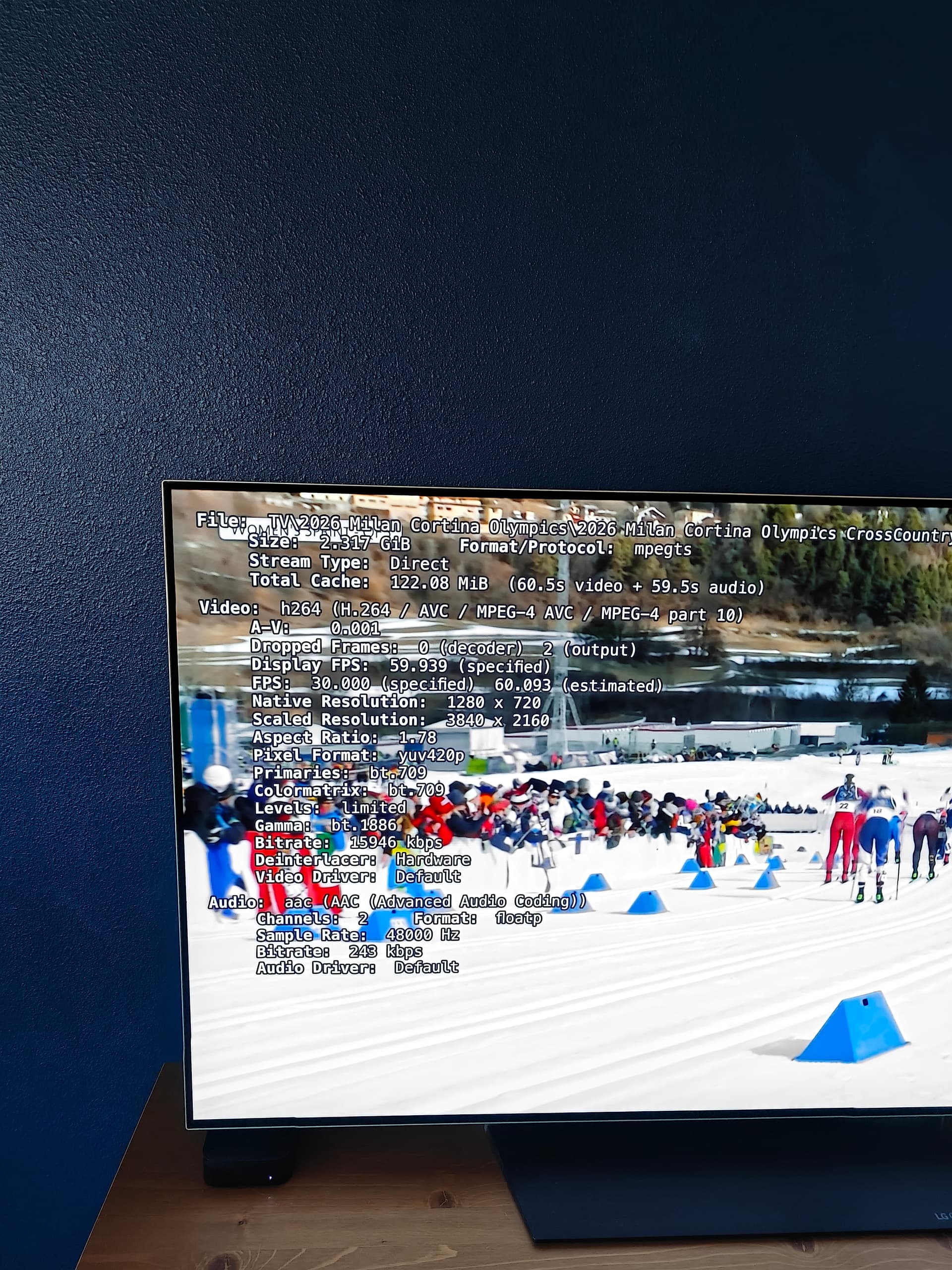
If anyone's working on Windows, it looks like Chrome is ignoring my 8mb and 60 FPS video config presets. It's streaming at 16mb/60fps but the specified fps is 30. It is 720p which is what I specified. Pretty sure the 30 FPS issue was also in CC4C.
Hopefully you can make out the stats from the screenshot, it's a recording from this morning.