Introducing PrismCast: Browser-based Live TV Capture for Channels DVR and Plex

Yeah it's really weird, at prism startup channels says that both specified and estimated FPS is 30 when you show stats. Or it will say 30 specified and 60 estimated, and then finally when it starts dropping a lot of frames it shows up as some weird number like 57 specified with nothing estimated.

The bitrate setting is definitely not being respected, I've seen it go anywhere from 2mb to 16mb depending on streaming source.

It's an ATV 4k device, not sure if it up converts or if the channels client does.

My guess is your Apple TV is frame doubling when it’s up converting to 4k. There is a match content, match frame rate in ATV settings you could try. Anyway I think PrismCast is handling the frame restriction properly but not the maximum allowed bitrate setting.

My guess is your Apple TV is frame doubling when it’s up converting to 4k. There is a match content, match frame rate in ATV settings you could try. Anyway I think PrismCast is handling the frame restriction properly but not the maximum allowed bitrate setting.

To clarify, PrismCast isn't transcoding anything...it hands the bitrate/FPS requests to Chrome and Chrome treats them as it's target...which it may or may not completely honor all the time, but in my experience I find that it does. :smile:

In general: the defaults for these things are the defaults for a reason. Don't touch them unless you have an absolute need to and know what you're doing, would be my advice. :smile:

But I specified 60fps and it's only delivering 30 from what I can see. This is the same behavior we saw with CC4C on Windows.

So I don't think FPS and bitrate work properly in Chrome.

@Jean0987654321,

Would you show what settings your using for integrating FruitDeepLinks with PrismCast? Specifically with a Peacock event? Nothing I've tried seems to work. Thanks.

Download the cc4c m3u file and open on Notepad++

You see a url like this
http://192.168.1.74:5589/stream?url=http%3A%2F%2F192.168.1.74%3A6656%2Fapi%2Flane%2F1%2Flaunch%3Fdeeplink_format%3Dhttp

It should be converted to something like this. Notepad++ is easy to do that. Just replace and boom
http://192.168.1.74:6656/api/lane/1/launch?deeplink_format=http

after that, save it and upload it onto Prismcast and you're done. Just make sure to login to all the streaming services you got on friutdeeplinks.

Until @KineticMan inplements a feature that'll output a prismcast json file (or at least a m3u file in the way I put it), you'll have to add the lanes manually...

As for any other settings, I use @bnhf settings

Weird, that's exactly what I use too! Which PrismCast profile do you use?

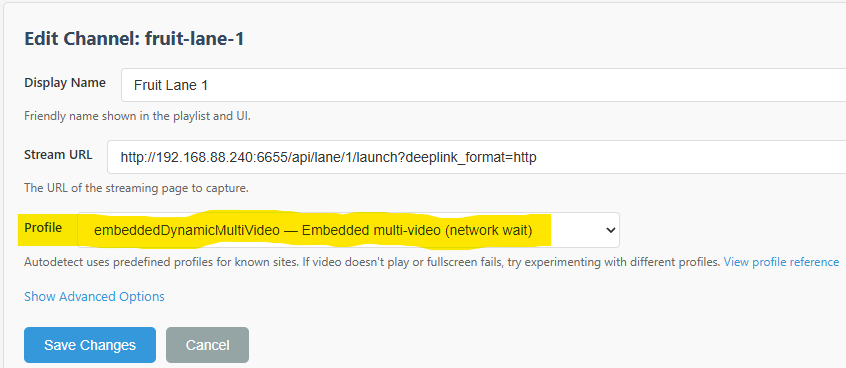
Prismcast profile?

Again, same settings as @bnhf

This setting. I'm guessing if you didn't change it, it's set to "auto".

I just set it on auto and it works

I got this up and running, and it works great so far for the small number of channels for which I am using ah4c, except for Comedy Central. Is there any chance DirecTV Stream could also be supported at some point like YouTubeTV and Hulu? I know this probably gets into the slippery slope of how many streamers to support, but DirecTV Stream seems like one of the biggest ones along with those two. Either way, the project works well and the timing is perfect because I was just about to buy a 2nd DirecTV Osprey box.

I have this running on an intel 10th gen in Unraid in docker. It works okay, but is pretty choppy. After doing some troubleshooting and watching the stream in the docker container, it looks like the chopping is from the chrome browser itself not the capture or device playback. I’ve tried limiting it to 720 but that doesn’t limit the stream just the capture so it’s not super helpful. I’ve also noticed it’s only taking up 12-20% of my CPU so it’s not a resource issue.

Thanks for the work on this. It’s a game changer.

1 Like

I got this up and running, and it works great so far for the small number of channels for which I am using ah4c, except for Comedy Central. Is there any chance DirecTV Stream could also be supported at some point like YouTubeTV and Hulu? I know this probably gets into the slippery slope of how many streamers to support, but DirecTV Stream seems like one of the biggest ones along with those two. Either way, the project works well and the timing is perfect because I was just about to buy a 2nd DirecTV Osprey box.

Possible at some point, but DirecTV Stream isn’t on my priority list right now. I don’t have an account and won’t be subscribing just to build support for it.

That said, I see there’s a short free trial available. When I get to it, I’ll use that to evaluate what would be required and see what I can make happen. I’ve got a few other items ahead of it at the moment.

Stay tuned.

I have Prismcast running on Unraid (12th gen) - 1080p doesn't seem choppy, but the picture quality may not be as good as using ADBTuner - one question: are you running version 1.1.0 in the bnhf docker from dockerhub (I am), or is there another way to install a newer version?

Stop the stack, and then change the image name to ghcr.io/hjdhjd/prismcast:latest

1 Like

I couldn’t get bnhf’s to run. No matter what I added to it it wouldn’t connect. At best I got a blank screen on chrome in the container. Any thoughts? Thanks.

@hjd has taken over publishing the container. Here's what your Docker Compose should look like in Portainer-Stacks:

services:
  prismcast:
    # 2026.02.09
    # GitHub home for this project with setup instructions: https://github.com/hjdhjd/prismcast.
    # Docker container home for this project : https://ghcr.io/hjdhjd/prismcast.
    image: ghcr.io/hjdhjd/prismcast:${TAG:-latest}
    container_name: prismcast
    hostname: prismcast
    dns_search: ${DOMAIN:-localdomain}
    shm_size: '1gb'
    ports:
      - ${HOST_PORT:-5589}:5589
      - ${HOST_VNC_PORT:-5900}:5900
      - ${HOST_NOVNC_PORT:-6080}:6080
      - ${HOST_HDHR_PORT:-5004}:5004
    environment:
      - DISPLAY_NUM=${DISPLAY_NUM:-99}
      - SCREEN_WIDTH=${SCREEN_WIDTH:-1920}
      - SCREEN_HEIGHT=${SCREEN_HEIGHT:-1080}
      - SCREEN_DEPTH=${SCREEN_DEPTH:-24}
    healthcheck:
      test: ["CMD", "wget", "-q", "--spider", "http://localhost:5589/health"]
      interval: 30s
      timeout: 10s
      retries: 3
      start_period: 30s
    volumes:
      - prismcast-data:/root/.prismcast
    restart: unless-stopped
volumes:
  prismcast-data:

And here are some sample env var overrides -- if you need to use any:

TAG=latest
DOMAIN=localdomain
HOST_PORT=5589
HOST_VNC_PORT=5900
HOST_NOVNC_PORT=6080
HOST_HDHR_PORT=5004
DISPLAY_NUM=99
SCREEN_WIDTH=1920
SCREEN_HEIGHT=1080
SCREEN_DEPTH=24

@hjd has taken over publishing the container. Here's what your Docker Compose should look like in Portainer-Stacks:

More like I felt guilty with you having the burden of updating the Docker builds you wrote every time I pushed a release and just automated it. I remain appreciative, and there's even an upcoming feature in the next release that's dedicated to you. :smile: As always, with gratitude.

1 Like

I didn't use Portainer to install Prismcast - I went to the Unraid app store, typed in "prismcast" - it found no results but a dockerhub button appeared - I pushed it and let Unraid figure out how to install and it actually works, but I guess its not maintained - I used Portainer in the past when I ran cDVR in Windows - sounds like I may have to figure out how to use Portainer from Unraid

EDIT: one other thing - the video actually does seem choppy at first, but it seems like if I pause for a second and resume, then enough video buffers up so that it becomes smooth...

Thanks - will try re-installing prismcast via Portainer this weekend