
I updated from the 1.1.0 bnhf docker to the current one and it appears to be working well with YTTV, however, before I knew better, I attempted to override abc with the YTTV URL that I use with ADBTuner; I disabled, then re-enabled the channel to attempt to restore it and now it seems like all other channels tune properly except this one - when tuning, it actually appears to tune the proper ABC channel, then it re-tunes to the local FOX affilliate - is there a way to reset the channel settings to the default, or do I have to clean house and re-install the docker?
I updated from the 1.1.0 bnhf docker to the current one and it appears to be working well with YTTV, however, before I knew better, I attempted to override abc with the YTTV URL that I use with ADBTuner; I disabled, then re-enabled the channel to attempt to restore it and now it seems like all other channels tune properly except this one - when tuning, it actually appears to tune the proper ABC channel, then it re-tunes to the local FOX affilliate - is there a way to reset the channel settings to the default, or do I have to clean house and re-install the docker?
Just delete the channel in the channels tab - the predefined channel will return. No restart needed...all this works in realtime.
Thanks for the feedback. It is 99% of the time a headless server, but I occasionally remote in from work and use my own web browser on there vs work computer.
1 Like
Try this.
You could create a new user account, say prismcast, and run it under that user account.
Then enable fast user switching so you can switch to your primary admin user account to do some things and logout of your primary admin user account when done.
All the time prismcast is still running under the user account you set it up under.
I moved to a new M4 Mac mini and then installed the rpm but have some issues:
First, the login pages will not open in Chrome so I cannot login
Second, is there a way to have a separate Chrome so I can use my favorites?
Here's the logs:
[2026/02/13 23:08:17.785] Loaded 239 channels.

[2026/02/13 23:08:21.037] Chrome ready: Chrome/144.0.7559.132.

[2026/02/13 23:08:21.077] Generated HDHomeRun DeviceID: 83C4060C.

[2026/02/13 23:08:21.077] PrismCast is now listening on 0.0.0.0:5589.

[2026/02/13 23:08:21.078] Configuration saved to /root/.prismcast/config.json.

[2026/02/13 23:08:21.078] HDHomeRun emulation is now listening on 0.0.0.0:5004 (DeviceID: 83C4060C).

[2026/02/13 23:49:15.161] Login mode started for https://www.espn.com/watch/player?network=sec.

[2026/02/13 23:49:26.352] Login tab was closed. Ending login mode.

[2026/02/13 23:49:26.470] Login mode ended.

[2026/02/13 23:53:41.391] [ERROR] [espn-eeb7uo] Stream setup failed for https://www.espn.com/watch/player?network=espn: Waiting for selector `video` failed.

[2026/02/14 00:00:35.611] Login mode started for https://abc.com/watch-live/b2f23a6e-a2a4-4d63-bd3b-e330921b0942.

[2026/02/14 00:00:40.839] Login tab was closed. Ending login mode.

[2026/02/14 00:00:40.952] Login mode ended.

[2026/02/14 00:00:49.627] Login mode started for https://play.fyi.tv/live.

[2026/02/14 00:00:50.825] Login tab was closed. Ending login mode.

[2026/02/14 00:00:50.935] Login mode ended.

[2026/02/14 00:01:06.776] Login mode started for https://www.espn.com/watch/player?network=espn.

[2026/02/14 00:01:10.488] Login tab was closed. Ending login mode.

[2026/02/14 00:01:10.600] Login mode ended.

[2026/02/14 00:02:09.189] Login mode started for https://abc.com/watch-live/b2f23a6e-a2a4-4d63-bd3b-e330921b0942.

[2026/02/14 00:02:10.568] Login tab was closed. Ending login mode.

[2026/02/14 00:02:10.680] Login mode ended.

[2026/02/14 00:03:25.366] Login mode started for https://www.espn.com/watch/player?network=sec.

[2026/02/14 00:03:27.986] Login tab was closed. Ending login mode.

[2026/02/14 00:03:28.096] Login mode ended.

[2026/02/14 00:04:43.311] [ERROR] [espn-hou1w7] Stream setup failed for https://www.espn.com/watch/player?network=espn: Waiting for selector `video` failed.

[2026/02/14 00:06:00.447] Login mode started for https://abc.com/watch-live/b2f23a6e-a2a4-4d63-bd3b-e330921b0942.

[2026/02/14 00:06:04.056] Login tab was closed. Ending login mode.

[2026/02/14 00:06:04.167] Login mode ended.```How are you connecting to the Mac Mini in order to do the logins? VNC? Chrome Remote Desktop? Something else?
I didn't set it up any of of those ways. That’s the same way I did on my old computer. However, I see a mistake. I’ve made in that I set it up as a docker container ended the NPM. Should I delete one?
Yes, stop the Docker container. You're going to want to run this directly installed via NPM or Homebrew.
Thanks. I got it working. Now how to I find my old Chrome browser with my bookmarks? The one that opens for prism lets me sign into my gmail account but does not show the bookmarks.
I have this running on a Win11 PC dedicated to just Channels and Prismcast I have 1.21 installed via NPM and it starts up with Windows etc i can tune many channels that I previously Authenticated BUT now i no longer get Chrome to open to authenticate a new channel etc It seems to be running hidden BUT I didnt set up the Windows svc to hide anything I even tried via direct to my tv NO headless and still no open???? Any ideas
PrismCast's Chrome uses its own user profile, and its functionalities are somewhat reduced from your typical Chrome through the use of certain flags. You can save login details, but I don't believe you can use other extensions for example.
PrismCast's Chrome uses its own user profile, and its functionalities are somewhat reduced from your typical Chrome through the use of certain flags. You can save login details, but I don't believe you can use other extensions for example.
Correct. Some folks seem to be approaching this as if it’s something you can comfortably run side-by-side on a daily driver or interactive desktop environment. That’s not the intended use case.
While it may work in certain situations, I don’t provide support or accommodations for those scenarios, and there are no plans to do so.
PrismCast — and more specifically Puppeteer, which is doing the heavy lifting behind the scenes — really needs full control of its browser environment. It isn’t designed to share that space with active user interaction, and running it that way can introduce instability or unpredictable behavior.
If you want reliable results, treat it as a dedicated, non-interactive process.
The Chrome that PrismCast is controlling is active somewhere, or you wouldn't be able to do any virtual tuning with it. You're going to need to review how you set up the Windows service, as that's probably where your issue lies.
Figured I would try this out today.
Installed latest version via Node.js on my Mac Mini M4.
As a test, I setup these 6 channels, using the included preset channels, only changing the provider on them to You Tube via the dropdown. Hit test on each one and verified they played in the chrome browser that PrismCast launched.
ABC
CBS
FOX
Magnolia Network
NBC
PBS
Problem is when I go to play them with VLC or Channels DVR using the url's from the playlist.
http://localhost:5589/hls/abc/stream.m3u8
http://localhost:5589/hls/cbs/stream.m3u8
http://localhost:5589/hls/fox/stream.m3u8
http://localhost:5589/hls/magnolia/stream.m3u8
http://localhost:5589/hls/nbc/stream.m3u8
http://localhost:5589/hls/pbs/stream.m3u8
ABC, CBS and FOX play fine.
Magnolia Network, NBC and PBS all play my ABC station !?!






I tried to recreate the same behavior here and can’t trigger it, so I suspect it’s something specific to your setup/config. The fastest way to narrow it down is the logs…can you grab the relevant PrismCast/Channels logs around the time it happens and share what they show (errors/warnings especially)?
Also worth double-checking the basics on the Channels side: after making changes, did you refresh the playlist in Channels DVR (and then reload/refresh the guide if needed) so it actually re-imports the channel lineup?
Prism was working perfectly last night but today it won't tune any channels. I get the "all tuners in use" error on CHDVR. Here are the logs:
[2026/02/14 08:03:58.442] [ERROR] [espnsec-j85z6k] Stream setup failed for https://www.espn.com/watch/player?network=sec: Stream initialization timed out.

[2026/02/14 08:04:14.599] [ERROR] [espn-ue3xr6] Stream setup failed for https://www.espn.com/watch/player?network=espn: Capture queue wait timed out.

[2026/02/14 08:04:29.525] Login mode started for https://watch.foodnetwork.com/channel/animal-planet.

[2026/02/14 08:04:40.587] GET /hls/espn/stream.m3u8 from 192.168.150.175 responded 503 in 0.394 ms.

[2026/02/14 08:04:41.816] GET /hls/espn/stream.m3u8 from 192.168.150.175 responded 503 in 0.310 ms.

[2026/02/14 08:04:46.083] GET /hls/espnsec/stream.m3u8 from 192.168.150.175 responded 503 in 0.317 ms.

[2026/02/14 08:04:55.516] Login tab was closed. Ending login mode.

[2026/02/14 08:04:55.821] Login mode ended.

[2026/02/14 08:05:19.600] [ERROR] [espnsec-rq48rf] Stream setup failed for https://www.espn.com/watch/player?network=sec: Stream initialization timed out.

[2026/02/14 08:05:49.601] [ERROR] [abc-g7oxa2] Stream setup failed for https://abc.com/watch-live/b2f23a6e-a2a4-4d63-bd3b-e330921b0942: Stream initialization timed out.

[2026/02/14 08:06:08.389] [ERROR] [usa-iy1w17] Stream setup failed for https://www.usanetwork.com/live: Capture queue wait timed out.```Update: a reboot fixed the issue but what would cause it to go offline overnight? I have the Mac set to not sleep and screensaver never to turn on.
When trying to install via Project One-Click, I get this error:
exit status 1

exit status 1

JSON response from https://192.168.7.180:9443/api/stacks/create/standalone/string?endpointId=2:
{
  "message": "failed to deploy a stack: compose up operation failed: no matching manifest for linux/arm64/v8 in the manifest list entries",
  "details": "Failed to deploy a stack: compose up operation failed: no matching manifest for linux/arm64/v8 in the manifest list entries"
}
false
I did some amateur Google searching, and thought maybe node was out of date on the machine, but even after updating, I get the same error. Not finding any posts in this thread with "manfest" in them, so unsure where to turn.
The container version of this project includes Chrome, and Linux Chrome is amd64 only -- so this container is not compatible with ARM-based systems.
PrismCast can be installed directly on Apple silicon based Macs - and that's the recommended method.
I had a similar experience using this approach to tune channels via the YouTube TV option in a channel's dropdown. In my case testing with the Denver locals, each local channel I tried resulted in the first channel in the YTTV grid guide being selected.
Looking at the code, I believe it'll work fine once the edge cases are addressed. However, since we have deep links available for YTTV, it seems to me using those will always be superior. Both from a speed and reliability standpoint -- not to mention going directly to the channel with no hint of the guide being displayed.
To use a deep link, you'll use the Add Channel button and use the same Key as the channel you want to override. Enter details similar to these:
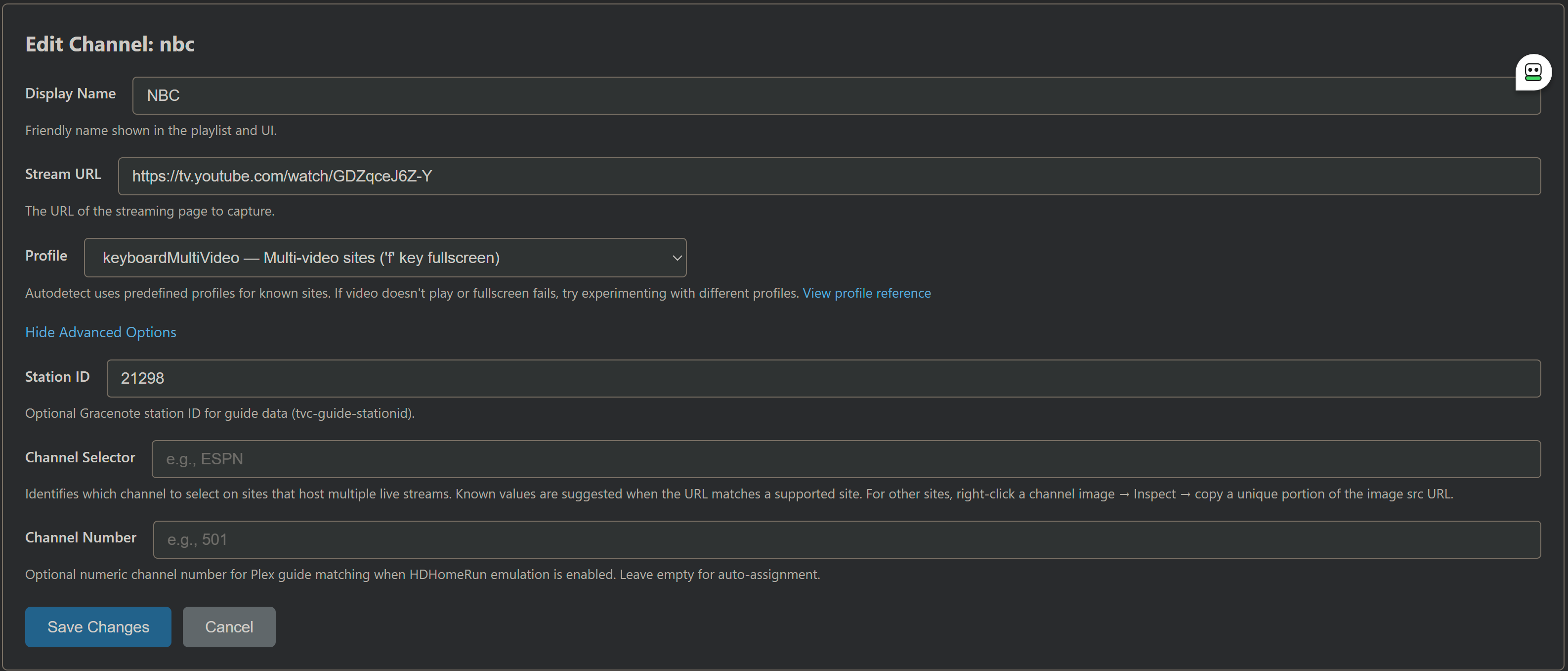
And the end result should look like this:

So, instead of Prismacast going to the grid guide and finding a match for the Channel Selector -- it has the link to go directly to the channel right from the start.