Introducing PrismCast: Browser-based Live TV Capture for Channels DVR and Plex

I considered for 1/2 a second until I saw the prices on the MacStudios. I had to go to my wife's jewerly box and put on her pearls so that I could clutch them. :stuck_out_tongue:

The most barebones of a Mac mini will still be plenty for most uses. Normal users don't need a Mac Studio. An M1 Mac mini will work plenty fine, if needed. My general advice is: if you can get a Mac, get a Mac. It does not need to be the highest end Mac on the market, but I would recommend getting the best Mac you can within the budget you're allowing yourself for future-proofing. All that said, PrismCast can (and does) run fine on any barebones Apple Silicon with terrific performance.

An observation - My streaming provider (DTV) doesn't work with PrismCast directly, so I'm using the network feeds with PrismCast. In almost all cases, when PrismCast has an issue with video or audio, that same issue exists if you go directly to the network site. So while PrismCast can be 100% stable, the network feeds are not.

On Thursday, I watched CNBC from 11am-4:00pm. "PrismCast" was having issues around 1pm. Horrible picture and sound. Accessed the CNBC site directly, same issue. It cleared up after 30 minutes. This happened for 4 times last week on different network website.

1 Like

Windows Users:

Today while I was trying to troubleshoot the video stuttering, I was recording 4 programs with Prismcast (the capture browser window had minimized). Somehow, after clicking on the minimized program to give it focus and bring it up on the screen I was accidentally able to see the YouTubeTV interface settings, clicking on the gear, it was set to 480i. I don't know how I was able to get control of that interface in the PrismCast Chrome session, but I was surprised to see that it was set to something as low as 480i and I wonder if that has something to do with my small file sizes and unchangeable 30 fps. I don't know how to get better control of that locked down session before it launches next time, and I can't repeat this strange session control that I had to test it.

EDIT: Ah, I can hit escape in the session and get the controls ... playing with that now...

EDIT: So, yeah, that was definitely it. Somehow in the Windows implementation this Chrome extension isn't getting the information it needs. Where is this configuration information stored on a Windows Node.js implementation of PrismCast?

1 Like

Thanks.
It's been working fine today.

Question re: deeplinks

I've seen you saying to avoid using deeplinks.
I would think using deeplinks for YTTV channels would avoid this problem.
I already have two channels that I have to use deeplinks for, since the Channel Selector is the same for both these two channels.
PBS selectors

Any reasons not to use deeplinks for all my tv.youtube.com channels?

Are you still using Windows RDC ?

Windows Remote Desktop (RDP) does not work — RDP creates a virtual display with different properties that interfere with Chrome's rendering. Use VNC or connect a physical display on Windows.

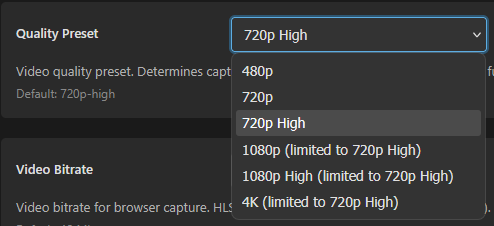
What does it show in the PrismCast Configuration tab on the Quality Preset dropdown?
Screenshot 2026-02-22 123206

I wondered if that was the issue. This morning I brought my server up to a 4k television and am now using that. I also have a 4k 60 fps dummy HDMI dongle coming today, hoping that would let me get it configured on the 4k TV and then run headless from there on in (still using RDC for occasional access to the otherwise headless server).

This is what I see with my M4 Mac-Mini display set to 1920x1080.

I want to get PrismCast working well before changing the display to 4k to capture 1080p.

So far, as I gained some control of those Chrome capture windows, I see there are some channels that don't broadcast through YoutubeTV in anything greater than 720p60, so I'm not sure I'll ever head for 1080p at this point. Sure would like to get 60 fps though on Windows, so far I can't fix that, but I am finally getting smooth video.

Should have listened to developer instructions about RDC but, well, too lazy to hook up a monitor until this morning.

I get 60fps on the channels that stream at 60fps and 30fps on the channels that stream at 30fps.

Known Limitations

  • Bitrate is approximate. Chrome's media encoder treats the configured bitrate as a target, not a hard limit. Actual bitrate may vary based on content complexity.
  • Frame rate follows the source. If the streaming site delivers 30fps, capture will be 30fps regardless of the configured frame rate setting.

In my experience so far, I can confirm that is not the case for Windows/non-docker. I also recognize that this was not specifically developed for Windows use. Every single capture video is currently at 30.000 fps, even after confirming its 720p60 in the capture window. The video is, however, fairly smooth now even at 30 fps.

How are you confirming that

After PrismCast launches the Window, I bring up the gear in that session and check it. To elaborate, when I launch PrismCast it launches a Chrome browser window (visible) that minimizes and sits and waits for capture session. If I restore that window by clicking on it from the taskbar, I can watch the capture live, hit escape on the keyboard, and click on the gear in the lower right corner of window to verify that it shows 720p60 (just like any youtube video for example).

What's the general consensus on the best place to disable channels from PrismCast that won't be used in Channels DVR, with consideration to the frequent updates to PrismCast during these early days? Disable them in Channels DVR or in PrismCast?

I prefer to do it at the source, PrismCast.
I've disabled 40 predefined channels there I don't get.

Any reasons not to use deeplinks for all my tv.youtube.com channels?

Because, and I've noted this previously, PrismCast already does this automatically. You gain nothing. The first time PrismCast looks at YouTube TV, it grabs all the deep links and uses them moving forward. If/when those links change - and they will change over a long enough time horizon - hardwiring them means everything breaks. PrismCast already deals with all this.

PrismCast does this for every source that has that ability - whether it's YouTube TV, or Sling, etc. It directly tunes anytime it can.

I tell folks don't do this because it's unnecessary and brittle, providing you the illusion of speed without any real net benefit.

What's the general consensus on the best place to disable channels from PrismCast that won't be used in Channels DVR, with consideration to the frequent updates to PrismCast during these early days? Disable them in Channels DVR or in PrismCast?

I debate this a lot. My current answer: disable them in PrismCast...the list of channels in PrismCast is only going to grow. Take what you want and leave the rest behind is my current philosophy. There's no right/wrong answer here and no benefit beyond preference to one or the other that I can see. Unless you're like me and very particular about your channel numbers being in a certain order. :smile:

How do I setup these two channels without using deeplinks?

1 Like

Yeah. I like that.

I want to get PrismCast working well before changing the display to 4k to capture 1080p.

FYI - this won't work unless you have a real monitor (or emulator dongle) into the Mac. You can change your display settings temporarily to 4K, but they will revert when you disconnect the session.

I have a 4k display attached. I just started using PrismCast with the Mac set to 2k resolution to make it easier using VNC from a Windows PC running at 2k resolution.

1 Like