
Just to give people an idea of resource usage on a M4 Mac Mini (base model)
PrismCast config settings 720p 60fps 3Mbps
Two 720p 60fps YTTV streams
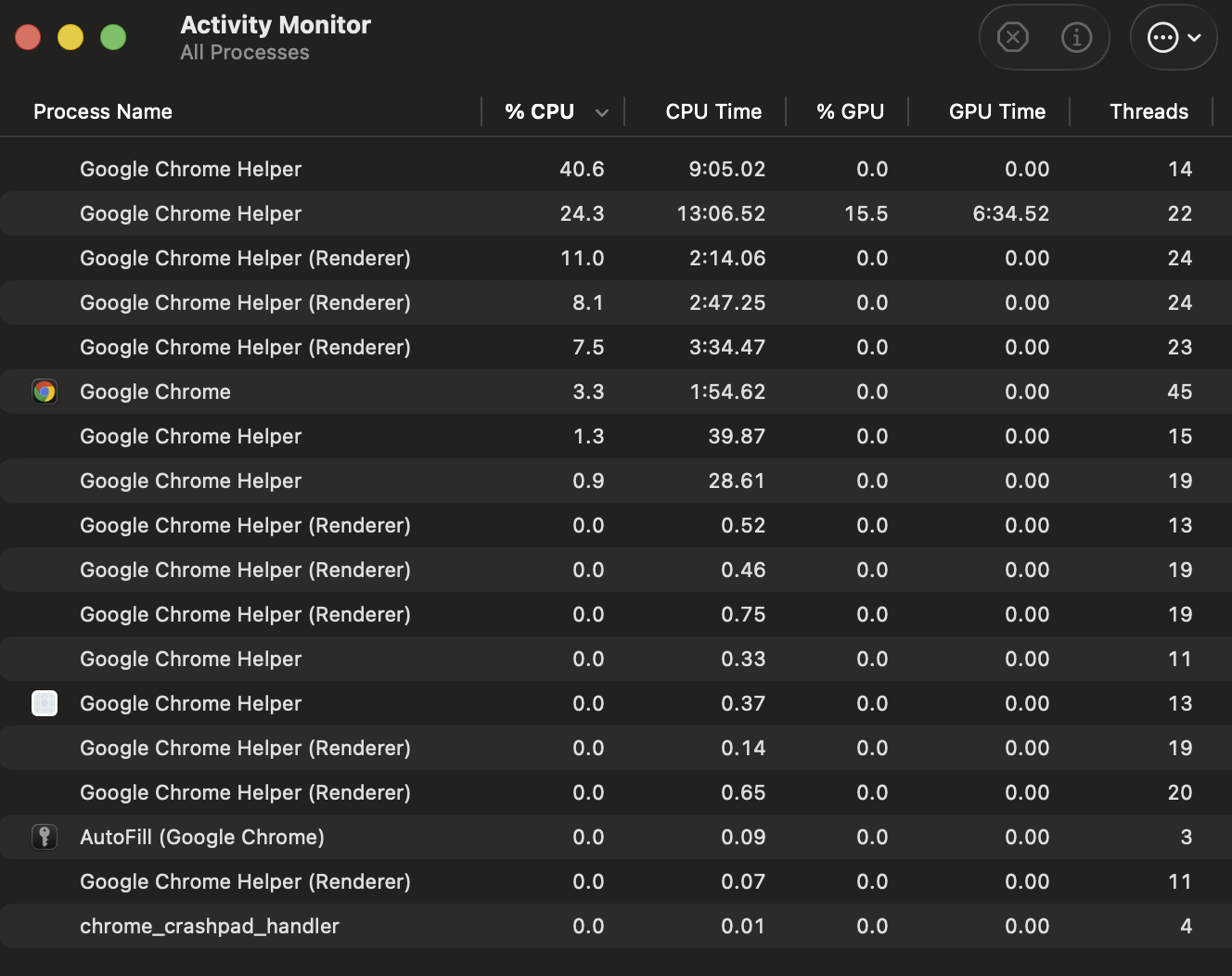
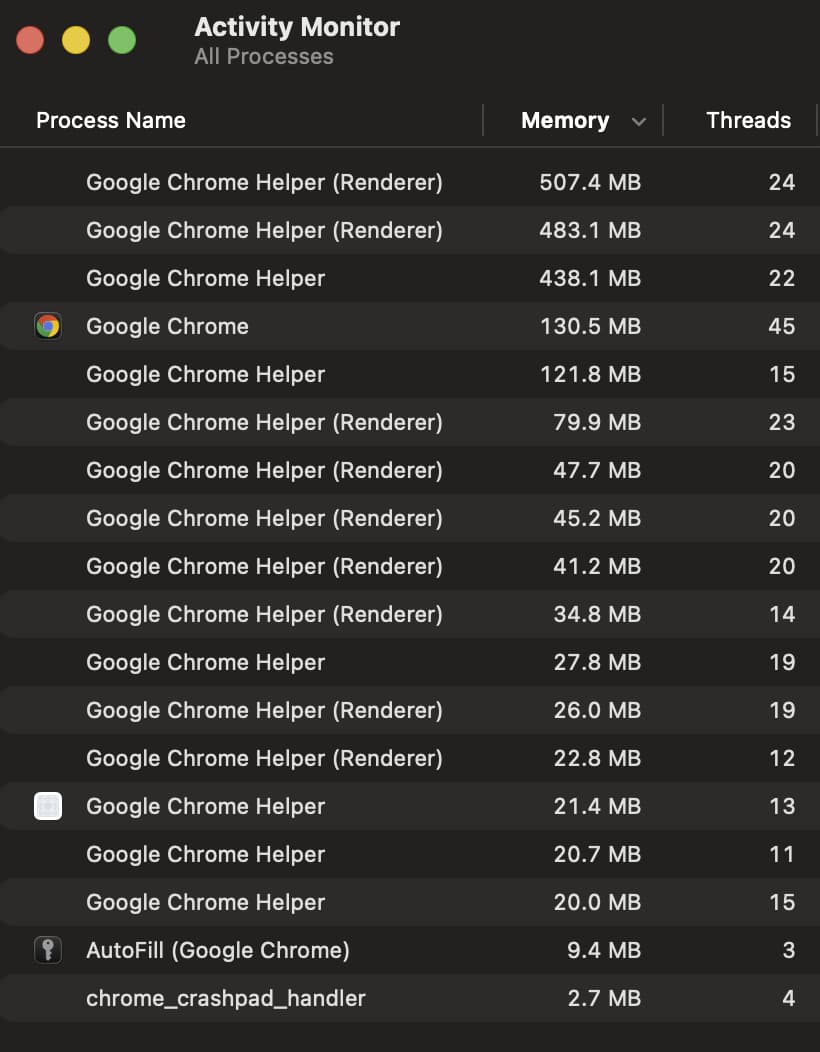
Mine is a DS1019+ with Celeron J3455 processor and 8GB RAM. I run a couple of docker containers on it but most of it's work is for Channels. I'd be willing to give the docker setup a go if there's a reasonable chance of success with one stream.
It should work without paid channels. I don't see why it wouldn't but yeah. That PR will be useful as I plan on switching back...
1 Like
Yeah, please keep me posted if this works. I'd love to add PrismCast as an extra source.
1 Like
Is anyone running this with YTTV and 1080p?
I just changed the display res on my M4 Mac Mini to 4k (attached to a 4k monitor)
I restarted PrismCast and set the config to 1080P High.
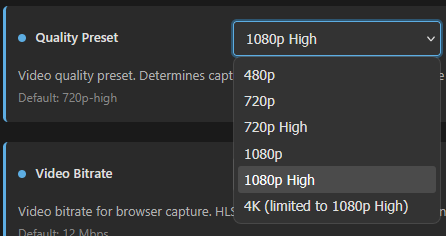
I start watching a channel that's available in 1080p on YTTV and it's set to 720p.
I have to access the Chrome window tab, press ESC and change the setting to 1080p.
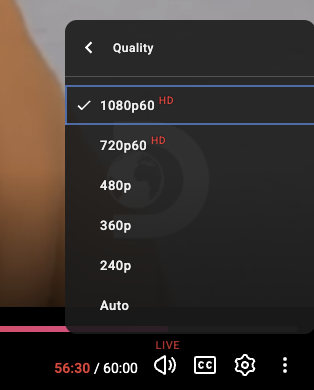
I also verified it was playing in 720p using the Stats for Nerds overlay in the browser tab.
EDIT: And now the channels are being selected at 1080p. Maybe because I went in and changed them. Will see tomorrow what happens with scheduled ones.
Setting up and testing isn't labor intensive. I'd say give it a shot. Worst thing that happens is it's not smooth on the clients and you delete the container.
I had the same experience in Windows. I suspect that using RDC (against developer instructions) to set this up, or in your case initially using a monitor with a resolution of 1920x1080 or lower initially locked the Chrome instances in at 720p. Manually changing mine with a 4k monitor as you did resolved my issue also.
Dang it, I had ABC working with my local provider using this and now ABC is blocking my local channel, saying it's not available with the provider. WFTV 9 in Orlando. Weird that this just stopped working recently.
I had noticed that with the new channel defaults that it was going to FX instead of ABC so tried to override it back to the URL that was working before, but now it's dead. Sigh.
Yep and I mentioned before that even if you set a high enough res to get 1080p with VNC, it might still not work if you set the display scaling too high (like 200% or more for a 4k res). The prism logs will tell you whether you can run 1080p at startup by showing the max actual res that is allowed.
YTTV is using Auto when tuning a channel.
My bandwidth is high enough for 1080P, but sometimes it auto selects 720p.
Doesn't seem to be a way to override it.
Testing 5 channels today they all auto selected 1080p.
You can bring up the Stats for Nerds overlay to verify. Trying to find a keyboard shortcut to toggle that.
A bit of a regression on the rendering of the WebUI on wider screens (4K UHD in my case). You fixed this previously, and it's been looking great:
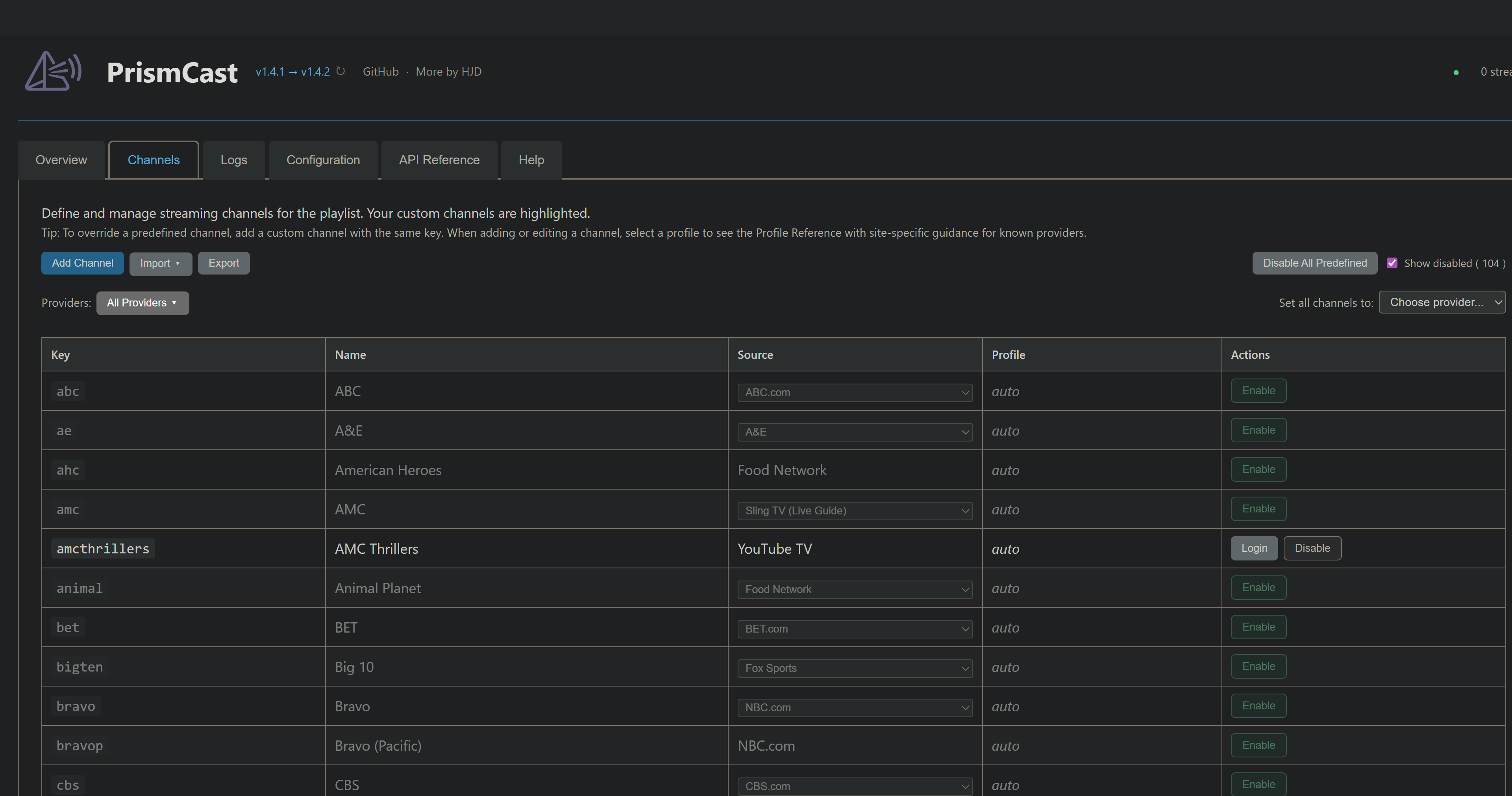
With the changes you made in 1.4.2, some of the WebUI is back to the previous width constraints:
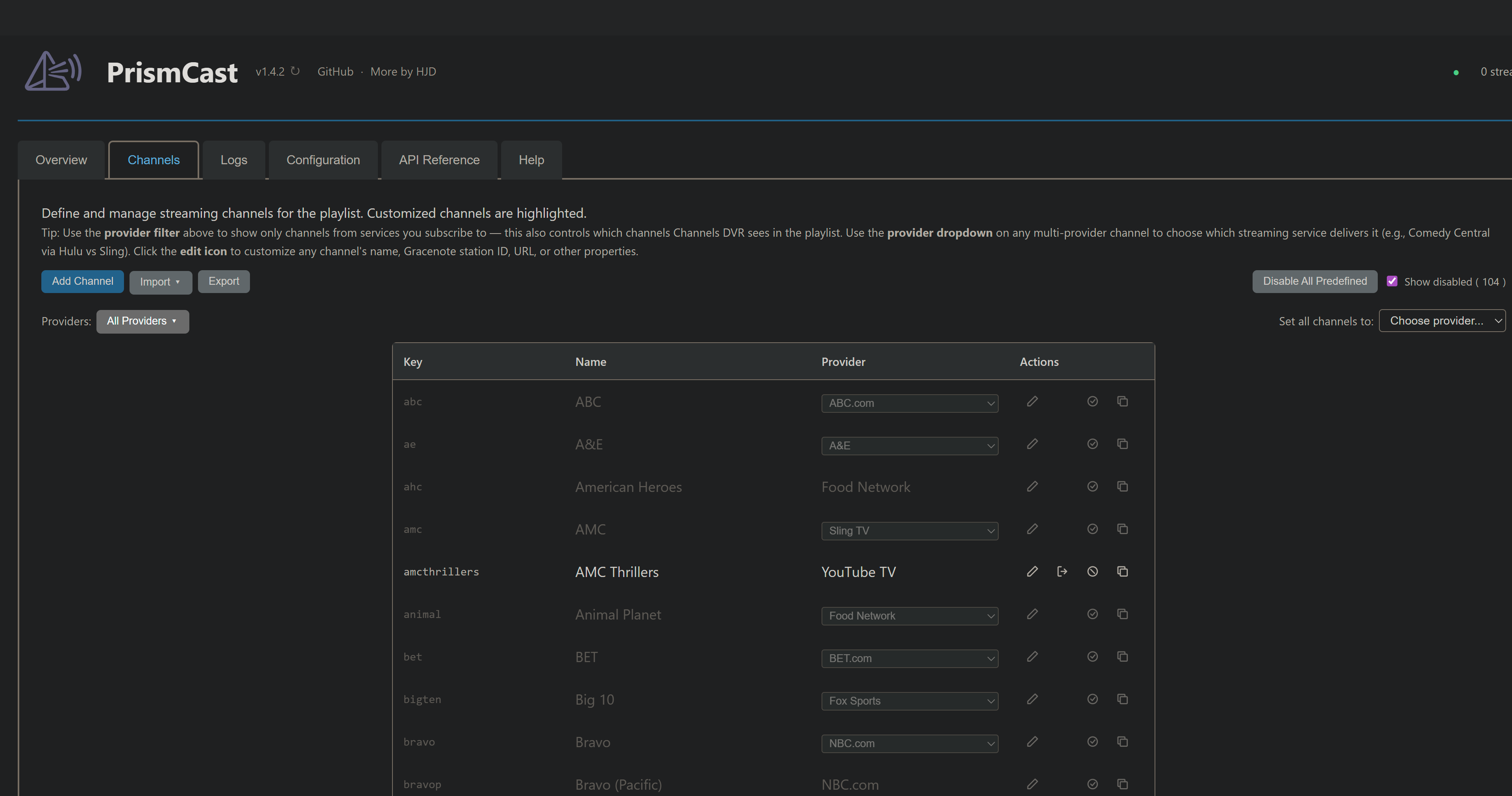
You mean the Profile is no longer displayed.
I noticed and miss that being there.
That too. But even with Profile added back, it wouldn't be full width.
1 Like
This isn't a regression, it's intended behavior. I like it better.  Thanks for raising it just the same, but it really is intended behavior for the time being.
I liked the "at a glance" view of the profile being used since I had problems using this new view where I couldn't tell what profile was selected without editing each individual channel.
So now I'm using the /channels json to verify which profile is being used.
And if not what I wanted, I'm exporting the user channels json /config/channels/export, editing and importing back again, then checking the /channels json again.
So now it looks like this
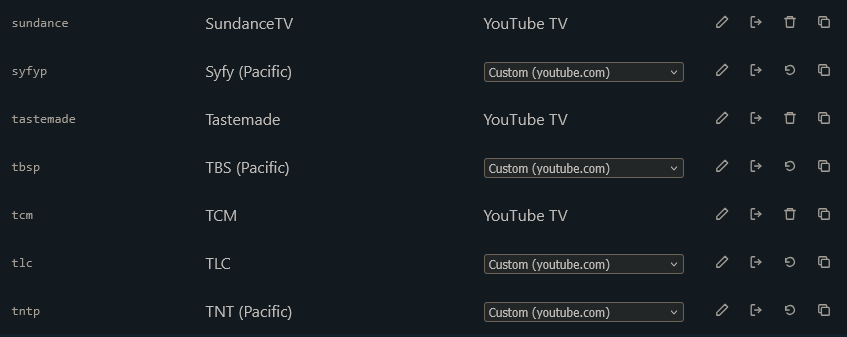
Where
Custom (youtube.com) lets me know my user defined channel is over riding the predefined channel and YouTube TV lets me know it's using my user defined channel where no predefined channel existed.
I liked the "at a glance" view of the profile being used since I had problems using this new view where I couldn't tell what profile was selected without editing each individual channel.
The at-a-glance view showed auto for every channel unless you overrode it. It wasn't particularly useful. You can export the channels if you like, as you are doing, but it's not going to show you much either unless you've overridden the defaults. If you want to see what profile is used for a particular channel, you can hit the edit button to take a look, or export the JSON as you're doing if you'd like to.
Appreciate the feedback. As I've said previously - it's early days, and I'm working toward a few things. Thanks for the insight into how some folks are using PrismCast.
2 Likes
Just curious if @KineticMan's DirecTV PR will be merged? I'm looking forward to trying that personally!
3 Likes
Thanks, just to be clear on what I'm trying to say in case I wasn't.
I understand for a newbie that auto profile will get them kick started, which is great and I applaud you for that.
I want to control my channels and what provider and method is used for each of them.
I started by manually entering each channel I wanted in the UI and that took a looong time.
I discovered the json method and decided that was a great way to backup my (user) channels and over ride the predefined ones.
So for an advanced user that wants control over each channel, my choice is using export/import for the user defined channels. I don't want to use ABC, CBS, ESPN, FOX ,NBC, PBS, etc. networks as a source that requires me to manually re-auth each one when they expire.
I want to use YTTV for my source and Provider and only have to auth with that.
Just not sure what will happen if I define a user channel that doesn't currently exist as a predefined channel, then I update to a new version that adds that same channel (channel key)?
P.S. All my scheduled recording are working great so far. Thanks for sharing this project!
I want to use YTTV for my source and Provider and only have to auth with that .
You can filter the provider list in the channels tab so that only YouTube TV is available. That’s all you need to do. You can also bulk-set all the channels that YouTube TV is supported on in the webUI.
If it makes you happy to disable everything and “roll your own”, you can. But it’s not necessary to do what you want. You’ve essentially opted to completely bypass what I’m trying to do with PrismCast and “roll your own”. I created the flexibility to enable that behavior…but you’re going to be out of the mainstream of what I am targeting and investing my time in, and I’m unlikely to be optimizing for use cases like yours.
Just not sure what will happen if I define a user channel that doesn't currently exist as a predefined channel, then I update to a new version that adds that same channel (channel key)?
That’s the world that exists today. User overrides always win, when they exist, if they’ve been named identically. If they aren’t named identically, you’ll see two channels.
To emphasize - I made PrismCast flexible in this way with intention…but I’m also not prioritizing people that want to “opt out” of the work I’m doing to streamline things either. I think user-defined channels should be used rarely and by exception, not en masse, for the vast majority of folks.
TL;DR: “I don’t like your channels, I want to do it my way” is a valid perspective that’s supported…I’m just being upfront that I’m not going to spend most of my effort focused on that cohort. I have my own point of view, and my software reflects it. For the group of folks that wants to do it differently, I’ve provided tools to enable you to do so - and they’ve existed since the earliest releases of PrismCast, right there in the webUI to import and export channels.
P.S. All my scheduled recording are working great so far. Thanks for sharing this project!
Glad you continue to enjoy it!
1 Like
Sounds like HJD was a step ahead of me… Stay tuned!
2 Likes