
Can I add spectrum channels ???
In the PrismCast configuration screen, DirecTV and YoutubeTV are the only providers I see in the pull-down menu, so it appears that Spectrum isn't natively supported at this time, and could be difficult if not impossible to add reliably in the future.
If Spectrum has URLs to access their streaming channels directly it would probably be doable. I've been using it with a few Xfinity Stream Channels that aren't available separately even though it's not one of the presets. You simply need to add the URL to the channel and select the appropriate profile (give auto a try but you may have to test a few, for Xfinity the fullscreenApi profile is what worked). I also had to adjust the timeout to be longer since Xfinity goes through a rather convoluted loading procedure to load a channel and it takes a bit sometimes.
1 Like
Spectrum has a separate url for all of it's channels , like this Spectrum TV. You basically change the tmsid number
Can you help me with adding spectrum as a custom list?
Sure I’ll pm you.
I was able to get Spectrum to work, see my post above.
2 Likes
The PBS feeds docker is not working again. I'm sure Millie will get it fixed soon, but I did a quick workaround with prism and it works fine.
Override the default PBS channel, go to https://pbs.org/livestream in Chrome and make sure it works for your local station. Then set that as the URL for the channel and change the profile to embeddedDynamicMultiVideo. Auto did not work.
2 Likes
I noticed what appears to be PrismCast doing some auto-recovery on some streams.
I think this is great that it can perform this.
Just wondering what the stats count= and maxReadyState= mean?
[2026/02/25 07:46:56.506] [bbca-ehruiq] Video no longer fills viewport. Re-applying fullscreen styling.
[2026/02/25 07:46:58.504] [bbca-ehruiq] Video fullscreen restored.
[2026/02/25 07:47:44.649] [smithsonian-ou6nks] Video element exists but not ready (count=68, maxReadyState=2). Treating as buffering.
[2026/02/25 07:47:48.537] [bbca-ehruiq] Video element exists but not ready (count=67, maxReadyState=2). Treating as buffering.
[2026/02/25 07:47:50.539] [bbca-ehruiq] Video element exists but not ready (count=67, maxReadyState=2). Treating as buffering.
[2026/02/25 07:47:58.657] [smithsonian-ou6nks] Video element exists but not ready (count=68, maxReadyState=2). Treating as buffering.
[2026/02/25 08:59:06.893] [bbca-ehruiq] Video element exists but not ready (count=66, maxReadyState=0). Treating as buffering.
[2026/02/25 11:59:04.666] [smithsonian-ou6nks] Video element exists but not ready (count=68, maxReadyState=0). Treating as buffering.
Got a question on one of the profile settings
clickToPlayApi
Sites requiring a click to start playback, using the JavaScript fullscreen API. Use clickSelector for play button overlays.
What is the clickSelector ? Where do you see that? Do you have to click it when you do the login page?
The selector is usually just the channel image name or a portion of it atleast.
Just find out what the link of the channel tile image is and if it’s website.com/image/channel123.png
In the selector put channel123.
It’ll try looking for that image in the page and then click it (I think).
1 Like
I noticed what appears to be PrismCast doing some auto-recovery on some streams.
I think this is great that it can perform this.
I thought it was a visible and documented capability. 
From the in-app documentation on the webUI homepage right at the top (italics added for emphasis):
PrismCast is built around three priorities, in order:
- Reliability — tuning a channel always delivers that channel. When the primary approach fails, fallback strategies ensure the tune still succeeds.
2. Health monitoring — once a channel is playing, PrismCast continuously monitors the stream and takes corrective action automatically if issues arise.- Speed — tuning and recovery should be as fast as possible, but never at the expense of reliability.
Tried chucking x-matroska hvc1 into your project and is working quite well as a replacement to h264. Obviously more resource intensive but would be cool to have an optional check box with a disclaimer.
3 concurrent 1080p50 streams on a m2 pro Mac mini stream very well - going to 4 starts producing reduced framerate (unsure if prism side or channels side)
I know it seemed like you weren’t interested in using this but just letting you know my experience if you ever decide to go down this road. 
Thanks for pointing that out. I had already read that. It was meant as a compliment and leading to my question about what the stats count= and maxReadyState= mean.
I can see the results in the recording (which isn't missing any frames) where I get a momentary loss of video and audio, but then it picks up right where it was when it lost the a/v.
I can tell you put a lot of work into the project.
I didn't take it otherwise. Tongue was firmly in cheek.
It simply means "buffering". Ignore it. The stats aren't a count of anything other than what's on the page.
1 Like
With a little assist from you (I pinged you privately), the next release will feature full support for DirecTV Stream. Once @KineticMan and I can collaborate on a quick item, this should be good to go. Looking forward to the next release.
Apologies if this exhists and I haven't fuigured out how to display it within the app.
Currently on 1.4.2 and am using the custom channel number within each channel. Would be great for folks who wish to use that if we could direct entry on the channel list vs. having to go into each channel. Threadfind has the ability to direct entry into the summary page:
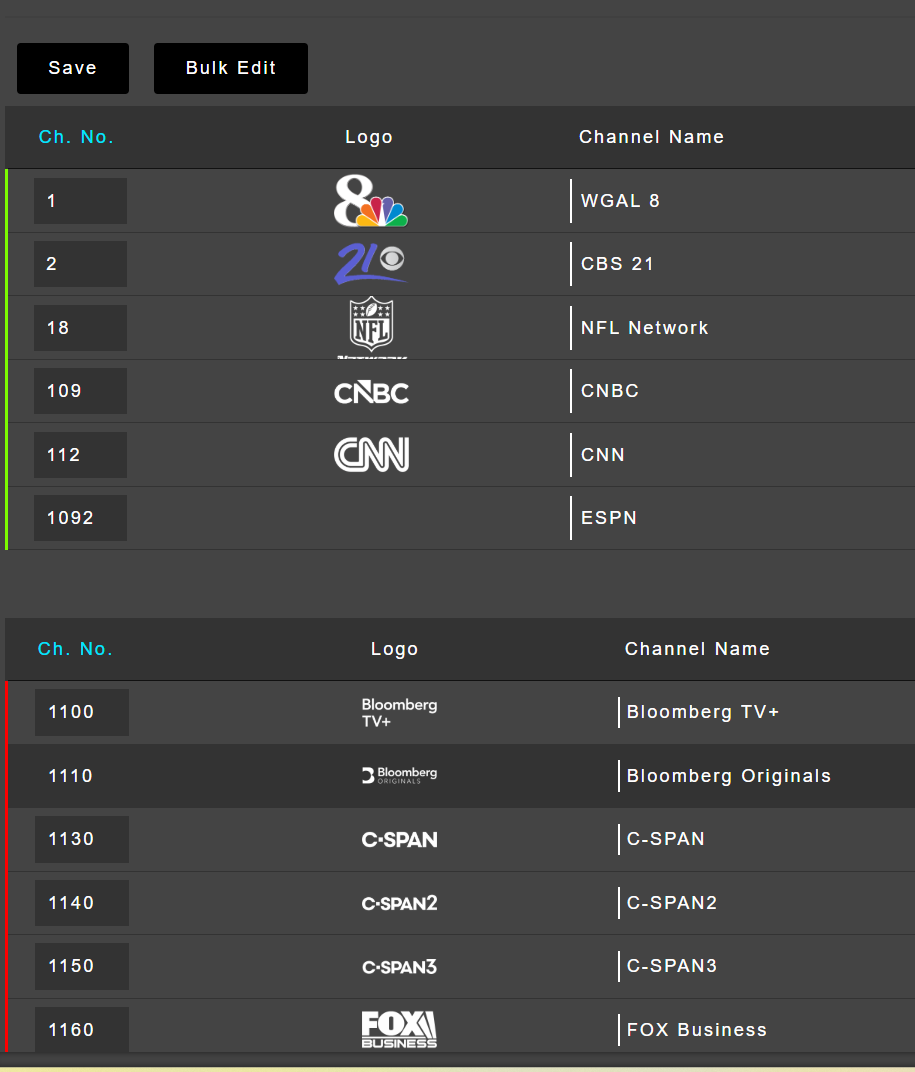
Because I can't for some reason get downstream apps to pull Prismcast through Threadfin, I'm trying to remove that layer and use channels direct to feed my downstream apps. However, channels doesn't have the ability to manipulate channel numbers, so I have to do it either upstream in the source I'm using (ADB, PrismCast) or downstream through a seperate layer (currently threadfin).
Also, by having the channel entry feature on the channel summary page, we would also be able to quickly check the channel number and bypass a few drill down clicks per channel.
Thanks for considering.
Regarding the Chrome extension that's used for capture, is there a way that I can install and play with this extension outside of PrimeCast? I'd like to see what it might take to get video at 60fps in Windows.
The extension has nothing to do with PrismCast itself. It’s puppeteer…google away and you’ll find plenty. It’s well known, and well documented, but it’s a developer tool not an end user one.
So all been solid on 1.4.2 Except I cant get it past this 480p thing
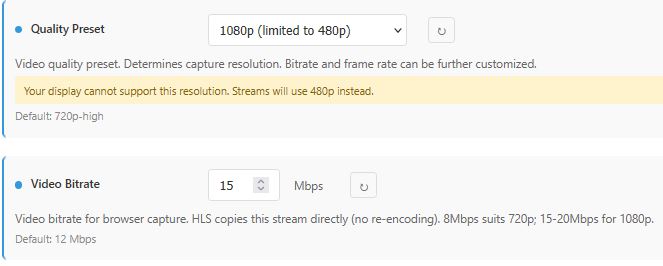
My dedicated Chanels DVR / Prismcast PC is an I5-8500 with around 48 gb ram and stock intel graphics hd 630 its Plugged into my TV via HDMI at 3840x2160 reported resolution and im running native via Node.exe
What am i doing wrong ?? Also is there any way to adjust the buffer timeout for 1 custom channel ?? My Gotham Sports login tends to need extra time to login BUT works so nice once loaded.