Introducing PrismCast: Browser-based Live TV Capture for Channels DVR and Plex

My installation on an M1 Mac went smoothly enough with one error: WARN] Bundled FFmpeg is not available. Preroll generation skipped — startup playlists will have no segments.

I verified ffmpeg is installed (v8.1) but is apparently not bundled properly?

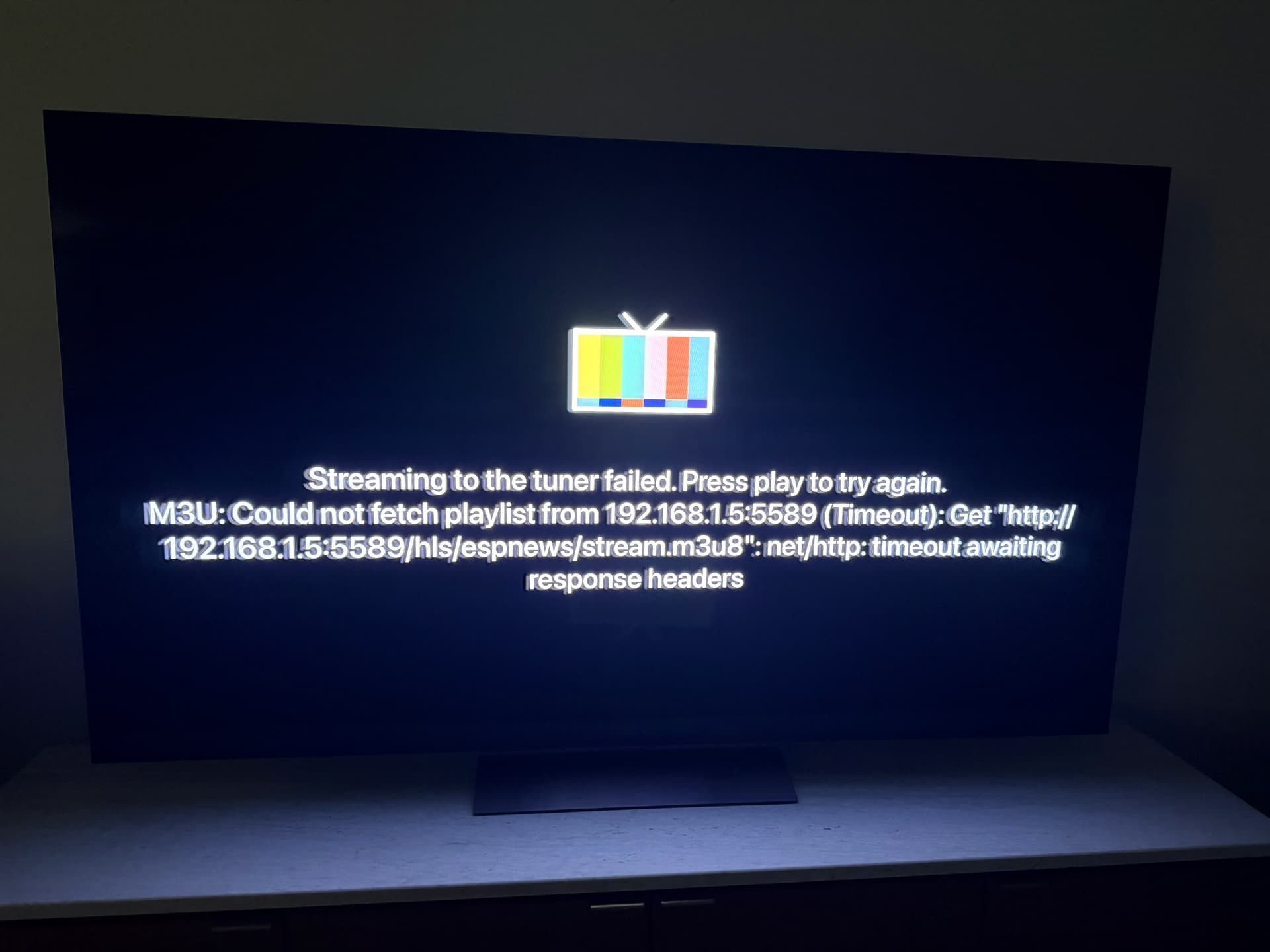
When tuning a channel, all timeout with the error shown in the pic.

All help appreciated.

You shouldn't have to create a custom channel for USA, the USA Network website is already there as the provider. Remove any filters you have when you look at the channel list. Same for Golf, SyFy etc.

1 Like

I'm seeing the same error. How did you install ffmpeg and PrismCast?
I installed both using homebrew https://github.com/hjdhjd/prismcast?tab=readme-ov-file#homebrew-macos

chDVRuser@chDVRusers-Mac-mini ~ % which ffmpeg
/opt/homebrew/bin/ffmpeg

chDVRuser@chDVRusers-Mac-mini ~ % /opt/homebrew/bin/ffmpeg -version
ffmpeg version 8.1 Copyright (c) 2000-2026 the FFmpeg developers
built with Apple clang version 17.0.0 (clang-1700.6.4.2)
configuration: --prefix=/opt/homebrew/Cellar/ffmpeg/8.1 --enable-shared --enable-pthreads --enable-version3 --cc=clang --host-cflags= --host-ldflags= --enable-ffplay --enable-gpl --enable-libsvtav1 --enable-libopus --enable-libx264 --enable-libmp3lame --enable-libdav1d --enable-libvpx --enable-libx265 --enable-openssl --enable-videotoolbox --enable-audiotoolbox --enable-neon
libavutil      60. 26.100 / 60. 26.100
libavcodec     62. 28.100 / 62. 28.100
libavformat    62. 12.100 / 62. 12.100
libavdevice    62.  3.100 / 62.  3.100
libavfilter    11. 14.100 / 11. 14.100
libswscale      9.  5.100 /  9.  5.100
libswresample   6.  3.100 /  6.  3.100

Did you already authenticate the channel.
What does it show in the PrismCast log.

I use PrismCast to watch and record the Dallas Stars and LOVB. You need to use it in conjunction with something else like FruitDeepLinks to pass PrismCast the on demand URLs.

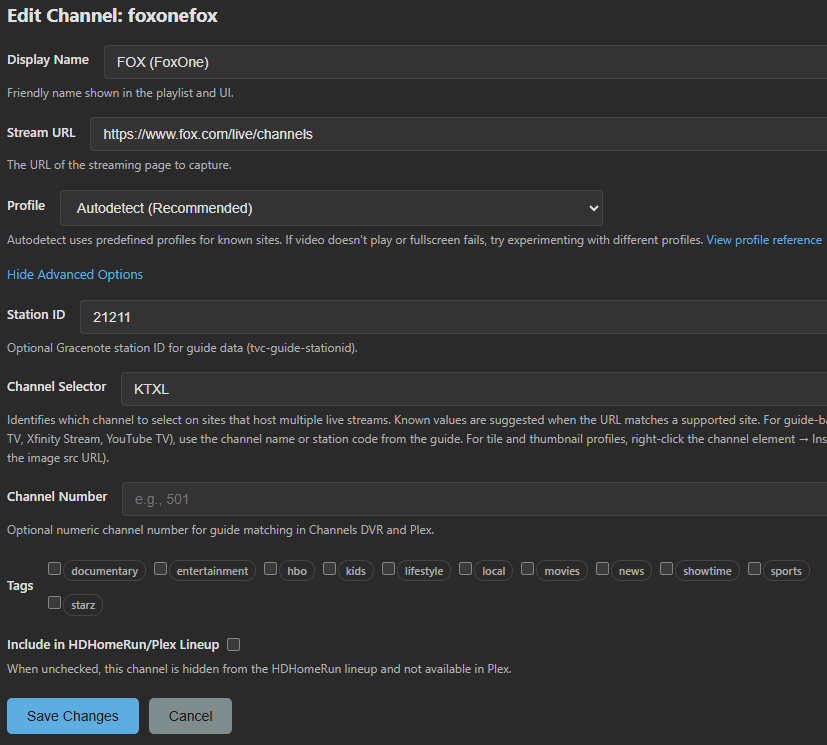
Yeah what I've noticed is when you upgrade from one version to another Fox gets messed up somehow. I think my custom override to set the station ID as the selector instead of the default gets ignored on an upgrade. When I upgraded from 1.7 to 1.8 all of a sudden I started getting Fox News instead of my local station.

My workaround was to go into the channel list and revert Fox back to the default, then add back WOFL as the channel selector and it started working again.

Update: local Fox broke again, was working yesterday but now all I get is Fox News. So I will have to disable this channel in Prism.

I'm experiencing the same thing using fox.com as the stream source.
And it doesn't matter which of these 2 selectors I use

Not fixed in v1.9.0
@hjd What info do you need to troubleshoot this one?
I scheduled 7 test recordings for today on the channel to see how many correctly record my Local Fox station. The first 6 recorded Fox News channel instead. 1/7.

PrismCast has a pretty robust recovery method!

It continued recording a YTTV channel during a 3 minute Internet outage.
The recording continues showing the last frame before the outage for 3 minutes (with no audio) and then resumes exactly where it left off.

All through the recording the playtime indicator displays the current PTS. So the PTS continues increasing during the 3 minutes of outage.

This makes sense because PrismCast is recording the Chrome browser, not the feed from YTTV.

No errors in the PrismCast or Channels DVR log.

If I didn't know any better, I would think the playback was paused for 3 minutes.

2 Likes

Hello, I have a question on channel filtering using the tags. I'm on Windows, installed with NPM method. Perhaps I'm doing something wrong, but I have channels categorized into different categories so that I can filter on a specific set and then auto-number each set a certain way. When I tried that, it numbered all of my enabled channels, not just the visible, "filtered by tag" set. Any ideas and has anyone else tried this? It could be user error but wondering if anyone else is seeing this?

Probably best to restate your post as
I want to do ___
How do I do that?

Reading your post, it sounds like you want to create groups of channel numbers depending on the category you assign them?
001-099 Local channels
100-199 News
200-299 Movies
300-399 Sports
...

Yes, sorry I could have written that a little more clearly, but you have essentially stated what I wanted to do. I tagged my channels into groups and then wanted to filter on each of those groups individually to use the auto-number feature only for each specific set. I guess I made the assumption based on the instructions in the pop-up that said my 'visible' channels would be re-written with auto-number. However, I think 'visible' in this instance does not take into account what is currently filtered, but just what is currently not disabled. I believe wrong assumption on my part. I think the filtering is intended more to be used for creating a playlist based on the filtered set (there's a small icon next to filter to do that). It's not a big deal and I just went through and manually numbered everything. Just be careful on using the auto-number because in my instance it over-wrote some of the work I did because the functionality is not what I assumed on a filtered set.

@bnhf I tried to use your example of the weather static page you posted earlier to add a static page for my FireBoard BBQ thermometer web page. When I use the below text url in cdvr source it launches two additional tabs in VNC, one of the fireboard web page and another of what appears to be the video creation tab that has a blank white page with a play button. The problem is I have to go into the vnc tab on the video page and hit the play button for it to start playing the web page capture and it works fine if I do that. it seems like I'm not using the correct url text in channels. I got the stream.m3u8 by using the copy stream url box inside prismcast under channels.

#EXTM3U

#EXTINF:-1 channel-id="fireboard" tvg-logo="https://docs.fireboard.io/wp-content/themes/fireboard-wordpress-theme/assets/images/fireboard-logo-vertical-orange.png",FireBoard
http://192.168.1.151:5589/play?url=http://192.168.1.151:5589/hls/fireboard/stream.m3u8&profile=staticPage

If I try this text it launches the static web page in VNC tab but fails in channels playback and I don't think it is running any capture on the web page.

#EXTM3U

#EXTINF:-1 channel-id="fireboard" tvg-logo="https://docs.fireboard.io/wp-content/themes/fireboard-wordpress-theme/assets/images/fireboard-logo-vertical-orange.png",FireBoard
http://192.168.1.151:5589/play?url=https://fireboard.io/sessions=staticPage

Prismcast logs

[2026/04/19 03:29:50.682] User channel 'fireboard' updated.
[2026/04/19 03:40:03.609] [ERROR] [fireboard.io-6y1220] Stream setup failed for https://fireboard.io/sessions=staticPage: Waiting for selector `video` failed.
[2026/04/19 03:40:03.609] [fireboard.io-6y1220] Stream ended after 12s (setup failed).
[2026/04/19 03:40:03.610] GET /play?url=https://fireboard.io/sessions=staticPage from 192.168.1.152 responded 500 in 11610.556 ms.

Both ways are using hls in source setup. Any help would be appreciate. Apologies if I missed static web page setup instructions in the thread, I did search.

PrismCast v1.9.0 is here. This release brings playlist intelligence, smarter channel management, and reliability improvements across the board.

M3U playlist tags and guide metadata. Your channel tags now flow through to the M3U playlist as group-title attributes, so Channels DVR and other M3U consumers can automatically group channels by tag. Guide metadata — tvg-id, tvg-name, and tvg-logo — is embedded for richer channel identification. Tags preserve the exact casing you entered.

Informed channel creation. Adding a custom channel now shows you matching predefined channels as suggestions and warns when your active service filter would prevent the new channel from appearing. A small change that saves a lot of confusion.

Beyond the headlines:

  • Static page channels in playlists and HDHR — static page channels are now fully supported in the M3U playlist and HDHomeRun lineup.
  • Service selection indicators — the channels tab now shows service selection indicators and channel override badges, making it easier to see which service is
    active and where you've customized settings.
  • Consistent terminology — provider terminology has been unified as service throughout the interface for a cleaner, more consistent experience.
  • Improved configuration persistence — settings are now saved with atomic writes and automatic backup, so your configuration is always safely preserved.
  • Windows service improvements — service installation now uses a structured file-based task definition for more reliable installs and uninstalls.

As always, I really appreciate the feedback, enthusiasm, and passion around PrismCast. Almost every feature added since 1.0.0 has come from thoughtful, respectful discussion with this community.

My only ask is simple: please be kind, not demanding. PrismCast started as a project for my own needs, and I share it because I enjoy this community and wanted to give something back. Respectful feedback is always welcome; entitlement is not.

Thank you to everyone who's shared encouragement or joy in using PrismCast — it genuinely keeps this project fun to work on.

One more note for everyone's benefit: please don't repost the same questions in this thread. Many of them have already been asked and answered, and the forum's topic-only search works well. Keeping discussions focused helps everyone. Please treat the thread and each other with the same consideration you'd expect in return.

To reiterate from prior release notes:

If you've created user-defined channels that are now covered by predefined options, I recommend deleting those overrides and using the defaults. Predefined channels are what I test and maintain; overrides are entirely optional, but they do create long-term configuration debt for you as PrismCast evolves.


1.9.0 (2026-04-19)

  • New feature: M3U playlist tags and guide metadata — the playlist now includes group-title attributes from your channel tags, enabling automatic channel grouping
    in Channels DVR and other M3U consumers. Guide metadata (tvg-id, tvg-name, tvg-logo) is embedded for richer channel identification. Tags preserve the exact
    casing you entered.
  • New feature: informed channel creation — adding a custom channel now shows matching predefined channels as suggestions and warns when your active service filter
    would prevent the new channel from appearing.
  • Improvement: static page channels are now fully supported in the M3U playlist and HDHomeRun lineup.
  • Improvement: configuration persistence now uses atomic writes with automatic backup and recovery, so your settings are always safely saved.
  • Improvement: service selection indicators and channel override badges on the channels tab.
  • Improvement: provider terminology unified as service throughout the interface for a cleaner, more consistent experience.
  • Improvement: Windows service installation now uses a structured file-based task definition for more reliable installs and uninstalls.
  • Fix: Fox local affiliate service selection not persisting across restarts.
  • Housekeeping.
2 Likes

Thanks for raising this. I'll publish a bugfix release today to cover it...sorry about that miss on my part!

Edit: I updated v1.9.0 to include it since it wasn't fully published yet. Enjoy!

1 Like

Try it like this:

#EXTM3U

#EXTINF:-1 channel-id="fireboard" tvg-logo="https://docs.fireboard.io/wp-content/themes/fireboard-wordpress-theme/assets/images/fireboard-logo-vertical-orange.png",FireBoard
http://192.168.1.151:5589/play?url=https://fireboard.io/sessions&profile=staticPage

Also, it appears the latest version described just above, should allow you to skip this process -- and simply add the channel like any other in PrismCast.

2 Likes

Also, it appears the latest version described just above, should allow you to skip this process -- and simply add the channel like any other in PrismCast.

Correct. :smile:

3 Likes

I just saw Weatherscan work without much effort with the new version. I was able to get it in SLM and then flip it over to Channels. Neat

Thank You
But it still isn't working consistently.
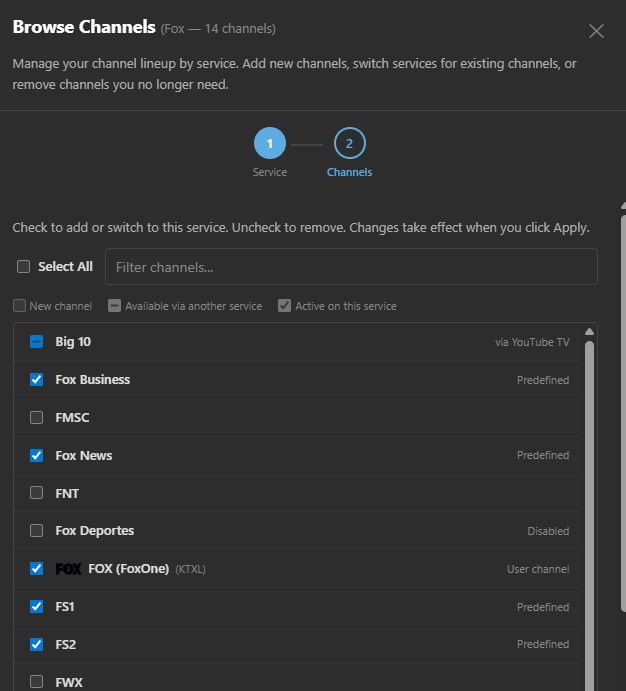
Sourcing these channels from Fox One it's a crap shoot as to which channel each one tunes to.
Local Fox
Fox Business
Fox News
FS1
FS2

Seems it should be easy to reproduce.
Let me know what I can do to help troubleshoot.

I'm finished with trying to figure it out today.
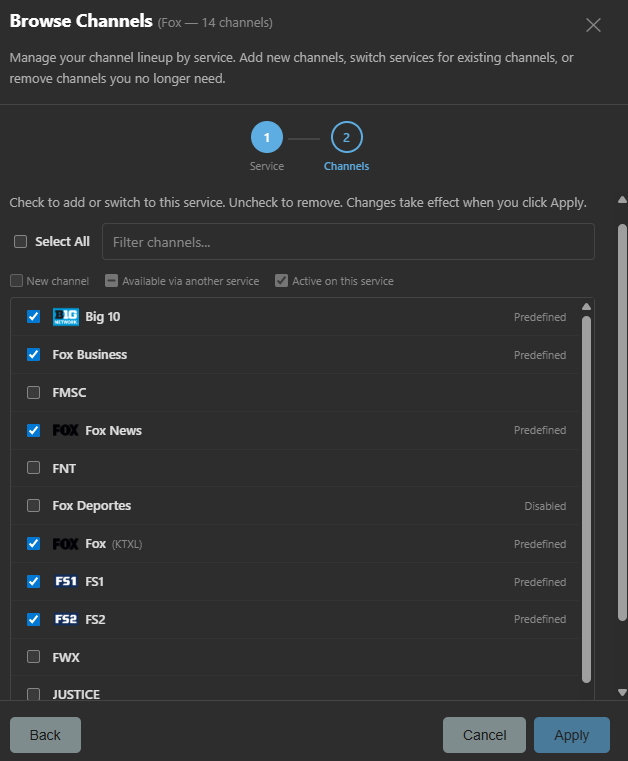
I deleted all the channels I had defined available at Fox One and added them back "the approved way".
Still having issues where selecting one channel plays a different one.
And yes, I did refresh the playlist m3u in Channels DVR.

1 Like

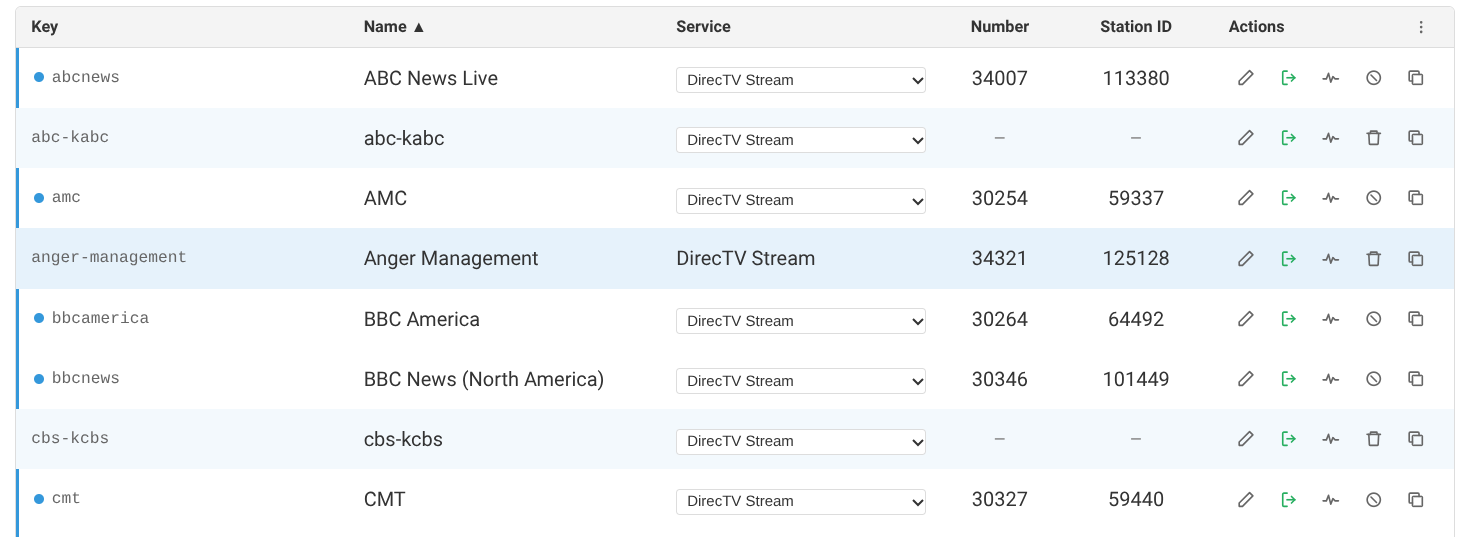
I just upgraded to Prismcast v1.9.0. Through this update and the last, my local channels, added through DirecTV Stream as a provider, have not survived the update intact. Each update has dropped the channel number and station ID from the channel. I have had to enter manually after the last couple of updates.

As you can see in the screen capture below, there are blank spots for Number and Station ID. (abc-kabc, cbs-kcbs) (this also happens with fox-kttv and nbc-knbc).

Agreed, reverting to defaults for Fox local still results in tuning Fox News for me, even though the selector default is FOXD2C. I changed my selector back to the local station ID, WOFL, and it's working again for now. But I don't trust it given the recent history, so it's now lower in my priority list.

This is with 1.9.0.

Thanks for the reports from both you and @chDVRuser - I'll take a look and come back with any questions. Don't need anything additional from folks at this time...but as soon as I do, I'll reach out.