Introducing PrismCast: Browser-based Live TV Capture for Channels DVR and Plex

There seems to be an ongoing issue with upgrades where any user-defined channel changes get whacked. Thanks. I realize that you want folks to use defaults.

Also, I've mentioned this before - mobile channel admin is broken, if you try to edit a channel it disappears in the list. Desktop is fine.
It's happening with all the Fox One channels I added.
Big 10, Fox local, Fox Business, Fox News, FS1 and FS2.

Go to watch one channel and it displays a different channel.
Don't know if it matters, but I use YTTV as a provider to authenticate the Fox One channels.

Also, I've mentioned this before - mobile channel admin is broken, if you try to edit a channel it disappears in the list. Desktop is fine.

Unsupported. To the extent it works, great. Not a use case I am actively solving for nor plan to in the immediate future.

Don't think the provider auth is the issue, it's the selector for Fox One.

1 Like

So do i need to uninstall everything and reinstall to get the improved windows service install ??? I currently have the black cmd window and chrome stay open on my channels PC

The issues are specific to Fox.

2 Likes

I have updated to V 1.9. I am still using Poweshell to start/stop PrismCast. Have any Windows users found a way to move to a service? Would like to maintain my configuration if possible. Just to echo, I am also seeing the Fox issues. Not a big deal since I have other sources for this. Continue to really like this app.

here are the logs:

[2026/04/22 07:29:26.450 AM] Starting PrismCast v1.9.0 with configuration:

[2026/04/22 07:29:26.450 AM] Configuration file: /Users/Home/.prismcast/config.json

[2026/04/22 07:29:26.450 AM] Chrome profile: /Users/Home/.prismcast/chromedata

[2026/04/22 07:29:26.450 AM] Server port: 5589

[2026/04/22 07:29:26.450 AM] Quality preset: 720p-high (1280×720)

[2026/04/22 07:29:26.450 AM] Capture codecs: h264, hevc

[2026/04/22 07:29:26.450 AM] Video bitrate: 12000000

[2026/04/22 07:29:26.450 AM] Max retries: 4

[2026/04/22 07:29:26.450 AM] Max concurrent streams: 10

[2026/04/22 07:29:26.450 AM] Circuit breaker threshold: 10 failures in 5 minutes

[2026/04/22 07:29:26.450 AM] Chrome executable: autodetect

[2026/04/22 07:29:26.450 AM] HLS segment duration: 2s, max segments: 10

[2026/04/22 07:29:26.450 AM] HDHomeRun emulation: enabled (port 5004)

[2026/04/22 07:29:26.615 AM] Using FFmpeg at: ffmpeg

[2026/04/22 07:29:26.620 AM] Saved configuration to /Users/Home/.prismcast/config.json.

[2026/04/22 07:29:26.626 AM] Loaded 1170 channels.

[2026/04/22 07:29:27.967 AM] Chrome ready: Chrome/147.0.7727.102 (GPU: Apple M1 [AV1, H264, HEVC]).

[2026/04/22 07:29:27.967 AM] [WARN] Bundled FFmpeg is not available. Preroll generation skipped — startup playlists will have no segments.

[2026/04/22 07:29:28.820 AM] Capture system verified successfully.

[2026/04/22 07:29:29.612 AM] PrismCast is now listening on 0.0.0.0:5589.

[2026/04/22 07:29:29.612 AM] HDHomeRun emulation is now listening on 0.0.0.0:5004 (DeviceID: 9C96F404).

[2026/04/22 08:00:19.728 AM] Saved configuration to /Users/Home/.prismcast/config.json.

[2026/04/22 08:00:19.728 AM] Service filter updated: directv, hbomax.

[2026/04/22 08:00:30.644 AM] Login mode started for https://stream.directv.com.

[2026/04/22 08:00:49.755 AM] Login tab was closed. Ending login mode.

[2026/04/22 08:00:50.635 AM] Login mode ended.

[2026/04/22 08:00:58.716 AM] Saved configuration to /Users/Home/.prismcast/config.json.

[2026/04/22 08:11:58.124 AM] [ERROR] [msnow-crzv0s] Stream setup failed for https://stream.directv.com: Stream initialization timed out.

[2026/04/22 08:11:58.126 AM] [msnow-crzv0s] Stream ended after 10s (setup failed).

[2026/04/22 08:12:11.760 AM] [ERROR] [msnow-19w5dc] Stream setup failed for https://stream.directv.com: Stream initialization timed out.

[2026/04/22 08:12:11.761 AM] [msnow-19w5dc] Stream ended after 10s (setup failed).

[2026/04/22 08:12:25.796 AM] [ERROR] [msnow-zn2rk4] Stream setup failed for https://stream.directv.com: Stream initialization timed out.

[2026/04/22 08:12:25.797 AM] [msnow-zn2rk4] Stream ended after 10s (setup failed).

[2026/04/22 08:12:39.809 AM] [ERROR] [msnow-a0kmzx] Stream setup failed for https://stream.directv.com: Stream initialization timed out.

[2026/04/22 08:12:39.809 AM] [msnow-a0kmzx] Stream ended after 10s (setup failed).
1 Like

PrismCast doesn't seem to be limited to tuning more than one channel at a time, however Chrome doesn't seem to like having more than one tab with live video.

Is there a work around for this?

PrismCast doesn't seem to be limited to tuning more than one channel at a time, however Chrome doesn't seem to like having more than one tab with live video.

Is there a work around for this?

That's incorrect. There is no practical limit, beyond your system resources, to how many tabs with live video you can have simultaneously in PrismCast. I've had as many as 14 tabs with live video in PrismCast.

I wasn't saying PrismCast couldn't, more that Chrome complains about opening more than one tab with video, at least for me

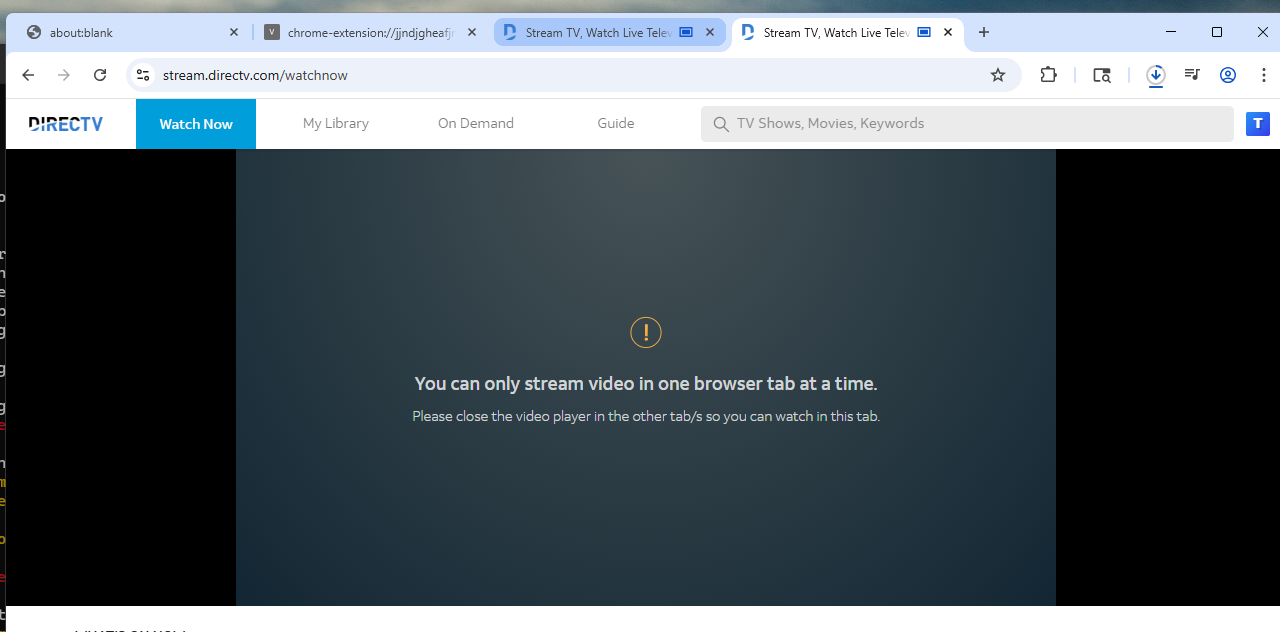
Whenever I try to tune more than one channel concurrently through PrismCast, I get a message in Chrome :

I always presumed that I could tune more than one channel at a time, thank you for verifying that. I have had this issue on more than one machine. I also use Windows.

This is an issue I have with Chrome (not PrismCast). I ask my question here since this is the only thing effected by this issue with Chrome.

This is actually a DirecTV limitation. Nothing to do with Chrome or PrismCast.

Ok that answers that.
I presume there is no work around (as in some browser extension or to change provider).

I'm not aware of any other provider having this limitation.

Some channels you can go to their website to stream(ESPN, USA, TNT, etc) vs. DirecTV (Hallmark) and that shouldn't count against your stream limit. Only when you can't access via the channel's website and have to use your provider's site do you typically hit the various limits that exist.

It does depend on whether your provider has access to the "TVEish" access via their web. Some providers don't give you access, likely an added extra cost they have to incur charged by the channel owner. Sling has very limited access through web as compared to most other providers as an example.

1 Like

Not a work around as much as what PrismCast was originally designed to do, but as @jator states just above, you should set up PrismCast to stream from a given network's site first (using your DTV credentials for login), and only stream from DTV's website when that's the only option.

For DTV in particular, this is the way to go.

1 Like

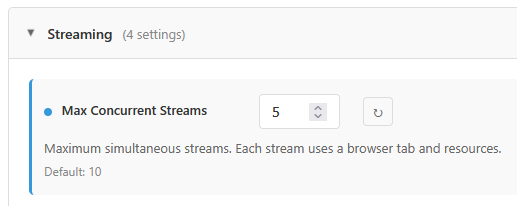
And as an absolute last resort if you can't do the other suggestions, you can limit concurrent streams in PrismCast settings to one:

image

It is the same ordeal with Sling but you have either 2 or 3 streams depending on the channel.

Obviously, yes the best way to go is to use the network website when you can if you can...

similar but different. directv stream only has this issue specifically with web browser. you can have many different browsers all streaming, but only 1 stream per browser.
I actually just tested and you can get A 2nd stream in chrome with an incognito window.

1 Like

I had an issue with ABC detecting my location within a Podman container. It didn't seem to be an issue with any of the other networks but ABC continued to give me a blank page for Live content. As another poster indicated, if you post the id generated on a successful attempt into the URL, it works. That ID is unique per computer though so you have to go to the computer in which Podman/Docker is running and run a browser outside of the container which presumably will generate the ID and then you can append this id to the URL with the ABC channel in Prismcast.