
Is there a way to use the HDHR emulation in software besides Plex? If so, how do you get other software (which can see physical HDHR devices just fine) to see the emulated device? So far my attempts (with NextPVR and SageTV) have not been successful. Are there some configuration-steps that need to be taken, or is it just not possible?
Lois, I brought the tuners into Sage by way of Channels DVR. So Channels DVR becomes my tuner pool that is shared between Channels and Sage. It takes a little fooling around in SageTV (with OpenDCT), but after you do it once it gets a lot easier. If you want some more instructions on this, please hit me up in the Sage forum.
1 Like
So, I tried setting up Fubo, using the @cmlittle77 guide. I get the same "video setup not permitted error" for ESPN channels. Which, unfortunately, are the main channels I was hoping to use Prismcast for. Other channels, such as Hallmark, work fine. If I click on the channel verify button in Prismcast, it opens the browser window and plays ESPN, with no issue. If I paste the edited channel link into the sandboxed Chrome browser session, ESPN plays without issue. If I try tune to ESPN using Channels, then I get the "not permitted" error. Prismcast is running on a Windows 11 PC, and I verified the monitor is HDCP 2.2 capable, and I used a new HDMI cable that is HDCP 2.2 and 2.3 capable. At a loss as to why it will play when Prismcast verifies the channel or when I paste the link, but not when Channels calls to Prismcast to tune ESPN?
Also, I had Prismcast working well with Hulu Live, but recently change over to Fubo to be able to watch my regional sports provider for baseball, which Fubo carries. I guess if Fubo is a no go, then I'll drop them for DirecTV or Spectrum.
1 Like
Covered above...
and above...
and above...
and...
I have the same issue with ESPN channels on Fubo. All other channels I have tried with Prismcast works.
Can you effectively run PrismCast on a 16 GB Raspberry Pi 5?
If so, I have a few questions:
- Do you need to boot from an SSD or will the SD card work fine?
- Is hardware encoding/decoding supported?
- Would a native or docker based installation work best?
Maybe but yeah it'll have to be an SSD boot. No SD card can handle the horsepower that Prismcast requires
I think you would be better getting a NUC and using that instead. I'm thinking about getting one or reusing an old system lying around but yeah...you need a powerful system with either an Intel, Nvidia, or AMD GPU on an SSD in order to have a chance to run it
Any update on getting Fox local working again? E+ TV stopped working again yesterday and prism was my backup. Thanks.
To those who have Directv as a service working, which profile did you use? And any other special settings to use?
My hardware is an M1 Mac and Apple TV. (Prismcast v.1.9.0) I have ESPN working via ESPN.com but any channel with Directv as service fails with a timeout error.
Really, really would like to get Hallmark Channel working.
For environments where the GPU can be utilized, I believe that would be good enough. If you work in an environment where the GPU can't be utilized (Windows Desktop Docker I believe is one), then it would fall on the CPU and that would tax that CPU I believe, especially if other activities or multiple windows were opened. Others know better than I, so that's just my opinion.
1 Like
Excuse my ignorance, but can PrismCast capture web page content and broadcast it as video as Chrome Capture used to try to do? Or does this just capture video streams.
I'd love a way to get things like Windy or other web pages as a stream.
Prism supports static pages which you can add as a channel. Just have to set the profile to static page.
Does it need a display attached? I'm running it 100% headless on a server via Docker.
It seems to be failing on boot each time.
[2026/05/07 03:07:42.735 PM] [ERROR] Unhandled promise rejection: net::ERR_BLOCKED_BY_CLIENT at chrome-extension://jjndjgheafjngoipoacpjgeicjeomjli/options.html#55200.
[2026/05/07 03:07:43.750 PM] [WARN] Extension did not initialize within 1000 ms. Streams may need additional time to start.
[2026/05/07 03:07:43.816 PM] Chrome ready: Chrome/147.0.7727.101 (GPU: Mesa Intel(R) UHD Graphics 630 (CFL GT2)).
[2026/05/07 03:07:45.375 PM] [WARN] Capture probe attempt 1 of 3 failed: Cannot read properties of undefined (reading 'query'). Retrying in 5s.
[2026/05/07 03:07:55.395 PM] [WARN] Capture probe attempt 2 of 3 failed: Capture probe timed out. Retrying in 5s.
[2026/05/07 03:08:05.418 PM] [ERROR] Capture system verification failed during startup: Capture system verification failed after 3 attempts: Capture probe timed out.
[2026/05/07 03:08:05.419 PM] [ERROR] Fatal startup error occurred: Capture system verification failed after 3 attempts: Capture probe timed out.
Can't answer that one, I run prism native and headless with a dummy HDMI plug. You could try a display temporarily to see if that fixes it in docker.
I don’t believe it needs a dummy plug when running in docker. As long as you are using the variables to define the screen you want.
SCREEN_WIDTH=1920
SCREEN_HEIGHT=1080
SCREEN_DEPTH=24
I’m 100% on this when it comes to normal video capture but I’m not 100% on static.
You could also try to use this old style static example as a source in channels though it is not necessary any longer as static pages are now included in the m3u. I like to use the old way to create static sources in channels for web pages so I can add my own logos and guide data summaries.
#EXTM3U

#EXTINF:-1 channel-id="fireboard" tvg-logo="https://docs.fireboard.io/wp-content/themes/fireboard-wordpress-theme/assets/images/fireboard-logo-vertical-orange.png",FireBoard
http://192.168.1.151:5589/play?url=https://fireboard.io/sessions&profile=staticPage
With this setup inside of PrismCast
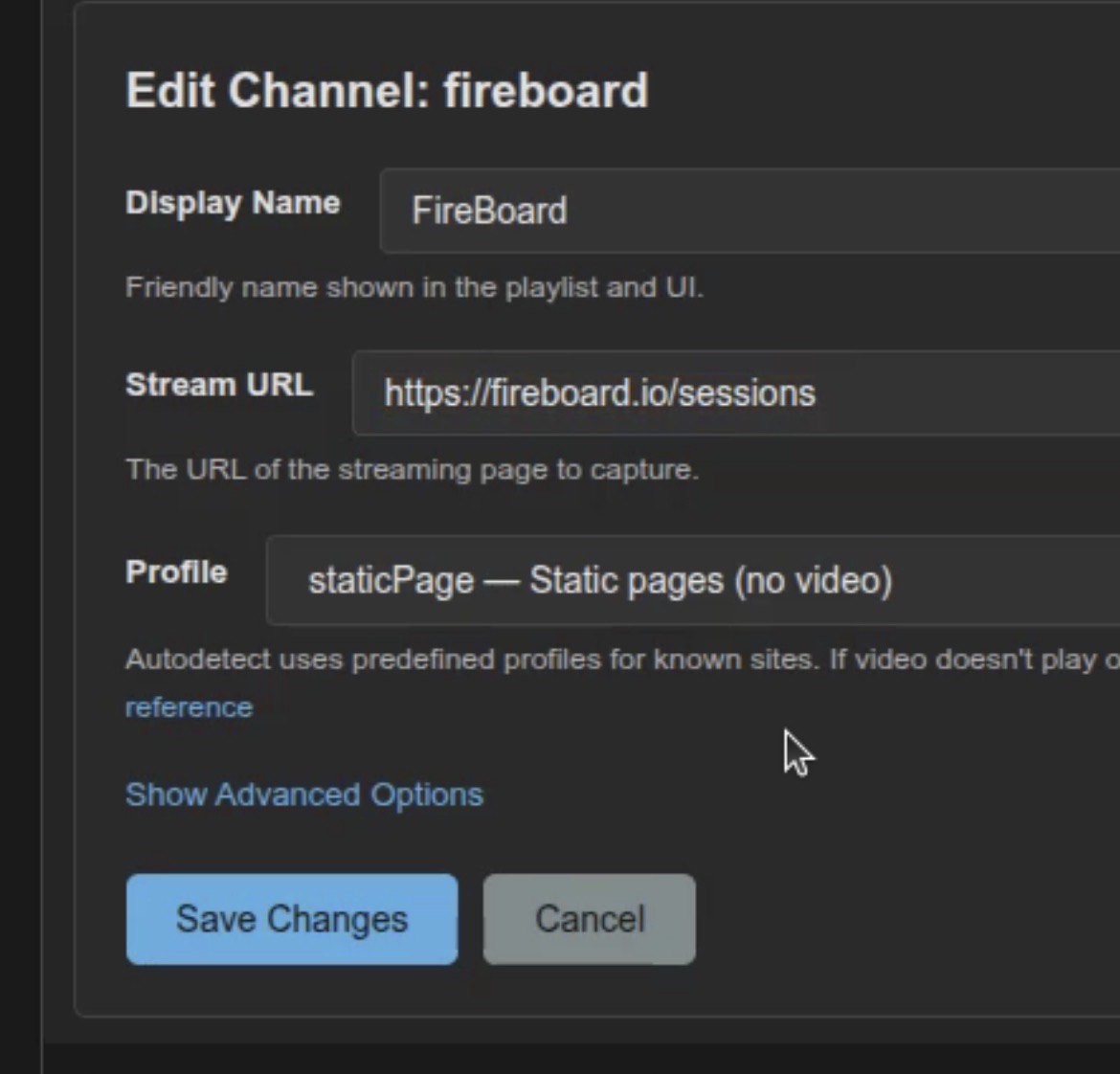
Well my issue seems to be that I can't boot the app up at all. Those are the logs I sent.
I know you have other problems but I just tested in docker headless and no dummy plug is needed for static or normal video capture.
PrismCast v1.10.0 is here.
Before getting into what's new, I want to address v1.9.0. That release left a handful of rough edges in place - FoxOne tuning issues and Fox-local affiliate setup that regressed or broke, settings that didn't always survive upgrades, and configuration save races - and some of you got hit by them. I'm sorry for the disruption, and I'm grateful to everyone who took the time to file detailed reports and giving me a bit of grace to work through the issues.
Those problems pushed me back to first principles on two fronts.
First, I built out a substantial test framework for PrismCast - unit, integration, and end-to-end - covering the configuration framework, channel resolution, the media pipeline, and the utilities everything else stands on. The kind of regressions that slipped into 1.9.0 should be caught long before they ever reach you.
Second, I took a hard look at how PrismCast stores, validates, migrates, and upgrades its configuration data. The persistence framework expansion in this release is the result of that work: atomic writes with automatic backup recovery, versioned and audited schema migrations, and a cross-store consistency probe that catches and repairs orphaned references at startup. As PrismCast's storage formats evolve, your data should travel cleanly with them - and hopefully, your settings are safer than they've ever been.
Both are about holding PrismCast to the high bar I hold for my work to - reliable, "it just works", elegant, and user-friendly.
With that, here's what's new. Three headline features in this release:
Fox local affiliate auto-detection. PrismCast now detects your local Fox affiliate automatically on the first tune and remembers it for future tunes, so you don't have to look up your market's call sign yourself. Every tune is also verified against the requested channel, so a misclick on the Fox guide can't silently land you on the wrong station. If you'd rather use a different affiliate than the one PrismCast picked, you can still edit the channel's selector to your preferred call sign.
Native HLS streaming covers more providers. When PrismCast first introduced native HLS (in 1.6.0), it required a service to expose a separate master manifest listing video and audio variants. Plenty of providers ship media-only HLS playlists instead - just a list of segments, no master manifest. PrismCast now handles those too, inferring codec details from the first segment and consuming the stream directly. The net effect: more channels stream at the provider's native quality with significantly lower CPU usage.
HLS stream resilience for token-protected streams. Several providers embed an authentication token in their HLS manifest URL - sometimes in the path, sometimes as a query parameter - that expires partway through a long-running stream. Until now, expiry meant dead segment URLs and a stalled recording. PrismCast now refreshes the manifest with a fresh token when expiry is detected, keeping native HLS streams alive across longer recordings.
Beyond the headlines:
-
Service management hardening -
install,start,stop,restart, anduninstallare now fully asynchronous and no longer block the CLI during multi-second platform operations. Error messages surface the underlying tool's stderr text instead of a generic "Command failed" line, so when something goes wrong you can actually see why. On Windows, the service launcher was rewritten to a single PowerShell script with stdout and stderr redirected to the data directory, eliminating a class of
shell-quoting hazards in argument handling. - Configurable Channels DVR port - if your Channels DVR runs on a non-default port, you can now set it from the Advanced settings tab. PrismCast continues to auto-discover the DVR's host address; only the port is configurable.
- Numerous fixes - predictive pretuning now respects your service filter, user-set channel numbers and station IDs on local-affiliate variants are preserved across upgrades, channel tags and guide titles containing quote or backslash characters no longer break the generated M3U playlist, and rapid back-to-back profile saves no longer overwrite each other.
As always, I really appreciate the feedback, enthusiasm, and passion around PrismCast. Almost every feature added since 1.0.0 has come from thoughtful, respectful discussion with this community.
My only ask: please be kind, not demanding. PrismCast started as a project for my own needs, and I share it because I enjoy this community and wanted to give something back. Respectful feedback is always welcome; entitlement is not.
Thank you to everyone who's shared encouragement or joy in using PrismCast - it genuinely keeps this project fun to work on.
One more note for everyone's benefit: please don't repost the same questions in this thread. Many of them have already been asked and answered, and the forum's topic-only search works well. Keeping discussions focused helps everyone. Please treat the thread and each other with the same consideration you'd expect in return.
To reiterate from prior release notes:
If you've created user-defined channels that are now covered by predefined options, I recommend deleting those overrides and using the defaults. Predefined channels are what I test and maintain; overrides are entirely optional, but they do create long-term configuration debt for you as PrismCast evolves.
1.10.0 (2026-05-10)
- Improvement: Fox local affiliate channels are easier to set up and more reliable - PrismCast now detects your local Fox affiliate automatically on the first tune and remembers it for future tunes, so you don't have to look up your market's call sign yourself. Each tune is also verified to match the requested channel, and if you'd rather use a different local affiliate, you can edit the channel's selector to your preferred call sign.
- Improvement: native HLS streaming now covers more providers - PrismCast can bypass screen capture for services that deliver media-only HLS playlists (no separate master manifest) by inferring codec details from the first segment, expanding the set of channels that stream at higher quality with lower CPU usage.
- Improvement: HLS stream resilience for token-protected streams - when a provider's HLS manifest URL embeds an authentication token (in the path or as a query parameter) that expires mid-stream, PrismCast now refreshes the manifest with a fresh token instead of stalling on dead segment URLs, keeping native HLS streams alive across longer recordings.
- Improvement: service management hardening -
install,start,stop,restart, anduninstallcommands are now fully asynchronous and no longer block the CLI during multi-second platform operations, and error messages surface the underlying tool's stderr text instead of a generic "Command failed" line. On Windows, the service launcher was rewritten to a single PowerShell script with stdout and stderr redirected to the data directory, eliminating a class of shell-quoting hazards in argument handling. - Improvement: persistence framework expansion - atomic writes with automatic backup recovery now apply across every configuration file (channels, profiles, health, and config), schema migrations are versioned and audited, and a cross-store consistency probe catches and repairs orphaned references at startup.
- Improvement: configurable Channels DVR port - if your Channels DVR runs on a non-default port, you can now set it from the Advanced settings tab. PrismCast continues to auto-discover the DVR's host address; only the port is configurable.
- Fix: profile saves applied in rapid speech now both apply correctly without one overwriting the other.
- Fix: predictive pretuning now respects your service filter - channels you've hidden are skipped, keeping browser resources focused on your active lineup.
- Fix: user-set channel numbers and station IDs on local-affiliate variants are now preserved across upgrades.
- Fix: channel tags and guide titles containing quote or backslash characters no longer break the generated M3U playlist - attribute values are now properly escaped at every write site.
- Housekeeping.
2 Likes
Excuse my ignorance, but can PrismCast capture web page content and broadcast it as video as Chrome Capture used to try to do? Or does this just capture video streams.
I'd love a way to get things like Windy or other web pages as a stream.
It can indeed...v1.10.0 added a bit more flexibility of the types of things it can capture as well.
I use it for airport delay information (I travel quite extensively) and it should work fine: Disrupted Airports Dashboard — Flighty
Windy works right out of the box (just tested myself to validate).
If you're still stuck, let me know...happy to take a closer look.