Introducing PrismCast: Browser-based Live TV Capture for Channels DVR and Plex

@gfhartzell My Timberwolves are getting shown the door, so I decided to try this now. I did a stack start, followed by a dirty restart -- and it worked fine. Any chance you can get me logs showing this failing without your redundant delete of the lock file?

Starting PrismCast with noVNC support...
  Display: :99
  Screen: 1920x1080x24
  VNC Port: 5900
  noVNC Port: 6080
  PrismCast Port: 5589
  Data Directory: /root/.prismcast
  Intel GPU: /dev/dri/renderD128 present (LIBVA_DRIVER_NAME=iHD)
Starting Xvfb...
screen 0 shmid 0
WARNING: Kernel has no file descriptor comparison support: Operation not permitted
Xvfb started successfully (DRI3: -vfbdevice /dev/dri/renderD128).
Starting x11vnc...
Xlib:  extension "DPMS" missing on display ":99".
The VNC desktop is:      prismcast:0

0
x11vnc started successfully.
Starting noVNC...
Warning: could not find self.pem
Using installed websockify at /usr/bin/websockify
Starting webserver and WebSockets proxy on port 6080
WebSocket server settings:
  - Listen on :6080
  - Web server. Web root: /usr/share/novnc
  - No SSL/TLS support (no cert file)
  - proxying from :6080 to localhost:5900
noVNC started successfully.
==============================================
  noVNC available at: http://localhost:6080/vnc.html
  PrismCast UI at:    http://localhost:5589
==============================================
Starting PrismCast...
Navigate to this URL:
    http://prismcast:6080/vnc.html?host=prismcast&port=6080
Press Ctrl-C to exit
[2026/05/15 08:33:49.462 PM] Starting PrismCast v1.10.1 with configuration:
[2026/05/15 08:33:49.462 PM]   Configuration file: /root/.prismcast/config.json
[2026/05/15 08:33:49.462 PM]   Chrome profile: /root/.prismcast/chromedata
[2026/05/15 08:33:49.462 PM]   Server port: 5589
[2026/05/15 08:33:49.462 PM]   Quality preset: 720p-high (1280×720)
[2026/05/15 08:33:49.462 PM]   Capture codecs: h264, hevc
[2026/05/15 08:33:49.462 PM]   Video bitrate: 12000000
[2026/05/15 08:33:49.462 PM]   Max retries: 4
[2026/05/15 08:33:49.462 PM]   Max concurrent streams: 10
[2026/05/15 08:33:49.462 PM]   Circuit breaker threshold: 10 failures in 5 minutes
[2026/05/15 08:33:49.462 PM]   Chrome executable: /usr/local/bin/chrome-no-sandbox
[2026/05/15 08:33:49.462 PM]   HLS segment duration: 2s, max segments: 10
[2026/05/15 08:33:49.462 PM]   HDHomeRun emulation: enabled (port 5004)
[2026/05/15 08:33:49.482 PM] Using FFmpeg at: /usr/lib/node_modules/prismcast/node_modules/ffmpeg-for-homebridge/ffmpeg
[2026/05/15 08:33:49.502 PM] Loaded 1384 channels (214 user, 1170 predefined).
[2026/05/15 08:33:49.503 PM] Loaded health state for 2 channels and 2 domains.
[2026/05/15 08:33:50.653 PM] Chrome ready: Chrome/148.0.7778.96 (GPU: Mesa Intel(R) Graphics (ADL-N)).
[2026/05/15 08:33:53.918 PM] Capture system verified successfully.
[2026/05/15 08:33:54.051 PM] PrismCast is now listening on 0.0.0.0:5589.
[2026/05/15 08:33:54.051 PM] HDHomeRun emulation is now listening on 0.0.0.0:5004 (DeviceID: 2A87050E).
[2026/05/15 08:33:54.180 PM] Update available: v1.10.2 (current: v1.10.1).
Shutting down...
[2026/05/15 08:34:21.046 PM] Shutting down.
Terminating WebSockets proxy (37)
caught signal: 15
Starting PrismCast with noVNC support...
  Display: :99
  Screen: 1920x1080x24
  VNC Port: 5900
  noVNC Port: 6080
  PrismCast Port: 5589
  Data Directory: /root/.prismcast
  Intel GPU: /dev/dri/renderD128 present (LIBVA_DRIVER_NAME=iHD)
Starting Xvfb...
screen 0 shmid 0
WARNING: Kernel has no file descriptor comparison support: Operation not permitted
Xvfb started successfully (DRI3: -vfbdevice /dev/dri/renderD128).
Starting x11vnc...
Xlib:  extension "DPMS" missing on display ":99".
The VNC desktop is:      prismcast:0

0
x11vnc started successfully.
Starting noVNC...
Warning: could not find self.pem
Using installed websockify at /usr/bin/websockify
Starting webserver and WebSockets proxy on port 6080
WebSocket server settings:
  - Listen on :6080
  - Web server. Web root: /usr/share/novnc
  - No SSL/TLS support (no cert file)
  - proxying from :6080 to localhost:5900
noVNC started successfully.
==============================================
  noVNC available at: http://localhost:6080/vnc.html
  PrismCast UI at:    http://localhost:5589
==============================================
Starting PrismCast...
Navigate to this URL:
    http://prismcast:6080/vnc.html?host=prismcast&port=6080
Press Ctrl-C to exit
[2026/05/15 08:34:25.998 PM] Starting PrismCast v1.10.1 with configuration:
[2026/05/15 08:34:25.998 PM]   Configuration file: /root/.prismcast/config.json
[2026/05/15 08:34:25.998 PM]   Chrome profile: /root/.prismcast/chromedata
[2026/05/15 08:34:25.998 PM]   Server port: 5589
[2026/05/15 08:34:25.998 PM]   Quality preset: 720p-high (1280×720)
[2026/05/15 08:34:25.998 PM]   Capture codecs: h264, hevc
[2026/05/15 08:34:25.998 PM]   Video bitrate: 12000000
[2026/05/15 08:34:25.998 PM]   Max retries: 4
[2026/05/15 08:34:25.998 PM]   Max concurrent streams: 10
[2026/05/15 08:34:25.998 PM]   Circuit breaker threshold: 10 failures in 5 minutes
[2026/05/15 08:34:25.998 PM]   Chrome executable: /usr/local/bin/chrome-no-sandbox
[2026/05/15 08:34:25.998 PM]   HLS segment duration: 2s, max segments: 10
[2026/05/15 08:34:25.998 PM]   HDHomeRun emulation: enabled (port 5004)
[2026/05/15 08:34:26.002 PM] Using FFmpeg at: /usr/lib/node_modules/prismcast/node_modules/ffmpeg-for-homebridge/ffmpeg
[2026/05/15 08:34:26.023 PM] Loaded 1384 channels (214 user, 1170 predefined).
[2026/05/15 08:34:26.024 PM] Loaded health state for 2 channels and 2 domains.
[2026/05/15 08:34:26.485 PM] Chrome ready: Chrome/148.0.7778.96 (GPU: Mesa Intel(R) Graphics (ADL-N)).
[2026/05/15 08:34:29.695 PM] Capture system verified successfully.
[2026/05/15 08:34:29.832 PM] PrismCast is now listening on 0.0.0.0:5589.
[2026/05/15 08:34:29.832 PM] HDHomeRun emulation is now listening on 0.0.0.0:5004 (DeviceID: 2A87050E).
[2026/05/15 08:34:29.901 PM] Update available: v1.10.2 (current: v1.10.1).
Thank you. I'll look into it. I have a good background in Linux but I know just enough about docker to install, monitor and update. I haven't done anything with entrypoints.

Thanks,

I’ve been hit with this PID as well. To clear it I run


rm -f prismcast.pid chrome.pid

1 Like

That's how I have it installed in Windows 11 (node.js version, not Docker)

1 Like

I've been trying to use PrismCast with SageTV via its OpenDCT and XMLTV (for epg) plugins. These work fine for TV Everywhere, but not with Prismcast. When I try to set up a "tuner" for Prismcast, it just hangs up. Is there a way for us Sage users to integrate PrismCast with our installations? It works great with Channels itself. Some of us Sage people were thinking about the HDHR emulation, since Sage sees real HDHRs natively, but the emulated one isn't recognized. It may need to put out some sort of "discovery" data on port 65001.

@hjd to add to your discussion with @Kryptonyte about Sage, we and a few others have been working in the Sage forums to try to figure this out. I also have some HD300s (as well as earlier models) around, and feed most of my media through Sage. I was trying to feed it the device- and epg data that Channels has for Prismcast, but it isn't working the same way as TVE through channels - which does import nicely into Sage. I don't have a good understanding of the innards of any of these programs to figure out the issue and how (if possible) to make it work. Either direct or through Channels would be great.

@gfhartzell Nevermind, I see the issue now.

I set up Channels for my elderly parents on a Mac mini that I remote into from out of state. Prismcast was working great until a storm knock out their power last night. When the mac restarted the Chrome window interface for Prismcast never loaded. When I type the start command "prismcast" into a terminal window I get the following message: Error: another PrismCast instance is already running (PID 653). Stop it before starting a new one.

If I type "prismcast service status" it says it's installed but not running. I've tried all these commands "prismcast service stop, prismcast service start, prismcast service restart," but nothing gets the Chrome interface to launch. And in the Channels admin page, the Sources tab says that Prismcast has 0 channels.

I'm running the latest version 1.10.2, and I've restarted the mac several times to no avail. I'm at my wits' end. Any advice?

How did you install prismcast?
Are you running it as a service?

I've found the best way for me is using brew, so I uninstalled node and npm and now use brew instead.

INSTALL PrismCast

brew update
brew upgrade
brew install hjdhjd/prismcast/prismcast
prismcast service install

UPDATE PrismCast

brew update
brew upgrade
prismcast service restart

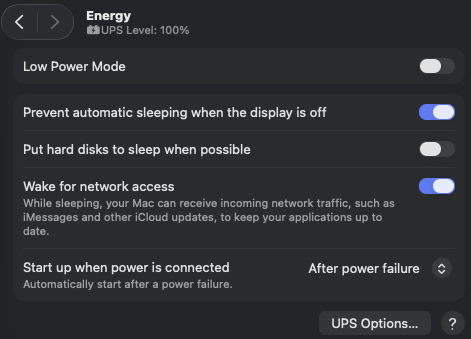
And make sure you have Node enabled in Privacy & Security > Files & Folder, App Management and Local Network. It should also be enabled in General > Login Items and Extensions under App Background Activity

Under Login Password, enable Automatically login after a restart.
Under Energy
Screenshot 2026-05-16 203551

With these settings it restarts after power failure (I tested by unplugging the UPS it's plugged into).

If it makes you feel any better, I was having the exact same issue tonight running Win11. Besides rebooting over and over, I even uninstalled and re-installed. Then somehow it started working properly.

I installed with the npm command, and yes it is running as a service.

I remember enabling Node way back when I first started the service, but it was turned off somehow. So I turned it back on, restarted the mac, but Prismcast still didn't load, and I still get the same error message when I type the run command in terminal.

If you uninstall and reinstall, do you lose all your channel settings and enabled sources in the Prismcast menu? I hate to go down that road if so.

I don't know if anyone else had the issue, but when I first set it up I installed node and npm.
I saw the same issue as you and running prismcast service status would say it's not running.
I then mistakenly ran it as sudo root to get the service status to show as running.
That's when I decided to remove node and npm and go with brew.

You can backup your configuration and restore after reinstalling.
Since you can't run it, here is the info from the Help tab.

Backup and Migration

PrismCast stores all user data in a single directory (default: ~/.prismcast). The files that matter for backup are:

  • config.json — Server settings (port, browser options, streaming, playback, etc.).
  • channels.json — User-defined channels and predefined channel enable/disable state.
  • profiles.json — Custom site profiles and domain mappings.

Using the Web UI

Go to Configuration → Backup to download and import settings and channels as JSON files. This is the easiest way to back up before an upgrade or transfer to another machine.

Manual Backup

Copy the data directory (~/.prismcast) or just the three JSON files listed above. To restore, place them in the data directory on the new machine and restart PrismCast. Docker users should ensure their container's data directory volume is backed up.

What Is Not Included

Service login sessions are stored in Chrome's profile data, not in the configuration files. After migrating to a new machine, you will need to re-authenticate with each TV provider through the browser. The health.json file (channel health and authentication state indicators) is also not exported — it rebuilds automatically as channels are tuned.

Thanks for the additional information. I appreciate it.

It's possible you have the same issue we're seeing currently with the container version of PrismCast, where if you have something other than a clean shutdown, 2 "PID" files are left behind.

Try stopping the prismcast service, and then check to see if prismcast.pid and chrome.pid still exist in the ~/.prismcast directory. If they do, delete them and then restart the service.

1 Like

I looked through the entire prismcast-main folder, before and after stopping the service, then I ran a search, but I can't find any pid files anywhere.

Sounds like you have a different issue then. The files I'm talking about would be right in with the other PrismCast data files:

slayer@Mac-Mini-M4 ~ % ls -la ~/.prismcast
total 1384
drwxr-xr-x  12 slayer  staff     384 May 17 14:51 .
drwxr-x---+ 32 slayer  staff    1024 May 17 15:19 ..
-rw-r--r--   1 slayer  staff    3182 Apr 24 10:31 channels.json
-rw-r--r--   1 slayer  staff    3063 Apr 24 10:31 channels.json.bak
-rw-r--r--   1 slayer  staff       5 May 17 14:51 chrome.pid
drwx------@ 43 slayer  staff    1376 May 17 14:52 chromedata
-rw-r--r--   1 slayer  staff    6882 May 17 14:51 config.json
-rw-r--r--   1 slayer  staff    6882 May 17 14:51 config.json.bak
-rw-r--r--   1 slayer  staff     532 May 17 11:12 health.json
-rw-r--r--   1 slayer  staff  665364 May 17 14:51 prismcast.log
-rw-r--r--   1 slayer  staff       5 May 17 14:51 prismcast.pid
-rw-r--r--   1 slayer  staff     512 Mar  1 18:24 profiles.json

Honestly, I'm out of my depth here. I don't even know how to show the file structure the way you pasted it. I only used finder.

Would you be interested in taking a look under the hood via Chrome remote desktop?

Sure, I'll take a quick look. PM me the one-time code.

@bnhf
Pulled and updated with the new container build. That fixed the problem. The container started up and the guide is now populated.

Thanks!